
1. Ներածություն
This manual provides instructions for the installation, operation, and maintenance of the NETGEAR WN2000RPT Universal WiFi Range Extender. This device is designed to expand the coverage of an existing wireless network, eliminating dead zones and improving signal strength in areas with weak Wi-Fi connectivity.
2. Փաթեթի բովանդակությունը
Ստուգեք, որ ձեր փաթեթը պարունակում է հետևյալ կետերը.
- NETGEAR WN2000RPT Universal WiFi Range Extender
- Էլեկտրաէներգիայի ադապտեր
- Ethernet մալուխ
If any items are missing or damaged, please contact NETGEAR support.
3. Ապրանքը ավարտված էview
The NETGEAR WN2000RPT is a compact device designed to blend into various environments. It features indicator lights on the front panel and multiple ports on the rear for connectivity.
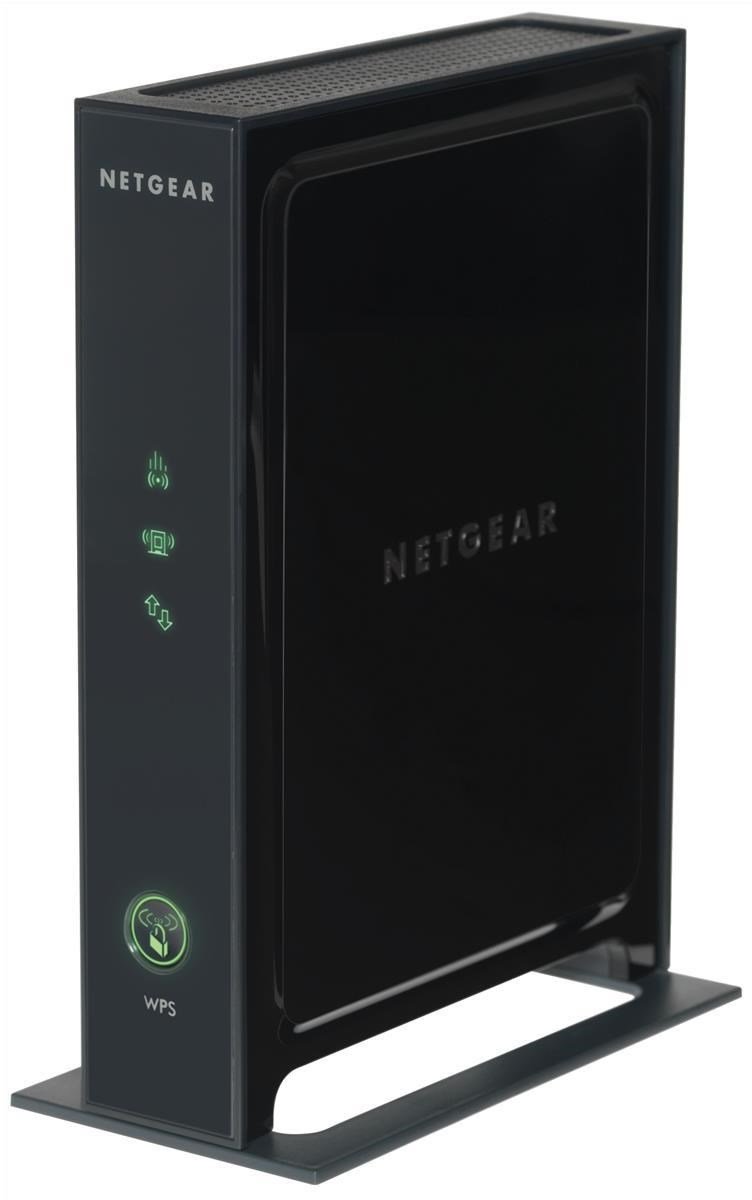
Նկար 3.1: Ճակատ view of the NETGEAR WN2000RPT Universal WiFi Range Extender. The front panel displays status indicator lights and a WPS button.
3.1 Առջևի վահանակի ցուցիչներ
- Power LED: Ցույց է տալիս սարքի հզորության կարգավիճակը:
- Router Link LED: Shows the connection status to your main wireless router.
- Client Link LED: Indicates the connection status to client devices.
- WPS կոճակ. Used for easy setup with WPS-compatible routers.
3.2 Հետևի վահանակի միացքներ

Նկար 3.2: Հետևի view of the NETGEAR WN2000RPT, illustrating the four Ethernet LAN ports, power switch, and DC-in jack.
- Ethernet LAN (RJ-45) Ports (x4): For connecting wired devices such as desktop PCs, notebooks, or gaming consoles.
- Միացման / անջատման կոճակ: Կառավարում է սարքի էլեկտրամատակարարումը։
- DC մուտքի վարդակ՝ Միանում է հոսանքի ադապտերին:
4. Կարգավորում
Follow these steps to set up your NETGEAR WN2000RPT Universal WiFi Range Extender:
- Տեղադրում: Place the extender in a location between your wireless router and the area where you want to improve Wi-Fi coverage. Ensure it is within the range of your existing router's Wi-Fi signal.
- Միացում՝ Connect the power adapter to the DC-in jack on the extender and plug it into an electrical outlet. Press the Power On/Off button. Wait for the Power LED to turn solid green.
- Միացեք ընդլայնիչին. On a computer or mobile device, connect to the extender's default Wi-Fi network. This network typically has a name like "NETGEAR_EXT" or similar. The network name and password can usually be found on a label on the extender.
- Մուտքի կարգավորման օգնական. Բացեք ա web browser and navigate to the extender's setup page. This is often http://www.mywifiext.net or the extender's IP address (e.g., 192.168.1.250). Follow the on-screen instructions to select your existing Wi-Fi network and enter its password.
- Միացեք երթուղիչին. The extender will connect to your main router. The Router Link LED should turn green, indicating a good connection.
- Տեղափոխել (ըստ ցանկության): If the Router Link LED is not green, try moving the extender closer to your router. Once connected, you can optionally rename the extended network or use the same name as your main network.
5. Երկարացնող սարքի շահագործումը
Once set up, the NETGEAR WN2000RPT operates automatically to extend your Wi-Fi signal. Devices within the extended range will connect to the extender's network.
- Անլար միացում: Your wireless devices (laptops, smartphones, tablets) can connect to the extended Wi-Fi network for improved signal strength and coverage.
- Լարային միացում. Use the Ethernet LAN ports to connect wired devices to your network. This is useful for devices that require a stable wired connection or do not have Wi-Fi capabilities.
- Մուտքի կետի ռեժիմ. The device supports Access Point Mode, allowing it to function as a new Wi-Fi access point when connected to a router via an Ethernet cable.
6. Պահպանում
Regular maintenance ensures optimal performance of your range extender:
- Fրագրակազմի թարմացումներ. Պարբերաբար ստուգեք NETGEAR-ի աջակցությունը webԾրագրային ապահովման թարմացումների կայք։ Ծրագրային ապահովման թարմացումը կարող է բարելավել աշխատանքի արդյունավետությունը, ավելացնել նոր գործառույթներ և շտկել սխալները։
- Մաքրում: Keep the device clean and free from dust. Use a soft, dry cloth to wipe the exterior. Do not use liquid cleaners.
- Օդափոխում: Համոզվեք, որ ընդլայնիչը տեղադրված է լավ օդափոխվող տարածքում՝ գերտաքացումից խուսափելու համար։
- Վերականգնում. If the device experiences persistent issues, a factory reset may be necessary. Refer to the troubleshooting section for instructions.
7: Անսարքություն
If you encounter issues with your NETGEAR WN2000RPT, refer to the following common problems and solutions:
- Հզորություն չկա.
Նշում. Power LED-ն անջատված է:
Լուծում: Ensure the power adapter is securely connected to the extender and a working electrical outlet. Press the Power On/Off button. - Cannot Access Setup Wizard:
Նշում. Web browser does not load the setup page (e.g., http://www.mywifiext.net).
Լուծում: Ensure your device is connected to the extender's Wi-Fi network (e.g., "NETGEAR_EXT"). Try clearing your browser's cache or using a different browser. Restart the extender and your computer/device. - Թույլ կամ երկարատև ազդանշանի բացակայություն։
Նշում. Devices connected to the extender still have poor signal or no internet access.
Լուծում: Relocate the extender closer to your main wireless router. Ensure the Router Link LED is green, indicating a strong connection to the router. Avoid placing the extender near large metal objects, concrete walls, or other sources of interference. - Ընդհատվող միացում.
Նշում. Devices frequently disconnect from the extended network.
Լուծում: Check for interference from other electronic devices. Ensure the extender's firmware is up to date. Try changing the Wi-Fi channel on your main router if possible. - Գործարանի զրոյացում.
Նշում. Persistent issues or forgotten login credentials.
Լուծում: With the extender powered on, use a paperclip to press and hold the Reset button (usually a small pinhole) for about 7-10 seconds until the LEDs flash. The extender will restart with factory default settings, requiring re-setup.
8. Տեխնիկական պայմաններ
| Բրենդ | NETGEAR |
| Մոդել | WN2000RPT |
| Անլար կապի ստանդարտ | 802.11n |
| Տվյալների փոխանցման արագություն | Մինչև 300 Մբիթ/վրկ |
| Հաճախականության գոտի | 2.4 ԳՀց |
| Միացման տեխնոլոգիա | Անլար |
| Ethernet LAN (RJ-45) պորտեր | 4 |
| Հատուկ առանձնահատկություններ | Access Point Mode, QoS |
| Գույն | Սեւ |
| Էլեկտրաէներգիայի մուտքագրում | DC-in Jack |
9. Երաշխիք և աջակցություն
For warranty information and technical support, please refer to the official NETGEAR website or the documentation included with your product. You can typically find support resources, FAQs, and contact information at www.netgear.com/support.