
1. Ներածություն
This manual provides essential instructions for the safe and efficient operation of your Sharp CD-DH950P 240W Mini-Component System. This system features a 5-disc CD changer, a cassette deck, an iPod/iPhone docking station, a USB host for digital audio playback, and an AM/FM tuner. Please read this manual thoroughly before using the system and retain it for future reference.
2. Անվտանգության տեղեկատվություն
- Power Source: Connect the unit only to an AC outlet of the specified voltage.
- Օդափոխում: Ապահովեք բավարար օդափոխություն։ Մի՛ փակեք օդափոխության բացվածքները։
- Ջուր և խոնավություն. Մի՛ ենթարկեք սարքը անձրևի, խոնավության կամ կաթող/ցայտող հեղուկների ազդեցությանը։
- Ջերմություն: Սարքը պահեք ջերմության աղբյուրներից հեռու, ինչպիսիք են ռադիատորները, ջերմային գրանցիչները, վառարանները կամ ջերմություն արտադրող այլ սարքերը։
- Մաքրում: Մաքրելուց առաջ անջատեք սարքը պատի վարդակից։ Օգտագործեք փափուկ, չոր կտոր։
- Սպասարկում: Մի փորձեք ինքներդ սպասարկել այս ապրանքը: Բոլոր սպասարկումները փոխանցեք որակյալ սպասարկող անձնակազմին:
3. Փաթեթի բովանդակությունը
Ստուգեք, որ ձեր փաթեթը պարունակում է հետևյալ կետերը.
- Main Unit (CD-DH950P)
- Ձախ խոսնակ
- Աջ խոսնակ
- Հեռակառավարման վահանակ մարտկոցներով
- AM Loop ալեհավաք
- FM լարային ալեհավաք
- Հոսանքի լարը
4. Կարգավորում
4.1 Բարձրախոսների միացումը
Connect the speaker wires from the main unit to the corresponding terminals on the back of each speaker. Ensure correct polarity (red to red, black to black) for optimal sound quality. The left speaker connects to the left speaker output, and the right speaker to the right speaker output.
4.2 Անտենաների միացումը
- FM ալեհավաք: Connect the supplied FM wire antenna to the FM antenna terminal on the rear of the main unit. Extend the wire for better reception.
- AM ալեհավաք. Connect the supplied AM loop antenna to the AM antenna terminals on the rear of the main unit. Position the antenna for best reception.
4.3 Էլեկտրաէներգիայի միացում
Plug the power cord into the AC IN jack on the rear of the main unit, then plug the other end into a standard AC wall outlet.
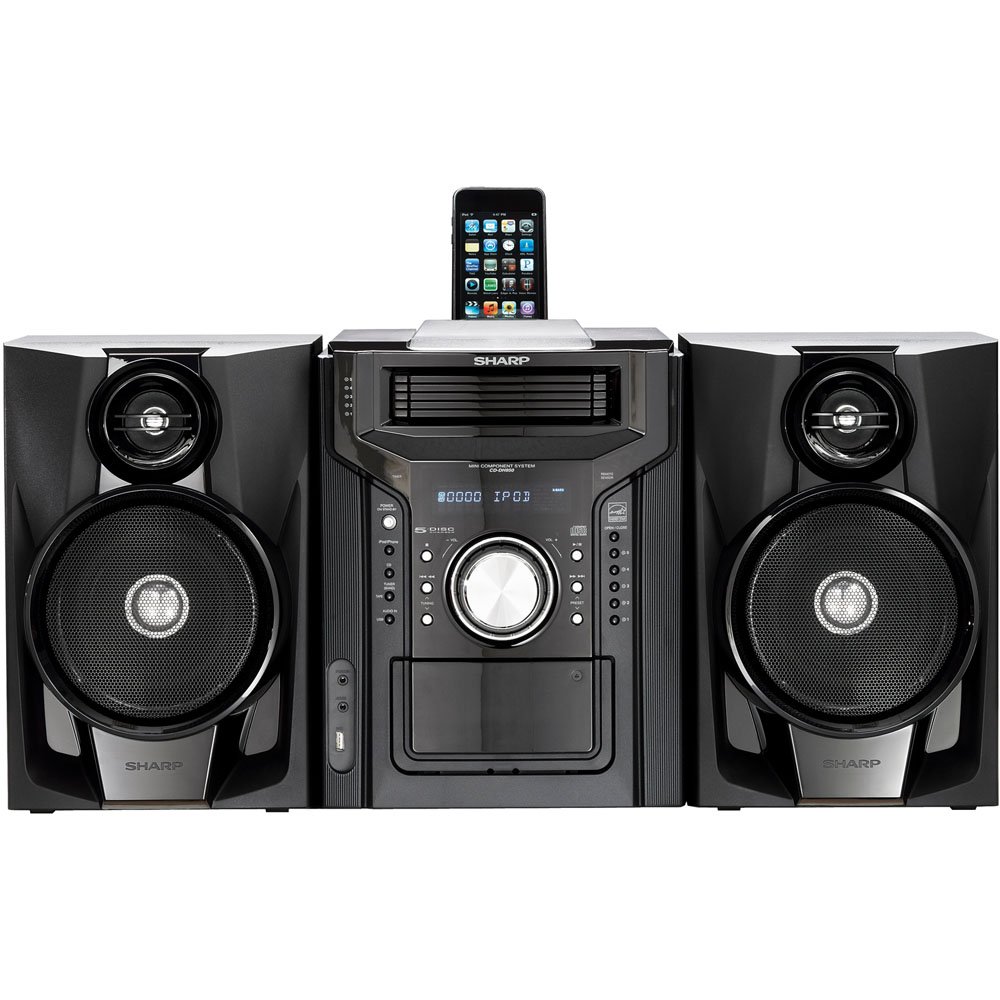
Գծապատկեր 4.3.1. Ընդհանուր առմամբ view of the Sharp CD-DH950P Mini-Component System, showing the main unit flanked by two speakers, with an iPhone docked on top of the main unit.
5. Գործառնական հրահանգներ
5.1 Միացում/անջատում և ձայնի կարգավորում
- Սեղմեք ԻՇԽԱՆՈՒԹՅՈՒՆ առջևի վահանակի կամ հեռակառավարման վահանակի վրա գտնվող կոճակը՝ սարքը միացնելու կամ անջատելու համար։
- Պտտեցնել ԾԱՎԱԼ առջևի վահանակի վրա գտնվող կոճակը կամ օգտագործեք VOL +/- հեռակառավարման վահանակի կոճակները՝ ձայնի մակարդակը կարգավորելու համար։
5.2 CD նվագարկում
This system features a 5-disc CD changer.
- Սեղմեք ԲԱՑ/ՓԱԿԵԼ կոճակ՝ CD սկուտեղը բացելու համար:
- Place up to five CDs on the disc trays, label side up.
- Մամուլ ԲԱՑ/ՓԱԿԵԼ կրկին սկուտեղը փակելու համար:
- Սեղմեք CD կոճակը՝ CD գործառույթն ընտրելու համար։
- Սեղմեք ԽԱՂԱՑՈՒՄ/ԴԱԴԱՐՁ կոճակ՝ նվագարկումը սկսելու համար:
- Օգտագործեք ԲԱՑՆԵԼ buttons to navigate between tracks or discs.
5.3 Cassette Deck Operation
- Սեղմեք TAPE OPEN/CLOSE button to open the cassette deck.
- Տեղադրեք ժապավենը:
- Սեղմեք Կասետային button to select the cassette function.
- Մամուլ ԽԱՂԱԼ նվագարկումը սկսելու համար:
- To record, ensure the source is selected (e.g., CD, Tuner) and press the ՌԵԿՈՐԴ button on the cassette deck.
5.4 iPod/iPhone Docking
The system includes a top-mounted docking slot for compatible iPod and iPhone devices (30-pin connector).
- Carefully place your iPod or iPhone into the docking slot.
- The system will automatically switch to iPod/iPhone mode or you may need to press the iPod / iPhone կոճակը։
- Use the system's controls or your device's controls to play music. The device will also charge while docked.
5.5 USB Host Playback
Connect a USB storage device containing MP3 or WMA audio files to the USB port on the front panel.
- Տեղադրեք USB սարքը USB պորտի մեջ:
- Սեղմեք USB button to select the USB function.
- Use the playback controls to navigate and play files.
5.6 AM/FM լարող
- Սեղմեք TUNER button to select AM or FM radio.
- Օգտագործեք ԹԵՅՆԻՆԳ +/- կոճակներ՝ ռադիոկայանը ձեռքով կարգավորելու համար։
- To auto-scan, press and hold the ԹԵՅՆԻՆԳ +/- կոճակներ.
- To store a preset, tune to the desired station, then press ՀԻՇՈՂՈՒԹՅՈՒՆ որին հաջորդում է նախապես սահմանված համարը։
5.7 աուդիո մուտք
Connect an external audio device (e.g., MP3 player, smartphone) to the AUDIO IN jack on the front panel using a 3.5mm stereo cable.
- Connect your device to the AUDIO IN jack.
- Սեղմեք Աուդիո IN button to select this source.
- Կառավարեք նվագարկումը ձեր միացված սարքից։
6. Պահպանում
6.1 Միավորի մաքրում
Wipe the exterior of the unit with a soft, dry cloth. Do not use abrasive cleaners, waxes, or solvents. Ensure the unit is unplugged before cleaning.
6.2 CD and Cassette Care
- Handle CDs by their edges to avoid fingerprints and scratches. Clean discs with a soft, lint-free cloth from the center outwards.
- Store cassette tapes away from strong magnetic fields and direct sunlight.
7: Անսարքություն
| Խնդիր | Հնարավոր պատճառ | Լուծում |
|---|---|---|
| Ոչ մի ուժ | Էլեկտրական լարը միացված չէ։ Էլեկտրական վարդակը անսարք է։ | Համոզվեք, որ լարը ամուր միացված է։ Փորձեք այլ վարդակից։ |
| Ոչ մի ձայն | Volume too low; Speakers not connected; Incorrect source selected | Increase volume; Check speaker connections; Select correct input source |
| CD-ն չի նվագարկվում | Disc inserted incorrectly; Disc is dirty or scratched | Insert disc correctly (label side up); Clean or replace disc |
| Վատ ռադիոընդունում | Antenna not positioned correctly; Weak signal | Adjust position of AM/FM antennas; Try auto-tuning or manual fine-tuning |
| iPod/iPhone not charging/playing | Device not properly docked; Device not compatible (e.g., newer connector) | Re-dock the device; Note that this system uses a 30-pin connector, newer devices may require an adapter (not included) |
8. Տեխնիկական պայմաններ
- Ապրանքանիշը: Սուր
- Մոդել: CD-DH950P
- Ընդհանուր ելքային հզորությունը. 240 Watts RMS (85W/ch FTC)
- Բարձրախոսի կոնֆիգուրացիա. 2.1 ալիք
- Աջակցվող աուդիո ձևաչափեր. CD, MP3, WMA
- Ազդանշանի և աղմուկի հարաբերակցությունը. 100 դԲ
- Համատեղելի սարքեր. MP3 Player, Smartphone (via 30-pin dock or USB/Audio In)
- Չափերը (L x W x H): 27.6 x 13.6 x 13.5 դյույմ
- Նյութի Քաշը: 24.4 ֆունտ
- UPC: 074000369863, 074000369290
9. Երաշխիքային տեղեկատվություն
This product is covered by a 1-year limited warranty from the date of purchase. Please refer to the warranty card included with your product for full terms and conditions, or contact Sharp customer service for details.
10. Աջակցություն
For further assistance, technical support, or service inquiries, please contact Sharp customer service. Contact information can typically be found on the Sharp official webկայքում կամ ձեր արտադրանքի հետ տրամադրված փաստաթղթերում։