
Ներածություն
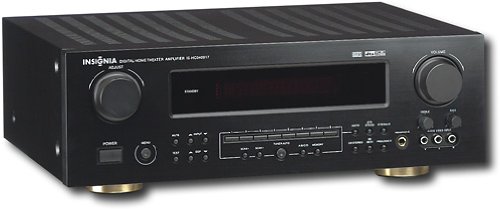
This manual provides essential instructions for the setup, operation, maintenance, and troubleshooting of your Insignia 6.1-Channel 600W Digital Home Theater Receiver, model IS-HC040917. Please read this manual thoroughly before using the receiver to ensure proper and safe operation.
Անվտանգության կարևոր ցուցումներ
- Մի՛ փակեք օդափոխության բացվածքները։ Տեղադրեք արտադրողի հրահանգներին համապատասխան։
- Մի տեղադրեք ջերմային աղբյուրների մոտ, ինչպիսիք են ռադիատորները, ջերմային ռեգիստրները, վառարանները կամ այլ սարքավորումները (այդ թվում՝ ampջեռուցիչներ), որոնք ջերմություն են արտադրում:
- Պաշտպանեք հոսանքի լարը քայլելուց կամ կծկվելուց, հատկապես խրոցակներում, հարմար պահարաններում և այն կետում, որտեղ դրանք դուրս են գալիս սարքից:
- Օգտագործեք միայն արտադրողի կողմից նշված կցորդներ/պարագաներ:
- Անջատեք այս սարքը կայծակային փոթորիկների ժամանակ կամ երկար ժամանակ չօգտագործելու դեպքում:
- Ամբողջ սպասարկումը փոխանցեք որակավորված սպասարկող անձնակազմին: Սպասարկումը պահանջվում է, երբ սարքը որևէ կերպ վնասված է:
Կարգավորման ուղեցույց
1. Փաթեթազերծում
Carefully remove the receiver and all accessories from the packaging. Ensure all components are present:
- Insignia IS-HC040917 Receiver
- Հեռակառավարման վահանակ
- AM Loop ալեհավաք
- FM լարային ալեհավաք
- Օգտագործողի ձեռնարկ (այս փաստաթուղթը)
2. Բարձրախոսների միացում
The IS-HC040917 receiver supports a 6.1-channel speaker configuration. Connect your speakers to the corresponding terminals on the rear panel. Ensure correct polarity (+ to + and - to -) for each speaker.
- Front Left/Right: Հիմնական ստերեո ձայնի համար։
- Կենտրոն. For dialogue.
- Surround Left/Right: For ambient sound effects.
- Շրջապատող հետև. For additional rear channel effects in 6.1 setups.
- Subwoofer (Pre-out): Connect to a powered subwoofer's LFE input.
Note: The receiver is designed for speakers with an impedance of 8 ohms.
3. Աուդիո/տեսանյութի աղբյուրների միացում
Connect your external devices (e.g., DVD player, Blu-ray player, game console, cable box) to the appropriate input jacks on the receiver.
- HDMI: Use HDMI cables for high-definition audio and video signals. The receiver has 3 HDMI input ports.
- Digital Audio (Optical/Coaxial): For digital audio from devices like CD players or set-top boxes.
- Անալոգային աուդիո (RCA): For standard stereo audio connections from devices like VCRs or older CD players.
- S- Տեսանյութ: For video signals from compatible devices.
4. Անթենային միացում
Connect the supplied AM loop antenna and FM wire antenna to their respective terminals on the rear panel for radio reception.
5. Էլեկտրաէներգիայի միացում
Once all audio/video and speaker connections are made, plug the receiver's power cord into a standard AC wall outlet.
Պատկեր՝ Rear panel of the Insignia IS-HC040917 receiver, showing various input and output connections for speakers, audio/video sources (HDMI, RCA, S-Video, Digital), and antenna terminals. This diagram is crucial for correctly wiring the home theater system.
Գործառնական հրահանգներ
1. Միացնել/անջատել
Սեղմեք ԻՇԽԱՆՈՒԹՅՈՒՆ առջևի վահանակի կամ հեռակառավարման վահանակի վրա գտնվող կոճակը՝ ընդունիչը միացնելու կամ անջատելու համար:
2. Մուտքի ընտրություն
Օգտագործեք ՄՈՒՏՔԻ ԸՆՏՐՈ knob/buttons on the front panel or the remote control to choose the desired audio/video source (e.g., HDMI 1, DVD, CD, Tuner).
3. Ձայնի վերահսկում
Կարգավորեք գլխավոր ձայնը մեծ կոճակի միջոցով ԾԱՎԱԼ առջևի վահանակի վրա գտնվող կոճակը կամ VԱ + +/- կոճակներ հեռակառավարման վահանակի վրա:
4. Աուդիո ռեժիմներ
The receiver supports various audio modes, including 6.1-channel surround sound. Use the ՌԵԺԻՄ or DSP buttons on the remote to cycle through available sound modes (e.g., Stereo, Dolby Digital, DTS, Pro Logic).
5. Tuner Operation (AM/FM Radio)
Select the "Tuner" input. Use the ԲԱՆԴ button to switch between AM and FM. Use the TUNE +/- buttons to manually tune to stations or Նախադրված +/- to select stored stations. Refer to the remote control for specific tuner functions.
Տեխնիկական սպասարկում
1. Մաքրում
Wipe the exterior of the receiver with a soft, dry cloth. Do not use liquid cleaners or aerosol sprays, as they may damage the finish or internal components. Ensure the unit is unplugged before cleaning.
2. Օդափոխում
Ensure that the ventilation openings on the top and sides of the receiver are not blocked. Proper airflow is essential to prevent overheating and ensure long-term performance.
3. Մալուխի կառավարում
Periodically check all cable connections to ensure they are secure. Loose connections can lead to poor audio or video quality.
Անսարքությունների վերացում
| Խնդիր | Հնարավոր պատճառ | Լուծում |
|---|---|---|
| Ոչ մի ուժ | Հոսանքի լարը անջատված է։ Վարդակը ակտիվ չէ։ | Ստուգեք էլեկտրական լարի միացումը։ Փորձեք այլ վարդակից։ |
| Ոչ մի ձայն | Ընտրված է սխալ մուտքային տվյալներ. բարձրախոսի լարերը թուլացած են. ձայնը չափազանց ցածր է. ձայնի անջատումը միացված է։ | Ընտրեք ճիշտ մուտքային տվյալները, ստուգեք բարձրախոսների միացումները, բարձրացրեք ձայնը, անջատեք լռեցումը։ |
| Տեսանյութ չկա | Incorrect input selected; video cables loose or incorrect. | Select correct input; check video cable connections (HDMI, S-Video, RCA). |
| Հեռակառավարումը չի աշխատում | Batteries depleted; obstruction between remote and receiver; incorrect remote mode. | Replace batteries; remove obstructions; ensure remote is in the correct operating mode. |
Տեխնիկական պայմաններ
- Մոդել: IS-HC040917
- Ապրանքանիշը: ԻՆՍԻԳՆԻԱ
- Ելքային հզորություն: 600 Վտ
- Ալիքների քանակը: 6.1 ալիք
- Աուդիո ելքի ռեժիմ. Շրջապատել
- Ընդհանուր HDMI պորտեր. 3
- Միակցիչների տեսակները. 3.5mm Jack, HDMI, RCA, USB
- Համատեղելի սարքեր. խոսնակ
- Վերահսկման մեթոդ. Հեռավոր
- Գույնը: Սեւ
- UPC: 799530659962
- ASIN: B0075C3DN2
Երաշխիք և աջակցություն
For warranty information and customer support, please refer to the warranty card included with your product or visit the official Insignia webկայք. Պահպանեք ձեր գնման անդորրագիրը երաշխիքային պահանջների համար:
For further assistance, you may contact Insignia customer service. Contact details are typically available on the manufacturer's webկայքում կամ ապրանքի փաթեթավորման մեջ: