
POLY M25
Plantronics M25 Bluetooth ականջակալի օգտագործողի ձեռնարկ
Մոդել: M25
Ներածություն
The Plantronics M25 Bluetooth headset is designed for convenient wireless communication and audio playback. It features an extended battery life with DeepSleep mode, ensuring readiness when needed. The headset provides whispered alerts for battery status and connection information, and allows for listening to music, internet radio, or navigation directions while managing calls.
Փաթեթի բովանդակությունը
Ստուգեք, որ բոլոր իրերը առկա են ձեր փաթեթում.
- Plantronics M25 Bluetooth ականջակալ
- AC Charger (100-240v)
- Clip-on Earloop
Կարգավորում
1. Ականջակալի լիցքավորում
Before first use, fully charge the headset. Connect the AC charger to the headset's charging port. The indicator light will change to show charging status and turn off or change color when fully charged. A full charge can provide up to 5 months of readiness in DeepSleep mode.
2. Զուգավորում սարքի հետ
To pair your Plantronics M25 headset with a Bluetooth-enabled device (e.g., smartphone, tablet):
- Համոզվեք, որ ականջակալը լիցքավորված է և անջատված։
- Press and hold the Call button on the headset until the indicator light flashes red and blue, indicating pairing mode.
- Ձեր սարքի վրա միացրեք Bluetooth-ը և որոնեք նոր սարքեր։
- Select "Plantronics M25" from the list of available devices.
- Եթե գաղտնաբառ մուտքագրելու խնդրեն, մուտքագրեք «0000» (չորս զրո):
- Once paired, the headset's indicator light will stop flashing and a voice prompt will confirm the connection.
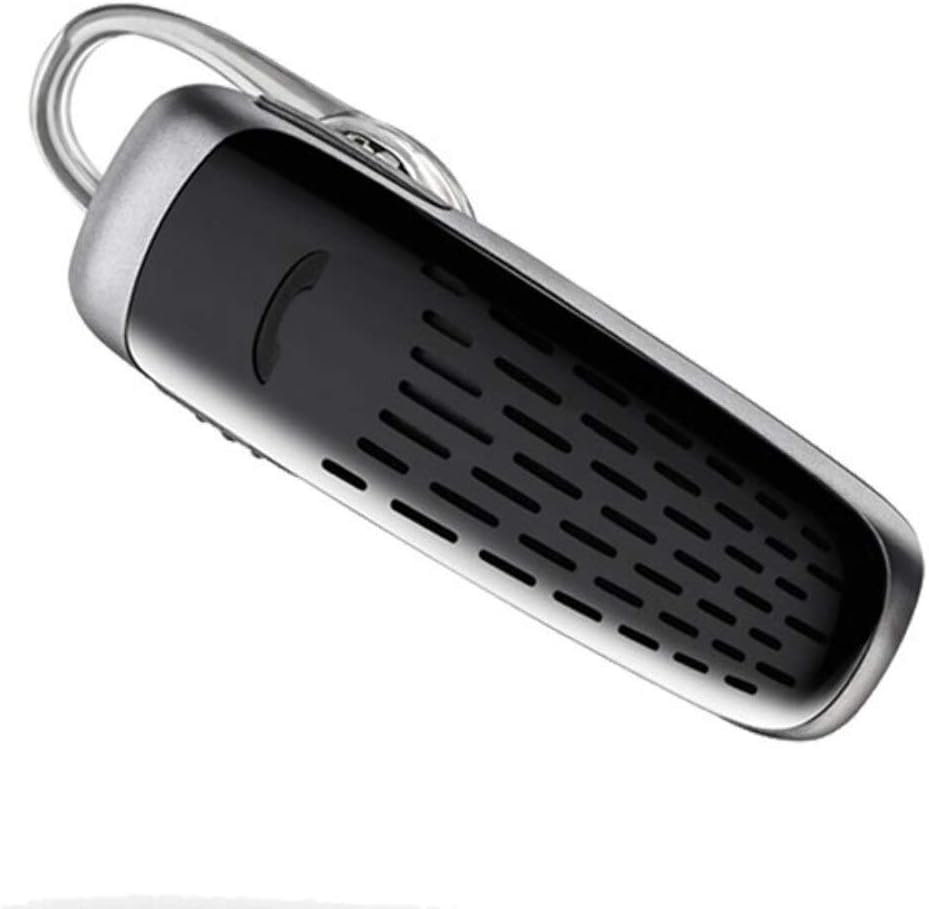
Image: The Plantronics M25 Bluetooth Headset, a compact black and silver device with an earloop, shown from an angled perspective. The call button is visible on the side.
Գործառնական հրահանգներ
Միացում/անջատում
- Միացում՝ Սեղմեք և պահեք միացման կոճակը, մինչև ցուցիչի լույսը կապույտ թարթի։
- Անջատել: Press and hold the Power button until the indicator light flashes red.
Զանգեր կատարելը և ստանալը
- Պատասխանել զանգին. Սեղմեք Զանգի կոճակը:
- Ավարտել զանգը. Սեղմեք Զանգի կոճակը:
- Մերժել զանգը. Սեղմեք և պահեք Զանգի կոճակը 2 վայրկյան:
- Կրկին հավաքեք Վերջին համարը. Կրկնակի սեղմեք «Զանգ» կոճակը։
Աուդիո նվագարկումը
The headset supports streaming audio from your device, including music, podcasts, and GPS directions.
- Նվագարկել/Դադար. Press the Call button during audio playback.
DeepSleep ռեժիմ
The headset enters DeepSleep power-saving mode if it is disconnected from your phone for over 90 minutes. To wake it up when it's back in range (within 33 feet), simply tap the Call button.
Տեխնիկական սպասարկում
- Մաքրում: Ականջակալները մաքրելու համար օգտագործեք փափուկ, չոր կտոր։ Մի օգտագործեք հեղուկ մաքրող միջոցներ կամ աէրոզոլներ։
- Պահպանում: Ականջակալները պահեք զով, չոր տեղում՝ ծայրահեղ ջերմաստիճաններից հեռու։
- Մարտկոցի խնամք. To preserve battery life, avoid fully discharging the battery frequently. Charge the headset regularly, even if not in use.
- Ջրի դիմադրություն: Այս սարքը Ջրակայուն չէԽուսափեք ջրի կամ չափազանց խոնավության ազդեցությունից։
Անսարքությունների վերացում
| Խնդիր | Լուծում |
|---|---|
| Ականջակալը չի միանում։ | Ensure the headset is charged. Connect it to the AC charger and allow it to charge for at least 30 minutes before attempting to power on. |
| Cannot pair the headset with my device. |
|
| No audio or low audio volume. |
|
| Headset frequently disconnects. |
|
Տեխնիկական պայմաններ
| Առանձնահատկություն | Մանրամասն |
|---|---|
| Մոդելի անվանումը | Plantronics M25 |
| Միացման տեխնոլոգիա | Bluetooth |
| Անլար կապի տեխնոլոգիա | Bluetooth |
| Համատեղելի սարքեր | Smartphones, Laptops, Desktops, Tablets, Smart Speakers, Televisions |
| Կառավարման տեսակը | Զանգի վերահսկում |
| Նյութի քաշը | 0.3 ունցիա (մոտավորապես 8.5 գրամ) |
| Ջրի դիմադրության մակարդակը | Ջրակայուն չէ |
| Հաճախականության միջակայք | 20 Հց-ից 20,000 Հց |
| Battery Life (DeepSleep) | Մինչև 150 օր |
| Bluetooth միջակայք | Մինչև 10 մետր (33 ոտնաչափ) |
| Ականջի տեղադրում | Ականջի մեջ |
| Ձևի գործոն | One Ear |
| Աղմուկի վերահսկում | Ակտիվ աղմուկի ջնջում |
| Ապրանքի չափերը | 1.85 x 0.59 x 0.35 դյույմ |
| Գույն | Սեւ |
| Արտադրող | Plantronics |
Երաշխիք և աջակցություն
Երաշխիքային տեղեկատվություն. Please note that this product is sold with No Warranty or Return as per the provided information. Users are advised to verify product condition upon receipt.
For further assistance or inquiries, please refer to the official POLY support channels or visit their website. Contact information may be available on the product packaging or the manufacturer's official webկայք։
Disclaimer: Product specifications and features are subject to change without notice. Always refer to the latest information provided by the manufacturer.
Ask a question about this manual
Ask about setup, troubleshooting, compatibility, parts, safety, or missing instructions. Manuals+ will review the question and use this page’s manual context to help answer it.