
Ներածություն
Շնորհակալություն գնման համարasing the Lexibook Disney Planes Portable Color Game Console JL2800PL. This console offers a collection of 120 games, including 10 Disney Planes themed games and 110 classic titles, all displayed on a vibrant 2.4-inch (6.1 cm) color LCD screen. Designed for portability, it features a 16-bit processor and a rechargeable battery for extended playtime. This manual provides essential information for safe and effective use of your new device.
Անվտանգության կարևոր տեղեկատվություն
Խնդրում ենք այս արտադրանքն օգտագործելուց առաջ կարդալ բոլոր անվտանգության նախազգուշացումները և հրահանգները՝ անվտանգ աշխատանքն ապահովելու և վնասը կանխելու համար: Պահպանեք այս ձեռնարկը ապագա հղումների համար:
- This device is not suitable for children under 3 years due to small parts that may present a choking hazard.
- Do not expose the console to extreme temperatures, direct sunlight, or moisture.
- Խուսափեք կոնսոլը վայր գցելուց կամ ուժեղ հարվածներից։
- Only use the provided charging cable or a compatible charger specified by Lexibook.
- Do not attempt to open, disassemble, or modify the console. This will void the warranty and may cause damage or injury.
- If the console becomes hot, emits smoke, or produces unusual odors, immediately discontinue use and disconnect from any power source.
- Dispose of the battery and console responsibly according to local regulations.
Փաթեթի բովանդակությունը
Խնդրում ենք ստուգել, որ բոլոր իրերը առկա են փաթեթում։
- Lexibook Disney Planes Portable Color Game Console JL2800PL
- USB լիցքավորման մալուխ
- Օգտագործողի ձեռնարկ (այս փաստաթուղթը)
Կարգավորում
1. Կոնսոլի լիցքավորում
Before first use, fully charge the console's built-in Lithium-ion battery. Connect the supplied USB charging cable to the console's charging port and the other end to a USB power adapter (not included) or a computer's USB port. The charging indicator light will typically show red while charging and turn off or change color when fully charged. A full charge may take approximately 2-3 hours.
2. Միացում/անջատում
To power on the console, press and hold the Իշխանություն button for a few seconds until the screen illuminates. To power off, press and hold the Իշխանություն կրկին սեղմեք կոճակը, մինչև էկրանը անջատվի։
Գործառնական հրահանգներ
Console Layout and Controls
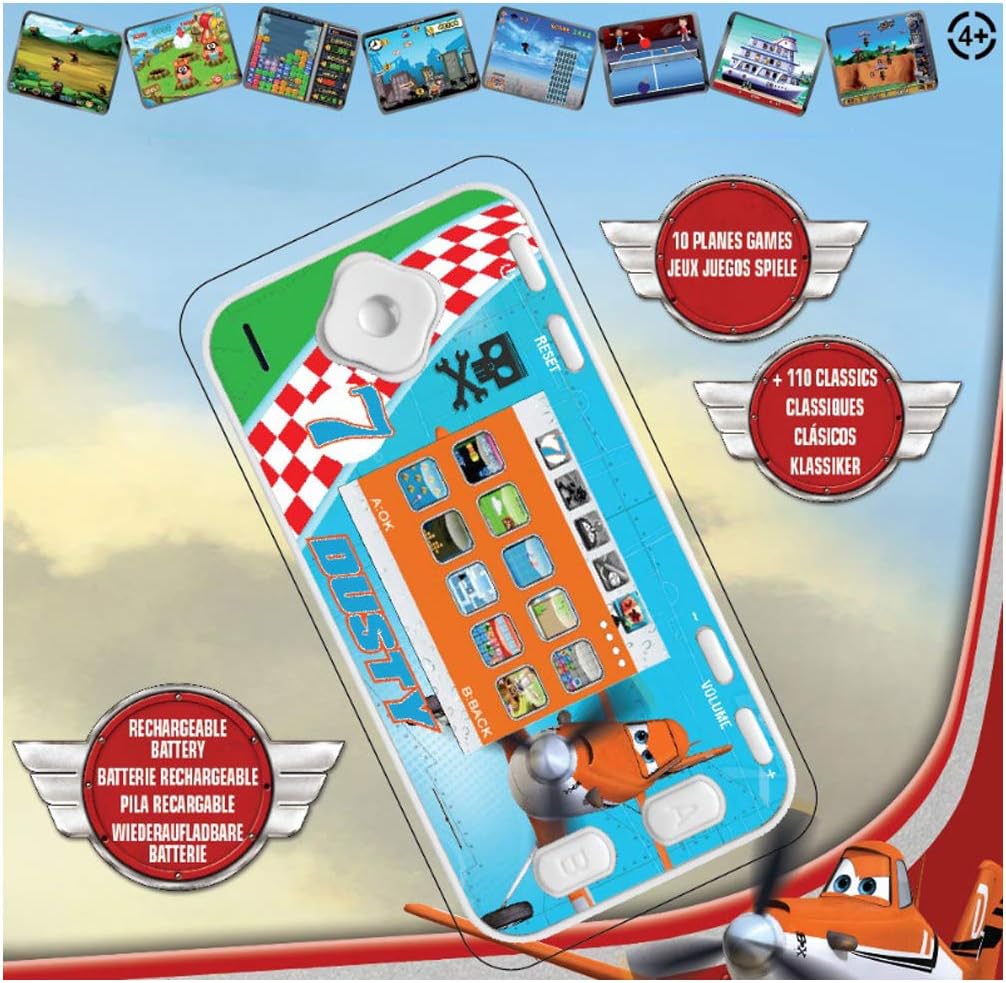
The console features a D-pad for movement, A/B/C/D action buttons, Start/Pause, Select, Reset, and Volume controls. Familiarize yourself with the button layout for optimal gameplay.
- D-Pad (ուղղորդող վահանակ): Used for moving characters or navigating menus (Up, Down, Left, Right).
- Action Buttons (A, B, C, D): Perform in-game actions such as jumping, shooting, or confirming selections. Functions vary by game.
- Սկսել/Դադար կոճակ. Starts a game or pauses gameplay.
- Ընտրել կոճակը. Used for various in-game options or menu selections.
- Վերականգնման կոճակ. Resets the console to the main menu. Use a thin object like a paperclip to press the recessed reset button.
- Ձայնի վերահսկում. Adjusts the sound level of the console.
Navigating Menus and Selecting Games
Once powered on, the console will display the main menu. Use the D-Pad to scroll through the available game categories or individual games. Press the A button (or equivalent action button) to select a game and begin playing.
Խաղախաղ
Each game has its own specific controls and objectives. Refer to the on-screen instructions within each game, if available, to understand how to play. The console includes 10 Disney Planes games and 110 classic games covering action, sports, racing, and more.
Տեխնիկական սպասարկում
Վահանակի մաքրում
To clean the console, gently wipe the surface with a soft, dry cloth. Do not use liquid cleaners, solvents, or abrasive materials, as these can damage the finish or internal components. Ensure no moisture enters the console's ports or openings.
Մարտկոցի խնամք և պահեստավորում
To prolong battery life, avoid fully discharging the console frequently. If storing the console for an extended period, charge it to approximately 50% before storage and recharge it every few months. Store the console in a cool, dry place away from direct sunlight and extreme temperatures.
Անսարքությունների վերացում
| Խնդիր | Հնարավոր պատճառ | Լուծում |
|---|---|---|
| Կոնսոլը չի միանում։ | Մարտկոցը սպառվել է։ | Charge the console using the provided USB cable. Ensure the charging indicator light is active. |
| Էկրանը դատարկ է կամ կախված։ | Ծրագրային ապահովման խափանում կամ ժամանակավոր սխալ։ | Press the recessed Վերականգնել button using a thin object (e.g., paperclip). If the issue persists, ensure the battery is charged. |
| Ձայն չկա կամ ձայնը ցածր է։ | Ձայնը ցածրացված է կամ անջատված։ | Կարգավորել Ծավալը control on the console. |
| Console not charging. | Անսարք մալուխ, սնուցման աղբյուր կամ լիցքավորման միացք։ | Try a different USB cable or power adapter. Ensure the charging cable is securely connected to both the console and the power source. |
Տեխնիկական պայմաններ
- Մոդելի համարը: JL2800PL
- Ապրանքանիշը: Լեքսիագիրք
- Էկրանի չափը: 2.4 դյույմ (6.1 սմ)
- Ցուցադրման տեսակը: LCD գույն
- Պրոցեսոր: 16-բիթ
- Խաղերի քանակը: 120 (10 Disney Planes + 110 Classic)
- Մարտկոցի տեսակը: 1 լիթիում-իոնային (լիցքավորվող)
- Power Source: սնուցվում է մարտկոցով
- Վերահսկիչի տեսակը. Կոճակի վերահսկում
- Ապրանքի չափսերը. 12.1L x 6.1W x 1.3H սանտիմետր
- Նյութը՝ Պլաստիկ
- Առաջարկվող տարիք. 3+ տարի

Երաշխիքային տեղեկատվություն
This Lexibook product is covered by a manufacturer's warranty for a period of 2 տարի գնման օրվանից։ Այս երաշխիքը ներառում է նյութերի և աշխատանքի թերությունները նորմալ օգտագործման դեպքում։ Այն չի ներառում չարաշահման, վթարների, չարտոնված փոփոխությունների կամ նորմալ մաշվածության հետևանքով առաջացած վնասը։ Խնդրում ենք պահպանել գնման ապացույցը երաշխիքային պահանջների համար։
Հաճախորդների աջակցություն
If you encounter any issues not covered in the troubleshooting section or require further assistance, please contact Lexibook customer support. You can find contact information on the official Lexibook webկայքում կամ ձեր մանրածախ վաճառողի միջոցով։
Ավելի շատ տեղեկությունների համար այցելեք պաշտոնական Lexibook-ը webկայքը: www.lexibook.com