
Ներածություն
This manual provides comprehensive instructions for the Superior Hotel TV Universal Programmable Remote Control, Model 8054242080070. This remote is specifically designed for hotel environments, featuring large buttons for ease of use and a disabled menu access button to prevent unauthorized changes to TV settings. It is programmable via PC for simple setup.
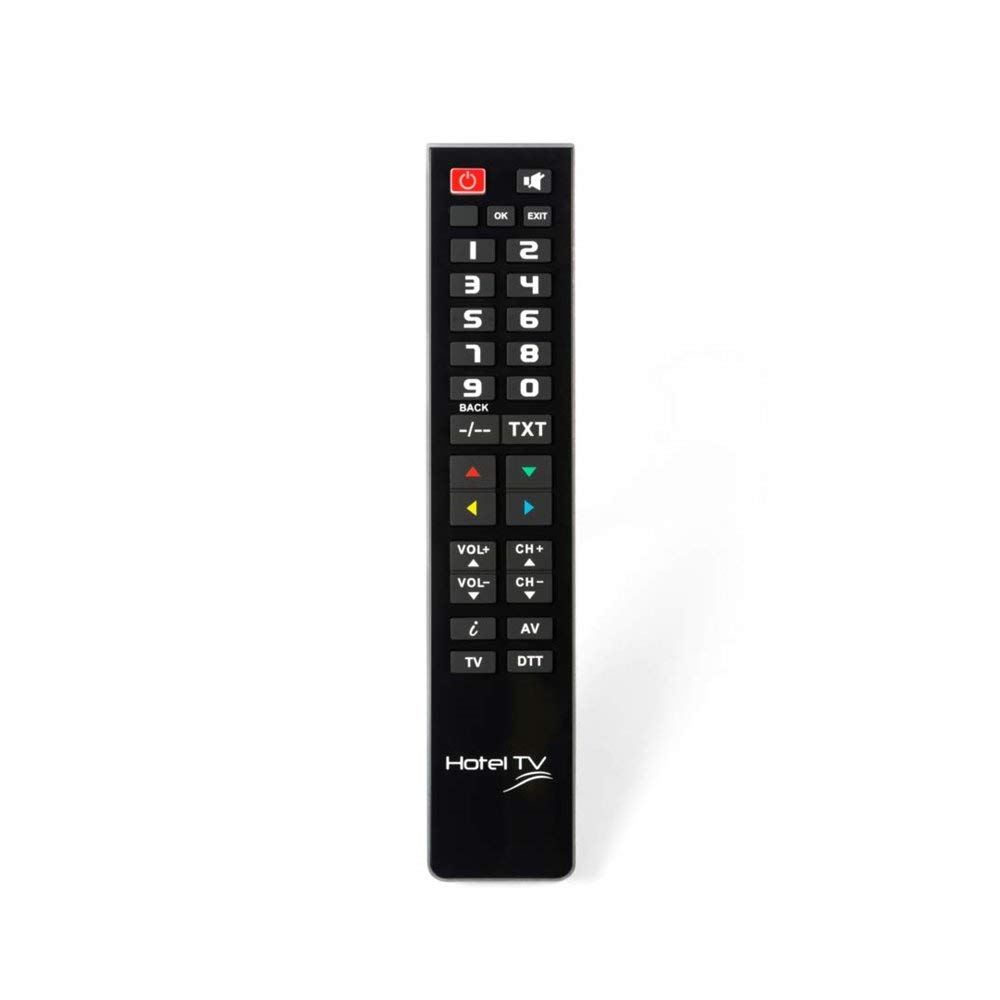
Image: Superior Hotel TV Universal Programmable Remote Control, showing its compact design and large buttons.
Կարգավորում
1. Մարտկոցի տեղադրում
- Տեղադրեք մարտկոցի խցիկի կափարիչը հեռակառավարման վահանակի հետևի մասում:
- Սահեցրեք կափարիչը ներքև կամ սեղմեք փականը բացելու համար։
- Տեղադրեք երկու AAA (LR03) մարտկոց՝ ապահովելով ճիշտ բևեռականություն (+ և -), ինչպես նշված է խցիկի ներսում։ Նշում. Մարտկոցները ներառված չեն։
- Տեղադրեք մարտկոցի խցիկի կափարիչը, մինչև այն ապահով կերպով ամրանա իր տեղում։
2. Համակարգչային ծրագրավորում
The remote control requires programming via a personal computer to function with your specific TV model. Follow these steps:
- Visit the official programming software webկայքը: www.telecontrol.tv.
- Download and install the programming software onto your PC.
- Connect the remote control to your PC using a compatible USB cable (not included).
- Follow the on-screen instructions within the software to select your TV brand and model, and program the remote control.
- Once programming is complete, disconnect the remote control from your PC.
Գործառնական հրահանգներ
After successful programming, the remote control is ready for use. Its design focuses on essential functions for hotel guests.
- Power կոճակը. Սեղմեք ՝ հեռուստացույցը միացնելու կամ անջատելու համար:
- Ալիքի վերև/ներքև՝ Use these buttons to change TV channels sequentially.
- Ձայնի բարձրացում/Նվազում՝ Adjust the TV's audio volume.
- Անջատելու կոճակ: Temporarily silence the TV audio.
- Համարային կոճակներ (0-9): Անմիջապես ընտրեք հեռուստաալիքները։
Կարևոր նշում. The menu access button is intentionally inactive on this remote control. This design prevents guests from altering TV settings, ensuring consistent operation within a hotel environment.
Տեխնիկական սպասարկում
Մարտկոցի փոխարինում
When the remote control's performance degrades or it stops responding, replace the batteries. Follow the battery installation steps outlined in the "Setup" section. Always use new AAA (LR03) alkaline batteries.
Մաքրում
Հեռակառավարիչը մաքրելու համար նրբորեն սրբեք դրա մակերեսը փափուկ, չոր կտորով: Համառ կեղտի դեպքում՝ թեթևակի չորացրեքampen the cloth with water or a mild, non-abrasive cleaner. Avoid using harsh chemicals or submerging the remote in liquid.
Անսարքությունների վերացում
- Հեռակառավարիչը չի արձագանքում.
- Ստուգեք, թե արդյոք մարտկոցները ճիշտ են տեղադրված և բավարար լիցք ունեն։ Անհրաժեշտության դեպքում փոխարինեք։
- Համոզվեք, որ հեռակառավարման վահանակի և հեռուստացույցի ինֆրակարմիր ընդունիչի միջև խոչընդոտներ չկան։
- Verify that the remote was programmed correctly for your TV model using the PC software.
- Կոճակները չեն աշխատում.
- Some buttons, like the menu button, are intentionally disabled for hotel use.
- If essential buttons are not working, re-program the remote control via PC.
- Clean the remote control to ensure no debris is interfering with button presses.
- Ծրագրավորման խնդիրներ.
- Ensure your PC meets the minimum requirements for the programming software.
- Use a reliable USB cable for connection.
- Refer to the software's help section or the telecontrol.tv website for specific programming guidance.
Տեխնիկական պայմաններ
| Բրենդ | Superior Electronics |
| Մոդելի համարը | 8054242080070 |
| Համատեղելի սարքեր | Հեռուստատեսություն |
| Միացման տեխնոլոգիա | Ռադիոհաճախականություն (ՌԴ) |
| Հատուկ առանձնահատկություն | Pre-programmed (via PC) |
| Աջակցվող սարքերի առավելագույն քանակը | 1 |
| Կոճակների քանակը | 1 (referring to the main function set, not individual keys) |
| Առավելագույն միջակայք | 10 մետր |
| Մարտկոցի նկարագրություն | AAA (LR03) |
| UPC / EAN | 08054242080070 |
Երաշխիք և աջակցություն
Երաշխիքային տեղեկատվություն
Specific warranty details for the Superior Hotel TV Universal Programmable Remote Control are not provided in this manual. Please refer to your purchase documentation or contact your vendor for warranty terms and conditions.
Տեխնիկական աջակցություն
For technical assistance, programming software, and additional information, please visit the official webկայքը: