
Ներածություն
This manual provides instructions for the setup, operation, and maintenance of your DIRECTV Universal Remote Control, model RC65. This remote is designed to operate your DIRECTV receiver and can be programmed to control other audio/video devices such as televisions and sound systems.
Please read this manual thoroughly before using your remote control to ensure proper functionality and to maximize your viewփորձը.
Ապրանքը ավարտվել էview
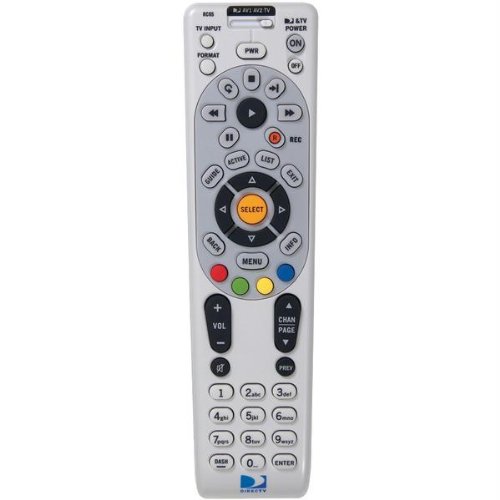
Պատկեր՝ առջևի view of the DIRECTV Universal Remote Control RC65. This image displays the remote's ergonomic design and the layout of its primary control buttons, including the directional pad, channel and volume controls, and various function keys. The remote is black with white button labels.
The DIRECTV RC65 remote control is a universal remote capable of controlling multiple devices. Its design focuses on ease of use and compatibility with a wide range of audio/video equipment.
Կարգավորում
1. Մարտկոցի տեղադրում
- Տեղադրեք մարտկոցի խցիկը հեռակառավարման վահանակի հետևի մասում:
- Սեղմեք լեզվակը և հանեք մարտկոցի կափարիչը։
- Insert two (2) AA batteries, ensuring the positive (+) and negative (-) terminals align with the markings inside the compartment.
- Սահեցրեք մարտկոցի կափարիչը իր տեղը, մինչև այն ապահով սեղմվի:
Նշում. մարտկոցները չեն մատակարարվում հեռակառավարման վահանակին։
2. Programming for DIRECTV Receiver
The remote is typically pre-programmed to operate your DIRECTV receiver. If it does not work, or if you are setting up a new remote, follow these steps:
- Հեռակառավարիչը ուղղեք ձեր DIRECTV ընդունիչի վրա։
- Սեղմեք և պահեք կոճակը ՀԱՄՐ և ԸՆՏՐԵԼ buttons simultaneously until the green light at the top of the remote flashes twice.
- Մուտքագրեք կոդը 961. The green light will flash twice.
- Սեղմեք CHANNEL UP button. The green light will flash twice.
- Սեղմեք ԸՆՏՐԵԼ button. The green light will flash twice.
- Test the remote by changing channels or adjusting volume.
3. Programming for Other Devices (TV, Audio)
To program the remote to control your television or other audio/video devices, you will need the device's brand code. Refer to the code list provided with your DIRECTV system or search online for "DIRECTV remote codes [your device brand]".
- Միացրեք այն սարքը, որը ցանկանում եք ծրագրավորել (օրինակ՝ ձեր հեռուստացույցը):
- Սեղմեք և պահեք կոճակը ՀԱՄՐ և ԸՆՏՐԵԼ buttons simultaneously until the green light at the top of the remote flashes twice.
- Press the mode button for the device you are programming (e.g., TV for television, AV1 or AV2 for audio/video devices). The green light will flash once.
- Enter the 5-digit code for your device's brand. The green light will flash twice if the code is accepted.
- Հեռակառավարիչը ուղղեք սարքի վրա և սեղմեք ԻՇԽԱՆՈՒԹՅՈՒՆ կոճակ։ Եթե սարքն անջատվում է, ծրագրավորումը հաջող է եղել։
- If the device does not turn off, repeat steps 1-5 with another code for your device's brand.
Tip: If you cannot find a code, try the "Code Search" method: After step 3, instead of entering a code, press CHANNEL UP repeatedly until the device turns off, then press ԸՆՏՐԵԼ.
Գործառնական հրահանգներ
The DIRECTV RC65 remote control features a standard layout for easy navigation and control of your entertainment system.
- MODE Buttons (DIRECTV, TV, AV1, AV2): Select the device you want to control. Press the corresponding button before issuing commands for that device.
- ԻՇԽԱՆՈՒԹՅՈՒՆԸ: Միացնում կամ անջատում է ընտրված սարքը։
- ԾԱՎԱԼԻ ԲԱՐՁՐԱՑՈՒՄ/ԻՋԵՑՈՒՄ. Adjusts the volume of the selected audio device (usually TV or AV receiver).
- CHANNEL UP/DOWN: Changes channels on the DIRECTV receiver.
- ՀԱՄՐ: Անջատում կամ միացնում է ձայնը:
- ՈՒՂԵՑՈՒՅՑ: Displays the DIRECTV program guide.
- ՄԵՆՈՒ. Accesses the DIRECTV system menu.
- SELECT/OK: Հաստատում է ընտրությունները կամ մուտք է գործում ընտրացանկեր։
- ARROW Buttons (UP, DOWN, LEFT, RIGHT): Navigate through menus and guides.
- ԳՐԱՌՈՒՄ: Records the current program on your DIRECTV DVR.
- PLAY, PAUSE, STOP, REW, FF, SKIP: Control playback of recorded content or live TV (with DVR).
- INFO: Ցուցադրում է ընթացիկ ծրագրի մասին տեղեկատվություն:
- ԵԼՔ: Ելք է գործում ընտրացանկերից կամ ուղեցույցներից։
Note: Specific button functions may vary slightly depending on your DIRECTV receiver model and programmed devices.
Տեխնիկական սպասարկում
Հեռակառավարիչի մաքրում
- Հեռակառավարման վահանակի մակերեսը սրբելու համար օգտագործեք փափուկ, չոր կտոր։
- Համառ կեղտի համար, մի փոքրampՄաքրեք կտորը ջրով կամ մեղմ, ոչ հղկող մաքրող միջոցով։ Մի՛ ցողեք մաքրող միջոցը անմիջապես հեռակառավարիչի վրա։
- Խուսափեք կոշտ քիմիական նյութերի, լուծիչների կամ հղկող մաքրող սպունգերի օգտագործումից, քանի որ դրանք կարող են վնասել հեռակառավարիչի մակերեսը կամ ներքին բաղադրիչները։
Մարտկոցի փոխարինում
Replace batteries when the remote's response becomes sluggish or if the green light at the top does not flash when a button is pressed. Refer to the "Battery Installation" section under Setup for detailed instructions.
- Միշտ փոխեք երկու մարտկոցները միաժամանակ:
- Use new AA alkaline batteries for optimal performance.
- Հին մարտկոցները դեն նետեք տեղական կանոնակարգերին համապատասխան։
Անսարքությունների վերացում
Հեռակառավարումը չի արձագանքում
- Ստուգեք մարտկոցները. Համոզվեք, որ մարտկոցները ճիշտ են տեղադրված և չեն սպառվել։ Անհրաժեշտության դեպքում փոխարինեք։
- Տեսողության գիծ. Make sure there are no obstructions between the remote and the device you are trying to control. The remote uses infrared (IR) signals, which require a clear line of sight.
- Ճիշտ ռեժիմ. Verify that the correct mode button (DIRECTV, TV, AV1, AV2) is pressed for the device you intend to control.
- Վերականգնել հեռակառավարումը. Remove batteries, press all buttons a few times to discharge any residual power, then reinsert batteries.
Device Not Responding After Programming
- Verify Code: Double-check that you entered the correct 5-digit code for your device's brand. Try other codes listed for your brand.
- Կոդի որոնում: Attempt the "Code Search" method described in the "Programming for Other Devices" section.
- Սարքի համատեղելիություն. While the remote has an extensive code library, some older or very new devices may not be fully compatible.
Volume/Channel Control Issues
- Ծավալի կողպեք. Ensure the volume is not locked to the DIRECTV receiver if you want to control the TV volume. To unlock, press and hold ՀԱՄՐ և ԸՆՏՐԵԼ until the green light flashes twice, then enter 993. Մամուլ ԸՆՏՐԵԼ.
- Ալիքի վերահսկում. Ensure the remote is in DIRECTV mode to change channels on the receiver.
Տեխնիկական պայմաններ
| Առանձնահատկություն | Մանրամասն |
|---|---|
| Բրենդ | DIRECTV |
| Մոդելի անվանումը / համարը | RC65 |
| Հատուկ առանձնահատկություն | Ունիվերսալ |
| Գույն | Սեւ |
| Համատեղելի սարքեր | Television, DIRECTV Receiver, Audio/Video Devices |
| Միացման տեխնոլոգիա | Ինֆրակարմիր (IR) |
| Վերահսկիչի տեսակը | Կոճակի վերահսկում |
| Մարտկոցի տեսակը | 2 x AA մարտկոցներ (ներառված չէ) |
| Նյութի քաշը | Մոտավորապես 0.52 ֆունտ |
Երաշխիքային տեղեկատվություն
This DIRECTV Universal Remote Control (Model RC65) comes with a limited warranty against defects in materials and workmanship under normal use. The warranty period typically covers 90 days from the date of purchase. Please retain your proof of purchase for warranty claims.
This warranty does not cover damage caused by misuse, accident, unauthorized modification, or use with non-DIRECTV approved accessories. For specific warranty terms and conditions, please refer to the documentation included with your DIRECTV system or visit the official DIRECTV support webկայք։
Հաճախորդների աջակցություն
If you require further assistance with your DIRECTV Universal Remote Control, please contact DIRECTV customer support:
- Առցանց աջակցություն. Visit the official DIRECTV support website for FAQs, troubleshooting guides, and programming code lists.
- Հեռախոսային աջակցություն. Refer to your DIRECTV service agreement or bill for the most current customer service phone number.
When contacting support, please have your DIRECTV account information and the remote control model number (RC65) ready.