
Remotec ZTS-500
Remotec ZTS-500 Z-Wave Smart Thermostat User Manual
Model: ZTS-500 | Brand: Remotec
1. Ներածություն
The Remotec ZTS-500 is a Z-Wave enabled smart thermostat designed for controlling your HVAC system. This device requires a Z-Wave gateway or hub for remote control and smart home integration. It aims to provide efficient temperature management for various heating and cooling systems.
2. Անվտանգության տեղեկատվություն
- Always disconnect power to your HVAC system at the circuit breaker before installing or servicing the thermostat.
- Installation should be performed by a qualified electrician or HVAC technician if you are unsure about the wiring process.
- Համոզվեք, որ բոլոր էլեկտրական միացումները անվտանգ են և համապատասխանում են տեղական էլեկտրական կանոններին։
- Do not expose the thermostat to excessive moisture or extreme temperatures.
3. Փաթեթի բովանդակությունը
- Remotec ZTS-500 Z-Wave Smart Thermostat
- Մոնտաժային սարքավորում
- Օգտագործողի ձեռնարկ (այս փաստաթուղթը)
4. Կարգավորում
4.1 Էլեկտրամոնտաժ
The ZTS-500 thermostat is compatible with a variety of HVAC systems. It can be powered by 4 AA batteries or a 24V AC C-wire connection. For optimal performance and to avoid frequent battery replacement, a C-wire connection is recommended.
Compatible HVAC Systems:
- 24 VAC single and two-stage conventional heating systems (gas, oil, electric)
- Heat pump systems with two-stage heating (electric/gas)
- Zoned forced air and zoned hot water (2 or 3 wire)
- Millivolt systems (12-24Vac or DC source)
- One or two-stage cooling systems
Հաղորդալարերի տերմինալներ. RH, RC, C, Y2, Y1, G2, G1, B, O, W2, W1
Refer to your existing thermostat's wiring and your HVAC system's manual for specific connections. Ensure the power to your HVAC system is OFF before connecting any wires.
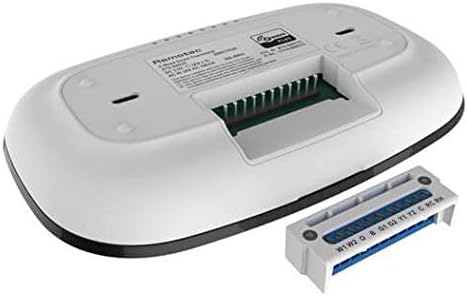
Պատկեր՝ Հետևի մաս view of the Remotec ZTS-500 thermostat, displaying the removable wiring terminal block with labeled connections for HVAC systems.
4.2 Մոնտաժում
Mount the thermostat to a wall using the provided hardware. Ensure the mounting location is away from direct sunlight, drafts, or heat sources that could affect temperature readings.
4.3 Z-Wave Inclusion (Pairing)
To integrate the ZTS-500 with your Z-Wave network:
- Put your Z-Wave gateway/hub into inclusion (pairing) mode. Refer to your hub's manual for specific instructions.
- On the ZTS-500 thermostat, follow the device-specific instructions (usually involving a button press sequence) to initiate Z-Wave inclusion. The display may indicate pairing status.
- Once successfully paired, the thermostat will appear in your Z-Wave controller's device list.
The ZTS-500 supports Z-Wave Plus and offers advanced configuration options and Over-The-Air (OTA) update capability, depending on your Z-Wave hub's support.
5. Ջերմակարգավորիչի շահագործումը
5.1 Հիմնական հսկողություն
The ZTS-500 features a minimalist digital display and touch-sensitive buttons for local control.
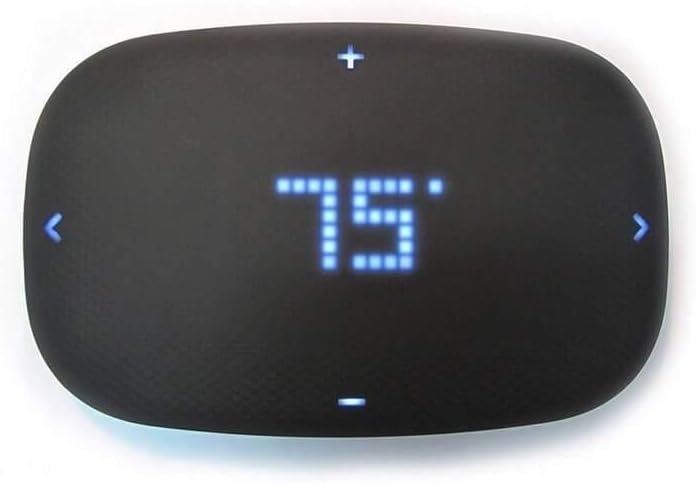
Պատկեր՝ առջևի view of the Remotec ZTS-500 thermostat, showing a digital display set to 75 degrees Fahrenheit, with touch controls for adjustment.
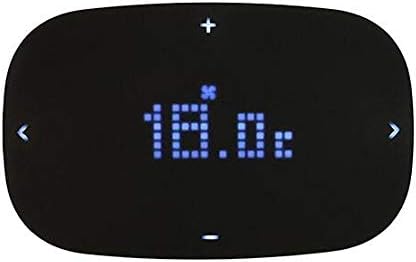
Պատկեր՝ առջևի view of the Remotec ZTS-500 thermostat, showing a digital display set to 18.0 degrees Celsius, with a fan icon indicating fan operation.
- Ջերմաստիճանի ճշգրտում. Օգտագործեք + և - buttons on the top and bottom of the display to increase or decrease the set temperature.
- Ռեժիմի ընտրություն. Օգտագործեք < և > buttons on the sides to cycle through operating modes (e.g., Heat, Cool, Auto, Off) or fan settings, depending on the thermostat's current configuration.
5.2 Z-ալիքի կառավարում
Once paired with a Z-Wave hub, you can control the thermostat remotely through your smart home application. This typically includes:
- Setting the target temperature.
- Changing operating modes (Heat, Cool, Auto, Off).
- Adjusting fan settings (On, Auto).
- Receiving temperature reports (functionality may vary by Z-Wave hub).
Note that some Z-Wave hubs may have limited support for advanced features or reporting capabilities of the ZTS-500. Consult your Z-Wave hub's documentation for specific integration details.
6. Պահպանում
6.1 Մարտկոցի փոխարինում
If the thermostat is powered by batteries (4 AA batteries required), they will need to be replaced periodically. The thermostat may display a low battery indicator. To replace batteries:
- Carefully remove the thermostat from its wall mount.
- Տեղադրեք մարտկոցի խցիկը սարքի հետևի մասում:
- Remove the old batteries and insert 4 new AA batteries, ensuring correct polarity.
- Reattach the thermostat to its wall mount.
Նշում. Battery life can vary significantly based on usage and whether a C-wire is connected. If not using a C-wire, expect to replace batteries more frequently (e.g., every 2-3 months).
6.2 Մաքրում
To clean the thermostat, gently wipe the surface with a soft, dry cloth. Avoid using abrasive cleaners, solvents, or spraying liquids directly onto the unit.
7: Անսարքություն
- Թերմոստատը միացված չէ. Check battery installation and charge. If using a C-wire, ensure it is correctly connected and receiving 24V AC power. Verify power to the HVAC system is on.
- Մարտկոցի կարճ կյանք. If not using a C-wire, frequent battery replacement is expected. Consider installing a C-wire for continuous power.
- Difficulty with C-wire power: Ensure the C-wire is properly connected to both the thermostat and the HVAC system. Some HVAC systems may require specific wiring configurations or adapters for a stable C-wire connection.
- Limited Z-Wave control/reporting: The ZTS-500's Z-Wave capabilities, such as mode changes or detailed temperature reporting, can be dependent on the specific Z-Wave hub and its device handler. Some hubs may only support basic temperature setting.
- Physical buttons unresponsive or stuck: Ensure the thermostat is clean and free from debris around the buttons. If issues persist, contact support.
- Loud internal relays: The thermostat uses internal relays to control the HVAC system, which may produce an audible click when switching on/off. This is a normal operational characteristic.
- Rapid HVAC cycling: The ZTS-500 may not have built-in minimum runtime or rest time settings. Consult your HVAC system's specifications and consider if rapid cycling is detrimental to your specific equipment.
- Thermostat not responding to Z-Wave commands: Ensure the thermostat is within range of your Z-Wave hub and that the hub is functioning correctly. Try re-including the device if necessary.
8. Տեխնիկական պայմաններ
| Առանձնահատկություն | Մանրամասն |
|---|---|
| Բրենդ | Remotec |
| Մոդելի անվանումը | Z-Wave Plus Thermostat |
| Ապրանքի չափերը | 1"D x 6.33"W x 4"H |
| Վերահսկիչի տեսակը | SmartThings (compatible) |
| Հատուկ առանձնահատկություն | Smart, compatible with home automation systems, energy-saving features |
| Գույն | Սեւ |
| Հատուկ կիրառումներ | Օդորակիչ, ջերմային պոմպ |
| Ջերմաստիճանի վերահսկման տեսակը | Խելացի/հեռակառավարվող |
| Միացման տեխնոլոգիա | Z-ալիք |
| Ներառված բաղադրիչներ | Թերմոստատ |
| Էլեկտրաէներգիայի աղբյուր | Battery Powered or C Wire |
| Հատtage | 24 վոլտ |
| Ցուցադրման տեսակը | Թվային |
| Կառավարման տեսակը | Կոճակի վերահսկում |
| Վերահսկման մեթոդ | Հավելված |
| Միացման արձանագրություն | Bluetooth, Z-Wave |
| Մոնտաժման տեսակը | Պատի լեռ |
| Ոճ | Խելացի |
| Հետին լույս | Այո՛ |
| Մարտկոցների քանակը | Պահանջվում է 4 AA մարտկոց |
| Նյութի քաշը | 9.6 ունցիա |
9. Երաշխիք և աջակցություն
For warranty information and technical support, please refer to the documentation provided with your purchase or visit the official Remotec webկայք։ Պահպանեք ձեր գնման ապացույցը երաշխիքային պահանջների համար։
Ask a question about this manual
Ask about setup, troubleshooting, compatibility, parts, safety, or missing instructions. Manuals+ will review the question and use this page’s manual context to help answer it.