
1. Ներածություն
This manual provides comprehensive instructions for the installation, operation, and maintenance of your BlueBird A1390 Automatic Irrigation Tap Programmer. This device is designed to automate your garden watering schedule, ensuring efficient and consistent irrigation. Please read this manual thoroughly before using the product to ensure correct operation and to prevent damage.
2. Անվտանգության տեղեկատվություն
- Do not immerse the unit in water. The unit is designed to be weather-resistant, but not submersible.
- Use only 1.5V AA alkaline batteries. Do not mix old and new batteries, or different types of batteries.
- Հեռացրեք մարտկոցները, եթե սարքը երկար ժամանակ չի օգտագործվելու՝ արտահոսքը կանխելու համար։
- Պահել երեխաներից հեռու:
- Մի փորձեք ինքներդ ապամոնտաժել կամ վերանորոգել սարքը։ Սպասարկման համար դիմեք որակավորված անձնակազմի։
- Համոզվեք, որ բոլոր միացումները անվտանգ են՝ արտահոսքերը կանխելու համար։
3. Փաթեթի բովանդակությունը
Խնդրում ենք ստուգել փաթեթի վրա հետևյալ կետերը.
- 1x BlueBird A1390 Automatic Irrigation Tap Programmer
- 1x օգտագործողի ձեռնարկ (այս փաստաթուղթը)
Note: 2 AA 1.5V batteries are required for operation and are not included in the package.
4. Ապրանքը ավարտված էview
The BlueBird A1390 features two main rotary dials for setting irrigation frequency and duration, along with a battery indicator and an ON/OFF switch.
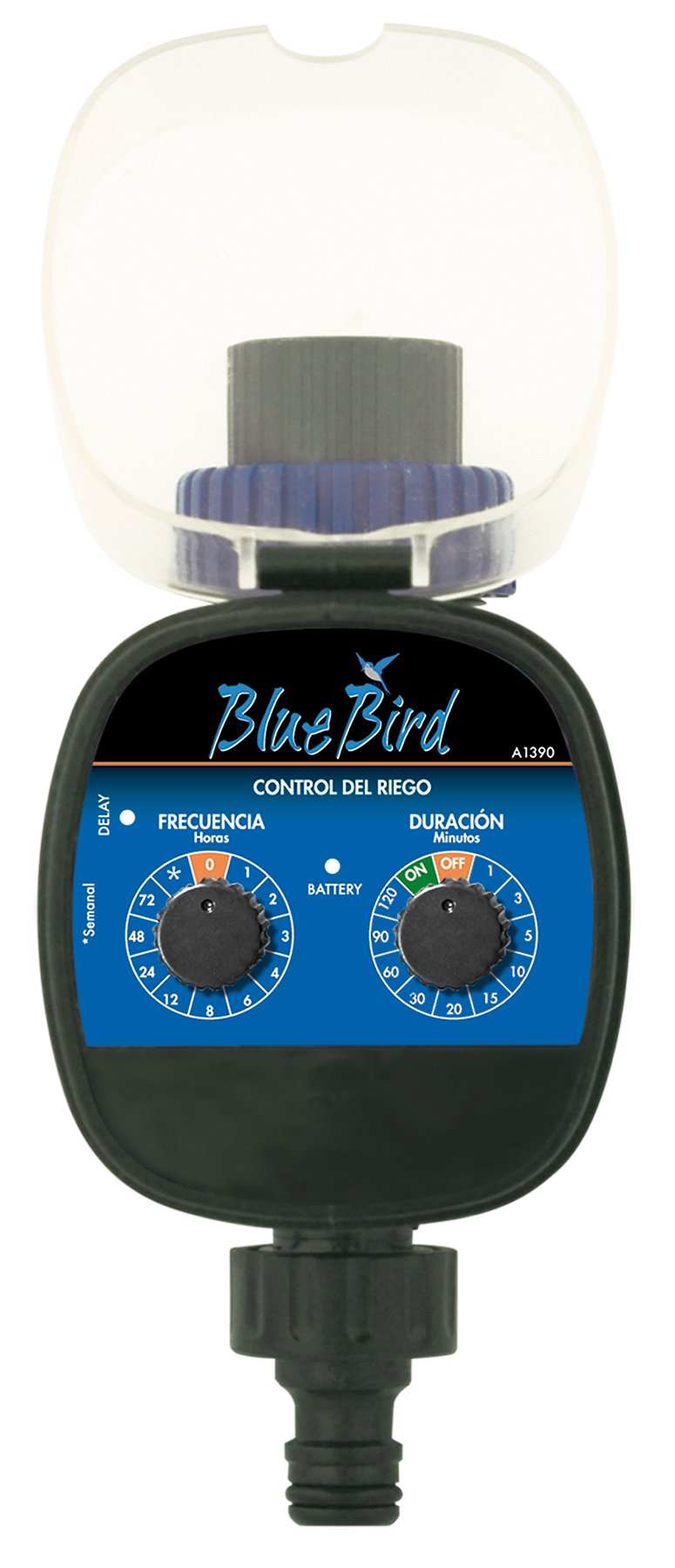
Նկար 1: Ճակատ view of the BlueBird A1390 Irrigation Programmer. The left dial controls irrigation frequency, and the right dial controls irrigation duration. A battery indicator light is located between the dials.
Բաղադրիչներ:
- Frequency Dial (Frecuencia): Sets how often the irrigation occurs. Options include 0 (off), 1, 2, 3, 4, 6, 8, 12, 24, 48, 72 hours, and a '*' setting for manual or weekly operation.
- Duration Dial (Duración): Sets how long each irrigation cycle lasts. Options include 0 (off), 1, 3, 5, 10, 15, 20, 30, 60, 90, 120 minutes.
- ON/OFF Անջատիչ. Located on the Duration Dial, allows for manual override or turning the unit off.
- Մարտկոցի ցուցիչ. A light that indicates battery status.
- Մարտկոցի խցիկ. Located at the rear of the unit (not visible in Figure 1).
- Ջրի մուտք/ելք՝ Standard tap and hose connections.
5. Կարգավորում
5.1 Մարտկոցի տեղադրում
- Գտեք մարտկոցի խցիկի կափարիչը սարքի հետևի մասում։
- Remove the cover by twisting or sliding it open.
- Insert two (2) new 1.5V AA alkaline batteries, ensuring correct polarity (+/-).
- Ջրակայունությունը պահպանելու համար մարտկոցի խցիկի կափարիչը ապահով կերպով տեղադրեք։
5.2 Connecting to the Tap
- Ensure your outdoor tap is turned off.
- Screw the BlueBird A1390 programmer onto your tap. Hand-tighten only to prevent damage.
- Connect your garden hose or irrigation system to the outlet of the programmer. Ensure a tight connection to prevent leaks.
- Slowly turn on your outdoor tap. Check for any leaks at the connections.
6. Գործառնական հրահանգներ
The BlueBird A1390 is designed for simple, intuitive programming using its two rotary dials.
6.1 Setting Irrigation Frequency
- Պտտեցնել Հաճախականության հավաքում (left dial) to your desired irrigation interval.
- Հասանելի կարգավորումներն են.
- 0: No irrigation (off).
- 1, 2, 3, 4, 6, 8, 12, 24, 48, 72: Irrigation every X hours.
- *: This setting typically indicates a manual mode or a weekly cycle, depending on the specific model's internal logic. Refer to the example below for common usage.
6.2 Setting Irrigation Duration
- Պտտեցնել Duration Dial (right dial) to your desired watering time per cycle.
- Հասանելի կարգավորումներն են.
- Անջատված: No irrigation.
- ՎՐԱ: Continuous irrigation (use with caution).
- 1, 3, 5, 10, 15, 20, 30, 60, 90, 120: Irrigation for X minutes.
6.3 Նախկինample Programming
To water every 6 hours for 10 minutes:
- Սահմանել Հաճախականության հավաքում դեպի 6 (ժամեր).
- Սահմանել Duration Dial դեպի 10 (րոպե):
The programmer will automatically begin the cycle based on these settings. The first cycle will typically start shortly after programming, or after a short delay.
6.4 Manual ON/OFF
To manually turn on the water, rotate the Duration Dial to the ON position. To stop manual watering, rotate the dial back to ԱՆՋԱՏՎԱԾ or a timed setting.
7. Պահպանում
7.1 Մարտկոցի փոխարինում
When the battery indicator light dims or the unit stops functioning, it's time to replace the batteries. Follow the steps in Section 5.1 for battery installation.
7.2 Մաքրում
Clean the exterior of the programmer with a damp cloth. Do not use abrasive cleaners or solvents. Ensure no water enters the battery compartment or internal electronics.
7.3 Ձմեռային պահեստավորում
Before the first frost, disconnect the programmer from the tap and hose. Remove the batteries. Store the unit indoors in a dry, frost-free location to prevent damage from freezing water.
8: Անսարքություն
| Խնդիր | Հնարավոր պատճառ | Լուծում |
|---|---|---|
| Unit does not turn on/display. | Մեռած կամ սխալ տեղադրված մարտկոցներ։ | Փոխարինեք մարտկոցները՝ ապահովելով ճիշտ բևեռականությունը։ |
| Ջուրը չի հոսում։ | Tap is off; programmer set to '0' or 'OFF'; low water pressure; clogged filter. | Ensure tap is fully open. Check frequency/duration settings. Verify water pressure. Clean any filters. |
| Unit leaks at connections. | Loose connections; missing or damaged washer. | Tighten connections. Check and replace washers if necessary. |
| Irrigation schedule is incorrect. | Incorrect frequency or duration settings. | Re-check and adjust the Frequency and Duration Dials according to your desired schedule. |
9. Տեխնիկական պայմաններ
- Մոդել: A1390
- Ապրանքանիշը: Կապույտ թռչուն
- Արտադրող: Altadex
- Power Source: 2 x AA 1.5V ալկալային մարտկոցներ (չի ներառվում)
- Ոռոգման հաճախականությունը՝ 0, 1, 2, 3, 4, 6, 8, 12, 24, 48, 72 hours, or '*' (manual/weekly)
- Ջրհեղեղի տևողությունը՝ OFF, ON, 1, 3, 5, 10, 15, 20, 30, 60, 90, 120 minutes
- Ապրանքի չափսերը. Մոտավորապես 19.4 x 10.6 x 10 սմ
- Ապրանքի քաշը: Մոտ 280 գ
- GTIN (UPC): 8426375113909
10. Երաշխիք և աջակցություն
This product is covered by a standard manufacturer's warranty. For specific warranty details, please refer to the documentation provided at the time of purchase or contact your retailer. For technical support or inquiries, please contact the seller or manufacturer directly.