
Ներածություն
This manual provides detailed instructions for the Sony BRAVIA KJ-43X8500F 43-inch 4K Android LCD TV. This high-quality television features a vibrant 4K display, a double-speed drive panel for smooth motion, and integrated Android TV functionality. It is also compatible with "Works with Alexa" for convenient voice control.
Հիմնական հատկանիշները
- Android TV(TM) functionality: Easily search for TV broadcasts, recorded programs, and online video content by speaking into the remote control. Enjoy desired content effortlessly.
- Աշխատում է Alexa-ի հետ. Link with Amazon Echo series for hands-free BRAVIA operation. Voice commands include "TV power on/off," "channel and input switching," and "playback/rewind/stop of recorded content."
- PS4 software "Kingdom Hearts III" certified image quality: High-definition processing ensures optimal image representation. Colors are faithfully reproduced (when game mode is set).
- Smooth motion display: Sports scenes and other fast-moving images are displayed smoothly. The TV predicts image movement and inserts new frames between existing ones, reducing afterimages by rendering 120 frames per second.
- 4K high-definition processor "HDR X1": Enhances the three major image quality elements: detail, color vibrancy, and contrast. Each high-quality function is precisely controlled.
- Supports 4K streaming services: Compatible with services like "Prime Video" and "Netflix," allowing you to enjoy desired content from a wide range of services.
- External HDD recording: Connect a separately sold USB hard disk (HDD) to BRAVIA to record programs while watching another, enabling "external HDD simultaneous recording."
- High-contrast 4K image quality: Enhances contrast for each subject in the image, enabling HDR-equivalent bright and dark rendering. All images, including terrestrial digital broadcasts, Blu-ray software, and online videos, are transformed into high-contrast, high-definition 4K quality.
- HDR (High Dynamic Range) signal compatible: Utilizes maximum image information closer to reality, reproducing brightness and vibrant colors that could not be expressed by previous TVs.
- "Voice Zoom" function: Adjusts the volume of voices without changing the overall sound volume.
Կարգավորում
Նախնական կարգավորում
Follow these steps for the initial setup of your Sony BRAVIA KJ-43X8500F television.
- Unpack the TV and accessories carefully.
- Attach the stand securely to the television. Refer to the diagram below for proper attachment.
- Միացրեք սնուցման լարը հեռուստացույցին, ապա՝ վարդակիցին։
- Connect your antenna or cable to the appropriate input on the TV.
- Connect any external devices (e.g., Blu-ray player, game console) to the HDMI ports.
- Միացրեք հեռուստացույցը հեռակառավարման վահանակի միջոցով։
- Հետևեք էկրանին տրված հրահանգներին՝ սկզբնական կարգավորումն ավարտելու համար, ներառյալ ցանցային միացումը և ալիքների սկանավորումը:
Հեռուստացույցի տակդիրի ամրացում
The TV stand provides stable support. Ensure it is correctly attached before placing the TV on a flat surface.
This image shows the rear of the television with the stand attached. Ensure all screws are tightened to prevent instability.
Արտաքին սարքերի միացում
Your BRAVIA TV offers multiple connectivity options.
- HDMI պորտեր. 4 ports available for high-definition devices.
- USB պորտեր. 3 միացք USB կրիչներ միացնելու համար։
- Կոմպոզիտային մուտքագրում՝ 1 port for older devices.
- Անլար LAN: IEEE802.11ac/a/b/g/n for network connectivity.

This image illustrates the various input and output ports located on the back of the television.
Գործառնական հրահանգներ
Հեռակառավարման վահանակի օգտագործումը
The remote control provides access to all TV functions, including smart features and voice control.

This image displays the remote control, highlighting buttons for power, volume, channel, and direct access to streaming services like Netflix and YouTube.
Ձայնի կառավարում Alexa-ի հետ
Your BRAVIA TV supports "Works with Alexa" for convenient voice commands.
- «Ալեքսա՛, միացրու հեռուստացույցը»։
- "Alexa, switch to Channel 1."
- "Alexa, play [content name] on the TV."
- "Alexa, rewind/fast forward/stop the recording."

This image demonstrates how to use Alexa voice commands to control your television, such as turning it on or changing channels.
Մեդիա ինտեգրացիա
Streaming Services and Content
The Android TV platform provides access to a wide array of streaming services.
- Amazon Prime Video
- Netflix
- YouTube
- Հուլու
- AbemaTV
- U-NEXT
- VideoMarket
- Google Play Ֆիլմեր և հեռուստացույցներ
- Spotify
- Niconico
- DAZN
- Եվ շատ ավելին:

This image illustrates the variety of streaming applications available on your BRAVIA TV, allowing you to enjoy movies, music, and games.
External HDD Recording
Connect a USB hard disk (sold separately) to enable recording of TV programs. You can record one program while watching another.
Տեխնիկական սպասարկում
Cleaning the TV Screen and Cabinet
- Հեռուստացույցը մաքրելուց առաջ միշտ անջատեք այն։
- For the screen, gently wipe with a soft, dry, lint-free cloth. For stubborn marks, lightly dampՄաքրեք կտորը ջրով կամ մեղմ, ոչ հղկող էկրան մաքրող միջոցով։ Մի՛ ցողեք հեղուկը անմիջապես էկրանի վրա։
- For the cabinet, use a soft, dry cloth. Avoid using abrasive pads, harsh chemicals, or solvents as they can damage the finish.
Ընդհանուր խնամք
- Խուսափեք հեռուստացույցը ուղիղ արևի լույսի տակ կամ ջերմության աղբյուրների մոտ տեղադրելուց։
- Ապահովեք հեռուստացույցի շուրջ բավարար օդափոխություն՝ գերտաքացումը կանխելու համար։
- Do not block the ventilation openings on the back or sides of the TV.
Անսարքությունների վերացում
Ոչ մի ուժ
- Ensure the power cord is securely connected to both the TV and the power outlet.
- Ստուգեք, որ վարդակը աշխատում է՝ միացնելով մեկ այլ սարք։
- Հեռակառավարման վահանակի հետ կապված խնդիրները բացառելու համար սեղմեք ոչ միայն հեռակառավարման վահանակի, այլև հեռուստացույցի միացման կոճակը։
Պատկեր/ձայն չկա
- Verify that the correct input source is selected. Press the "Input" button on your remote.
- Ստուգեք բոլոր մալուխային միացումները (HDMI, ալեհավաք)՝ համոզվելու համար, որ դրանք ամուր են։
- Արտաքին սարքեր օգտագործելիս համոզվեք, որ դրանք միացված են և ճիշտ են աշխատում։
- Adjust volume levels on both the TV and any connected audio systems.
Հեռակառավարումը չի աշխատում
- Փոխեք մարտկոցները հեռակառավարման վահանակում:
- Համոզվեք, որ հեռակառավարման վահանակի և հեռուստացույցի ինֆրակարմիր սենսորի միջև խոչընդոտներ չկան։
- Հեռակառավարիչը ուղղեք ուղիղ հեռուստացույցի վրա։
Ցանցային միացման խնդիրներ
- Վերագործարկեք ձեր ռոուտերը և մոդեմը։
- Անցեք հեռուստացույցի ցանցային կարգավորումներ և փորձեք վերամիանալ ձեր Wi-Fi ցանցին։
- Համոզվեք, որ ձեր Wi-Fi գաղտնաբառը ճիշտ է մուտքագրված։
- If the issue persists, try connecting the TV directly to your router via an Ethernet cable.
Տեխնիկական պայմաններ
| Էկրանի չափը | 43 դյույմ |
| Բրենդ | Sony |
| Ցուցադրման տեխնոլոգիա | LCD |
| Բանաձեւ | 4K |
| Առանձնահատկություններ | Android TV, Works with Alexa, Double Speed Drive, 4K HDR, External HDD Recording, Wi-Fi Wireless LAN |
| Միացման տեխնոլոգիա | IEEE802.11ac/a/b/g/n |
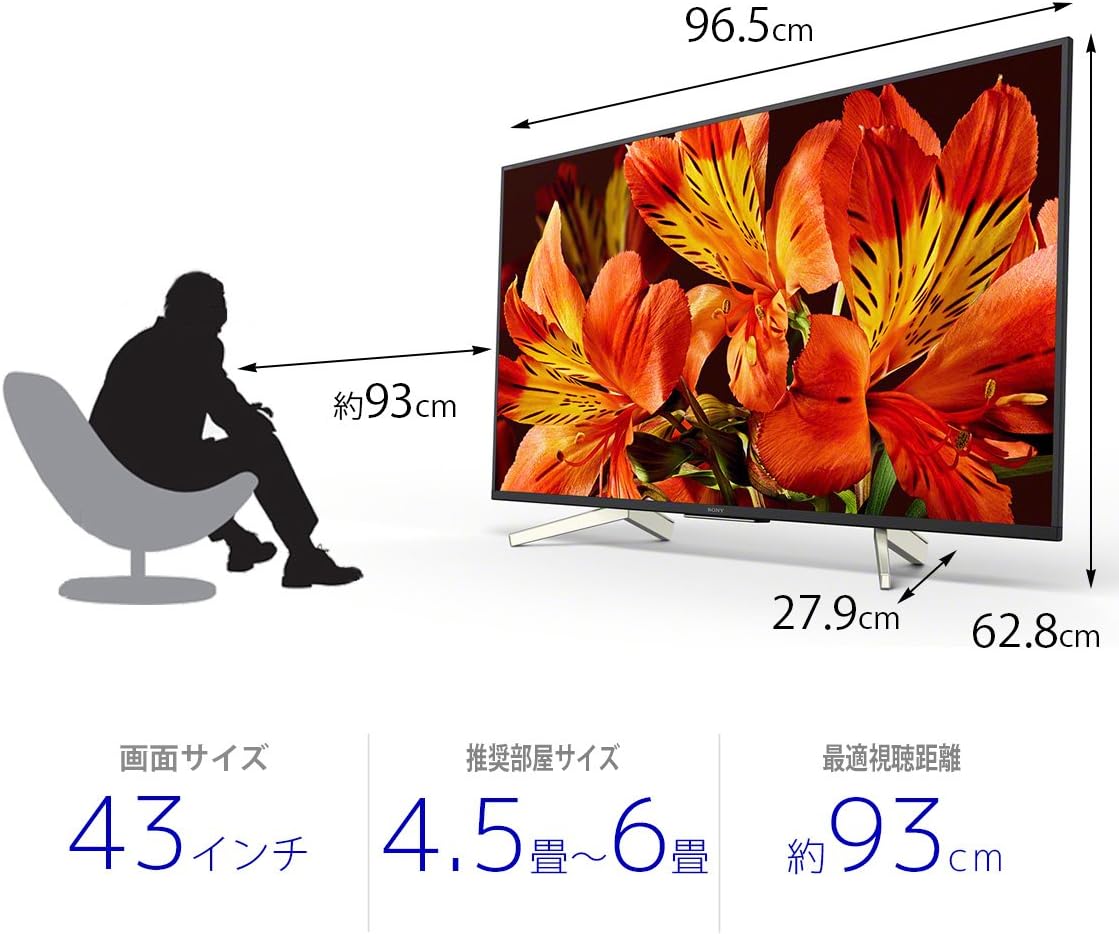
| Ապրանքի չափերը (D x W x H) | 27.9 x 96.5 x 62.8 սմ |
| Աջակցվող ինտերնետ ծառայություններ | Amazon Prime Video, Netflix |
| Մոդելի անվանումը | KJ-43X8500F |
| Գույն | Սեւ |
| Նյութի քաշը | 11.3 կգ |
| HDMI պորտեր | 4 |
| Ապարատային միջերես | USB |
| Composite Input Count | 1 |
| USB Port Count | 3 |
| Մոնտաժման տեսակը | Սեղանի լեռ |
| լարող տեսակը | Terrestrial Digital, BS Digital, 110-degree CS Digital |
| Օպերացիոն համակարգ | Android |
| Վերահսկման մեթոդ | Հեռակառավարվող, ձայնային |
Երաշխիք և աջակցություն
Երաշխիքի վերաբերյալ մանրամասն տեղեկությունների համար խնդրում ենք դիմել ձեր արտադրանքի հետ տրամադրված երաշխիքային քարտին կամ այցելել Sony-ի պաշտոնական աջակցության կենտրոն։ webկայք։
For technical assistance or customer support, please contact Sony customer service or visit their online support portal.