
1. Ներածություն
Thank you for choosing the Logic Life30 Smartwatch. This device is designed to integrate seamlessly into your active lifestyle, offering features such as Bluetooth calling, fitness tracking, sleep monitoring, and real-time notifications. This manual provides detailed instructions for setup, operation, and maintenance to ensure optimal performance and longevity of your smartwatch.

Image 1.1: Logic Life30 Smartwatches in multiple colors, showcasing different display options including a dialer, messages, contacts, time, date, and heart rate monitor.
2. Անվտանգության տեղեկատվություն
- Մի՛ փորձեք ապամոնտաժել, վերանորոգել կամ փոփոխել սարքը։ Սա կարող է չեղյալ համարել երաշխիքը և վնաս պատճառել։
- Սարքը պահեք ծայրահեղ ջերմաստիճաններից, արևի ուղիղ ճառագայթներից և բարձր խոնավությունից հեռու։
- Խուսափեք սարքը ուժեղ հարվածներից կամ ընկնելուց։
- Use only the provided charging cable and adapter. Using unauthorized accessories may cause damage or fire.
- Consult a medical professional before starting any new exercise regimen, especially if you have pre-existing health conditions. The heart rate monitor is for reference only and should not be used for medical diagnosis.
- Սարքը պահեք երեխաների և ընտանի կենդանիներից հեռու:
- Մաքրեք սարքը փափուկ, չոր կտորով։ Մի օգտագործեք կոշտ քիմիական նյութեր կամ հղկող նյութեր։
3. Փաթեթի բովանդակությունը
Խնդրում ենք տուփը բացելուց հետո ստուգել փաթեթի պարունակությունը։ Եթե որևէ ապրանք բացակայում է կամ վնասված է, կապվեք հաճախորդների սպասարկման հետ։
- Logic Life30 Smartwatch
- USB լիցքավորման մալուխ
- Օգտագործողի ձեռնարկ (այս փաստաթուղթը)
4. Սարքն ավարտված էview
Familiarize yourself with the physical components of your Logic Life30 Smartwatch.
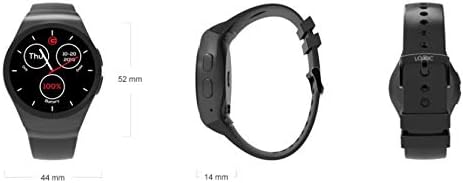
Image 4.1: Front, side, and back views of the Logic Life30 Smartwatch with dimensions (44mm width, 52mm height, 14mm thickness).
4.1 Frontակատ View
- IPS LCD Touch Display: The main interface for interacting with the smartwatch.
4.2 Կողք View
- Power կոճակը. Used to power on/off the device and wake/sleep the screen.
- Խոսափող: For voice commands and calls.
4.3 Հետ View

Պատկեր 4.2: Հետևի view of the Logic Life30 Smartwatch, highlighting the optical heart rate sensor and magnetic charging contacts.
- Սրտի հաճախականության ցուցիչ. Հետևում է ձեր սրտի զարկերին։
- Լիցքավորման կոնտակտներ. For connecting the magnetic USB charging cable.
- Բանախոս: For audio output during calls or media playback.
5. Կարգավորում
5.1 Խելացի ժամացույցի լիցքավորում
- Connect the USB charging cable to a power adapter (not included) or a computer's USB port.
- Align the magnetic end of the charging cable with the charging contacts on the back of the smartwatch. It will snap into place.
- The watch display will show a charging indicator. Allow the device to fully charge before first use (approximately 2 hours).
5.2 Միացում/անջատում
- Միացնել. Press and hold the Power Button on the side of the watch until the Logic logo appears.
- Անջատելու համար. Սեղմեք և պահեք միացման կոճակը, այնուհետև էկրանին ընտրեք «Անջատել»։
5.3 Pairing with Your Smartphone (Bluetooth)
To access all features, including calls, notifications, and data synchronization, pair your Life30 Smartwatch with your smartphone via Bluetooth.
- Ensure your smartwatch is powered on and Bluetooth is enabled on your smartphone.
- On your smartwatch, navigate to the Bluetooth settings.
- On your smartphone, open Bluetooth settings and search for available devices.
- Select "Logic Life30" (or similar name) from the list of found devices on your smartphone.
- Հաստատեք զուգավորման հարցումը ձեր սմարթֆոնի և խելացի ժամացույցի վրա։
5.4 Ուղեկցող հավելվածի տեղադրում
For full functionality, including fitness data tracking and advanced settings, download the recommended companion app from your smartphone's app store. Refer to the smartwatch's display or packaging for the specific app name or QR code.
- Scan the QR code displayed on the smartwatch or in the quick start guide, or search for the app name in your phone's app store.
- Install the app and follow the on-screen instructions to create an account and connect your Life30 Smartwatch.
6. Գործառնական հրահանգներ
6.1 Ինտերֆեյսի նավարկություն
- Սահեցրեք վեր/ներքև. Գլորել ընտրացանկերի կամ ծանուցումների միջով։
- Սահեցրեք ձախ/աջ՝ Access different screens, widgets, or app lists.
- Հպեք՝ Ընտրեք տարր կամ բացեք ծրագիր։
- Սեղմեք Power կոճակը. Return to the home screen or wake/sleep the display.
6.2 Հաղորդակցման առանձնահատկություններ
- Զանգերի կատարում/ընդունում. Once paired via Bluetooth, you can dial numbers directly from the watch or answer incoming calls.
- Հաղորդագրություններ. View incoming text messages and social media notifications directly on your watch.
- Կոնտակտներ: Access your phone's contact list from the smartwatch.
6.3 Առողջության և ֆիթնեսի հետևում

Image 6.1: The Logic Life30 Smartwatch supports fitness tracking, monitoring activities like running.
- Սրտի զարկերի մոնիտոր. Access the heart rate app to measure your current heart rate. The watch can also log your heart rate over time.
- Pedometer: Tracks your steps, distance, and estimated calories burned throughout the day.
- Քնի մոնիտոր. Հետևում է ձեր քնի ռեժիմներին, ներառյալ խորը քունը, թեթև քունը և արթնության ժամերը։
- Նստակյաց հիշեցում. Notifies you when you have been inactive for too long, encouraging you to move.
6.4 Multimedia and Other Features
- Camera/Remote Camera: Use the built-in camera (if available) or control your smartphone's camera remotely from the smartwatch.
- MP3/MP4 նվագարկիչ։ Play music or videos stored on the device or control media playback on your connected smartphone.
- Ձայնագրիչ. Record audio directly from the smartwatch.
- Calculator, Calendar, Alarm, Stopwatch: Standard utility applications.
- Հակագողություն. Helps locate your phone if it's out of range or alerts you if the connection is lost.
- Ձայնի օգնական. Access your phone's voice assistant through the smartwatch.
6.5 Անհատականացում
- Դիտեք դեմքերը. Personalize your smartwatch by choosing from various pre-installed watch faces or downloading new ones via the companion app.
- Թեմաներ: Adjust the overall visual theme of the smartwatch interface.
7. Պահպանում
7.1 Ձեր խելացի ժամացույցի մաքրումը
- Wipe the screen and body of the watch with a soft, lint-free cloth.
- Համառ բծերի համար մի փոքր դampen the cloth with water. Avoid using harsh cleaning agents, solvents, or abrasive materials.
- Լիցքավորելուց առաջ համոզվեք, որ լիցքավորման կոնտակտները մաքուր և չոր են՝ կոռոզիայից խուսափելու համար։
7.2 Պահպանում
- When not in use for extended periods, store the smartwatch in a cool, dry place.
- Charge the device periodically (e.g., every 3 months) to prevent deep discharge of the battery.
8: Անսարքություն
| Խնդիր | Հնարավոր լուծում |
|---|---|
| Խելացի ժամացույցը չի միանում։ | Համոզվեք, որ սարքը լիովին լիցքավորված է։ Միացրեք այն լիցքավորիչին առնվազն 30 րոպե։ |
| Հնարավոր չէ զուգակցվել սմարթֆոնի հետ։ |
|
| Ծանուցումներ չեն ստացվում: |
|
| Սրտի հաճախության ցուցմունքները անճշտ են։ | Համոզվեք, որ ժամացույցը ամուր է կրում ձեր դաստակին, ոչ շատ ամուր կամ շատ թույլ։ Մաքրեք ժամացույցի հետևի մասում գտնվող սենսորը։ |
| Էկրանը չի արձագանքում: | Restart the smartwatch by pressing and holding the power button. If the issue persists, ensure the screen is clean and dry. |
9. Տեխնիկական պայմաններ
| Առանձնահատկություն | Մանրամասն |
|---|---|
| Մոդելի անվանումը | Life30 |
| Բրենդ | Տրամաբանություն |
| Ցուցադրել | 1.3 Inch IPS LCD Touch Screen |
| Միացում | Bluetooth |
| Անլար կապ | Bluetooth |
| Հատուկ առանձնահատկություններ | Email, Sleep Monitor, Notifications, Heart Rate Monitor, Pedometer, Remote Camera, MP3/MP4 Player |
| Մարդկային ինտերֆեյսի մուտքագրում | Սենսորային էկրան |
| Ապրանքի չափերը | 3.81 x 1.3 x 4.5 սմ (1.5 x 0.51 x 1.77 դյույմ) |
| Նյութի քաշը | 426 գ (0.94 ֆունտ) |
| Գույնի ընտրանքներ | Silver/White (other colors may be available) |
| Ձևավորում | Կլոր |
10. Երաշխիք և աջակցություն
10.1 Երաշխիքային տեղեկատվություն
The Logic Life30 Smartwatch comes with a standard manufacturer's warranty. Please refer to the warranty card included in your package or visit the official Logic webկայքը՝ երաշխիքային ծածկույթի, տևողության և պահանջների գործընթացի վերաբերյալ մանրամասն պայմանների և դրույթների համար։
10.2 Հաճախորդների աջակցություն
For technical assistance, troubleshooting, or any questions regarding your Logic Life30 Smartwatch, please contact Logic customer support. Contact information can typically be found on the official Logic webկայքում կամ ապրանքի փաթեթավորման վրա։
- Առցանց աջակցություն. Visit the official Logic webԿայք՝ հաճախակի տրվող հարցերի, օժանդակ հոդվածների և կապի ձևերի համար։
- Էլփոստի աջակցություն. Հաճախորդների աջակցության էլ․ հասցեն կարող եք գտնել ձեր արտադրանքի փաստաթղթերում։
- Հեռախոսային աջակցություն. Հաճախորդների սպասարկման հեռախոսահամարների համար դիմեք ձեր արտադրանքի փաստաթղթերին։