
Ներածություն
The Xfinity HD 720p Wireless Indoor/Outdoor Home Security Camera allows you to monitor your home environment with live video accessible from anywhere. Designed for both indoor and outdoor use, this camera provides essential security features to keep you informed.
Ինչ կա տուփի մեջ
- Xfinity HD 720p Wireless Security Camera (Model: SCHC2AEW)
- Power Adapter
- USB մալուխ
- Մոնտաժային պարագաներ (պտուտակներ և խարիսխներ)

Image: Xfinity Home Security Camera and accessories neatly packaged in its box.
Կարգավորման ուղեցույց
- Էլեկտրաէներգիայի միացում. Connect the camera to the power adapter using the provided USB cable, then plug the adapter into a standard electrical outlet.
- Ծրագրի ներբեռնումը. Download the official Xfinity Home app from your smartphone's app store (iOS App Store or Android Google Play).
- Սարքի զուգավորում. Open the Xfinity Home app and follow the on-screen instructions to add a new device. You will typically need to scan a QR code on the camera or manually enter its details to pair it with your home Wi-Fi network. Ensure your Wi-Fi network is 2.4 GHz for compatibility.

Image: The Xfinity Home Security Camera placed on a surface, ready for setup.
Գործառնական հրահանգներ
Ապրեք View and Basic Controls
Once paired, access the live video feed through the Xfinity Home app. The app provides controls for:
- Ուղիղ հեռարձակում՝ View իրական ժամանակի սնունդtage ձեր տեսախցիկից:
- Ձայնագրում: Ձեռքով ձայնագրեք տեսահոլովակներ։
- Սքրինշոթ: Լուսանկարեք անշարժ պատկերներ ուղիղ եթերից:
- Երկկողմանի աուդիո. Speak through the camera's speaker and hear audio from its microphone.
Գիշերային տեսիլք
The camera features night vision capabilities for clear monitoring in low-light conditions. This feature automatically activates when ambient light is insufficient, providing a black-and-white image. Some models may offer color night vision depending on ambient light and settings.
Շարժման հայտնաբերում և ազդանշաններ
Configure motion detection settings within the Xfinity Home app to receive alerts on your smartphone when activity is detected. You can customize sensitivity levels and notification preferences.
Պահպանման ընտրանքներ
The camera supports local storage via a MicroSD card (not included). Insert a compatible MicroSD card into the designated slot to store recorded video clips directly on the device. Cloud storage options may also be available through your Xfinity Home service subscription.
Տեղադրում և տեղադրում
The Xfinity Home Security Camera can be placed on a flat surface or mounted to a wall. Use the included mounting hardware for secure wall installation. Ensure the camera is positioned to cover the desired monitoring area.
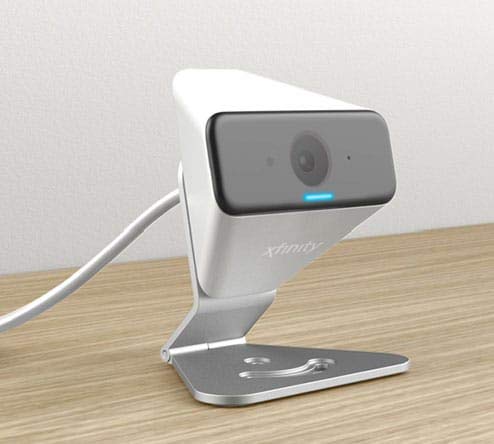
Image: The Xfinity Home Security Camera positioned on a desk, demonstrating its compact design.
Ապրանքի բնութագրերը
| Առանձնահատկություն | Մանրամասն |
|---|---|
| Մոդելի համարը | SCHC2AEW |
| Տեսանյութի նկարահանման լուծում | 720p |
| Միացման տեխնոլոգիա | Անլար (Wi-Fi) |
| Միացման արձանագրություն | Wi-Fi (2.4 GHz համատեղելի) |
| Ներքին/Դրսի օգտագործումը | Ներքին, Դրսի |
| Հատուկ առանձնահատկություններ | Շարժման սենսոր, գիշերային տեսողություն |
| Էլեկտրաէներգիայի աղբյուր | DC (12 Volts, 1 Watt) |
| Չափերը (L x W x H) | 3 x 3 x 2 դյույմ |
| Նյութի քաշը | 1.57 ֆունտ |
| Պաշտպանության միջազգային վարկանիշ | IP65 |
Անսարքությունների վերացում
- Հզորություն չկա. Ensure the power adapter is securely connected to both the camera and a working electrical outlet.
- Միացման հետ կապված խնդիրներ. Verify your Wi-Fi network is 2.4 GHz. Restart your router and the camera. Ensure the camera is within range of your Wi-Fi signal.
- Հավելվածը չի արձագանքում. Close and reopen the Xfinity Home app. If the issue persists, try reinstalling the app.
- Տեսանյութի վատ որակ. Ստուգեք ձեր Wi-Fi ազդանշանի ուժգնությունը։ Համոզվեք, որ տեսախցիկի օբյեկտիվը մաքուր է և առանց խոչընդոտների։
Երաշխիք և հաճախորդների աջակցություն
For warranty information, please refer to the documentation included with your purchase or visit the official Xfinity support website. For technical assistance or customer service, please contact Xfinity customer support directly.