
Ներածություն
This user manual provides comprehensive instructions for the setup, operation, maintenance, and troubleshooting of your Alienware M15 Gaming Laptop. Please read this manual thoroughly to ensure optimal performance and longevity of your device. For additional support, refer to the official Alienware support resources.
Ապրանքը ավարտվել էview
Հիմնական հատկանիշները
- 8th Generation Intel Core i7-8750H (6-Core, 9MB Cache, up to 4.1GHz w/ Turbo Boost)
- 15.6" FHD (1920 x 1080) 60Hz Anti-glare IPS, 300-nits 72% Color gamut, narrow-border Display
- 16GB, 2x8GB, DDR4, 2666MHz RAM
- 128GB PCIe M.2 SSD + 1TB (+8GB SSHD) Hybrid Drive
- Nvidia GeForce GTX 1060 with 6GB GDDR5 Graphics Card
- Windows 10 Տնային օպերացիոն համակարգ
Ֆիզիկական բաղադրիչներ

Նկար 1: Ճակատ view of the Alienware M15 laptop, showcasing the display with the Alienware logo.

Նկար 2: Վերևից ներքև view of the open Alienware M15 laptop, highlighting the keyboard layout and touchpad.

Նկար 3: Ձախ կողմը view of the Alienware M15 laptop, showing various ports such as USB 3.0.
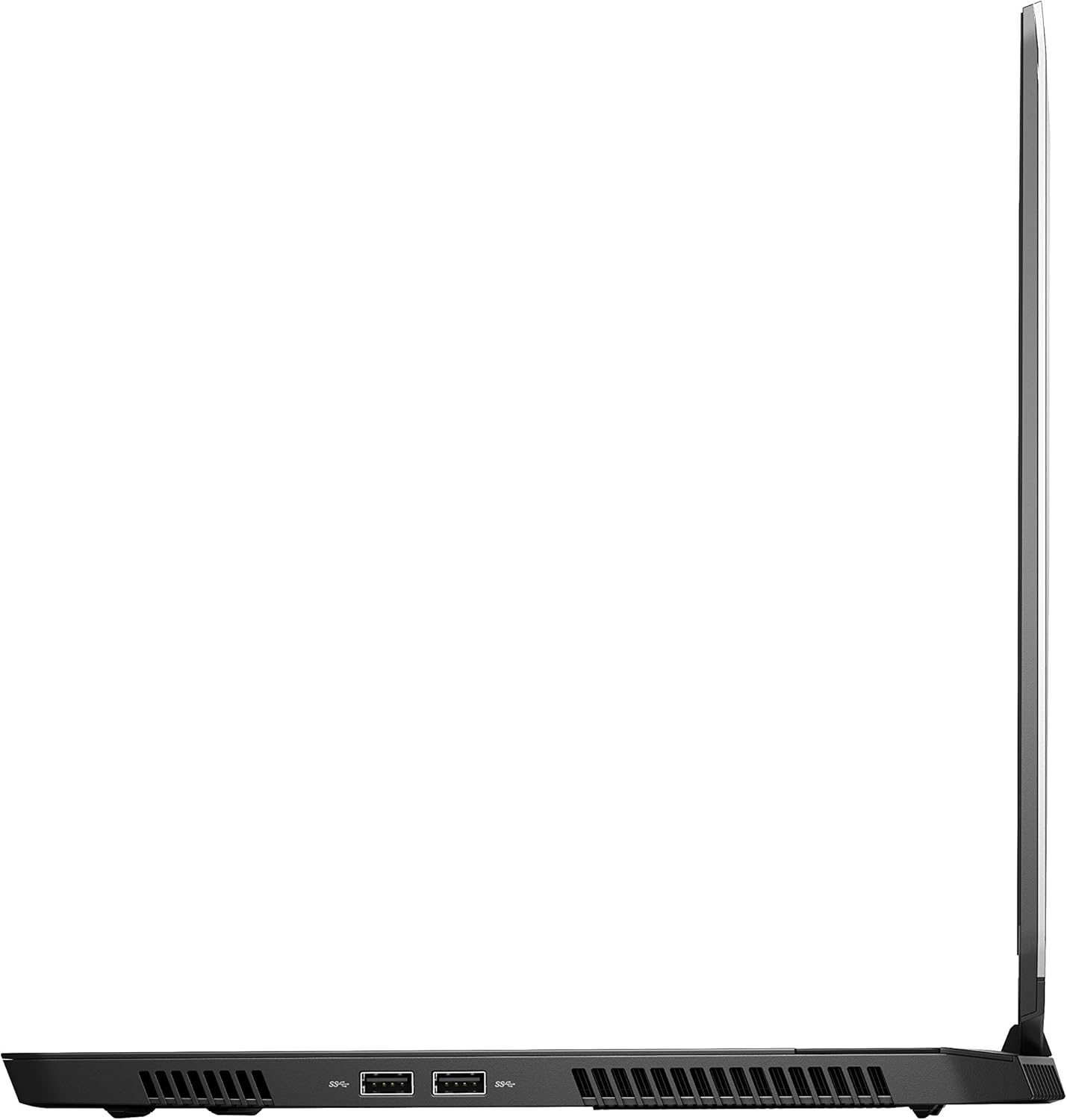
Նկար 4: Աջ կողմը view of the Alienware M15 laptop, displaying additional ports and ventilation.

Նկար 5: Պայթեց view illustrating the internal cooling system of the Alienware M15 laptop, including fans and heat sinks.
Կարգավորում
Փաթեթազերծում
Զգուշորեն հանեք բոլոր բաղադրիչները փաթեթավորումից։ Համոզվեք, որ առկա են հետևյալ իրերը՝
- Alienware M15 Gaming Laptop
- Հոսանքի լարը
- 180 Վտ հզորության ադապտեր
Նախնական միացում
- Միացրեք սնուցման ադապտերը նոութբուքի սնուցման մուտքի միացքին։
- Միացրեք հոսանքի լարը պատի վարդակից:
- Open the laptop lid and press the power button, typically located on the top right of the keyboard deck or a dedicated button on the chassis.
- Հետևեք էկրանին հայտնվող հրահանգներին՝ Windows 10 Home-ի կարգավորման գործընթացն ավարտելու համար, ներառյալ լեզվի ընտրությունը, ցանցային միացումը և օգտատիրոջ հաշվի ստեղծումը:
Գործառնական հրահանգներ
Հիմնական գործողություն
Your Alienware M15 laptop runs on Windows 10 Home. Familiarize yourself with the operating system's interface. The keyboard features customizable backlighting via Alienware's software. The touchpad supports multi-touch gestures for navigation.
Խաղային կատարողականություն
The Alienware M15 is designed for high-performance gaming. For optimal gaming experience, ensure the laptop is connected to the power adapter. This allows the system to utilize its full power capabilities for the CPU and GPU. While gaming, the laptop may generate significant heat; this is normal for high-performance hardware. Consider using a cooling pad for extended gaming sessions to enhance thermal management.
Տեխնիկական սպասարկում
Մաքրում
- Էկրան: Օգտագործեք փափուկ, առանց մզկի կտոր, թեթևակի դampջրով կամ էկրան մաքրող միջոցով։ Խուսափեք կոշտ քիմիական նյութերից։
- Ստեղնաշար և շասսի. Use a soft brush or compressed air to remove dust from keys and vents. Wipe surfaces with a microfiber cloth.
- Նավահանգիստներ: Use compressed air to clear dust from USB, HDMI, and other ports.
Ծրագրային ապահովման թարմացումներ
Regularly update your Windows operating system, graphics drivers (NVIDIA GeForce), and Alienware software. Updates often include performance improvements, security patches, and bug fixes. Access Windows updates through Settings > Update & Security. Graphics drivers can be updated via the NVIDIA GeForce Experience application.
Մարտկոցի խնամք
To maximize battery lifespan, avoid consistently discharging the battery completely. For prolonged use while plugged in, consider using battery management features (if available in Alienware Command Center) to limit charging to 80-90% capacity.
Անսարքությունների վերացում
This section addresses common issues you might encounter with your Alienware M15 laptop.
| Խնդիր | Հնարավոր պատճառ / լուծում |
|---|---|
| Laptop gets excessively hot during use. | High-performance components generate heat. Ensure ventilation vents are clear. Use a cooling pad. Update graphics drivers. |
| "No media present" error or SSD/HDD not detected. | This can sometimes be a temporary software glitch. Try restarting the laptop. If persistent, ensure the power cable is securely connected and try a hard reboot (unplug power, hold power button for 15 seconds, then reconnect and power on). If the issue persists, contact support. |
| Wi-Fi connection drops frequently. | Ensure Wi-Fi drivers are up to date. Check for interference from other devices. Restart your router and the laptop. If the issue persists, consider reinstalling Wi-Fi drivers or contacting support. |
| System performance is slow or lagging. | Ensure the laptop is plugged into power for full performance. Close unnecessary background applications. Check for malware. Ensure sufficient free space on the SSD/HDD. |
Տեխնիկական պայմաններ
Detailed technical specifications for the Alienware M15 Gaming Laptop (Model: AWM15-7830SLV-PUS).
| Առանձնահատկություն | Մանրամասն |
|---|---|
| Կանգնած էկրանի ցուցադրման չափը | 15.6 դյույմ |
| Էկրանի լուծում | 1920 x 1080 պիքսել |
| Էկրանի առավելագույն լուծում | 1920x1080 պիքսել |
| Պրոցեսոր | 4.1 GHz core_i7_8750h |
| RAM | 16 ԳԲ DDR4 |
| Հիշողության արագություն | 2666 ՄՀց |
| Կոշտ սկավառակ | 1000 GB 128GB PCIe M.2 SSD + 1TB (+8GB SSHD) Hybrid Drive |
| Գրաֆիկական համապրոցեսոր | NVIDIA GeForce GTX 1060 |
| Chipset ապրանքանիշ | NVIDIA |
| Քարտի նկարագրություն | Նվիրված |
| Գրաֆիկական քարտ Ram Size | 6 ԳԲ |
| Անլար տեսակ | 802.11a/b/g/n |
| USB 3.0 պորտերի քանակը | 3 |
| Բրենդ | Alienware |
| Սերիա | AWm15-7830SLV-PUS |
| Նյութի մոդելի համարը | AWM15-7830SLV-PUS |
| Օպերացիոն համակարգ | Windows 10 Home |
| Նյութի քաշը | 4.8 ֆունտ |
| Ապրանքի չափերը | 10.8 x 14.3 x 0.8 դյույմ |
| Գույն | Սեւ |
| Պրոցեսորի ապրանքանիշ | Intel |
| Պրոցեսորների թիվը | 6 |
| Համակարգչի հիշողության տեսակը | DDR4 SDRAM |
| Ֆլեշ հիշողության չափը | 16 |
| Կոշտ սկավառակի միջերես | Պինդ վիճակ |
| Կոշտ սկավառակի պտտման արագություն | 5400 rpm |
| Օպտիկական սկավառակի տեսակը | Օպտիկական սկավառակ չկա |
| Հատtage | 240 վոլտ |
| Մարտկոցներ | Պահանջվում է 1 լիթիում մետաղական մարտկոց: (ներառյալ) |
| Ամսաթիվ առաջին հասանելի | 5 հունվարի, 2019 թ |
| Մոդելի անվանումը | AWm15-7830SLV-PUS |
| Էկրանի չափը | 15.6 դյույմ |
| Կոշտ սկավառակի չափը | 1000 ԳԲ |
| CPU մոդել | Core i7 8750H |
| Ram հիշողության տեղադրված չափը | 16 ԳԲ |
| Հատուկ առանձնահատկություն | Հակափայլ ծածկույթ |
Երաշխիք և աջակցություն
For detailed warranty information, please refer to the documentation included with your purchase or visit the official Alienware support website. For technical assistance, driver downloads, and further resources, please visit the Alienware support portal.
Պաշտոնական օգտագործողի ձեռնարկը (PDF) նույնպես հասանելի է ներբեռնման համար. Ներբեռնել օգտագործողի ձեռնարկը PDF-ում