
1. Ներածություն
This manual provides detailed instructions for the installation, operation, and maintenance of your Everycom EC801B 80mm Thermal Printer. Please read this manual thoroughly before using the printer to ensure proper function and longevity of the device. The EC801B is a high-speed thermal receipt printer equipped with an auto-cutter and versatile connectivity options including USB and LAN.
2. Անվտանգության տեղեկատվություն
- DO NOT DISASSEMBLE THE PRINTER PERSONALLY. For any service-related queries, please contact Everycom support.
- The printer should be installed on a flat and solid surface to avoid vibration or impact damage.
- Ensure the power supply matches the printer's requirements to prevent electrical damage.
- Keep the printer away from water, dust, and direct sunlight.
3. Փաթեթի բովանդակությունը
Խնդրում ենք ստուգել, որ ստորև թվարկված բոլոր ապրանքները ներառված են ձեր փաթեթում.
- 1 x Everycom EC801B Thermal Receipt Printer
- 1 x Power Adapter
- 1 x USB տվյալների մալուխ
- 1 x Paper Roll (Sampլե)
- 1 x Օգտագործողի ձեռնարկ
- 1 x Վարորդի CD

Image: Contents of the Everycom EC801B printer package, including the printer unit, power adapter, USB cable, sample paper roll, user manual, and driver CD.
4. Ապրանքը ավարտված էview
Familiarize yourself with the various parts of your Everycom EC801B thermal printer.
4.1 Առջևի և վերևի մասեր View

Պատկեր՝ առջևի view of the Everycom EC801B thermal printer, showing the paper output slot and control panel.

Պատկեր՝ Վերև view of the Everycom EC801B thermal printer, highlighting the control panel with POWER, ERROR, PAPER indicators, and the FEED button.
4.2 Կառավարման վահանակ
- POWER Ցուցանիշ: Լուսավորվում է, երբ տպիչը միացված է։
- ՍԽԱԼ Ցուցանիշ. Flashes or illuminates to indicate an error (e.g., paper out, cover open).
- PAPER Indicator: Illuminates when paper is present, flashes when paper is low.
- FEED կոճակ: Press to advance paper. Hold to print a self-test page.
4.3 Rear Panel (Connectivity Ports)

Պատկեր՝ Հետևի մաս view of the Everycom EC801B thermal printer, showing the power port, cash drawer port, Ethernet (LAN) port, and USB port.
- POWER Port: Միանում է հոսանքի ադապտերին:
- CASH Drawer Port: Connects to a compatible cash drawer.
- LAN (Ethernet) միացք՝ Connects to a network for network printing.
- USB պորտ. Connects to a computer via USB cable.
5. Կարգավորում
5.1 Ֆիզիկական տեղաբաշխում
Place the printer on a stable, flat surface. Ensure there is adequate space around the printer for ventilation and easy access to ports and paper loading.
5.2 Միացնող մալուխներ
- Էլեկտրաէներգիայի միացում. Connect the power adapter to the printer's POWER port and then plug the adapter into a power outlet.
- Data Connection (Choose one):
- USB: Միացրեք USB տվյալների մալուխը տպիչի USB միացքից ձեր համակարգչի ազատ USB միացքներից մեկին:
- LAN. Միացրեք Ethernet մալուխը տպիչի LAN միացքից ձեր ցանցային ռաութերին կամ անջատիչին:
- Cash Drawer (Optional): If using a cash drawer, connect its cable to the printer's CASH Drawer port.
5.3 Թուղթ բեռնելը
- Open the printer cover by pushing the cover open lever (if present) or lifting the top cover.
- Insert the 80mm thermal paper roll into the compartment, ensuring the paper feeds from the bottom and the leading edge extends out of the printer.
- Close the printer cover firmly until it clicks into place. Ensure there is no slack in the paper.

Պատկեր՝ Վերև view of the Everycom EC801B printer with the cover open, revealing the paper roll compartment.
5.4 Վարորդի տեղադրում
For the printer to communicate with your computer, drivers must be installed.
- Insert the provided Driver CD into your computer's CD-ROM drive.
- Follow the on-screen instructions to install the printer drivers. If your computer does not have a CD drive, drivers can typically be downloaded from the Everycom official webկայք։
- After installation, configure the printer settings through your operating system's printer management tools.
6. Գործառնական հրահանգներ
6.1 Միացում/անջատում
To power on the printer, ensure the power adapter is connected and press the power switch located on the side or rear of the printer. The POWER indicator light will illuminate. To power off, press the power switch again.
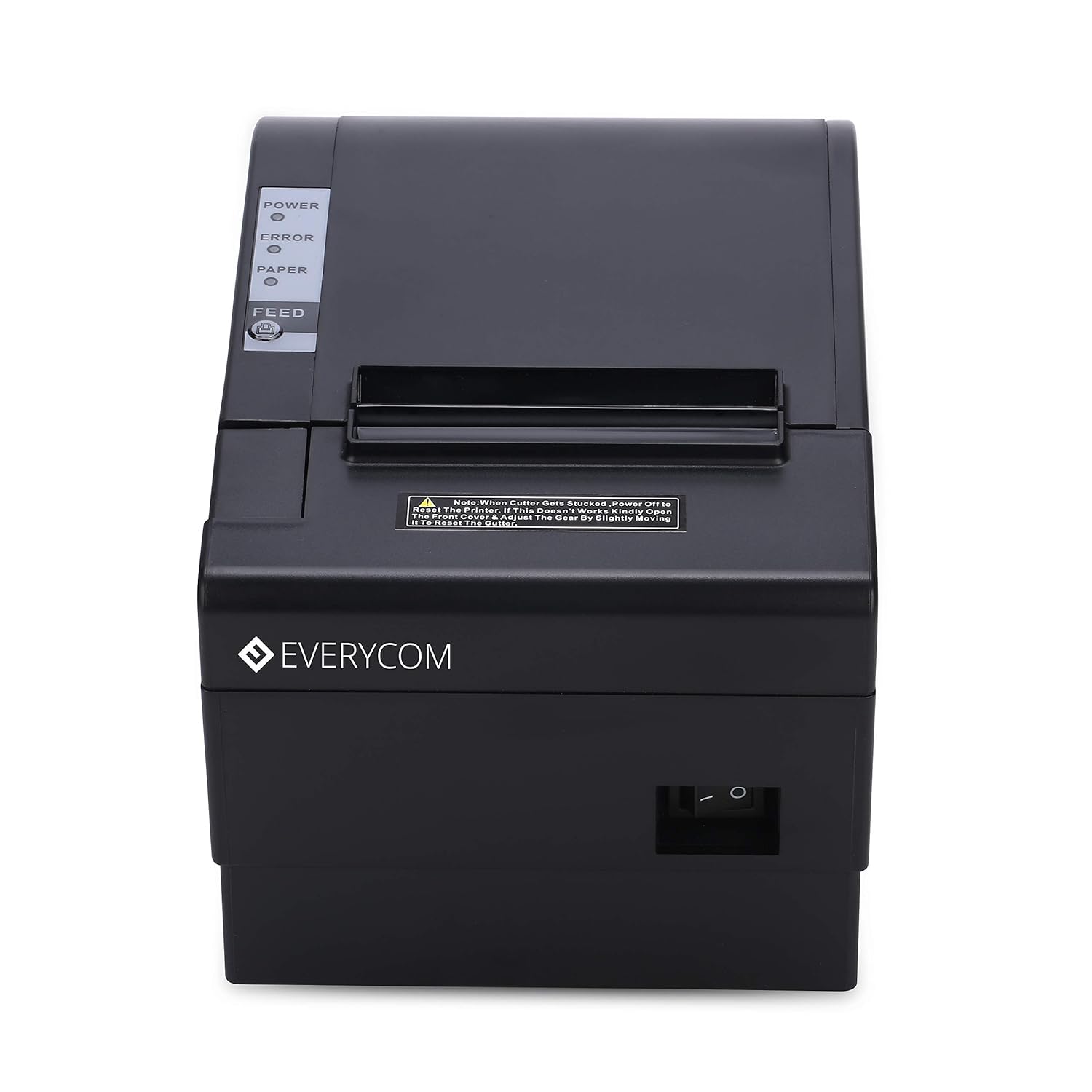
Պատկեր՝ առջևի view of the Everycom EC801B printer, showing the location of the power switch on the side.
6.2 Printing a Self-Test Page
A self-test page can confirm basic printer functionality and print quality without requiring a computer connection.
- Ensure the printer is powered off and paper is loaded.
- Սեղմեք և պահեք կոճակը ԿԵՐԵԼ կոճակը։
- Պահելիս ԿԵՐԵԼ կոճակը, միացրեք տպիչը։
- Ազատ արձակել ԿԵՐԵԼ button once the printer starts printing. A self-test page will print, showing printer information and a sample print.

Image: Everycom EC801B printer actively printing a self-test receipt with a QR code and text.
6.3 Basic Printing Operation
Once drivers are installed and the printer is connected, you can print from any application that supports printing. Select the Everycom EC801B from your list of available printers and initiate the print command.
6.4 Auto Cutter Function
The EC801B features an automatic cutter that will cut the receipt paper after each print job, or as configured in your printer settings/software.
7. Պահպանում
7.1 Տպիչի մաքրում
Կանոնավոր մաքրումը նպաստում է տպագրության որակի պահպանմանը և երկարացնում տպիչի կյանքի տևողությունը։
- Տպման ղեկավար. Թեթևակի օգտագործեք բամբակյա փայտիկampնոսրացրեք իզոպրոպիլ սպիրտով՝ ջերմային տպիչի գլխիկը նրբորեն սրբելու համար: Օգտագործելուց առաջ թողեք, որ այն լիովին չորանա:
- Թղթի ուղի՝ Use a soft, dry cloth to remove any paper dust or debris from the paper path.
- Արտաքին տեսք: Սրբեք արտաքինը փափուկով, դamp կտոր. Մի օգտագործեք կոպիտ քիմիական կամ հղկող մաքրող միջոցներ:
7.2 Թղթի գլանափաթեթի փոխարինում
When the PAPER indicator flashes or printing becomes faint, it's time to replace the paper roll. Follow the steps in Section 5.3 to load a new 80mm thermal paper roll.
8: Անսարքություն
Եթե ձեր տպիչի հետ կապված խնդիրներ եք ունենում, դիմեք հետևյալ տարածված խնդիրներին և լուծումներին.
| Խնդիր | Հնարավոր պատճառ | Լուծում |
|---|---|---|
| Տպիչը չի միանում | Հոսանք չկա, ադապտերը անսարք է | Check power cable connection, ensure outlet is working, try another adapter if available. |
| No printing / Blank output | Paper loaded incorrectly, no paper, print head issue, driver issue | Reload paper correctly (thermal side facing print head), replace paper roll, clean print head, reinstall drivers. |
| ERROR indicator on/flashing | Paper out, cover open, print head overheat | Check paper, close cover firmly, allow printer to cool down. |
| Տպման վատ որակ | Dirty print head, low quality paper, old paper roll | Clean print head, use high-quality thermal paper, replace old paper. |
| Տպիչը չի ճանաչվում համակարգչի կողմից | Driver not installed, incorrect cable, port issue | Install/reinstall drivers, check USB/LAN cable connection, try a different port. |
If the problem persists after attempting these solutions, please contact Everycom customer support.
9. Տեխնիկական պայմաններ
Key technical specifications for the Everycom EC801B Thermal Printer:
| Առանձնահատկություն | Մանրամասն |
|---|---|
| Մոդել | EC801B |
| Տպագրության տեխնոլոգիա | Ջերմային գծային տպագրություն |
| Տպման արագություն | 220 մմ/վրկ |
| Թղթի լայնությունը | 80 մմ |
| Միացում | USB, LAN (Ethernet) |
| Ավտո Դանակ | Այո՛ |
| Տպիչի ելք | Մոնոխրոմ |
| Չափեր (LxWxH) | 18.6 x 14.5 x 13.3 սմ |
| Նյութի քաշը | 1.2 կգ |
| Արտադրող | Everycom Electronics (Made in India) |
10. Երաշխիք և աջակցություն
The Everycom EC801B Thermal Printer comes with a 1 տարի երաշխիք գնման օրվանից։ Այս երաշխիքը ներառում է արտադրական թերությունները և անսարքությունները նորմալ օգտագործման պայմաններում։
For technical assistance, troubleshooting, or warranty claims, please contact Everycom Customer Support:
- Անվճար համար՝ 1800 121 4480
- Հաճախորդների աջակցության աշխատանքային ժամեր՝ Երկուշաբթի - Շաբաթ, 10:00 - 6:30 (բացառությամբ պետական տոների)

Image: Everycom customer service contact details, including the toll-free number and working hours.