Geekee G350

Geekee G350 True Wireless Earbuds Instruction Manual

Մոդել՝ G350

1. Ներածություն

The Geekee G350 True Wireless Earbuds offer a high-fidelity audio experience with advanced Bluetooth 5.0 technology. Designed for comfort and versatility, these in-ear headphones feature deep bass, crystal clear treble, and noise-cancelling capabilities. They are sweatproof with an IPX5 rating, making them suitable for sports and active use. The earbuds provide a stable connection, instant pairing, and extended battery life with their portable charging case.

Geekee G350 True Wireless Earbuds in charging case

Image 1: Geekee G350 True Wireless Earbuds in their charging case.

2. Փաթեթի բովանդակությունը

Խնդրում ենք ստուգել, ​​որ բոլոր իրերը առկա են ձեր փաթեթում։

  • Geekee G350 Earphone x 2 (Left and Right Earbuds)
  • Լիցքավորման պատյան x 1
  • Regular Ear Tips (Sizes S, M, L, XL) x 4 Pairs
  • Rubber Ear Pieces x 2 Pairs
  • Լիցքավորման մալուխ x 1
  • Օգտագործողի ձեռնարկ x 1
Contents of the Geekee G350 Earbuds package

Image 2: All items included in the Geekee G350 package.

3. Կարգավորում

3.1 Սկզբնական զուգավորում

For the first-time use, follow these steps to pair your Geekee G350 earbuds:

  1. Հեռացնել պաշտպանիչ ֆիլմը. Before charging or first use, remove the plastic protective film from the charging contact points located on the bottom of each earbud.
  2. Լիցքավորող ականջակալներ՝ Place both earbuds back into the charging case and allow them to charge for a short period.
  3. Automatic Power On & Pairing Mode: Հանեք երկու ականջակալները լիցքավորման պատյանից։ Դրանք ավտոմատ կերպով կմիանան և կմտնեն զուգավորման ռեժիմ։
  4. Միացեք Bluetooth-ի միջոցով. On your smartphone or Bluetooth-enabled device, go to the Bluetooth settings menu and select "Geekee G350" to connect.

After the initial connection, the earbuds will automatically turn on and connect to your smartphone when removed from the case, and automatically turn off and charge when placed back in the case.

Steps for instant pairing of Geekee G350 earbuds

Image 3: Visual guide for initial pairing of the earbuds.

3.2 Լիցքավորում

The earbuds and charging case have separate battery capacities and charging times:

  • Ականջակալի մարտկոցի հզորությունը. 50mAh/3.7V per earbud.
  • Earbud լիցքավորման ժամանակը. Մոտավորապես 1.5 ժամ լրիվ լիցքավորման համար:
  • Լիցքավորման գործի մարտկոցի հզորությունը. 500 mAh/3.7V.
  • Լիցքավորման պատյան Լիցքավորման ժամանակը. Մոտավորապես 2.5 ժամ լրիվ լիցքավորման համար:

The charging case provides additional power, extending the total playtime. A fully charged case can boost the earbuds' playtime from 3-3.5 hours to 15 hours. In mono mode, using one earbud while the other charges, playtime can be extended up to 28 hours.

Battery life and charging times for Geekee G350 earbuds

Պատկեր 4. Ավարտվել էview of battery life and charging specifications.

4. Գործառնական հրահանգներ

4.1 Ականջակալների կառավարում

Each earbud features a multi-function button and an LED indicator. Refer to the diagram below for control functions:

Geekee G350 earbud function button and LED indicator guide

Image 5: Detailed functions of the earbud button and LED indicator.

  • Նվագարկել/Դադար. Սեղմեք գործառույթի կոճակը մեկ անգամ:
  • Հաջորդ հետքերը. Press the function button for 2 seconds (Right earbud).
  • Նախորդ ուղի ՝ Press the function button for 2 seconds (Left earbud).
  • Ակտիվացրեք ձայնային օգնականը (Siri): Կրկնակի սեղմեք գործառույթի կոճակը:
  • Պատասխանել/Ավարտել զանգը. Սեղմեք գործառույթի կոճակը մեկ անգամ:
  • Մերժել զանգը. Սեղմեք գործառույթի կոճակը 2 վայրկյան:

The LED indicator displays charging status and Bluetooth connection status.

4.2 Listening Modes

The Geekee G350 earbuds support two listening modes:

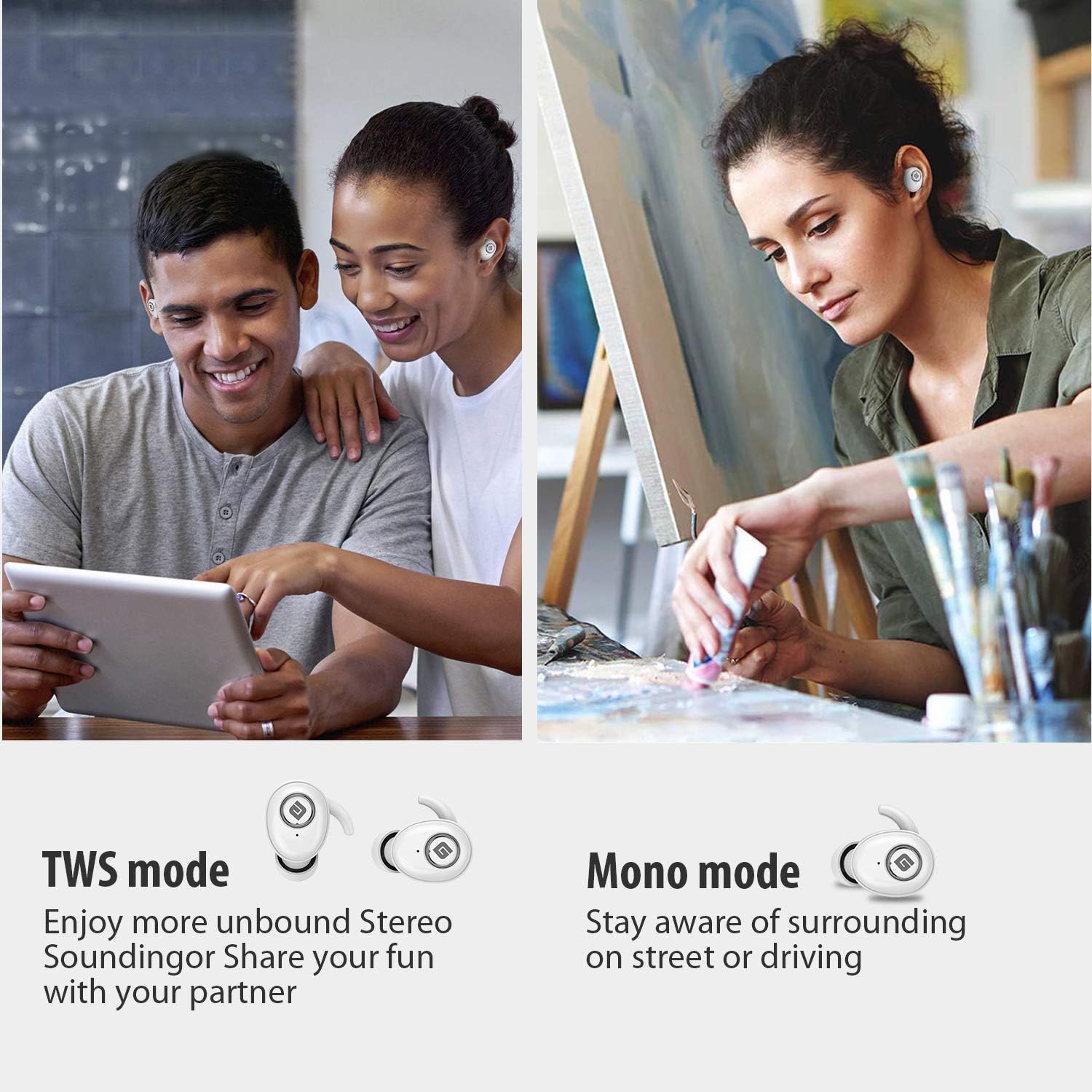
  • TWS (True Wireless Stereo) ռեժիմ. Use both earbuds simultaneously for a full stereo sound experience. This mode is ideal for immersive audio.
  • Մոնո ռեժիմ: Use a single earbud (only the Right earbud supports mono mode) to stay aware of your surroundings, such as when driving or walking in public.
Illustration of TWS and Mono listening modes for earbuds

Image 6: Comparison of TWS and Mono listening modes.

5. Պահպանում

  • Մարտկոցի խնամք. Keep your headphones charged when the battery life is low to ensure optimal Bluetooth connection and protect the battery's longevity.
  • Ականջի ծայրակալի ընտրություն. Choose suitable ear tips and wear your headphones snugly, especially during physical activities like running or cycling. This helps reduce wind noise and ensures a secure fit.
  • Մաքրում: Regularly clean the earbuds and charging case with a soft, dry cloth to prevent dust and debris buildup. Avoid using harsh chemicals or abrasive materials.
  • Պահպանում: Երբ ականջակալները չեք օգտագործում, պահեք դրանք լիցքավորման պատյանի մեջ՝ դրանք պաշտպանելու և լիցքավորված պահելու համար: Պահեք զով, չոր տեղում՝ ծայրահեղ ջերմաստիճաններից հեռու:
  • Ջրի դիմադրություն: The earbuds are IPX5 sweatproof, meaning they can resist a sustained, low-pressure water jet spray. They are not designed for submersion in water.

6: Անսարքություն

If you encounter issues with your Geekee G350 earbuds, please refer to the following common solutions:

  • Ականջակալները չեն լիցքավորվում.
    • Ensure the plastic protective film has been removed from the charging contacts on the earbuds.
    • Verify the charging cable is securely connected to both the case and a power source.
    • Check if the charging case itself has sufficient battery charge.
  • Earbuds Not Pairing/Connecting:
    • Համոզվեք, որ Bluetooth-ը միացված է ձեր սարքում:
    • Ensure the earbuds are fully charged and out of the charging case.
    • Forget "Geekee G350" from your device's Bluetooth settings and attempt to pair again.
    • Փորձեք վերագործարկել ձեր սարքը և ականջակալները։
  • Sound Issues (Low Volume, Distortion):
    • Adjust the volume on both your connected device and the earbuds.
    • Ensure ear tips are correctly sized and provide a snug fit to optimize sound quality and noise isolation.
    • Մաքրեք ականջակալների բարձրախոսներից ցանկացած մնացորդ։
  • Միայն մեկ ականջակալ է աշխատում։ 👍
    • Համոզվեք, որ երկու ականջակալները լիցքավորված են:
    • Place both earbuds back into the charging case, close the lid, wait a few seconds, then take them out again to re-establish the stereo connection.
    • Եթե ​​խնդիրը շարունակվում է, փորձեք վերագործարկել ականջակալները (եթե կա, դիմեք ամբողջական օգտագործողի ձեռնարկին՝ վերագործարկման կոնկրետ հրահանգների համար):

7. Տեխնիկական պայմաններ

Առանձնահատկություն Մանրամասն
Bluetooth ստանդարտ V5.0
Անլար Profile HFP, HSP, A2DP, AVRCP
Գործառնական միջակայք 10 մ (33 ֆտ)
Լիցքավորում Voltage DC 5V 1A
Սպասման ժամանակ 160 ժամ
Talk / Playing Time 2~3 hours (single charge), up to 15 hours with charging case, up to 28 hours in mono mode
Լիցքավորման ժամանակ (ականջակալներ) 1.5 ժամ
Լիցքավորման ժամանակ (լիցքավորման պատյան) 2.5 ժամ
Battery Capacity (Headset) 50 mAh/3.7V
Մարտկոցի հզորություն (լիցքավորման պատյան) 500 mAh/3.7V
Նյութի քաշը 1.76 ունցիա (մոտավորապես 50 գ)
Ապրանքի չափերը 0.8 x 0.4 x 0.4 inches (per earbud)
Ջրակայունություն IPX5 քրտինքի դիմացկուն
Աղմուկի վերահսկում Ակտիվ աղմուկի ջնջում
Միկրոֆոն Ներառված է

8. Երաշխիք և աջակցություն

Geekee is committed to providing high-quality service and professional support for its products. For any technical assistance or inquiries, please contact our support team.

  • Տեխնիկական աջակցություն. Lifetime technical help is available.
  • Արձագանքման ժամանակը: Inquiries are typically responded to within 24 hours.
  • Կոնտակտային էլ. support@getgeekee.com
Geekee customer support contact information

Image 7: Geekee customer support details.

Պաշտոնական ապրանքի տեսանյութ

Տեսանյութ 1. Պաշտոնյան ավարտեցview of the Geekee G350 True Wireless Earbuds, highlighting key features and design.