
1. Ներածություն
This user manual provides detailed instructions for the Waveshare Raspberry Pi 4 Model B Display Kit. It covers the assembly, setup, operation, and maintenance of your 7-inch capacitive touch LCD display kit designed for the Raspberry Pi 4. Please read this manual thoroughly before use to ensure proper functionality and to maximize your experience with the product.
2. Փաթեթի բովանդակությունը
Ստուգեք, որ ստորև թվարկված բոլոր իրերը ներառված են ձեր փաթեթում: Եթե որևէ բաղադրիչ բացակայում է կամ վնասված է, խնդրում ենք կապվել հաճախորդների սպասարկման հետ:

Image: All components included in the Waveshare Raspberry Pi 4 Display Kit.
- 7-inch Capacitive Touch LCD
- Acrylic Case (Black/White)
- HDMI մալուխ
- USB-A to Micro-USB Cable (for touch and power)
- Power Adapter
- Միկրո SD քարտ (16 ԳԲ)
- Micro SD քարտի ընթերցող
- Պտուտակներ և հենարաններ հավաքման համար
3. Ապրանքը ավարտված էview
The Waveshare Raspberry Pi 4 Model B Display Kit combines a high-resolution 7-inch capacitive touch screen with essential accessories, allowing you to build a compact, all-in-one computer solution with your Raspberry Pi 4.
3.1 Raspberry Pi 4 Model B Features (Raspberry Pi board sold separately)
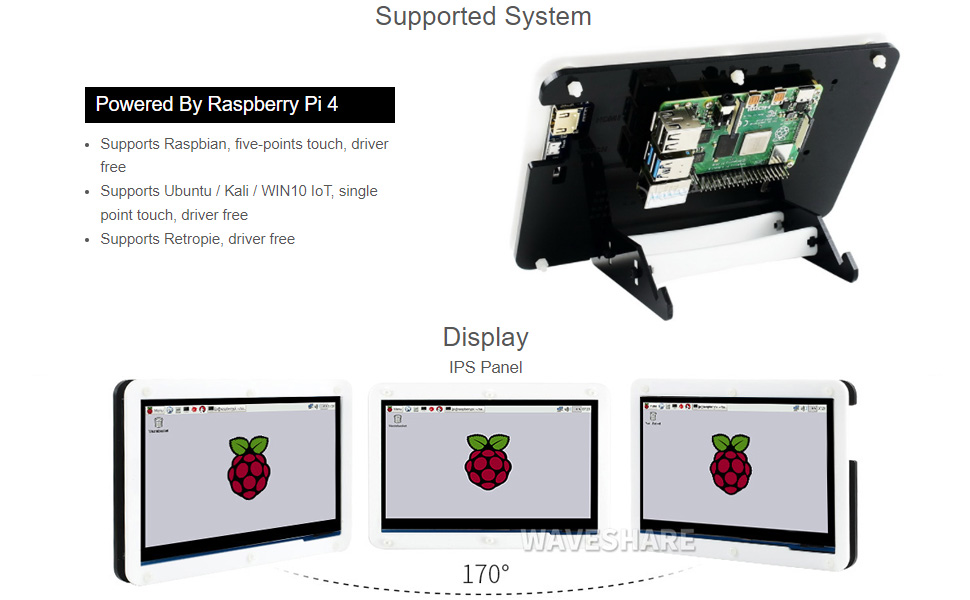
Image: Raspberry Pi 4 Model B board layout with key components labeled.
- Պրոցեսոր: Broadcom BCM2711, քառամիջուկ Cortex-A72 (ARM v8) 64-բիթանոց SoC @ 1.5 ԳՀց
- Հիշողություն: LPDDR4-2400 SDRAM (available in 1GB, 2GB, 4GB, or 8GB options)
- Միացում: 2.4 GHz and 5.0 GHz IEEE 802.11ac wireless, Bluetooth 5.0, Gigabit Ethernet
- USB պորտեր. 2 × USB 3.0 ports, 2 × USB 2.0 ports
- Տեսանյութ և ձայն. 2 × micro-HDMI ports (up to 4Kp60 supported), 2-lane MIPI DSI display port, 2-lane MIPI CSI camera port, 4-pole stereo audio and composite video port
- GPIO: 40-pin GPIO header
- Հզորությունը: 5V DC via USB-C connector (minimum 3A recommended)
4. Կարգավորման ուղեցույց
Follow these steps to assemble and set up your Waveshare Raspberry Pi 4 Display Kit.
4.1 Սարքավորումների հավաքում

Image: Fully assembled Waveshare Raspberry Pi 4 Display Kit.
- Prepare the Raspberry Pi: Ensure your Raspberry Pi 4 Model B board is ready.
- Mount the Raspberry Pi: Attach the Raspberry Pi 4 board to the designated mounting points on the back panel of the acrylic case using the provided screws and standoffs.
- Միացրեք էկրանը՝ Connect the 7-inch LCD to the Raspberry Pi 4. Typically, this involves connecting the HDMI cable from the display to one of the micro-HDMI ports on the Raspberry Pi, and the USB-A to Micro-USB cable for touch functionality and power.
- Հավաքեք պատյանը. Secure the front panel of the acrylic case around the display and then attach it to the back panel, enclosing the Raspberry Pi and display. Ensure all cables are properly routed and not pinched.
- Կցեք հենակը՝ Assemble and attach the included stand to the bottom of the case for stable positioning. The stand often allows for adjustable viewing angles (e.g., 45° or 60°).
4.2 Softwareրագրաշարի կազմաձևում
The Waveshare 7-inch capacitive touch LCD is designed for driver-free operation with several popular operating systems.
- Օպերացիոն համակարգի տեղադրում. Install your preferred operating system (e.g., Raspbian, Ubuntu, Kali, WIN10 IoT, Retropie) onto the provided 16GB Micro SD card using a suitable imaging tool (e.g., Raspberry Pi Imager).
- Տեղադրեք SD քարտ. Insert the prepared Micro SD card into the Raspberry Pi's Micro SD card slot.
- Միացում՝ Connect the power adapter to the display kit. The Raspberry Pi and display should power on automatically.
- Վարորդից զերծ աշխատանք. For most supported systems, the display and touch functionality will work automatically without additional driver installation.
5. Գործառնական հրահանգներ
5.1 Touch Functionality

Image: User interacting with the capacitive touch screen.
- The 7-inch display features a capacitive touch panel, supporting up to five-point touch input.
- Ensure the USB touch cable is securely connected between the display and the Raspberry Pi for touch input to function.
- Touch gestures and multi-touch capabilities will depend on the operating system and applications running on your Raspberry Pi.
5.2 Աջակցվող օպերացիոն համակարգեր
The display kit offers broad compatibility with various Raspberry Pi operating systems:
- Raspbian: Supports five-point touch, driver-free.
- Ubuntu / Kali / WIN10 IoT: Supports single-point touch, driver-free.
- Retropie: Supports driver-free operation.
6. Տեխնիկական պայմաններ
| Առանձնահատկություն | Հստակեցում |
|---|---|
| Ցուցադրման չափը | 7 դյույմ |
| Հպեք Տեսակ | Capacitive, up to 5-points |
| Ինտերֆեյս | HDMI for display, USB for touch |
| Համատեղելիություն | Raspberry Pi 4 Model B |
| Օպերացիոն համակարգի աջակցություն | Raspbian, Ubuntu, Kali, WIN10 IoT, Retropie |
| Memory Storage Capacity (SD Card) | 16 ԳԲ |
| Նյութի քաշը | 1.28 ֆունտ |
| Մոդելի համարը | PI4B Display Acce |
| Արտադրող | Waveshare |
7. Պահպանում
- Մաքրում: Էկրանը նրբորեն սրբելու համար օգտագործեք փափուկ, թել չթողնող կտոր։ Համառ բծերի դեպքում մի փոքր սրբեքampՄաքրեք կտորը ջրով կամ էկրանի համար անվտանգ մաքրող միջոցով: Խուսափեք կոշտ քիմիական նյութերից կամ հղկող նյութերից:
- Պահպանում: When not in use, store the kit in a cool, dry place away from direct sunlight and extreme temperatures.
- Կառավարում: Handle the display and Raspberry Pi board with care to avoid physical damage. Avoid applying excessive pressure to the screen.
8: Անսարքություն
8.1 Ցուցադրման ելք չկա
- Ստուգեք հզորությունը. Ensure the power adapter is securely connected to the display kit and plugged into a working power outlet.
- HDMI միացում. Verify that the HDMI cable is firmly connected between the display and the Raspberry Pi's micro-HDMI port. Try a different micro-HDMI port if available.
- SD քարտ. Confirm that the Micro SD card with a properly installed operating system is inserted correctly into the Raspberry Pi.
- Էլեկտրաէներգիայի մատակարարում. Ensure your Raspberry Pi is receiving adequate power (a 5V/3A USB-C power supply is recommended for Raspberry Pi 4).
8.2 Touch Functionality Not Working
- USB միացում. Check that the USB-A to Micro-USB cable is securely connected from the display to a USB port on the Raspberry Pi.
- Օպերացիոն համակարգի աջակցություն. Confirm that your operating system supports the touch functionality of this display. While most are driver-free, some configurations might require specific settings.
- Reboot: Try rebooting the Raspberry Pi.
8.3 Screen Flickering or Instability
- Էլեկտրաէներգիայի մատակարարում. Ensure a stable and sufficient power supply is used for both the display and the Raspberry Pi.
- Մալուխի ամբողջականություն. Check the HDMI and USB cables for any damage or loose connections.
9. Երաշխիք և աջակցություն
Երաշխիքային տեղեկությունների, տեխնիկական աջակցության կամ լրացուցիչ օգնության համար խնդրում ենք դիմել Waveshare-ի պաշտոնական կայքէջին։ webկայքում կամ կապվեք ձեր վաճառողի հետ: Պահպանեք ձեր գնման կտրոնը որպես գնման ապացույց՝ երաշխիքային պահանջների համար: