
1. Ներածություն
Thank you for choosing the CREATE NETBOT S15 Robot Vacuum Cleaner. This manual provides essential information for the safe operation, maintenance, and troubleshooting of your device. Please read it thoroughly before first use and retain it for future reference.
Ապրանքը ավարտվել էview

The image above displays the CREATE NETBOT S15 Robot Vacuum Cleaner, its dedicated remote control, and a smartphone screen showing the companion application interface. The robot is black with a textured top surface and a central green power button. The remote control features a digital display and various control buttons. The app shows a map of a cleaned area.
The NETBOT S15 is designed to simplify your cleaning routine, offering multiple cleaning modes and smart features for efficient floor maintenance.
2. Անվտանգության հրահանգներ
Անվտանգ շահագործումն ապահովելու և վնասներից խուսափելու համար խնդրում ենք պահպանել հետևյալ անվտանգության միջոցառումները.
- Սարքը օգտագործելուց առաջ կարդացեք բոլոր հրահանգները:
- Թույլ մի տվեք երեխաներին աշխատեցնել ռոբոտ-փոշեկուլը։ Հսկեք երեխաներին և ընտանի կենդանիներին, երբ ռոբոտը աշխատում է։
- Ensure the charging base is placed against a wall on a hard, level surface, with adequate clear space around it.
- Մազերը, ազատ հագուստը, մատները և մարմնի բոլոր մասերը հեռու պահեք բացվածքներից և շարժվող մասերից:
- Do not pick up large objects, sharp objects, liquids, or burning/smoking materials.
- Մի օգտագործեք ռոբոտը խոնավ միջավայրում կամ խոնավ մակերեսների վրա։
- Remove power cords, small objects, and fragile items from the floor before operation to prevent entanglement or damage.
- Use only the original charger and battery provided by the manufacturer.
- Do not modify or attempt to repair the robot vacuum yourself. Contact qualified service personnel for repairs.
3. Փաթեթի բովանդակությունը
Ստուգեք, որ բոլոր բաղադրիչները առկա են փաթեթում.

The image shows the retail box for the CREATE NETBOT S15 Robot Vacuum Cleaner, indicating the product and its key features.
- Ստեղծեք NETBOT S15 ռոբոտային փոշեկուլ
- Լիցքավորման բազա
- Power Adapter
- Հեռակառավարման վահանակ
- Փոշու տարա (600 մլ տարողությամբ)
- Ջրի բաք (400 մլ տարողությամբ)
- Side Brushes (2 + 2 replacements)
- HEPA Filter (1 + 1 replacement)
- Cleaning Mop (1 + 1 replacement)
- Մաքրող խոզանակ
- Մագնիսական շերտ
- Օգտագործողի ձեռնարկ
4. Կարգավորում
4.1 Լիցքավորման բազայի տեղադրում

The image shows the CREATE NETBOT S15 Robot Vacuum Cleaner correctly docked on its charging station, indicating proper placement for recharging.
- Place the charging base against a wall in an open area.
- Ensure there is at least 1 meter (3 feet) of clear space on both sides of the charging base and 2 meters (6 feet) in front of it.
- Միացրեք հոսանքի ադապտերը լիցքավորման հիմքին և միացրեք այն պատի վարդակից։
- Ensure the power indicator light on the charging base is illuminated.
4.2 Սկզբնական լիցքավորում

This image depicts the CREATE NETBOT S15 Robot Vacuum Cleaner positioned near its charging dock in a room, ready for or undergoing charging.
Before first use, fully charge the robot vacuum. Place the robot onto the charging base, ensuring the charging contacts align. The indicator light on the robot will show charging status. A full charge typically takes 4-5 hours.
4.3 Հավելվածի տեղադրում և միացում
The CREATE NETBOT S15 can be controlled via a smartphone application, compatible with Alexa and Google Home.
- Download the official CREATE app from your smartphone's app store.
- Գրանցեք հաշիվ և մուտք գործեք:
- Follow the in-app instructions to add your NETBOT S15 device. This typically involves putting the robot into pairing mode and connecting it to your home Wi-Fi network.
- Once connected, you can program cleaning schedules, select cleaning modes, and monitor the robot's status from your phone.
- For voice control, link the CREATE app with your Alexa or Google Home account through their respective applications.
5. Գործառնական հրահանգներ
5.1 Մաքրման ռեժիմներ
The NETBOT S15 offers four cleaning functions:
- Մաքրել: Uses side brushes to gather debris.
- Վակուում: Utilizes suction power to collect dust and dirt. Features up to 1500 Pa suction power with adjustable levels.
- Շվաբր: Wipes floors with a damp cloth from the water tank.
- Լվանալ: Combines sweeping, vacuuming, and mopping for comprehensive cleaning.

This image illustrates the CREATE NETBOT S15 Robot Vacuum Cleaner actively cleaning under a sofa, demonstrating its ability to reach confined spaces. Two dogs are visible in the foreground, suggesting a pet-friendly environment.
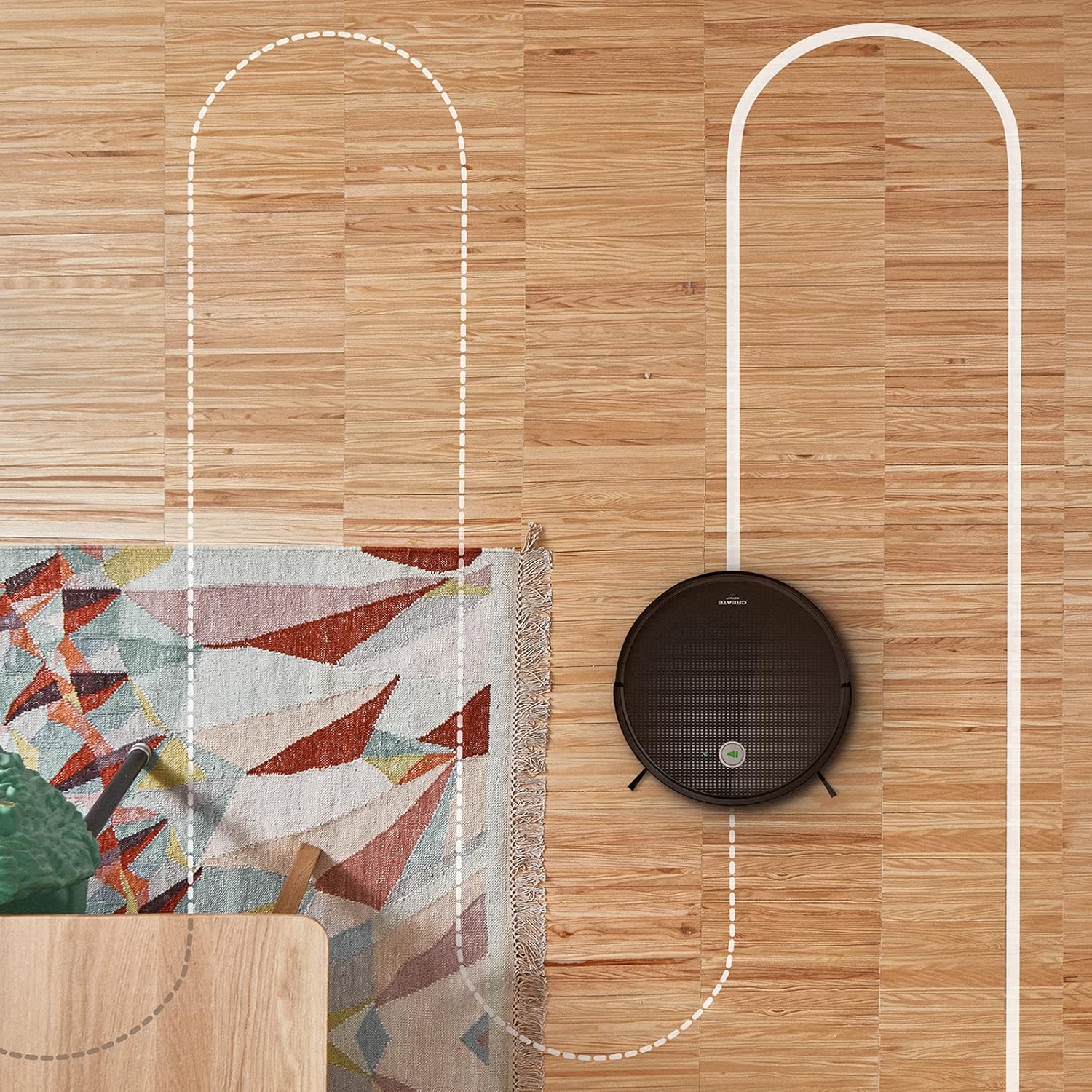
Մի օդային view shows the CREATE NETBOT S15 Robot Vacuum Cleaner moving across a wooden floor, with a dotted line indicating its systematic cleaning path, highlighting its gyroscopic navigation.
5.2 Օգտագործելով հեռակառավարման վահանակը
The included remote control allows for direct operation of the robot vacuum. Refer to the remote control diagram in your quick start guide for button functions. Common functions include:
- Սկսել / դադարեցնել մաքրումը
- Վերադառնալ լիցքավորման բազա
- Directional Control (manual steering)
- Կետերի մաքրում
- Եզրերի մաքրում
- Ժամանակացույցի կարգավորում
5.3 Magnetic Strip Usage
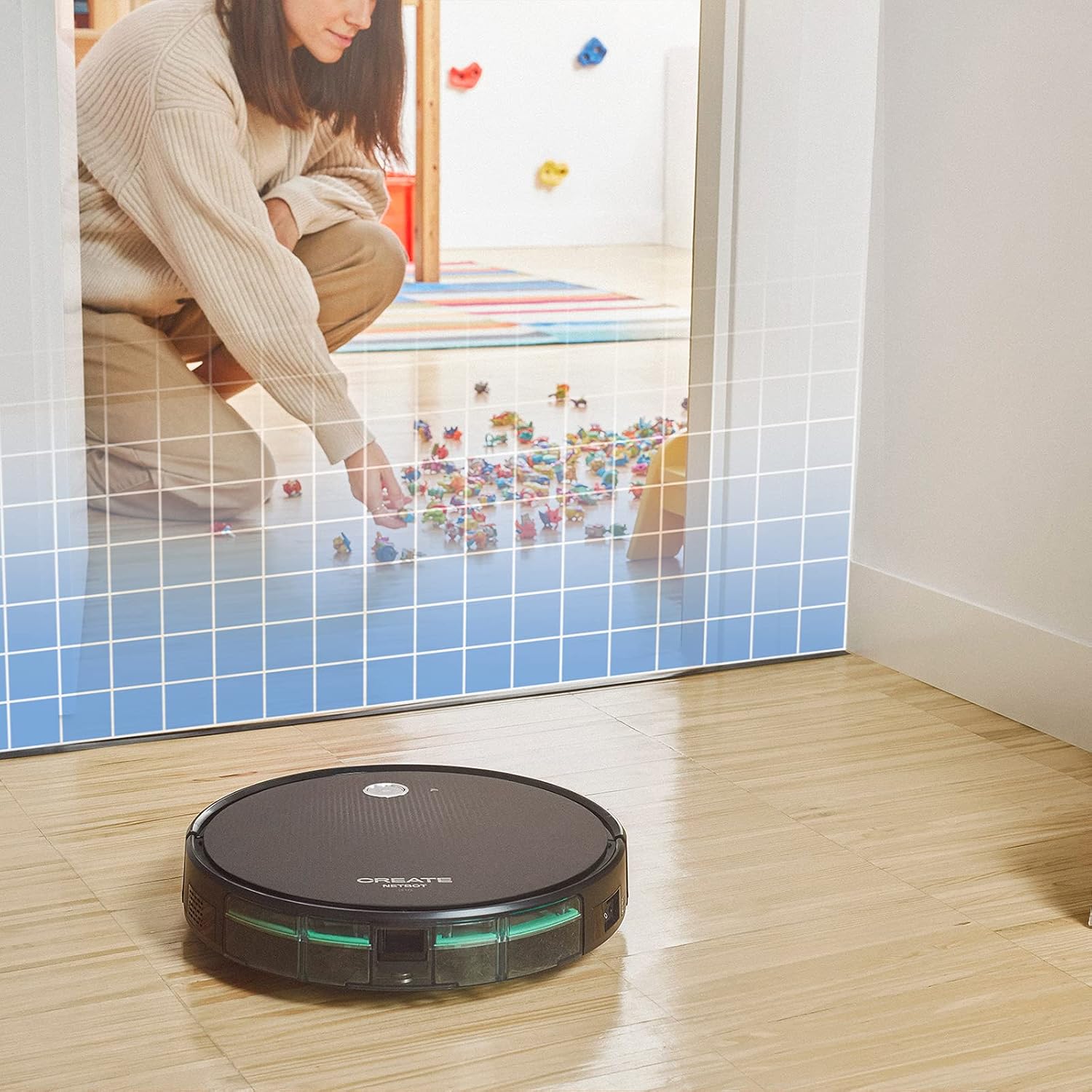
This illustration demonstrates the CREATE NETBOT S15 Robot Vacuum Cleaner approaching a virtual boundary, represented by a grid, which prevents it from entering a specific area, such as where toys are located.
Use the provided magnetic strip to create virtual boundaries that the robot will not cross. Place the strip on the floor to delimit areas where the robot should not enter, such as pet feeding zones or areas with delicate items.
5.4 Մարտկոցի կյանք
The NETBOT S15 is equipped with a long-lasting LG Lithium battery, providing up to 120 minutes of cleaning autonomy on a single charge, depending on the selected power mode.
6. Պահպանում
Կանոնավոր սպասարկումը ապահովում է ձեր ռոբոտ-փոշեկուլի օպտիմալ աշխատանքը և երկարացնում է դրա կյանքի տևողությունը։
6.1 Փոշու տարայի և ջրի բաքի մաքրում
Empty the dustbin after each use. The 600 ml dustbin is easily removable. If using the mopping function, empty and rinse the 400 ml water tank after each use to prevent mold or odors.
6.2 Խոզանակով մաքրում

Խոշոր պլանով view of the CREATE NETBOT S15 Robot Vacuum Cleaner's side brush, showing its design for sweeping debris into the main suction path.
- Կողային խոզանակներ՝ Regularly check for hair or debris entanglement. Remove and clean as needed. Replace worn brushes with the provided spares.
- Գլխավոր խոզանակ՝ Հեռացրեք գլխավոր խոզանակի կափարիչը և բարձրացրեք այն։ Մաքրող գործիքով հեռացրեք խճճված մազերը և մնացորդները։
6.3 Ֆիլտրի մաքրում/փոխարինում
The robot uses a double filter system: a sponge filter and a HEPA filter. Tap the filters to remove loose dirt. Do not wash HEPA filters with water. Replace filters every 3-6 months, or more frequently with heavy use, to maintain suction performance.
6.4 Սենսորների մաքրում
Wipe the cliff sensors (located on the bottom of the robot) and the bumper sensors (on the front) with a clean, dry cloth to ensure proper navigation and obstacle detection.
7: Անսարքություն
If you encounter issues with your NETBOT S15, refer to the following common problems and solutions:
| Խնդիր | Հնարավոր պատճառ | Լուծում |
|---|---|---|
| Ռոբոտը չի միանում կամ չի արձագանքում։ | Մարտկոցի լիցքը թույլ է։ Սնուցման անջատիչը անջատված է։ Ռոբոտը խրված է։ | Լիցքավորեք ռոբոտը։ Համոզվեք, որ սնուցման անջատիչը միացված է։ Հեռացրեք բոլոր խոչընդոտները։ |
| Վատ մաքրման արդյունավետություն: | Full dustbin; Clogged brushes/filters; Worn brushes. | Empty dustbin; Clean brushes and filters; Replace brushes/filters. |
| Ռոբոտը չի կարողանում գտնել լիցքավորման բազան։ | Լիցքավորման բազան խցանված է. Ռոբոտը չափազանց հեռու է բազայից. բազան չի սնուցվում։ | Ensure clear space around base; Manually place robot closer; Check power connection to base. |
| Ռոբոտը հաճախակի է խցանվում։ | Cables/small objects on floor; Uneven surfaces; Dark colored carpets. | Clear floor of obstacles; Use magnetic strips for problem areas; Robot may struggle on very dark surfaces. |
| Wi-Fi կապի խնդիրներ։ | Սխալ Wi-Fi գաղտնաբառ։ Ռոուտերը չափազանց հեռու է։ 5 ԳՀց ցանց։ | Verify password; Move robot closer to router; Ensure connection to a 2.4GHz Wi-Fi network. |
8. Տեխնիկական պայմաններ
Key technical specifications for the CREATE NETBOT S15 Robot Vacuum Cleaner:
- Ապրանքանիշը: ՍՏԵՂԾԵԼ
- Մոդելի համարը: Netbot S15
- Գույնը: Black - Turquoise
- Չափերը (L x W x H): 33 x 33 x 7.5 սմ
- Քաշը: 3 կգ
- Հզորությունը: 25 Վտ
- Suction Power: Մինչև 1500 Պա
- Աղմուկի մակարդակը. 62 դԲ
- Մարտկոցի տեսակը: Լիթիում-իոն
- Մարտկոցի կյանք. Մինչև 120 րոպե
- Աղբամանի հզորություն. 600 մլ
- Ջրի տանկի հզորությունը. 400 մլ
- Զտիչ համակարգ. Double sponge Clean + HEPA filter
- Միացում: Wi-Fi, App Control
- Ձայնային օգնականի համատեղելիություն. Google Home, Alexa
- Հատուկ առանձնահատկություններ. Gyroscopic navigation, Magnetic strip boundary, 4 cleaning modes (sweep, vacuum, mop, wash)
9. Երաշխիք և աջակցություն
For warranty information, technical support, or service inquiries, please refer to the warranty card included with your product or visit the official CREATE webկայք։ Պահպանեք ձեր գնման կտրոնը որպես գնման ապացույց։