
Ներածություն
This manual provides detailed instructions for the installation, operation, maintenance, and troubleshooting of the HP ProDesk 400 G3 MS-7957 motherboard. Please read this manual thoroughly before proceeding with any installation or operation to ensure proper functionality and safety.
Անվտանգության տեղեկատվություն
Մայրական սալիկի վնասումը կամ ինքներդ ձեզ վնասվածքը կանխելու համար միշտ հետևեք հետևյալ անվտանգության միջոցառումներին.
- Մինչև որևէ բաղադրիչ տեղադրելը կամ հեռացնելը, անջատեք էլեկտրամատակարարումը պատի վարդակից։
- Wear an anti-static wrist strap or frequently touch a grounded metal object to discharge static electricity before handling the motherboard.
- Մայրական սալիկը բռնեք եզրերից՝ զգայուն մասերին դիպչելուց խուսափելու համար։
- Ապահովեք համակարգչի պատյանի պատշաճ օդափոխություն՝ գերտաքացումը կանխելու համար։
- Մայրական սալիկը պահեք խոնավությունից և ծայրահեղ ջերմաստիճաններից հեռու։
Ապրանքը ավարտվել էview
The HP ProDesk 400 G3 MS-7957 is a MicroATX motherboard designed for Intel processors with an LGA 1151 socket. It supports DDR4 RAM and features a B250 chipset, offering a reliable foundation for desktop computing.
Հիմնական հատկանիշները
- Compatible CPU Brand: Intel
- Socket տեսակը: LGA 1151/Socket H4
- Ձևի գործոն. MicroATX
- I/O միակցիչներ. Ethernet (RJ-45), USB 2.0, USB 3.0, VGA, DisplayPort, HD Audio Jack
Բաղադրիչի նույնականացում
Familiarize yourself with the layout of the motherboard to facilitate proper installation and connection of components.

Նկար 1. Անկյունային view of the HP ProDesk 400 G3 MS-7957 motherboard. This image highlights the CPU socket (LGA 1151), four DDR4 RAM slots, PCIe slots, and various headers for front panel connections and storage devices.
Կարգավորում և տեղադրում
Նախքան սկսելը
- Ensure your computer case is compatible with the MicroATX form factor.
- Gather all necessary components: CPU, RAM, CPU cooler, power supply, storage devices, and graphics card (if not using integrated graphics).
- Prepare your workspace by ensuring it is clean, well-lit, and static-free.
Մայր տախտակի տեղադրում
- Install the CPU into the LGA 1151 socket. Carefully align the CPU with the socket's notch and gently lower it into place. Close the retention arm.
- Քսեք ջերմային մածուկ պրոցեսորի վրա և տեղադրեք պրոցեսորի սառեցուցիչը արտադրողի հրահանգների համաձայն։
- Install the DDR4 RAM modules into the designated slots. Ensure they are fully seated until the clips lock into place.
- Mount the motherboard into the computer case using the appropriate standoffs and screws.
- Միացրեք սնուցման աղբյուրի հիմնական 24-փինանոց ATX սնուցման միակցիչը և 4-փինանոց կամ 8-փինանոց CPU սնուցման միակցիչը մայրական սալիկին։
- Install any expansion cards (e.g., graphics card) into the PCIe slots.

Նկար 2. Վերևից ներքև անկյունային view of the HP ProDesk 400 G3 MS-7957 motherboard. This perspective provides a clear view of the processor socket, memory slots, and the layout of the various internal connectors and components.
Ծայրամասային սարքերի միացում
- Connect SATA storage devices (HDDs/SSDs) to the SATA ports on the motherboard.
- Connect front panel headers (power button, reset button, USB ports, audio jacks) to their respective pins on the motherboard. Refer to your case manual for specific pin assignments.
- Connect external peripherals such as monitor, keyboard, mouse, and Ethernet cable to the rear I/O panel.
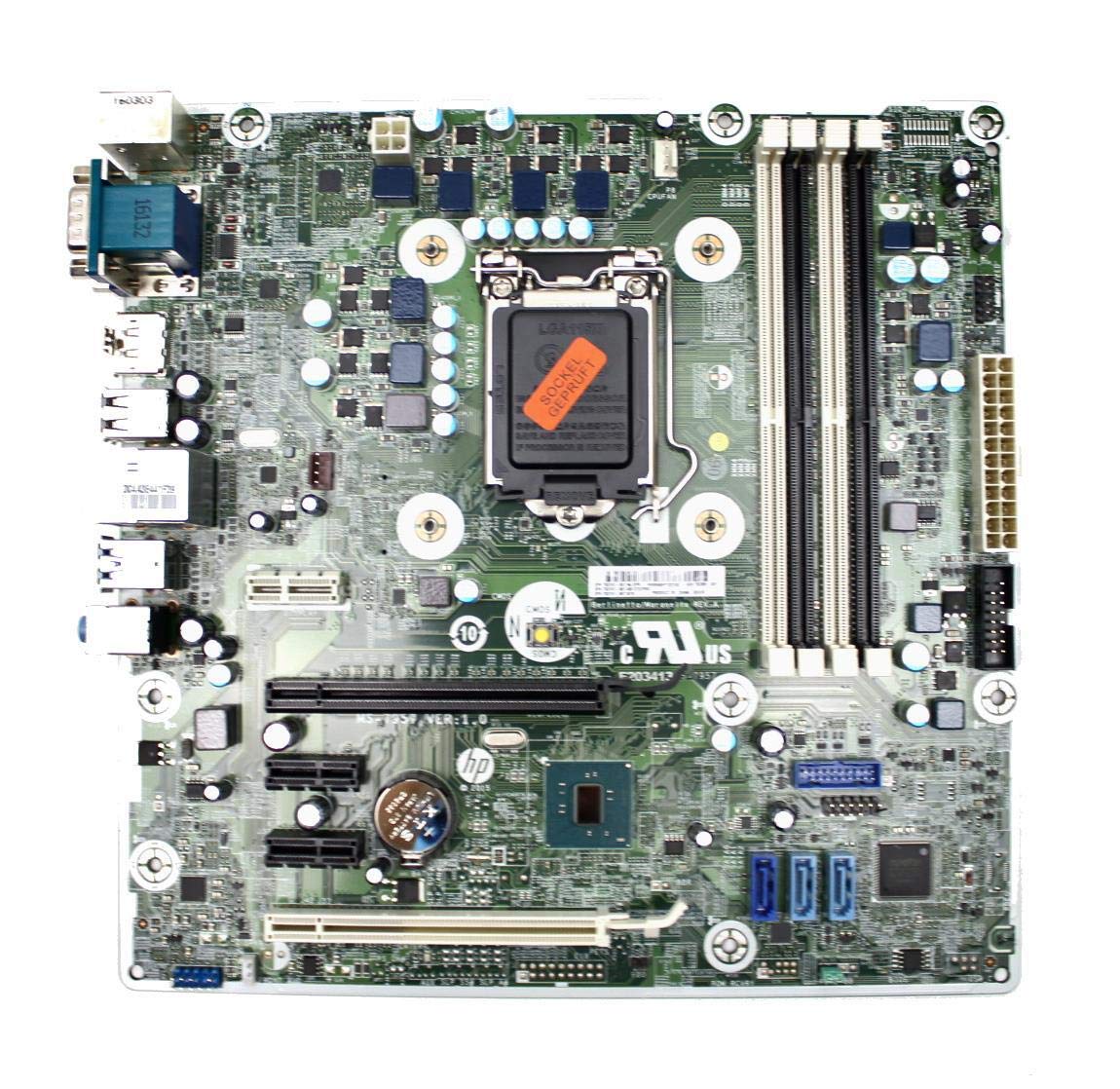
Figure 3: Rear I/O panel of the HP ProDesk 400 G3 MS-7957 motherboard. This image displays the available external connectivity options, including PS/2 ports, serial port, VGA, DisplayPort, USB 2.0, USB 3.0, Ethernet (RJ-45), and HD audio jacks.
Գործառնական հրահանգներ
Նախնական միացում
After all components are installed and connected, connect the power cable to the power supply and press the power button on your computer case. The system should initiate the boot process.
BIOS/UEFI կարգավորում
To access the BIOS/UEFI setup utility, press the designated key (commonly Դել, F2, F10, կամ F12) during the initial boot sequence. Here you can configure boot order, system time, and other hardware settings.
Վարորդի տեղադրում
After installing your operating system, it is crucial to install the latest drivers for your motherboard's chipset, integrated graphics, audio, and network adapter. These drivers can typically be found on the HP support webկայքը կամ չիփսեթի արտադրողի webկայք։
Տեխնիկական սպասարկում
- Մաքրում: Մայրական սալիկն ու բաղադրիչները պարբերաբար մաքրեք փոշուց՝ օգտագործելով սեղմված օդ։ Մաքրելուց առաջ համոզվեք, որ համակարգը անջատված է և վարդակից հանված։
- BIOS/UEFI թարմացումներ. Periodically check for BIOS/UEFI updates from HP's official support website. Updates can improve stability, compatibility, and performance. Follow update instructions carefully to avoid system damage.
- Վարորդի թարմացումներ. Keep all system drivers updated to ensure optimal performance and compatibility with new software and hardware.
Անսարքությունների վերացում
Այս բաժինը լուծումներ է տրամադրում ձեզ հանդիպող տարածված խնդիրների համար՝
- Հզորություն չկա. Check all power connections, including the 24-pin ATX and CPU power cables. Ensure the power supply is switched on and the wall outlet is functional.
- Ցուցադրում չկա. Verify that your monitor is connected to the correct video output (VGA or DisplayPort) and is powered on. Reseat the graphics card (if applicable) and RAM modules.
- Համակարգի անկայունություն/վթարներ՝ This could be due to overheating, faulty RAM, or outdated drivers. Check CPU and GPU temperatures, run memory diagnostic tools, and update drivers.
- Ծայրամասային սարքը չի հայտնաբերվել։ Ensure the peripheral is properly connected. Try a different port or update the relevant drivers.
- BIOS/UEFI խնդիրներ. If you encounter issues after changing BIOS settings, try resetting the CMOS by removing the CMOS battery for a few minutes or using the clear CMOS jumper (refer to motherboard diagram for location).
Տեխնիկական պայմաններ
| Առանձնահատկություն | Հստակեցում |
|---|---|
| Բրենդ | HP |
| CPU Socket | LGA 1151 |
| Համատեղելի սարքեր | Սեղանի համակարգիչ |
| RAM տեխնոլոգիա | DDR4 |
| Համատեղելի պրոցեսորներ | Intel Core i3-6xxx, Intel Core i5-6xxx, Intel Core i7-6xxx, Intel Core i3-7xxx, Intel Core i5-7xxx, Intel Core i7-7xxx, Intel Core i3-8xxx, Intel Core i5-8xxx, Intel Core i7-8xxx |
| Չիփսեթի տեսակը | Intel B250 |
| Հարթակ | Windows |
| Մոդելի անվանումը | MS-7957 |
| CPU մոդել | Core i3 (Note: Supports i3, i5, i7 as listed above) |
| Հիմնական հոսանքի միակցիչի տեսակը | 24 փին |
| Գրաֆիկական քարտի ինտերֆեյս | PCI Express |
| Available Memory Slots | 4 |
| Total SATA Ports | 6 |
| Ընդհանուր USB պորտեր | 2 (Note: Refers to internal headers, rear I/O has more) |
| Ethernet պորտերի ընդհանուր քանակը | 1 |
| Total PCIe Ports | 3 |
| Արտադրող | Computer Store Berlin (Reseller/Supplier) |
| Մասի համարը | 4061435962741 |
| ASIN | B08CS13PTQ |
Երաշխիք և աջակցություն
Այս ապրանքը գալիս է ա 1 տարվա երաշխիք գնման օրվանից։ Այս երաշխիքը ներառում է նյութերի և աշխատանքի թերությունները նորմալ օգտագործման դեպքում։
For technical support, warranty claims, or further assistance, please contact your point of purchase or refer to the official HP support resources for the ProDesk 400 G3 series.