
Ներածություն
This manual provides detailed instructions for the installation, operation, and maintenance of your XVIM 8CH 1080P Home Security Camera System. Please read this manual thoroughly before using the product to ensure proper setup and functionality. Keep this manual for future reference.
Ապրանքը ավարտվել էview
The XVIM 8CH 1080P Home Security Camera System includes an 8-channel Digital Video Recorder (DVR) with a 1TB hard drive and four 2MP HD outdoor IP66 waterproof cameras. The system is designed for reliable surveillance with features such as night vision and remote access capabilities.

Պատկեր՝ Վերևview of the XVIM 1080P HD Security Camera System, showing a camera and a smartphone displaying live view.
Տեսախցիկի առանձնահատկությունները
- IP66 Metal Housing: Durable and weatherproof construction.
- 3.6mm HD Lens: Provides a 75° viewանգլ.
- IR-Cut Filter: Ensures clear day and night vision.
- 24 LED: Offers up to 65ft night vision range.

Image: Diagram highlighting key camera features: IP66 metal housing, 3.6mm HD lens, IR-cut filter, and 24 LEDs.
Day and Night Monitoring
The cameras are equipped with an IR-Cut filter and infrared LEDs to provide clear surveillance both during the day and at night. During the day, images are colorful and high definition. At night, the cameras automatically switch to infrared mode for clear black and white vision in low-light conditions.
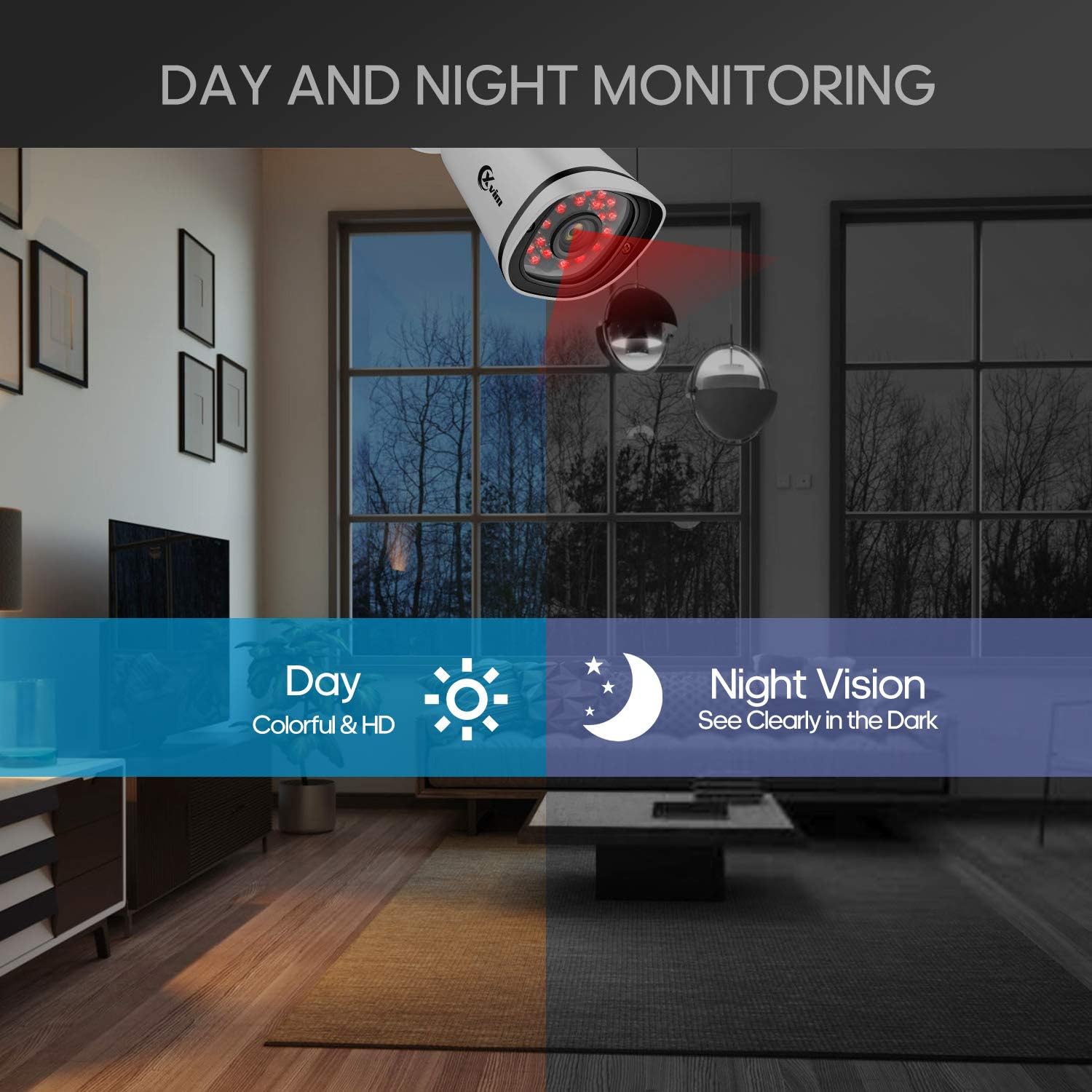
Image: Illustration showing the camera's ability to monitor both during the day (colorful HD) and at night (clear vision in the dark).
Անջրանցիկ դիզայն
The cameras feature an IP66-rated metal housing, ensuring they are protected against dust and powerful water jets, making them suitable for outdoor installation in various weather conditions.
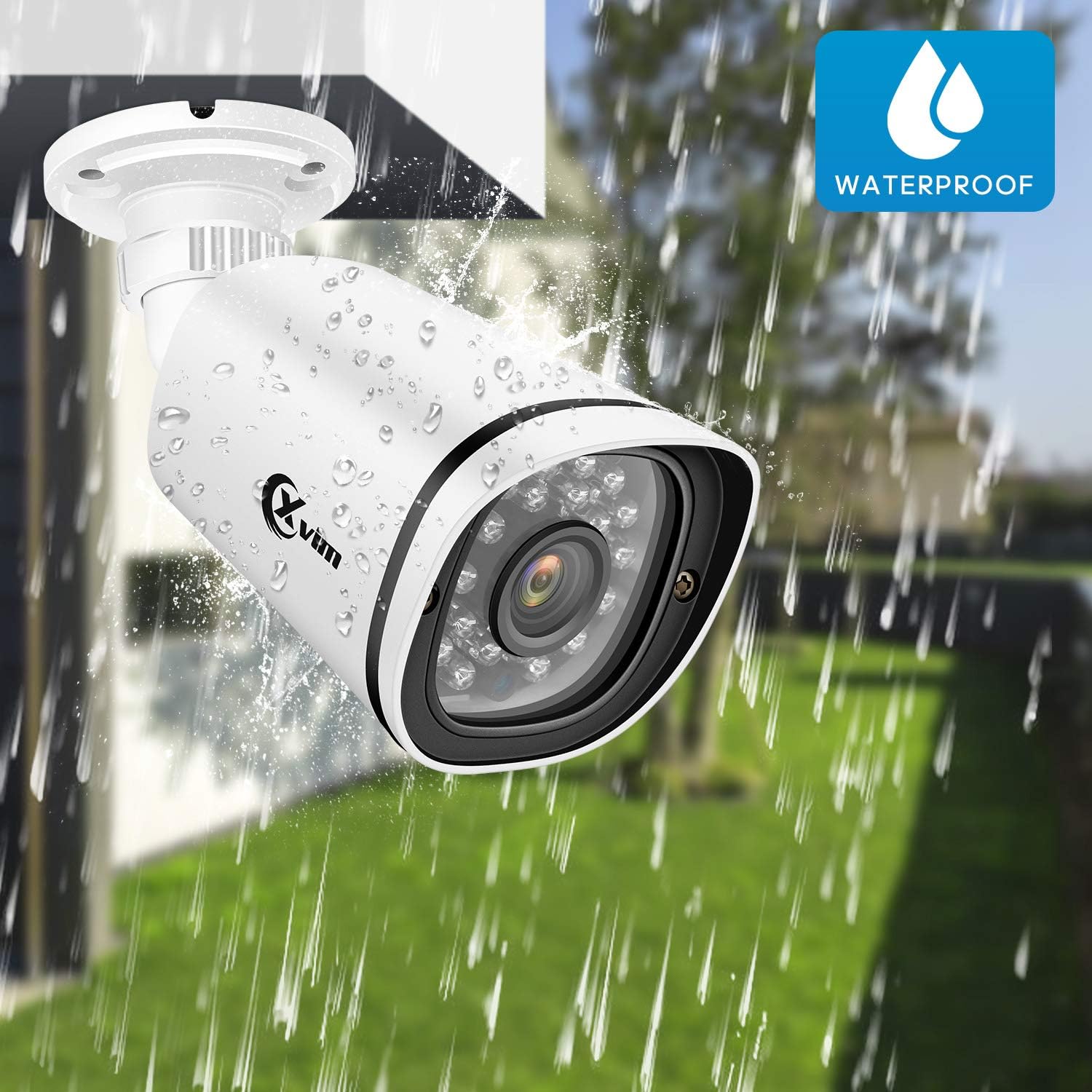
Image: An XVIM camera being sprayed with water, illustrating its waterproof design.
DVR Back Panel Overview
The DVR unit provides multiple ports for connecting cameras, a monitor, audio input/output, and network connectivity. Familiarize yourself with the ports before installation.
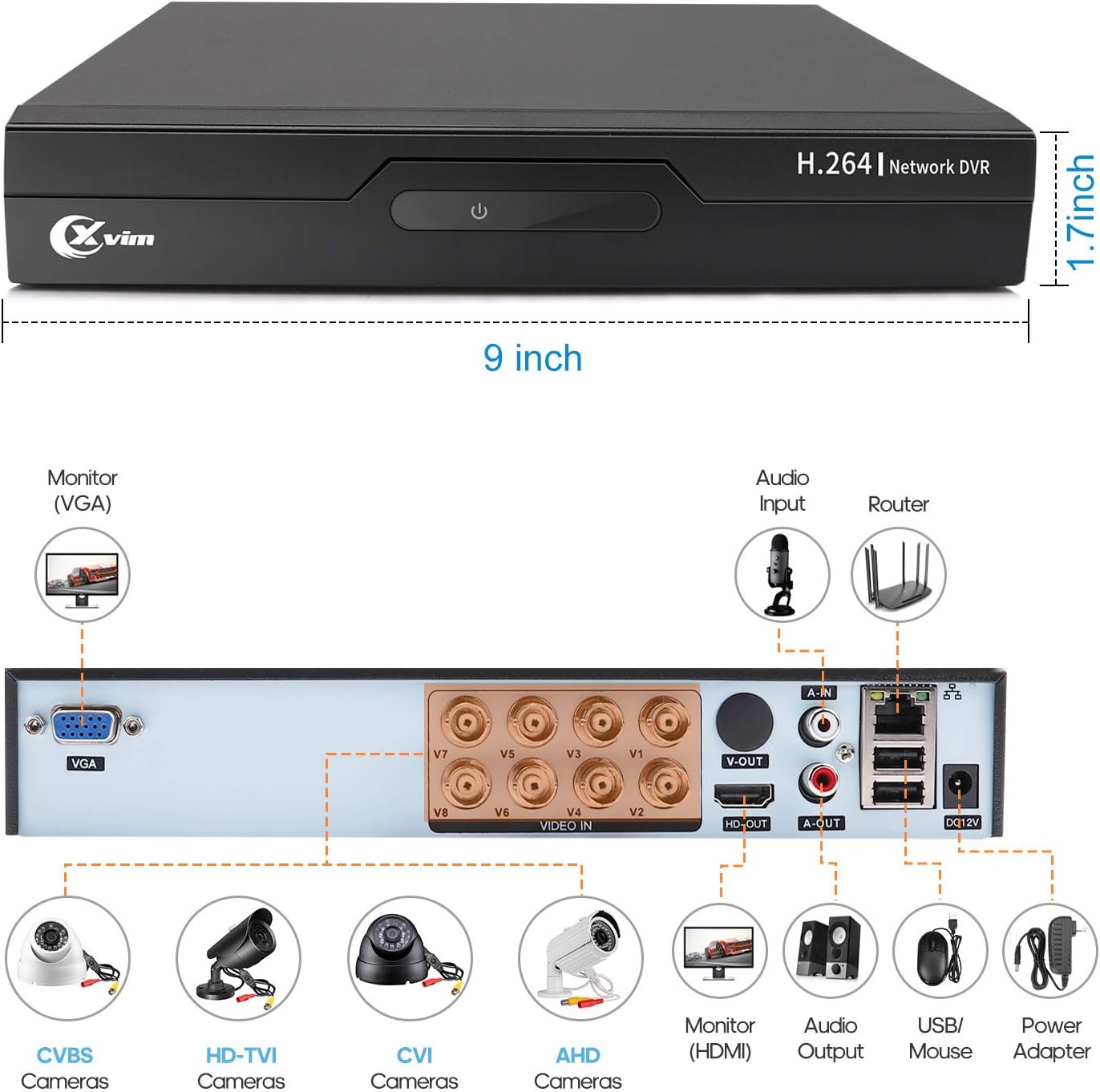
Image: Diagram of the DVR's back panel, showing ports for VGA, HDMI, video input (BNC), audio input/output, USB, and power.
Կարգավորման հրահանգներ
- Տեսախցիկները միացրեք DVR-ին. Connect each camera to the corresponding video input (BNC) port on the DVR using the provided cables. Ensure secure connections.
- Միացրեք DVR-ը մոնիտորին. Connect the DVR to a monitor using either the VGA or HDMI port.
- Connect DVR to Network: Հեռակա մուտքի համար միացրեք DVR-ը ձեր ռաութերին Ethernet մալուխի միջոցով։
- Միացրեք հոսանքը. Connect the power adapters to the cameras and the DVR, then plug them into a power outlet. The system will power on automatically.
- Նախնական կարգավորում. Follow the on-screen prompts on your monitor to complete the initial DVR setup, including setting up a password and configuring basic settings.
- Բջջային հավելվածի կարգավորում.
- Download the "XVR Pro" app from your smartphone's app store.
Ներբեռնեք Android-ի համար
Ներբեռնեք iOS-ի համար - Register for an account within the app.
- Add your DVR device by scanning the QR code displayed on the DVR's monitor or by manually entering the device ID.
- Ավելացվելուց հետո դուք կարող եք view your cameras remotely from anywhere.
- Download the "XVR Pro" app from your smartphone's app store.

Image: Step-by-step guide for connecting the system components and setting up the XVR Pro mobile application.
Գործառնական հրահանգներ
Ապրեք View
After successful setup, you can view ապրես ֆուtage from your cameras on the connected monitor or through the XVR Pro mobile app. The DVR interface allows you to switch between single-camera view և բազմախցիկ ցանց view.
Ձայնագրման եղանակները
Համակարգը աջակցում է ձայնագրման տարբեր ռեժիմներ՝
- Ձեռքով ձայնագրում. Start and stop recording manually via the DVR interface.
- Շարժման հայտնաբերման ձայնագրում. Configure the system to record automatically when motion is detected in specified areas. This helps conserve hard drive space.
- Պլանավորված ձայնագրություն. Սահմանեք որոշակի ժամանակներ շարունակական ձայնագրման համար։
Refer to the DVR's on-screen menu for detailed configuration of recording schedules and motion detection zones.
Հեռավոր մուտք
The XVR Pro app enables you to:
- View Ուղիղ տեսախցիկի հեռարձակումներ ցանկացած վայրից, որտեղ կա ինտերնետ կապ։
- Նվագարկումը ձայնագրված էtagպահված է DVR-ում։
- Ստացեք շարժման հայտնաբերման ազդանշաններ:
- Control certain DVR settings remotely.
Camera Mode Switching (OSD Menu)
Each camera features an OSD (On-Screen Display) button on its cable, allowing you to switch between different video modes (Analog, AHD, TVI, CVI) to ensure compatibility with various DVRs. To access the OSD menu and switch modes:
- Analog (CVBS) Mode: Սեղմեք OSD կոճակը Դեպի վեր 5 վայրկյանով։
- AHD Mode: Սեղմեք OSD կոճակը Ձախ 5 վայրկյանով։
- TVI Mode: Սեղմեք OSD կոճակը Աջ 5 վայրկյանով։
- CVI Mode: Սեղմեք OSD կոճակը Դեպի վար 5 վայրկյանով։
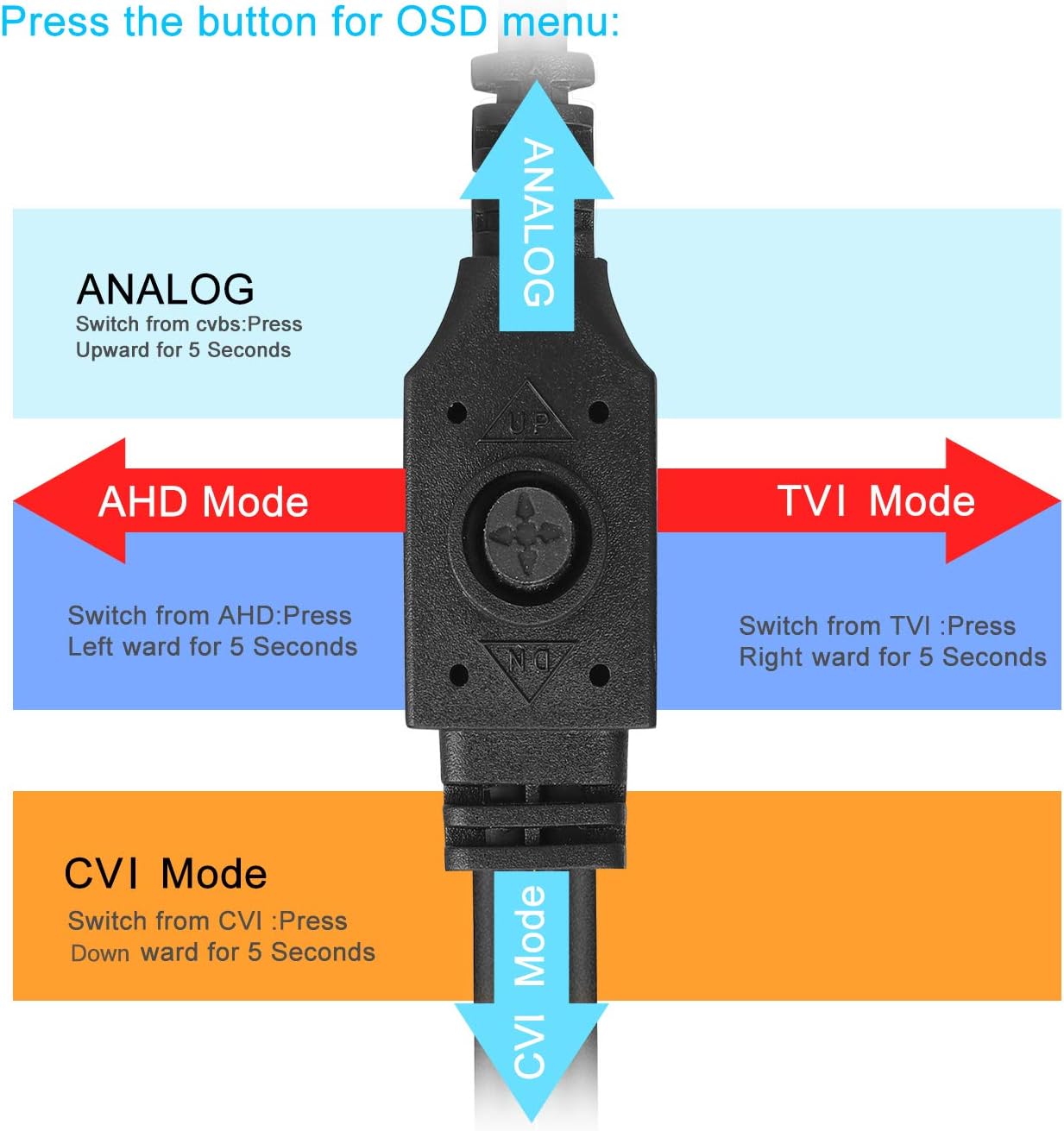
Image: Diagram illustrating how to use the OSD button on the camera cable to switch between Analog, AHD, TVI, and CVI video modes.
Տեխնիկական սպասարկում
- Տեսախցիկի մաքրում. Regularly clean the camera lenses with a soft, damp կտոր՝ պատկերի հստակ որակն ապահովելու համար: Խուսափեք հղկող մաքրող միջոցներից:
- Մալուխի ստուգում. Periodically check all cables and connections for wear, damage, or loose connections.
- DVR օդափոխություն. Ensure the DVR unit has adequate ventilation to prevent overheating. Keep vents clear of obstructions.
- Կոշտ սկավառակի կառավարում. The 1TB hard drive will automatically overwrite the oldest footage when full. Regularly back up important recordings if needed.
- Fրագրակազմի թարմացումներ. Check the XVIM official webԿայք՝ ձեր DVR-ի համար առկա ցանկացած ծրագրային ապահովման թարմացումների համար՝ օպտիմալ աշխատանք և անվտանգություն ապահովելու համար։
Անսարքությունների վերացում
Տեսաէկրան չկա
- Check all power connections for the DVR and cameras.
- Verify that the monitor is correctly connected to the DVR via VGA or HDMI and is set to the correct input source.
- Ensure camera cables are securely connected to the DVR's video input ports.
- If a specific camera has no video, try switching its video mode using the OSD button (refer to "Camera Mode Switching" section).
Remote Access Issues
- Confirm the DVR is connected to your router and has internet access.
- Ստուգեք ձեր ռաութերի ինտերնետ կապը։
- Ensure the XVR Pro app is updated to the latest version.
- Verify that the device ID is correctly added in the app and your login credentials are correct.
Վատ գիշերային տեսողություն
- Համոզվեք, որ տեսախցիկի օբյեկտիվը մաքուր է և առանց խոչընդոտների։
- Check for strong light sources near the camera that might interfere with the infrared LEDs.
DVR Not Recording
- Check the hard drive status in the DVR's system settings. Ensure it is detected and functioning.
- Verify that recording schedules or motion detection settings are correctly configured.
- Ensure there is sufficient hard drive space (though the system typically overwrites old footagե)
If you encounter persistent issues not covered here, please contact XVIM customer support for assistance.
Տեխնիկական պայմաններ
| Բրենդ | XVIM |
| Մոդելի համարը | US-D8-4AHD7-1T-203 |
| Միացման տեխնոլոգիա | Լարային |
| Տեսանյութի նկարահանման լուծում | 1080p |
| Հատուկ առանձնահատկություններ | Image, Motion Sensor, Night Vision, Waterproof |
| Ալիքների քանակը | 4 (cameras included, DVR supports 8 channels) |
| Հիշողության պահպանման հզորություն | 1 ՏԲ (կոշտ սկավառակ) |
| Էլեկտրաէներգիայի աղբյուր | Լարով էլեկտրական |
| Նյութի չափերը (L x W x H) | 13.94 x 11.85 x 6.93 դյույմ |
| Գիշերային տեսողության տիրույթ | 85 ոտնաչափ |
| Ձայնագրման ռեժիմ | Manual, Motion Detection |
| Ապարատային միջերես | USB 3.0 Type B |
| Ոսպնյակի տեսակը | Ամրագրված |
| Տեսանյութի մուտքագրում | BNC, RCA (CVBS) |
| Viewանգլ | 81 աստիճան |
Երաշխիք և աջակցություն
XVIM products are designed for reliability and performance. For specific warranty details, please refer to the warranty card included with your product or visit the official XVIM website. For technical support, troubleshooting assistance, or any inquiries, please contact XVIM customer service through their official channels.
Առցանց ռեսուրսներ. For additional support, FAQs, and software downloads, please visit the XVIM Store on Amazon or the official XVIM webկայք։