
Ներածություն
Thank you for choosing the VITCOCO 5MP Visible Facial Pore Cleaner. This device is designed to help you achieve clearer, healthier skin by effectively removing blackheads, whiteheads, and impurities using advanced vacuum technology and a high-definition visual camera. Please read this manual thoroughly before first use to ensure safe and optimal performance.

Image: Visual representation of the benefits of using the VITCOCO pore cleaner, including blackhead removal, acne reduction, pimple reduction, fine line reduction, improved exfoliation, and skin lifting/firming.
Անվտանգության կարևոր տեղեկատվություն
- Մի օգտագործեք վնասված, գրգռված կամ բորբոքված մաշկի վրա։
- Avoid using on areas with skin conditions such as eczema, psoriasis, or severe acne.
- Do not stay in one area for more than 3 seconds to prevent redness or bruising. Move the device continuously.
- Start with the lowest suction level and gradually increase as your skin tolerates.
- Սարքը հեռու պահեք ջրից և խոնավությունից:
- This device is not intended for medical use. Consult a dermatologist for severe skin concerns.
- Պահել երեխաներից հեռու:
- Ensure the device is fully charged before use to maintain consistent suction power.
Փաթեթի բովանդակությունը

Image: The VITCOCO 5MP Visible Facial Pore Cleaner, charging base, USB cable, four suction probes, and a set of manual blackhead removal tools.
- VITCOCO 5MP Visible Facial Pore Cleaner Device
- Լիցքավորման բազա
- USB լիցքավորման մալուխ
- 4 x Replaceable Suction Probes (Large Round, Small Round, Oval, Microcrystalline)
- Օգտագործողի ձեռնարկ
- Manual Blackhead Removal Tool Kit (Bonus)
Ապրանքը ավարտվել էview
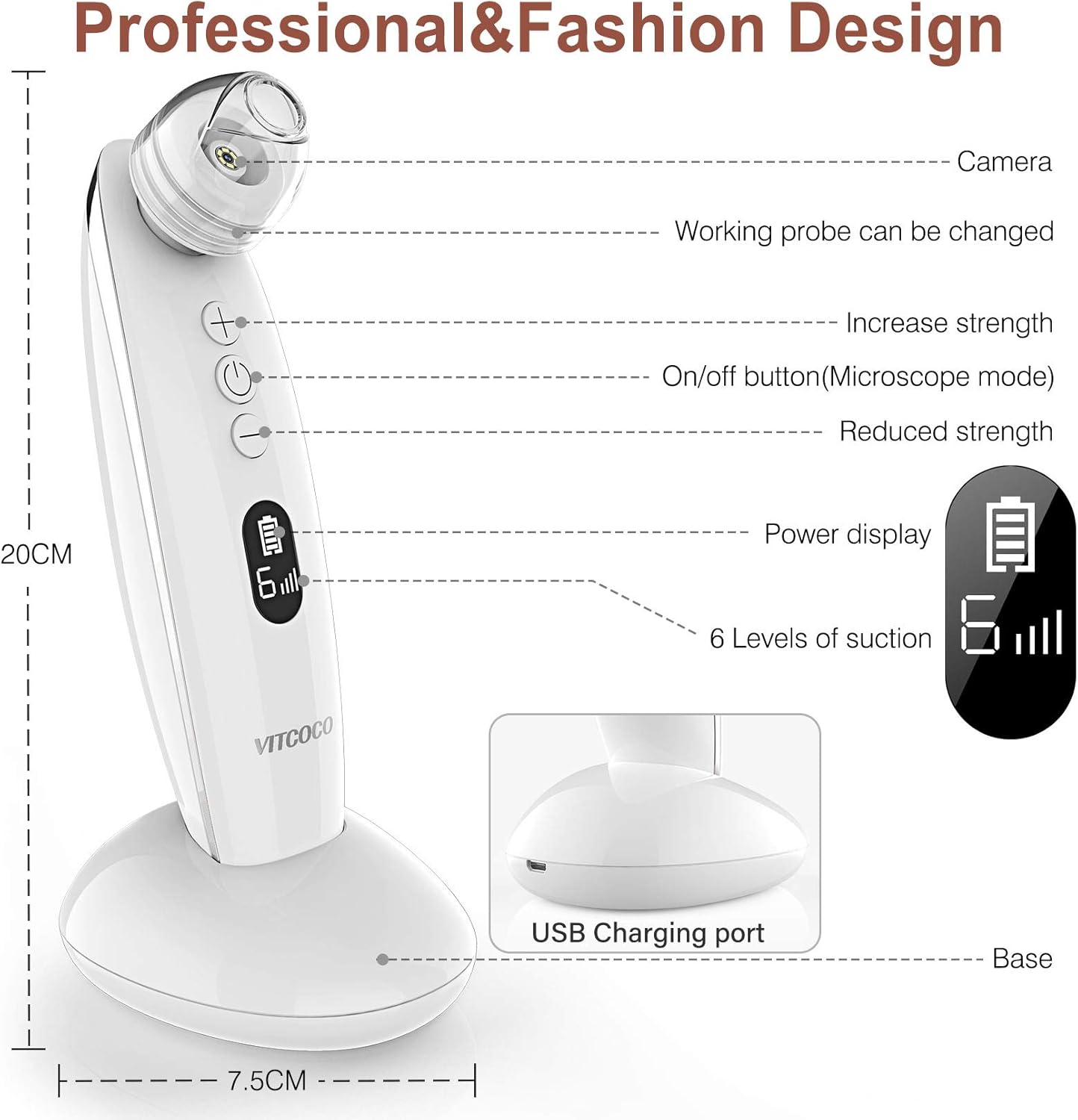
Image: Labeled diagram of the VITCOCO pore cleaner showing the camera, working probe, strength adjustment buttons, on/off button, power display, suction level display, USB charging port, and base.
- Տեսախցիկ: 5.0 Megapixels HD camera with 20x magnification for real-time skin viewինգ.
- Working Probe: Interchangeable suction heads.
- Increase Strength Button (+): Increases suction level.
- On/Off Button (Microscope Mode): Powers the device on/off and activates microscope mode.
- Reduced Strength Button (-): Decreases suction level.
- Power Display: Ցույց է տալիս մարտկոցի մնացած լիցքը։
- Suction Level Display: Indicates the current suction intensity (1-6).
- USB լիցքավորման նավահանգիստ: Located on the base for charging.
- Հիմք: Charging and storage stand.
Suction Probes

Image: Illustration of the four interchangeable suction probes: Large Round Hole, Small Round Hole, Oval Hole, and Microcrystalline Hole, with their recommended uses.
- 1. Large Round Hole: Suitable for oily spots and blackheads. Use on larger areas like the forehead and cheeks.
- 2. Small Round Hole: Ideal for normal or fragile skin. Use for sensitive areas or precise blackhead removal.
- 3. Oval Hole: Designed for cheeks, corners of eyes, nose wings, around the mouth, and other facial parts. Helps to lift and firm skin.
- 4. Microcrystalline Hole: Exfoliates dead skin and clogged pores, promoting smoother skin texture.
Կարգավորում
1. Սարքի լիցքավորում
Before first use, fully charge the device. Connect the USB charging cable to the charging port on the base and plug the other end into a USB power adapter (not included) or a computer USB port. The power display on the device will indicate charging status.
Image: The USB charging port located on the device's base.
2. Հավելվածի տեղադրում և միացում
The VITCOCO pore cleaner features a 5MP camera for real-time viewing. To utilize this feature, you need to install the companion app on your smartphone or tablet (iOS, Android, iPad compatible).
- Ներբեռնեք հավելվածը՝ Scan the QR code below or search for "SOGWIFI" in your device's app store (Google Play Store for Android, Apple App Store for iOS).
- Միացեք Wi-Fi-ի միջոցով.
- Turn on the VITCOCO pore cleaner by pressing the On/Off button.
- Ձեր սմարթֆոնի կամ պլանշետի վրա անցեք Wi-Fi կարգավորումներ։
- Locate and connect to the Wi-Fi network named "FYA300A-xxxx" (where xxxx are unique characters). No password is required.
- Open the "SOGWIFI" app. You should now see a real-time view from the device's camera.

Image: Instructions for downloading the "SOGWIFI" app via QR code or app stores.
Գործառնական հրահանգներ
1. Pre-Treatment Steps
Proper preparation is crucial for effective and safe blackhead removal:
- Մաքրել ձեր դեմքը. Remove all makeup and thoroughly cleanse your face to ensure it is free of dirt and oils.
- Open Pores: Apply a warm compress to your face for 3-5 minutes. Alternatively, use a facial steamer to help open your pores.
- Apply Blackhead Export Liquid (Optional): For stubborn blackheads, apply a blackhead export liquid to the affected areas to help them emerge to the skin surface.
2. Using the Pore Cleaner
- Select a Probe: Choose an appropriate suction probe based on your skin type and the area you intend to treat (refer to "Suction Probes" section).
- Միացում՝ Սարքը միացնելու համար սեղմեք միացնել/անջատել կոճակը:
- Կարգավորեք ներծծման մակարդակը՝ Start with the lowest suction level (Level 1) by pressing the '-' button. You can increase the suction using the '+' button as needed, but always proceed cautiously.
- Սկսել բուժումը. Place the chosen probe gently against your skin. Move the device continuously in one direction, avoiding staying in a single spot for more than 3 seconds. Observe your skin condition in real-time via the connected app.
- Թիրախային տարածքներ.
- For blackheads and oily areas, use the Large Round Hole or Small Round Hole.
- For fine lines and lifting, use the Oval Hole.
- For exfoliation, use the Microcrystalline Hole.
- Ավարտել: Once you have treated all desired areas, press the On/Off button to turn off the device.

Image: A user demonstrating the VITCOCO pore cleaner in action, with a smartphone displaying the real-time camera feed of the skin.
3. Post-Treatment Care
After using the pore cleaner, it is important to soothe and close your pores:
- Cool Mist/Compress: Use a cool mist spray or apply a cold compress to your face to help close the pores.
- Խոնավացնել: Apply a hydrating and soothing moisturizer or a frozen sheet mask to calm the skin.
Տեխնիկական սպասարկում
Cleaning the Device and Probes
- After each use, remove the suction probe from the device.
- Clean the probe and the device's suction head with a cotton swab or soft cloth dampened with rubbing alcohol or mild soap and water.
- Ensure all parts are completely dry before reattaching the probe or storing the device.
- Do not immerse the main device body in water.
Պահպանում
Store the device and its accessories in a cool, dry place, away from direct sunlight and extreme temperatures. Keep it in its original packaging or a protective case when not in use.
Անսարքությունների վերացում
| Թողարկում | Հնարավոր պատճառ | Լուծում |
|---|---|---|
| Սարքը չի միանում: | Մարտկոցի լիցքը թույլ է, կամ սարքը անջատված է։ | Charge the device fully. Press and hold the On/Off button to power on. |
| Կլանում չկա կամ թույլ է։ | Probe not properly attached, suction level too low, or clogged probe. | Ensure the probe is securely attached. Increase suction level using the '+' button. Clean the probe. |
| App not connecting to the device. | Wi-Fi not connected, incorrect app, or app permissions. | Ensure device is on and connected to "FYA300A-xxxx" Wi-Fi. Verify you are using the "SOGWIFI" app. Check app permissions. |
| Redness or bruising after use. | Suction level too high or device held in one spot for too long. | Use a lower suction level. Move the device continuously and do not stay in one area for more than 3 seconds. |
Տեխնիկական պայմաններ
| Առանձնահատկություն | Մանրամասն |
|---|---|
| Բրենդ | ՎԻՏԿՈԿՈ |
| Մոդելի համարը | 1 |
| Տեսախցիկի լուծում | 5.0 մեգապիքսել |
| Խոշորացում | 20x |
| Suction Power | Մինչև 60 կՊա |
| Ներծծման մակարդակները | 6 կարգավորելի մակարդակ |
| Զոնդերը ներառված են | 4 (Large Round, Small Round, Oval, Microcrystalline) |
| Լիցքավորման տեսակը | USB վերալիցքավորվող |
| Շարունակական օգտագործման ժամանակ | Approx. 180 minutes (on a single charge) |
| Նյութ | Ակրիլոնիտրիլ բութադիեն ստիրեն (ABS) |
| Հավելվածի համատեղելիություն | iOS, Android, iPad |
| Հավաստագրեր | FCC, CE, ROHS |
Երաշխիք և աջակցություն
VITCOCO products are manufactured with high-quality materials and undergo strict quality control. This product is covered by a standard manufacturer's warranty against defects in materials and workmanship. Please refer to the warranty card included in your package for specific terms and conditions.
For technical support, troubleshooting assistance, or warranty claims, please contact VITCOCO customer service through the retailer where you purchased the product or visit the official VITCOCO webկայքը կոնտակտային տեղեկատվության համար:


