
ITECH IT6952A
ITECH IT6952A ծրագրավորվող մշտական հոսանքի աղբյուրի օգտագործողի ձեռնարկ
Model: IT6952A | Brand: ITECH
1. Ներածություն
This user manual provides essential information for the safe and effective operation of your ITECH IT6952A Programmable DC Power Supply. Please read this manual thoroughly before using the device to ensure proper functionality and to prevent damage or injury. The IT6952A is a high-performance, programmable DC power supply designed for laboratory and industrial applications, offering precise control over voltage և ընթացիկ ելքը:
2. Անվտանգության տեղեկատվություն
Always observe the following safety precautions to prevent electric shock, injury, or damage to the instrument:
- Համոզվեք, որ էլեկտրամատակարարումը միացված է հողակցված փոփոխական հոսանքի վարդակիցին։
- Սարքը մի աշխատեք թաց կամ դamp պայմանները.
- Մի՛ բացեք c-նasinգ; ներսում օգտագործողի կողմից սպասարկվող մասեր չկան: Բոլոր սպասարկման հարցերը դիմեք որակավորված անձնակազմին:
- Ստուգեք, որ մուտքագրման ծավալըtage matches the power supply's rating before connecting to the mains.
- Avoid short-circuiting the output terminals, especially at high power settings.
- Ապահովեք սարքի շուրջ պատշաճ օդափոխություն՝ գերտաքացումից խուսափելու համար:
3. Ապրանքը ավարտված էview
The ITECH IT6952A features a clear VFD display and intuitive controls for easy operation.
3.1 Առջևի վահանակի դասավորություն

Figure 3.1: Front Panel of IT6952A
The front panel includes the VFD display for voltage and current readings, a rotary knob for precise adjustments, number keys (0-9) and ESC for direct input, function keys (V-SET, I-SET, Save, Recall, Meter, Trigger, Enter, On/Off) for various operations, navigation keys (UP/DOWN/LEFT/RIGHT) for cursor movement, and output terminals for connecting loads. The 'Shift' and 'Local' keys provide additional control options, and the main power switch is integrated.
3.2 Հետևի վահանակի դասավորությունը
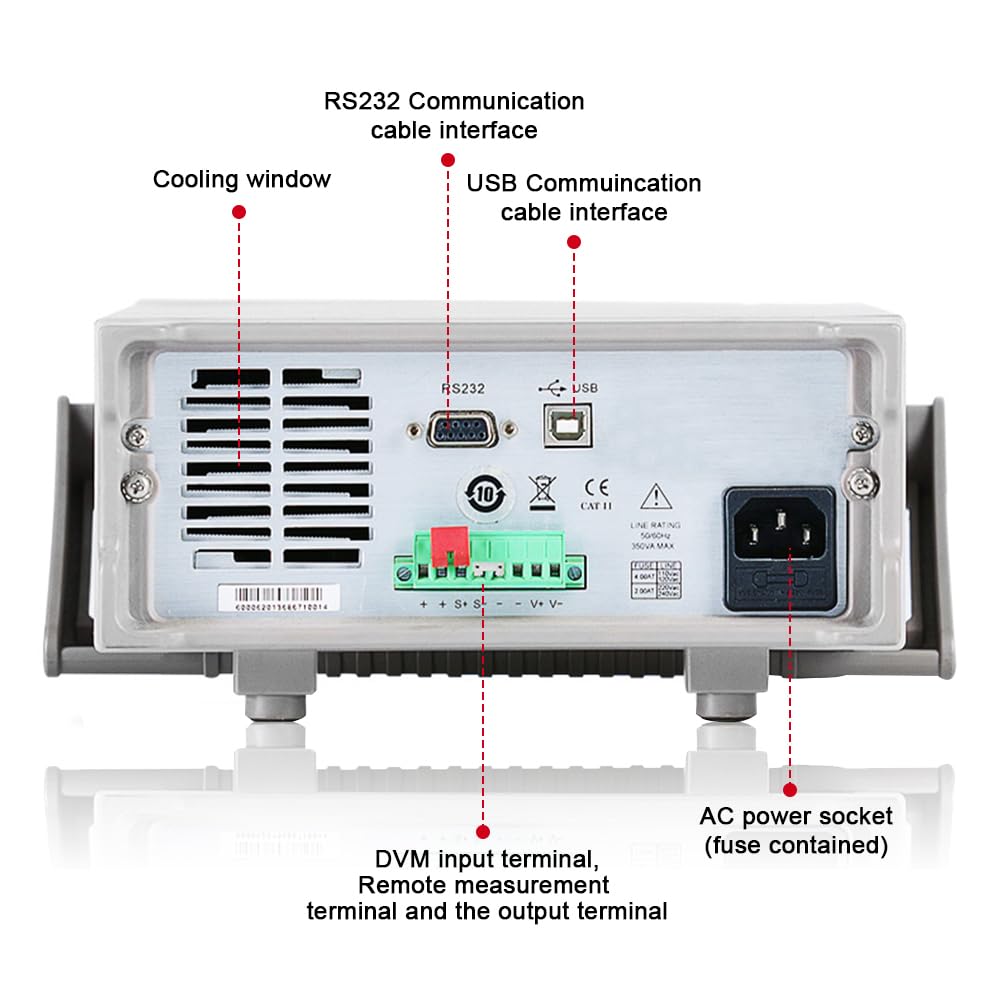
Figure 3.2: Rear Panel of IT6952A
The rear panel features the AC power socket (with integrated fuse), cooling windows for heat dissipation, an RS232 communication cable interface, a USB communication cable interface, and DVM input terminals along with remote measurement terminals and additional output terminals for specific applications.
4. Կարգավորում
Նախնական տեղադրման համար հետևեք հետևյալ քայլերին.
- Ապափաթեթավորում. Carefully remove the power supply from its packaging. Inspect for any signs of damage during transit.
- Տեղադրում: Place the unit on a stable, level surface with adequate ventilation around all sides. Do not block the cooling vents on the sides and rear.
- Էլեկտրաէներգիայի միացում. Connect the provided AC power cord to the AC power socket on the rear panel of the IT6952A. Plug the other end into a grounded electrical outlet.
- Միացում՝ Press the main power switch on the front panel to turn on the unit. The VFD display should illuminate.
- Ելքային կապ. Connect your load to the output terminals on the front panel using appropriate test leads. Ensure correct polarity (positive to positive, negative to negative).
5. Գործառնական հրահանգներ
This section covers basic operation of the IT6952A.
5.1 Կարգավորման ծավալtagե և Ընթացիկ
- Սահմանել Voltage: Սեղմեք V-SET button. The voltage display will become active. Use the rotary knob to adjust the voltage, or use the number keys for direct input followed by Մուտքագրեք.
- Սահմանել հոսանքը՝ Սեղմեք I-SET button. The current display will become active. Use the rotary knob to adjust the current limit, or use the number keys for direct input followed by Մուտքագրեք.
- Միացնել ելքը՝ Ցանկալի ծավալը սահմանելուց հետոtage և հոսանք, սեղմեք Միացնել/Անջատել button to enable the output. The output indicator will illuminate.
- Անջատել ելքը. To disable the output, press the Միացնել/Անջատել կրկին կոճակ:
5.2 Using Memory Functions (Save/Recall)
The IT6952A allows you to save and recall frequently used voltage և ընթացիկ կարգավորումները:
- Պահպանել կարգավորումը. Սահմանեք ցանկալի ծավալըtage and current. Press the Պահպանել button. Use the navigation keys or number keys to select a memory location (e.g., 0-9) and press Մուտքագրեք to store the settings.
- Recall Setting: Սեղմեք Հիշեցնենք button. Use the navigation keys or number keys to select the desired memory location and press Մուտքագրեք to load the stored settings.
6. Պահպանում
Proper maintenance ensures the longevity and reliability of your power supply.
- Մաքրում: Disconnect the power supply from the mains before cleaning. Use a soft, dry cloth to wipe the exterior. For stubborn dirt, a slightly damp cloth with mild detergent can be used, ensuring no liquid enters the unit.
- Օդափոխում: Regularly check that the cooling vents are free from dust and obstructions. Use compressed air to clear dust if necessary.
- Պահպանում: Երկար ժամանակ չօգտագործելու դեպքում սնուցման աղբյուրը պահեք զով, չոր և փոշուց զերծ միջավայրում։
7: Անսարքություն
If you encounter issues with your IT6952A, refer to the following common problems and solutions:
| Խնդիր | Հնարավոր պատճառ | Լուծում |
|---|---|---|
| Միացված ժամանակ հոսանք չկա | Power cord not connected; Blown fuse; No power from outlet | Check power cord connection; Replace fuse (refer to specifications for type); Test outlet with another device |
| Ելք չկաtage/ ընթացիկ | Output disabled; Overload protection activated; Incorrect settings | Մամուլ Միացնել/Անջատել to enable output; Reduce load or increase current limit; Verify voltagԷլեկտրոնային / ընթացիկ պարամետրեր |
| Display shows 'Error' | Internal fault; Over-temperature | Turn off unit, wait 5 minutes, restart; Ensure proper ventilation, allow unit to cool down. If error persists, contact support. |
| Ոչ ճշգրիտ ընթերցումներ | Poor connection; Calibration needed | Check all connections; Contact ITECH support for calibration information. |
8. Տեխնիկական պայմաններ
Key technical specifications for the ITECH IT6952A Programmable DC Power Supply:
| Հստակեցում | Արժեք |
|---|---|
| Բրենդ | ITECH |
| Մոդել | IT6952A |
| Ելք Voltage | 60 վոլտ |
| Ampզայրույթ | 25 Amps |
| Արդյունք Վատtage | 600 Վտ |
| Ձևի գործոն | Նստարան |
| Միակցիչի տեսակը | USB |
| Նյութ | Մետաղ |
| Գույն | Կարմիր, սև |
9. Երաշխիք և աջակցություն
ITECH products are designed for reliability and performance. For warranty information, technical support, or service inquiries, please refer to the warranty card included with your product or visit the official ITECH webկայք: Պահպանեք ձեր գնման կտրոնը որպես գնման ապացույց՝ երաշխիքային պահանջների համար:
For further assistance, you may contact ITECH customer service through their official channels. Always provide your product model (IT6952A) and serial number when seeking support.