
SPRT POS58 IVU
SPRT POS58 IVU Receipt Thermal Printer User Manual
Model: POS58 IVU
Ներածություն
This manual provides essential information for the proper setup, operation, and maintenance of your SPRT POS58 IVU Receipt Thermal Printer. Please read this manual thoroughly before using the printer to ensure optimal performance and longevity.
The SPRT POS58 IVU is a compact and efficient thermal receipt printer designed for various point-of-sale applications. It features USB connectivity and is compatible with 5.7 cm wide thermal paper.
Կարգավորում
1. Ապափաթեթավորում և ստուգում
- Զգուշորեն հանեք տպիչը և բոլոր պարագաները փաթեթավորումից։
- Verify that all components are present: printer unit, power adapter, USB cable.
- Inspect the printer for any visible damage. If damaged, contact your supplier immediately.
2. Տպիչի միացումը
- Միացրեք հոսանքը. Insert the power adapter cable into the printer's power port and plug the other end into a suitable power outlet.
- Միացնել USB. Connect one end of the USB cable to the printer's USB port and the other end to an available USB port on your computer or POS system.
- Միացում՝ Locate the power switch on the printer (typically on the side or front) and turn it to the 'ON' position.
3. Ջերմային թղթի բեռնում
The SPRT POS58 IVU printer uses standard 5.7 cm wide thermal paper rolls.
- Open the paper cover by pressing the release button or lifting the latch (location may vary slightly).
- Insert the thermal paper roll with the printing surface facing the thermal head. Ensure the roll is seated correctly in the paper compartment.
- Քաշեք մի փոքր քանակությամբ թուղթ կտրիչի կողքով։
- Թղթի կափարիչը ամուր փակեք, մինչև այն իր տեղում կտտացվի։
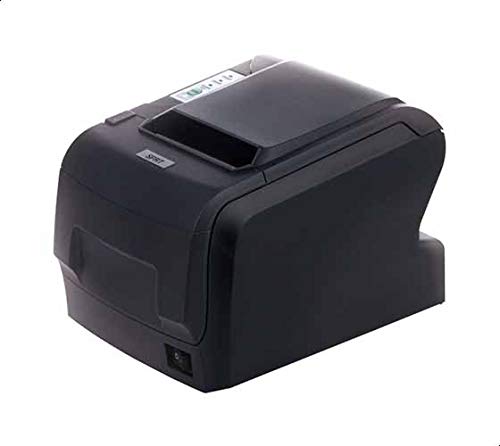
Figure 1: SPRT POS58 IVU Receipt Thermal Printer. This image displays the compact black thermal printer from an angled view, highlighting its paper output slot and the power switch located on the side.
Գործառնական հրահանգներ
Հիմնական տպագրություն
- Ensure the printer is powered on and connected to your computer/POS system.
- Install the necessary printer drivers on your operating system if not already installed. Refer to the driver installation guide provided separately or available from the manufacturer's webկայք։
- From your application (e.g., POS software, word processor), select the SPRT POS58 IVU as your printer.
- Initiate the print command. The printer will automatically feed and print the receipt.
- Tear off the receipt against the serrated edge of the paper output slot.
Ցուցանիշի լույսեր
The printer typically has indicator lights to show its status:
- Power լույս: Ցույց է տալիս, որ տպիչը միացված է։
- Error Light: Illuminates or blinks to indicate an error condition (e.g., paper out, print head overheat).
- Paper Out Light: Indicates that the paper roll is empty or incorrectly loaded.
Տեխնիկական սպասարկում
Ջերմային գլխի մաքրում
Regular cleaning of the thermal head ensures clear print quality and extends printer life. Clean the thermal head after every 50-100 km of printing or if print quality degrades.
- Անջատեք տպիչը և անջատեք սնուցման մալուխը։
- Բացեք թղթի ծածկը:
- Wait a few minutes for the thermal head to cool down if the printer has been recently used.
- Gently wipe the thermal head surface with a cotton swab lightly moistened with absolute alcohol (ethanol).
- Allow the alcohol to evaporate completely before closing the cover and reconnecting power.
Արտաքինի մաքրում
Մաքրեք տպիչի արտաքին մասը փափուկ,amp կտորից։ Մի օգտագործեք ուժեղ լուծիչներ կամ հղկող մաքրող միջոցներ։
Թղթի մշակում
- Use only high-quality thermal paper to prevent damage to the thermal head and ensure optimal print quality.
- Store thermal paper in a cool, dry place away from direct sunlight and heat.
Անսարքությունների վերացում
| Խնդիր | Հնարավոր պատճառ | Լուծում |
|---|---|---|
| Տպիչը չի միանում։ | Power cable not connected; power outlet faulty; printer switch off. | Ստուգեք սնուցման մալուխի միացումը։ Փորձեք այլ վարդակից։ Համոզվեք, որ սնուցման անջատիչը միացված է։ |
| No printing / Blank output. | Paper loaded incorrectly (upside down); paper out; driver not installed/configured; printer not selected. | Reload paper correctly (printing side facing thermal head); replace paper roll; install/reinstall drivers; select printer in application. |
| Տպման վատ որակ: | Thermal head dirty; low-quality paper; paper stored improperly. | Clean thermal head; use recommended thermal paper; store paper correctly. |
| Թղթի ջեմ. | Paper not loaded straight; foreign object in paper path. | Open cover, remove jammed paper carefully, reload paper straight; inspect for obstructions. |
Տեխնիկական պայմաններ
| Առանձնահատկություն | Մանրամասն |
|---|---|
| Բրենդ | SPRT |
| Մոդելի համարը | POS58 IVU |
| Տպիչի տեսակը | Անդորրագրի ջերմային տպիչ |
| Միացման տեխնոլոգիա | USB |
| Տպագիր մեդիա | Labels (commonly used for receipts) |
| Թղթի լայնությունը | 5.7 սմ |
| Գույն | Սեւ |
| Նյութի քաշը | 1.82 կգ |
| Փաթեթի չափերը | 28 x 21.4 x 17.8 սմ |
Երաշխիք և աջակցություն
Specific warranty terms and detailed support contact information are not provided within the available product data. For warranty claims, technical support, or service inquiries, please refer to the documentation included with your purchase or contact your point of sale or the manufacturer directly.
You may find additional resources and contact details on the official SPRT webկայք։
Առնչվող փաստաթղթեր - POS58 IVU
 |
SPRT SP-POS891 POS Ջերմային ստացական տպիչի օգտագործման ձեռնարկ SPRT SP-POS891 POS ջերմային կտրոնների տպիչի օգտագործողի ձեռնարկ, որը մանրամասն նկարագրում է առանձնահատկությունները, տեխնիկական բնութագրերը, աշխատանքը, ինտերֆեյսները և խնդիրների լուծումը: Իմացեք տպագրության արդյունավետության, թղթի մշակման, կապի և այլնի մասին: |
 |
Xprinter XP-58IIH ջերմային ստացական տպիչի Օգտագործողի ձեռնարկ Xprinter XP-58IIH ջերմային կտրոնային տպիչի օգտագործողի ձեռնարկ, որը ներառում է տեխնիկական բնութագրերը, միացումը, թղթի գլանափաթեթի տեղադրումը, դրայվերի տեղադրումը, տպագրության ռեժիմները և մաքրման ընթացակարգերը: |
 |
SPRT POS Thermal Receipt Printer SP-POS8811/POS8822 User Manual This manual provides detailed information on the features, performance, and operation of the SPRT POS Thermal Receipt Printer models SP-POS8811 and SP-POS8822. It covers installation, interface connections (Ethernet, USB, Bluetooth, Cash Drawer), indicator lights, buttons, troubleshooting, and parameter settings. |
 |
SPRT SP-POS890 Thermal Receipt Printer User's Manual User's manual for the SPRT SP-POS890 Thermal Receipt Printer, covering features, performance, operation specifications, interface details, buttons, indicators, self-test, and parameter settings. |
 |
SPRT SP-POS892 POS Thermal Receipt Printer User's Manual User's manual for the SPRT SP-POS892 POS Thermal Receipt Printer, detailing its features, performance, operation, specifications, interfaces, error handling, self-test, parameter settings, and upgrade procedures. |
 |
SPRT SP-POS891 POS Ջերմային ստացական տպիչի օգտագործման ձեռնարկ Comprehensive user manual for the SPRT SP-POS891 POS Thermal Receipt Printer, covering features, specifications, installation, interface options, operation, and troubleshooting. Includes details on print performance, paper handling, connectivity, buttons, indicators, and parameter settings. |
Ask a question about this manual
Ask about setup, troubleshooting, compatibility, parts, safety, or missing instructions. Manuals+ will review the question and use this page’s manual context to help answer it.