
1. Ներածություն
The LEDLUX SH104 Mini Wi-Fi Smart Switch Module is a compact device designed to integrate traditional electrical switches into a smart home system. It enables remote control of lighting and other appliances via Wi-Fi, RF 433MHz, and voice commands through compatible smart assistants. This manual provides essential information for safe installation, setup, and operation of your smart switch module.
2. Ապրանքի հատկությունները
- Wi-Fi կապ. Operates on 2.4 GHz Wi-Fi protocol for remote control via smartphone applications.
- Բարձր հզորության վարկանիշ՝ Supports up to 10A and 2500W at 220V, suitable for various household appliances.
- Կառավարման բազմաթիվ ընտրանքներ. Control via physical button (N.O.), RF 433 MHz remote, Wi-Fi app (Tuya or Smart Life), and voice assistants.
- Ձայնային օգնականի համատեղելիություն. Seamlessly integrates with Amazon Alexa and Google Home for convenient voice control.
- Կոմպակտ դիզայն. Small dimensions (53 x 48 x 18 mm) allow for easy installation within standard electrical boxes (e.g., 503 type).
- Ժամաչափի գործառույթ. Schedule devices to turn on or off automatically at specified times.

Նկար 2.1. Ավարտվածview of the LEDLUX SH104 Mini Wi-Fi Smart Switch Module, illustrating its compact size and various control methods including app, remote, and voice assistants.
3. Անվտանգության տեղեկատվություն
Please read this section carefully before installation and use. Failure to follow these instructions may result in electric shock, fire, or other hazards.
- Էլեկտրական անվտանգություն. This device operates at 220V. Always disconnect power at the circuit breaker before performing any electrical work.
- Պրոֆեսիոնալ տեղադրում. Եթե չեք վստահ էլեկտրական լարերի վերաբերյալ, խորհրդակցեք որակավորված էլեկտրիկի հետ։
- Միայն ներքին օգտագործման համար. This device is designed for indoor use in dry environments. Do not expose it to moisture or extreme temperatures.
- Բեռնատարողություն: Do not exceed the maximum load of 10A / 2500W. Overloading can cause damage to the device and create a fire hazard.
- Օդափոխում: Ensure adequate ventilation around the module when installed in an electrical box to prevent overheating.
4. Փաթեթի բովանդակությունը
Ստուգեք, որ բոլոր իրերը առկա են փաթեթում.
- 1 x LEDLUX SH104 Mini Wi-Fi Smart Switch Module
- 1 x Օգտագործողի ձեռնարկ (այս փաստաթուղթը)
5. Տեղադրում և էլեկտրամոնտաժում
Կարևոր է. Տեղադրումը սկսելուց առաջ համոզվեք, որ հիմնական էլեկտրամատակարարումն անջատված է անջատիչի մոտ։
- Անջատել սնուցումը. Locate the circuit breaker controlling the switch you intend to automate and turn it off. Verify that the power is off using a voltagե փորձարկող:
- Պատրաստել լարերը. Remove the existing wall switch from its electrical box. Identify the Live (L) wire, Neutral (N) wire, and the Load (L1/OUT) wire connected to your light fixture or appliance. If using an external switch, identify the switch wire (S1).
- Միացրեք մոդուլը. Refer to the wiring diagram below and connect the wires to the corresponding terminals on the SH104 module.
- L: Connect the Live wire from the mains power supply.
- N: Connect the Neutral wire from the mains power supply.
- S1: Connect one wire from your external push-button switch (N.O. type). The other wire from the push-button switch should connect to the Live (L) terminal.
- L1/OUT: Connect the Load wire leading to your light fixture or appliance.
- Ապահովեք մոդուլը. Carefully place the SH104 module into the electrical box, ensuring wires are not pinched. Its compact size allows it to fit behind most standard wall switches.
- Վերականգնել էներգիան. Reinstall the wall switch cover plate and turn the power back on at the circuit breaker.
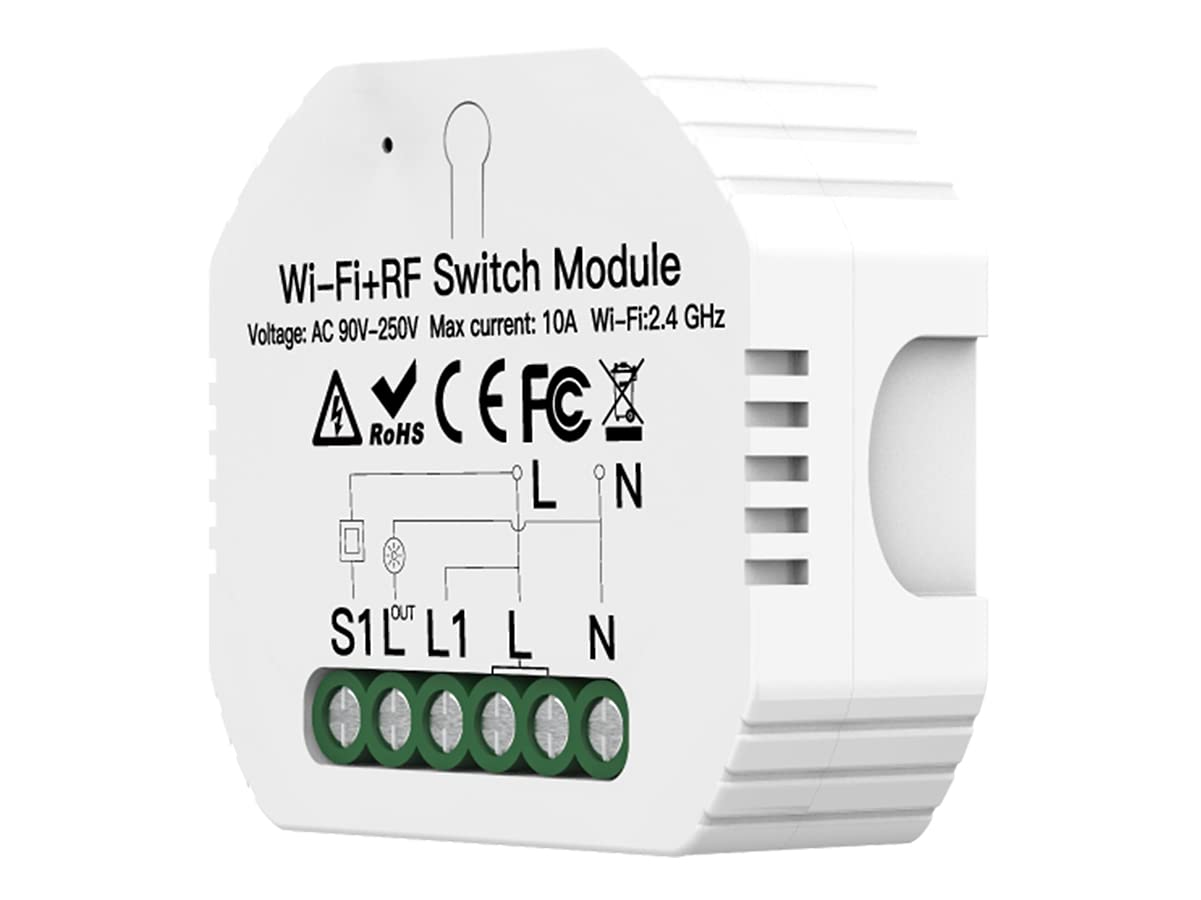
Figure 5.1: Detailed wiring diagram for the SH104 module, showing connections for Live (L), Neutral (N), external switch (S1), and Load (L1/OUT).
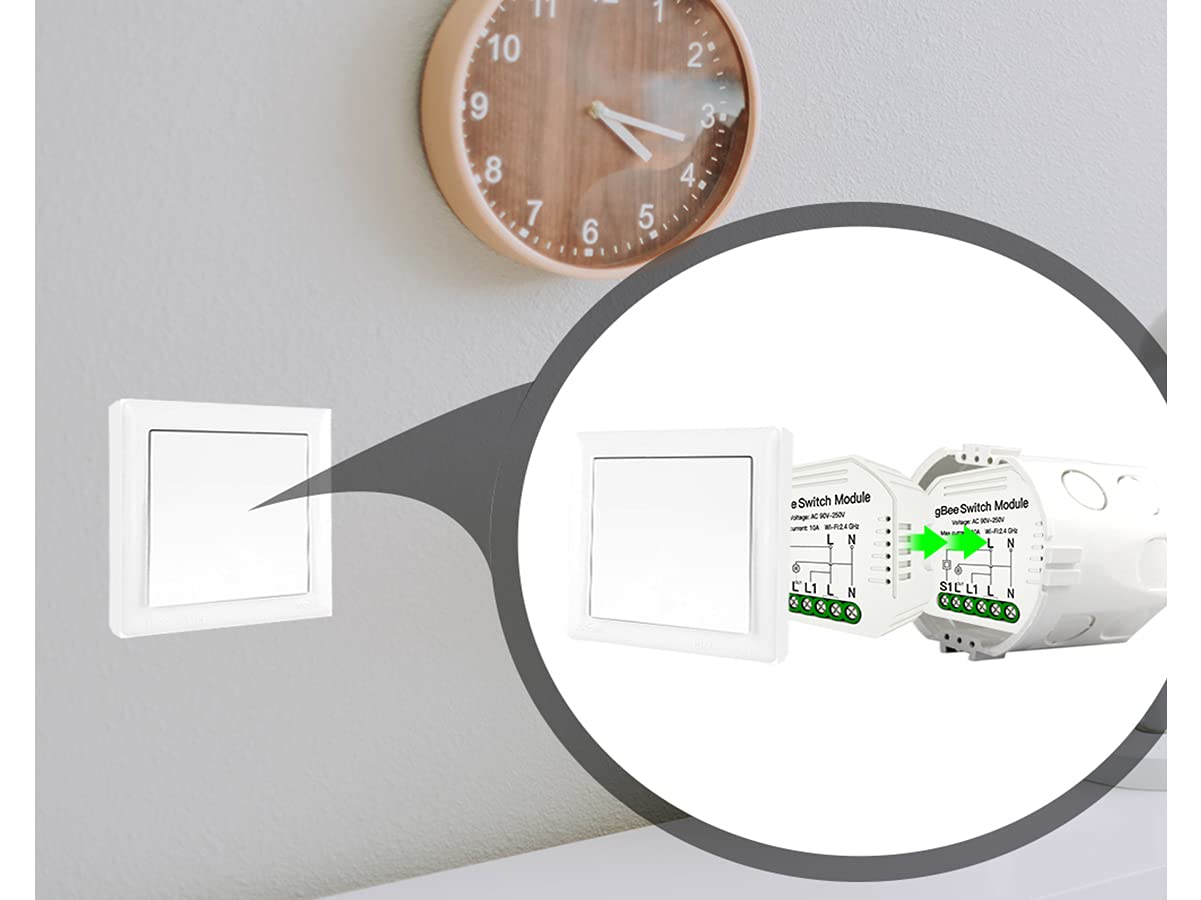
Figure 5.2: Illustration of the SH104 module's compact installation behind a standard wall switch in an electrical box.
6. Կարգավորում և զուգավորում
6.1 App Installation and Wi-Fi Pairing
- Ներբեռնեք հավելվածը ՝ Ներբեռնեք «Tuya Smart» կամ «Smart Life» հավելվածը ձեր սմարթֆոնի հավելվածների խանութից (iOS կամ Android):
- Գրանցվել/Մուտք գործել՝ Բացեք հավելվածը և գրանցվեք նոր հաշվի համար կամ մուտք գործեք առկա հաշվի միջոցով։
- Մուտք գործեք զուգավորման ռեժիմ. After power-up, the module should automatically enter pairing mode (indicated by a rapidly blinking LED, if present). If not, press and hold the physical button on the module for 5-10 seconds until the LED blinks rapidly.
- Սարքի ավելացում. In the app, tap the "+" icon (usually in the top right corner) to add a new device. Select "Electrical Switch" or "Switch (Wi-Fi)".
- Միացեք Wi-Fi-ին. Follow the on-screen instructions to connect the module to your 2.4 GHz Wi-Fi network. Ensure your phone is also connected to the same 2.4 GHz network during pairing.
- Ավարտում: Once successfully paired, the device will appear in your app, and you can rename it for easier control.
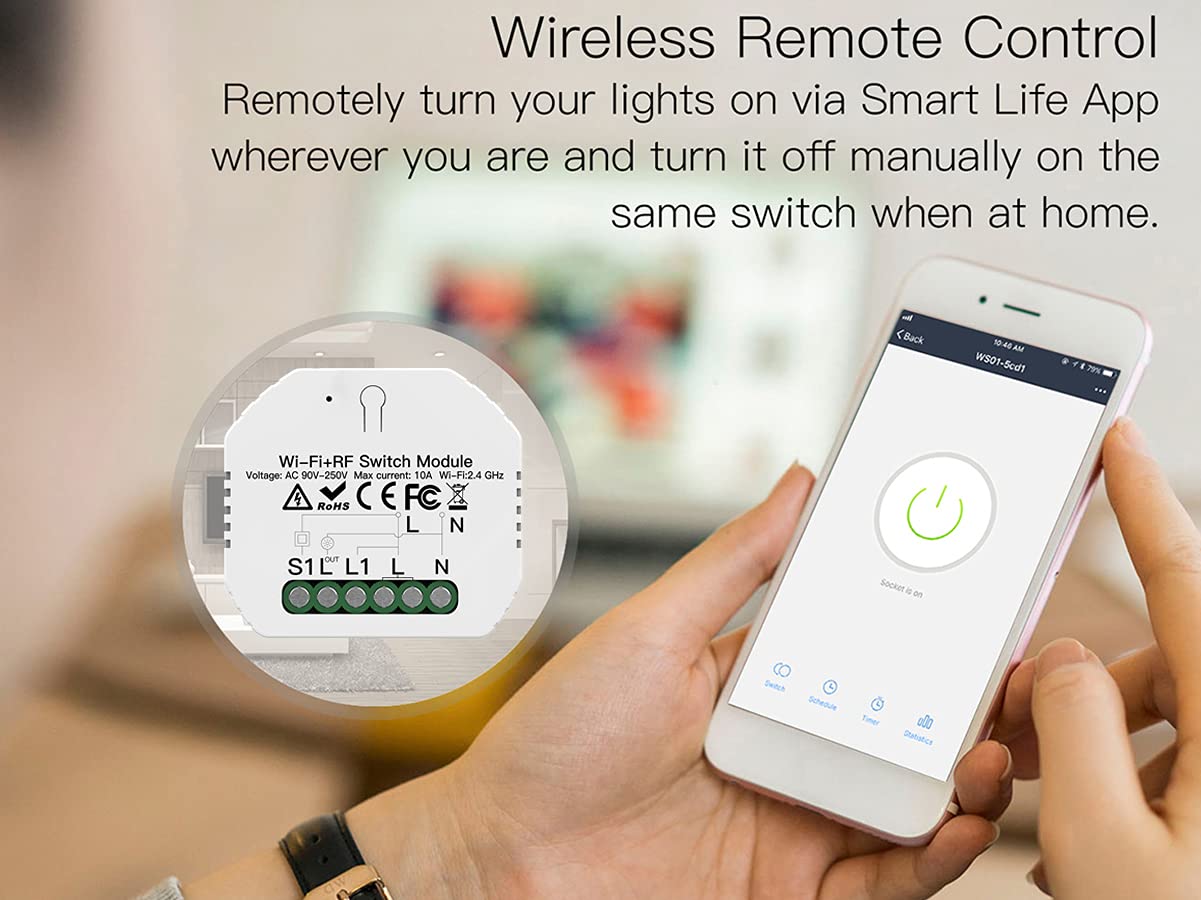
Նկար 6.1. Նախample of the Smart Life app interface used to control the SH104 module remotely.
6.2 RF 433MHz Remote Pairing
To pair an RF 433MHz remote control (not included) with the SH104 module:
- Enter RF Pairing Mode: Briefly press the physical button on the SH104 module twice. The module's indicator light will typically blink slowly to indicate it's ready for RF pairing.
- Սեղմեք հեռակառավարման կոճակը՝ Within a few seconds, press the desired button on your RF 433MHz remote control that you wish to associate with the module.
- Հաստատում: The module's indicator light will usually stop blinking or flash quickly to confirm successful pairing.
6.3 Ձայնային օգնականի ինտեգրում (Alexa/Google Home)
To enable voice control, link your Tuya Smart or Smart Life account to your Amazon Alexa or Google Home app:
- Open Voice Assistant App: Open the Amazon Alexa app or Google Home app on your smartphone.
- Add Skill/Service:
- For Alexa: Go to "Skills & Games" and search for "Tuya Smart" or "Smart Life". Enable the skill.
- For Google Home: Go to "Works with Google" and search for "Tuya Smart" or "Smart Life". Link the service.
- Հաշիվների հղումներ՝ You will be prompted to log in with your Tuya Smart/Smart Life account credentials.
- Բացահայտեք սարքերը. Once accounts are linked, ask Alexa to "Discover devices" or use the "Discover devices" option in the Google Home app. Your SH104 module will appear and can be controlled by voice.
7. Գործառնական հրահանգներ
The LEDLUX SH104 module offers several ways to control your connected appliances:
- Ձեռնարկի վերահսկում. Use the connected physical push-button switch (N.O. type) to toggle the appliance on or off.
- Հավելվածի վերահսկում. Open the Tuya Smart or Smart Life app on your smartphone. Tap on the device icon to turn the appliance on or off. You can also set schedules and timers within the app.
- ՌԴ հեռակառավարման վահանակ. If an RF 433MHz remote is paired, press the assigned button on the remote to control the appliance.
- Ձայնային կառավարում. Use voice commands with Amazon Alexa or Google Home. For example, "Alexa, turn on [Device Name]" or "Hey Google, turn off [Device Name]".
- Ժամաչափի գործառույթ. Within the Tuya Smart or Smart Life app, navigate to the device settings to set up countdown timers, schedules, or scene automations for your connected appliance.
8. Պահպանում
The LEDLUX SH104 Mini Wi-Fi Smart Switch Module requires minimal maintenance.
- Մաքրում: Ensure the device is disconnected from power before cleaning. Wipe the exterior with a soft, dry cloth. Do not use liquid cleaners or solvents.
- Շրջակա միջավայր: Keep the module in a dry environment, away from direct sunlight, high humidity, and extreme temperatures.
- Fրագրակազմի թարմացումներ. Periodically check the Tuya Smart or Smart Life app for available firmware updates for the device. Updates can improve performance and add new features.
9: Անսարքություն
If you encounter issues with your LEDLUX SH104 module, refer to the following common solutions:
| Խնդիր | Հնարավոր պատճառ / լուծում |
|---|---|
| Սարքը չի միանում: |
|
| Cannot connect to Wi-Fi / App pairing fails. |
|
| Device frequently disconnects from Wi-Fi. |
|
| RF 433MHz remote does not work. |
|
| Ձայնային կառավարումը չի արձագանքում։ |
|
| Device turns on/off unexpectedly. |
|
10. Տեխնիկական պայմաններ
| Պարամետր | Արժեք |
|---|---|
| Մոդելի համարը | A_SH104 |
| Բրենդ | LEDLUX |
| Ներածման ծավալըtage | AC 90-250V (typically 220V for this model) |
| Max ընթացիկ | 10 Ա |
| Max Power | 2500 Վ |
| Wi-Fi ստանդարտ | Wi-Fi 2.4 ԳՀց |
| ՌԴ հաճախականություն | 433 ՄՀց |
| Գործառնական ռեժիմ | ON-OFF-ON |
| Կոնտակտային տեսակը | Սովորաբար բաց (ՈՉ) |
| Միակցիչի տեսակը | Պտուտակային տերմինալ |
| Նյութ | Պլաստիկ |
| Ապրանքի չափերը (L x W x H) | 30 x 60 x 60 մմ (մոտավորապես 3 x 6 x 6 սմ) |
| Ապրանքի քաշը | 50 գրամ |
| Հավելվածի համատեղելիություն | Tuya Smart / Smart Life |
| Ձայնի օգնականի համատեղելիություն | Amazon Alexa, Google Home |
11. Երաշխիք և աջակցություն
Specific warranty information for the LEDLUX SH104 Mini Wi-Fi Smart Switch Module is not provided in this manual. Please refer to the retailer or your point of purchase for warranty details.
For technical support or further assistance, please contact LEDLUX customer service or visit the official LEDLUX webկայք։