
Ozuly NS-RC4NA-18
Universal Insignia TV Remote Control User Manual
Model: NS-RC4NA-18 | Brand: Ozuly
Ներածություն
This manual provides comprehensive instructions for the Ozuly Universal Replacement Remote Control, model NS-RC4NA-18, designed for Insignia LED LCD HDTVs. This remote offers direct functionality without the need for complex setup or programming, serving as a reliable replacement for your original Insignia TV remote.

Նկար 1. Առջև view of the Ozuly Universal Insignia TV Remote Control. The remote is black with clearly labeled buttons for power, input, numbers, navigation, volume, channel, and media playback.
Կարգավորում
The Ozuly Universal Replacement Remote Control is designed for immediate use with compatible Insignia TVs. No programming or pairing is required.
Մարտկոցի տեղադրում
- Տեղադրեք մարտկոցի խցիկը հեռակառավարման վահանակի հետևի մասում:
- Սահեցրեք մարտկոցի խցիկի կափարիչը ներքև՝ այն բացելու համար։
- Insert two (2) AAA batteries (not included) into the compartment, ensuring the positive (+) and negative (-) terminals align correctly with the indicators inside the compartment.
- Սահեցրեք մարտկոցի խցիկի կափարիչը իր տեղը, մինչև այն ապահով կերպով կտտացվի։
Մարտկոցները տեղադրելուց հետո հեռակառավարիչը պատրաստ է շահագործման։

Նկար 2. Հետևի view of the remote control, illustrating the battery compartment and its cover. The compartment requires two AAA batteries for operation.
Գործառնական հրահանգներ
This remote control provides full functionality for your Insignia TV, mirroring the original remote's capabilities.
Հիմնական գործառույթները.
- Power կոճակը (⏻): Միացնում կամ անջատում է հեռուստացույցը:
- Մուտքագրման կոճակ. Անցնում է հասանելի մուտքային աղբյուրների միջով (HDMI, AV և այլն):
- Համարային կոճակներ (0-9): Անմիջապես ընտրեք հեռուստաալիքները։
- Մենյու կոճակ. Մուտք է գործում հեռուստացույցի գլխավոր մենյու։
- Նավիգացիոն կոճակներ (վերև, ներքև, ձախ, աջ, Enter): Նավարկեք ընտրացանկերի միջով և հաստատեք ընտրությունները։
- Ձայնի բարձրացում/Նվազում (+/-): Կարգավորում է հեռուստացույցի ձայնը:
- Անջատելու կոճակ: Անջատում կամ միացնում է հեռուստացույցի ձայնը:
- Ալիքի վերև/ներքև (ալիք +/-): Փոխում է հեռուստաալիքները։
- Ելքի կոճակ: Ելք է կատարում ընթացիկ ընտրացանկից կամ գործառույթից։
- Info* Button: Ցուցադրում է ծրագրի տեղեկատվությունը։
- ACC Button: Accesses accessibility features.
- CC Button: Toggles Closed Captions.
- Մեդիա նվագարկման կառավարման տարրեր (նվագարկել, դադար տալ, կանգ առնել, հետ անցնել, արագացնել առաջ, բաց թողնել): Controls media playback if supported by the TV.
- Sleep, Aspect, Game, Picture, Audio: Dedicated buttons for quick access to specific TV settings.
The remote is designed for a fast response time, typically under 0.2 seconds, and offers precise control up to a range of 15 meters.

Figure 3: A user holding the remote control, demonstrating its comfortable fit and ease of use while operating a television.
Տեխնիկական սպասարկում
Ճիշտ սպասարկումը ապահովում է ձեր հեռակառավարման վահանակի երկարակեցությունը և օպտիմալ աշխատանքը։
Մարտկոցի փոխարինում
Replace batteries when the remote's response becomes sluggish or it stops functioning. Always replace both batteries simultaneously with new AAA batteries. Do not mix old and new batteries, or different types of batteries.
Մաքրում
Հեռակառավարիչը մաքրելու համար նրբորեն սրբեք դրա մակերեսը փափուկ, չոր կտորով: Համառ կեղտի դեպքում՝ թեթևակի չորացրեքampՍրբեք կտորը ջրով կամ մեղմ, ոչ հղկող մաքրող միջոցով: Խուսափեք կոշտ քիմիական նյութերի կամ հղկող նյութերի օգտագործումից, քանի որ դրանք կարող են վնասել հեռակառավարիչի մակերեսը կամ ներքին բաղադրիչները:
Պահպանում
Store the remote in a cool, dry place away from direct sunlight and extreme temperatures. If the remote will not be used for an extended period, it is recommended to remove the batteries to prevent leakage.
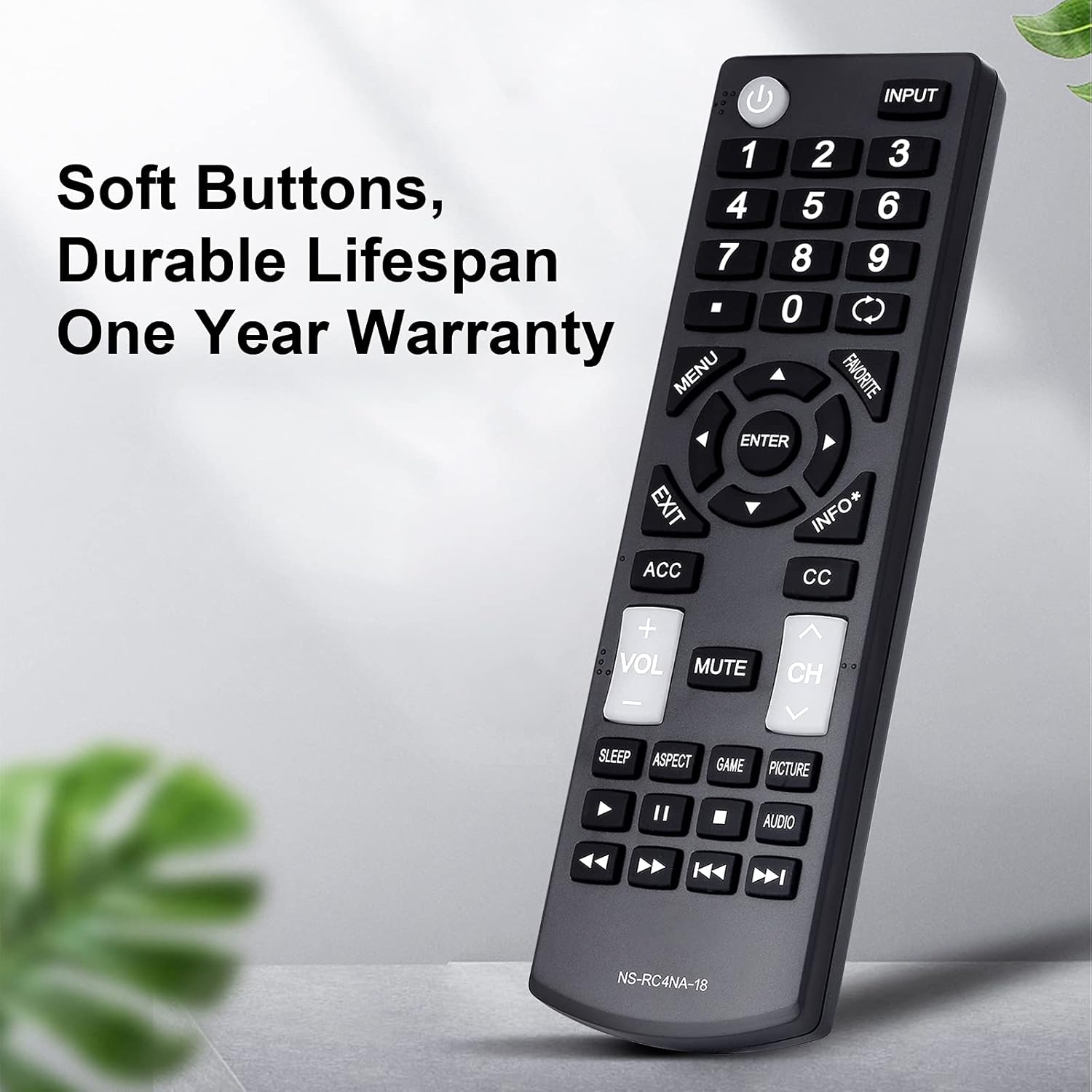
Նկար 4: Մանրամասն view of the remote control, emphasizing its soft, durable buttons and robust ABS plastic construction, designed for long-term use.
Անսարքությունների վերացում
Եթե ձեր հեռակառավարման վահանակի հետ կապված խնդիրներ ունեք, խնդրում ենք դիմել հետևյալ տարածված խնդիրներին և լուծումներին.
| Խնդիր | Հնարավոր պատճառ | Լուծում |
|---|---|---|
| Հեռակառավարիչը չի արձագանքում։ | Մեռած կամ սխալ տեղադրված մարտկոցներ։ | Փոխարինեք մարտկոցները նոր AAA մարտկոցներով՝ ապահովելով ճիշտ բևեռականություն։ |
| Հեռակառավարիչը աշխատում է ընդհատումներով։ | Low battery power; obstruction between remote and TV; remote sensor on TV is blocked. | Replace batteries. Ensure a clear line of sight between the remote and the TV's infrared sensor. Remove any objects blocking the TV's sensor. |
| Որոշակի կոճակներ չեն աշխատում։ | Button stuck or damaged; TV model incompatibility for specific advanced functions. | Gently press the button multiple times to dislodge any debris. Verify your TV model is listed as compatible for all functions. |
| Հեռակառավարիչը չի կառավարում հեռուստացույցը։ | TV is not an Insignia brand or is an incompatible Insignia model. | Confirm your TV is an Insignia brand and its model number is listed in the compatible models section of this manual or product description. This remote is specifically designed for Insignia TVs. |
If troubleshooting steps do not resolve the issue, please contact customer support for assistance.
Տեխնիկական պայմաններ
- Մոդելի համարը: NS-RC4NA-18
- Ապրանքանիշը: Օզուլին
- Համատեղելի սարքեր. Insignia Televisions (LED LCD HDTVs)
- Աջակցվող սարքերի առավելագույն քանակը. 1
- Գույնը: Սեւ
- Ապրանքի չափսերը. 6 x 2 x 1 դյույմ (մոտավորապես)
- Նյութի Քաշը: 2.39 ունցիա (մոտավորապես)
- Հատուկ առանձնահատկություն. Universal replacement, no programming required
- Power Source: 2 x AAA մարտկոցներ (ներառված չէ)
- Արձագանքման ժամանակը: 0.2 վայրկյանից պակաս
- Գործառնական միջակայք. Մինչև 15 մետր
- Նյութը՝ Երկարակյաց ABS պլաստիկ
- Առաջին հասանելի ամսաթիվը. 1 հունվարի, 2021 թ

Figure 5: An illustration highlighting the upgraded internal chip of the remote control, contributing to its longer lifespan and improved performance.
Երաշխիք և աջակցություն
Երաշխիքային տեղեկատվություն
Այս ապրանքը գալիս է ա Մեկ տարվա երաշխիք from the date of purchase, covering manufacturing defects and material flaws under normal use. Please retain your proof of purchase for warranty claims.
Հաճախորդների աջակցություն
For any questions, concerns, or assistance with your Ozuly Universal Replacement Remote Control, please do not hesitate to contact our customer service team. We are committed to providing timely and high-quality service to ensure your satisfaction.
Please refer to the contact information provided with your purchase or on the product packaging for the most direct support channels.
Ask a question about this manual
Ask about setup, troubleshooting, compatibility, parts, safety, or missing instructions. Manuals+ will review the question and use this page’s manual context to help answer it.