
1. Ներածություն
This manual provides detailed instructions for the setup, operation, maintenance, and troubleshooting of your Focusrite Scarlett 8i6 3rd Gen USB Audio Interface Studio Bundle. This comprehensive package is designed to provide a complete solution for professional-grade audio recording and production, combining a high-quality audio interface with essential studio accessories.
Խնդրում ենք ապրանքը օգտագործելուց առաջ ուշադիր կարդալ այս ձեռնարկը՝ օպտիմալ աշխատանքն ու երկարակեցությունն ապահովելու համար։
2. Ապրանքը ավարտված էview
The Focusrite Scarlett 8i6 3rd Gen Studio Bundle includes the following components:
- Focusrite Scarlett 8i6 3rd Gen USB Audio Interface: An 8-in/6-out USB audio and MIDI interface.
- Mackie CR3-X Studio Monitors: A pair of active studio monitors for accurate sound reproduction.
- Կոնդենսատոր Միկրոֆոն. For vocal and instrument recording.
- Acoustic Foam Panels: For room sound treatment.
- Ականջակալներ. Աուդիո մոնիթորինգի համար։
- Մալուխներ: Necessary cables for connectivity.
- Production Software Bundle: A suite of software tools for recording, mixing, and production.

Ճակատ view of the Scarlett 8i6 3rd Gen audio interface, showing inputs, gain controls, and monitor knob.
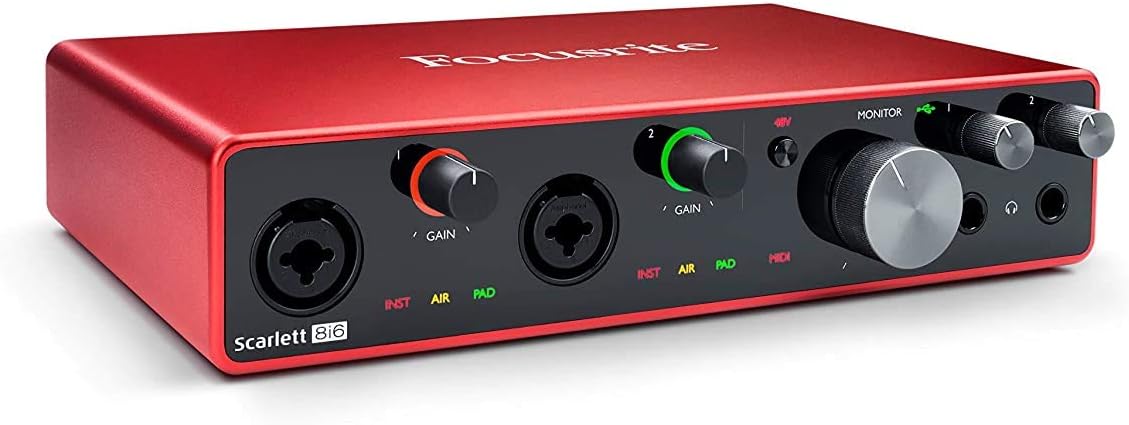
Անկյունային view of the Scarlett 8i6 3rd Gen, highlighting its compact design and front panel controls.

Հետևի view of the Scarlett 8i6 3rd Gen, displaying line inputs/outputs, MIDI I/O, S/PDIF, and USB connection.

The condenser microphone with its shock mount, designed for clear audio capture.

A visual representation of the various software and plugins included with the Scarlett 8i6 bundle.

The Focusrite Hitmaker Expansion, a collection of studio-grade plugins and virtual instruments.

Screenshots of Ableton Live Lite and Pro Tools First, two digital audio workstations included in the bundle.

Sonnox Toolbox plugins, offering advanced audio widening and thickening effects.
3. Կարգավորում
3.1. Scarlett 8i6 Audio Interface
- Վարորդի տեղադրում. Մինչև Scarlett 8i6-ը համակարգչին միացնելը, այցելեք Focusrite-ի պաշտոնական կայքը։ webկայք (focusrite.com/ բեռնում) to download and install the latest drivers for your operating system (Windows or macOS).
- Միանալ համակարգչին. Use the provided USB cable to connect the Scarlett 8i6 to an available USB port on your computer.
- Էլեկտրաէներգիայի միացում. Connect the included power adapter to the Scarlett 8i6 and then to a power outlet. The interface requires external power for operation.
3.2. Mackie CR3-X Studio Monitors
- Տեղադրում: Position the monitors on a stable surface, equidistant from your listening position, forming an equilateral triangle. Ensure the tweeters are at ear level.
- Connect to Interface: Use appropriate cables (e.g., TRS to RCA or TRS to TRS, depending on your monitor inputs) to connect the main outputs of the Scarlett 8i6 (Line Outputs 1-2) to the inputs of the Mackie CR3-X monitors.
- Էլեկտրաէներգիայի միացում. Connect the power cable to the active monitor and plug it into a power outlet. The passive monitor connects to the active monitor via speaker wire.
3.3. Կոնդենսատոր խոսափող
- Մոնտաժում: Secure the microphone in its shock mount and attach it to a microphone stand.
- Connect to Interface: Use an XLR cable to connect the microphone to one of the combo inputs (Input 1 or 2) on the front of the Scarlett 8i6.
- Phantom Power: Condenser microphones require 48V phantom power. Press the '48V' button on the Scarlett 8i6 to activate it for the connected input.
3.4. Ականջակալներ
- Connect your headphones to one of the headphone outputs on the front of the Scarlett 8i6.
3.5. Acoustic Foam Panels
- Strategically place the acoustic foam panels on walls at primary reflection points (e.g., behind monitors, side walls, ceiling) to reduce unwanted echoes and improve sound clarity.
3.6. Ծրագրերի տեղադրում
- Register your Scarlett 8i6 on the Focusrite website to gain access to the included software bundle, which typically includes Ableton Live Lite, Pro Tools First Focusrite Creative Pack, Softube’s Time and Tone Bundle, Focusrite’s Red Plug-in Suite, and XLN Audio’s Addictive Keys. Follow the instructions provided during registration to download and install these applications.
4. Գործառնական հրահանգներ
4.1. Հիմնական ձայնագրություն
- Ընտրեք մուտքագրում. Ensure your microphone or instrument is connected to an input on the Scarlett 8i6.
- Սահմանել ուժգնացում՝ Adjust the corresponding 'GAIN' knob for your input. The gain halo around the knob will illuminate green for a healthy signal, amber for approaching clipping, and red for clipping. Aim for a strong green signal without hitting red.
- INST/PAD: If connecting a guitar or bass directly, press the 'INST' button for instrument-level input. If the signal is too hot even with gain at minimum, press 'PAD' to attenuate the input.
- Օդային ռեժիմ՝ Press the 'AIR' button to engage Focusrite's classic ISA 110 preamp emulation, adding brightness and openness to your recordings.
- DAW-ի կարգավորումը՝ Open your Digital Audio Workstation (DAW) software (e.g., Ableton Live Lite, Pro Tools First). Go to your DAW's audio settings/preferences and select the Scarlett 8i6 as your audio input and output device.
- Մոնիտորինգ: Use the 'MONITOR' knob on the Scarlett 8i6 to control the overall output level to your studio monitors. Use the dedicated headphone volume knobs for headphone monitoring.
4.2. Նվագարկում
- Ensure your studio monitors are powered on and connected.
- Adjust the 'MONITOR' knob on the Scarlett 8i6 to control the playback volume through your monitors.
- Adjust the headphone volume knobs for private listening.
4.3. MIDI Connectivity
- Connect MIDI devices (e.g., MIDI keyboard, drum machine) to the 'MIDI IN' and 'MIDI OUT' ports on the rear of the Scarlett 8i6 using standard 5-pin DIN MIDI cables.
- Your DAW should automatically recognize the Scarlett 8i6's MIDI ports, allowing you to send and receive MIDI data.
5. Պահպանում
- Մաքրում: Use a soft, dry cloth to clean the exterior of the Scarlett 8i6 and monitors. Avoid using liquid cleaners or abrasive materials.
- Ծրագրային թարմացումներ. Պարբերաբար ստուգեք Focusrite-ը website for driver and firmware updates for your Scarlett 8i6 to ensure compatibility and optimal performance.
- Մալուխի կառավարում. Keep cables organized and free from kinks or excessive bending to prevent damage and ensure reliable connections.
- Պահպանում: When not in use for extended periods, store the equipment in a clean, dry environment away from extreme temperatures and direct sunlight.
6: Անսարքություն
6.1. No Sound/Audio Issues
- Ստուգեք կապերը. Ensure all cables (USB, power, monitor, microphone, headphones) are securely connected.
- Ձեռք բերելու մակարդակներ. Verify that input gain knobs are set appropriately and not at minimum.
- Phantom Power: If using a condenser microphone, ensure 48V phantom power is activated.
- Մոնիտորի ծավալը. Check the 'MONITOR' knob on the Scarlett 8i6 and the volume controls on your Mackie CR3-X monitors.
- DAW-ի կարգավորումները՝ Confirm that the Scarlett 8i6 is selected as the input and output device in your DAW's audio preferences. Check track routing and arming for recording.
- Computer Sound Settings: Ensure your computer's system sound output is set to the Scarlett 8i6.
6.2. Distortion or Clipping
- Reduce Gain: If the gain halo turns red, reduce the input 'GAIN' knob.
- Use PAD: For very loud sources, engage the 'PAD' button on the input.
- Check Software Levels: Ensure levels within your DAW are not clipping.
6.3. Connectivity Issues (USB)
- USB մալուխ: Փորձեք ձեր համակարգչի վրա օգտագործել այլ USB մալուխ կամ այլ USB միացք։
- Վարորդներ: Reinstall the latest drivers from the Focusrite webկայք։
- Վերագործարկեք՝ Վերագործարկեք ձեր համակարգիչը և Scarlett 8i6-ը։
6.4. Software Not Recognizing Interface
- Համոզվեք, որ դրայվերները ճիշտ տեղադրված են և թարմացված։
- Verify the Scarlett 8i6 is powered on and connected via USB.
- Check your DAW's audio device settings.
7. Տեխնիկական պայմաններ
| Առանձնահատկություն | Հստակեցում |
|---|---|
| Բրենդ | Ֆոկուսրիտ |
| Մոդել | Scarlett 8i6 3rd Gen |
| Միացման տեխնոլոգիա | USB |
| Ալիքների քանակը | 8 (մուտք) / 6 (ելք) |
| Առավելագույն Sample Գնահատել | 192 ԿՀց |
| Համատեղելի սարքեր | Անհատական համակարգիչ |
| Օպերացիոն համակարգ | Windows, macOS |
| Աջակցվող ծրագրակազմ | Ableton Live Lite, Pro Tools First Focusrite Creative Pack, Softube’s Time and Tone Bundle, Focusrite’s Red Plug-in Suite, XLN Audio’s Addictive Keys |
| Աուդիո մուտքագրում | USB |
8. Երաշխիքային տեղեկատվություն
Focusrite products typically come with a manufacturer's warranty. Please refer to the warranty card included with your product or visit the official Focusrite webկայք՝ երաշխիքի պայմանների, դրույթների և գրանցման ընթացակարգերի վերաբերյալ մանրամասն տեղեկություններ ստանալու համար: Պահպանեք ձեր գնման ապացույցը երաշխիքային պահանջների համար:
9. Աջակցության տեղեկատվություն
For further assistance, technical support, or to access FAQs and additional resources, please visit the official Focusrite support webկայքը:
Focusrite-ի աջակցություն Webկայք
You can also find contact information for customer service on their website if you require direct assistance.