
1. Ներածություն
This manual provides essential instructions for the proper use and maintenance of your Liene Amber 4x6 inch Photo Printer Paper and Cartridge (Model SD21). This replenishment package is designed to work seamlessly with compatible Liene Amber series photo printers, ensuring high-quality photo prints.
2. Ապրանքը ավարտված էview
The Liene Amber 4x6 inch Photo Printer Paper and Cartridge offers a user-friendly solution for printing your cherished memories. Each package includes 40 sheets of 4x6 inch photo paper and one integrated ink cartridge.
Հիմնական հատկանիշները:
- Integrated Ink Cartridge: Each cartridge contains all three necessary colors (Cyan, Magenta, Yellow) and is designed to support the printing of 40 photos, matching the paper quantity in the pack.
- Optimal Photo Size: The photo paper is provided in the popular 4x6 inch format.
- Fingerprint Prevention: Designed with crop areas on both sides, minimizing fingerprints on the printing surface during handling. These areas can be easily torn off without damaging the image.
- Thermal Dye-Sublimation Technology: Utilizes advanced thermal dye-sublimation for deep dye penetration, resulting in vivid, vibrant, and long-lasting colors that resist fading.
- Պաշտպանիչ շերտ. Photos are automatically coated with a protective layer during printing, making them water-resistant and oxidation-resistant, preserving your memories for longer.
Համատեղելիություն:
Այս ապրանքն է ՄԻԱՅՆ համատեղելի with Liene Amber M100/M200 4" x 6" Photo Printers (models DHP512/DHP513/DHP514/DHP515). It is ՉԻ համատեղելի with the Liene PixCut S1 printer or any other photo printer models.

Figure 1: Liene 4x6 inch Photo Printer Paper & Cartridge Refill Pack.
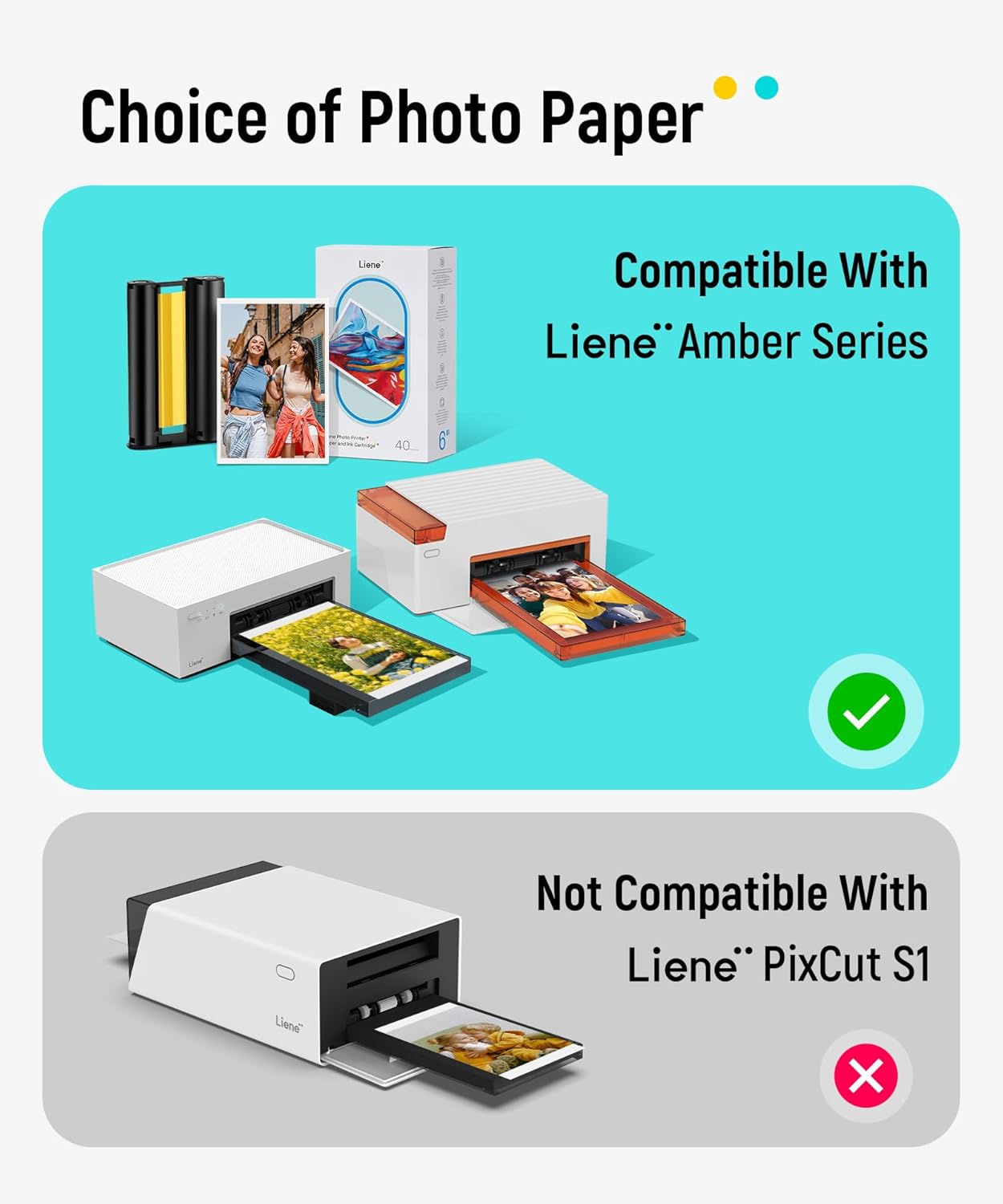
Նկար 2: Համատեղելիությունview for Liene 4x6 inch photo paper and cartridge.
Տեսանյութ 1: Պաշտոնական տեսահոլովակի ցուցադրությունasing the benefits and ease of use of Liene photo products, including the photo paper and cartridge.
3. Setup: Loading Paper and Cartridge
To ensure optimal printing performance, follow these steps to correctly load the photo paper and ink cartridge into your compatible Liene Amber photo printer:
- Պատրաստեք տպիչը. Ensure your Liene Amber photo printer is powered off and the paper tray is empty.
- Load Photo Paper: Open the paper tray cover. Carefully insert the 4x6 inch photo paper sheets into the tray, ensuring the glossy side is facing up. Do not overload the tray; refer to your printer's manual for maximum capacity (typically up to 20 sheets).
- Insert Ink Cartridge: Locate the cartridge slot on your printer. Gently slide the new ink cartridge into the slot until it clicks securely into place. The cartridge is designed for easy, tool-free installation.
- Փակել սկուտեղը՝ Ամուր փակեք թղթի սկուտեղի կափարիչը։

Figure 3: Illustration of paper and cartridge loading process.
4. Գործառնական հրահանգներ
Once the paper and cartridge are loaded, you can begin printing from your compatible Liene Amber photo printer. The printing process utilizes thermal dye-sublimation technology, applying colors in multiple passes to achieve high-quality results.
- Միացում՝ Turn on your Liene Amber photo printer. Ensure it is connected to your device (smartphone, tablet, etc.) via Wi-Fi or the appropriate connection method as per your printer's manual.
- Select Photo: Open the Liene photo printing application on your device and select the image you wish to print.
- Տպման հրաման. Follow the app's instructions to initiate the print command. The printer will begin processing the image.
- Multi-Pass Printing: The printer will feed the paper back and forth multiple times, applying each color layer (Yellow, Magenta, Cyan) and finally a protective laminate layer. This multi-pass process is normal and ensures the vibrant, durable finish.
- Վերցրեք տպագիր տարբերակը՝ Once all layers are applied and the print is complete, the photo will be fully ejected. Carefully retrieve your finished 4x6 inch print.

Figure 4: Illustration of thermal dye-sublimation printing layers.
5. Պահպանում
Proper maintenance ensures the longevity of your photo paper and cartridge, as well as consistent print quality:
- Պահպանում: Store unused photo paper and cartridges in their original sealed packaging in a cool, dry place away from direct sunlight and extreme temperatures.
- Կառավարում: Avoid touching the glossy surface of the photo paper before printing to prevent smudges or fingerprints. Handle prints by the edges.
- Մաքրում: Do not attempt to clean the ink cartridge. If your printer requires cleaning, refer to your specific Liene Amber printer's instruction manual.
- Հեռացում: Dispose of empty ink cartridges and used paper according to local regulations.
6: Անսարքություն
Եթե խնդիրներ եք ունենում, դիտարկեք հետևյալ ընդհանուր խնդիրների լուծման քայլերը.
- Տպման վատ որակ. Ensure the photo paper is loaded correctly (glossy side up) and the ink cartridge is properly seated. Check if the cartridge is empty and replace if necessary.
- Տպիչը չի արձագանքում. Verify the printer is powered on and connected to your device via Wi-Fi. Restart both the printer and your device.
- Թղթի խցանումներ. Ensure the paper tray is not overloaded and the paper is aligned correctly. Gently remove any jammed paper following your printer's manual.
- Համատեղելիության խնդիրներ. Double-check that your printer model is listed as compatible (Liene Amber M100/M200 series). This paper and cartridge are not universal.
For more detailed troubleshooting, please refer to the comprehensive manual provided with your Liene Amber photo printer.
7. Տեխնիկական պայմաններ
| Առանձնահատկություն | Մանրամասն |
|---|---|
| Բրենդ | Լիեն |
| Մոդելի համարը | SD21 |
| Նյութի քաշը | 11.1 ունցիա (0.32 կիլոգրամ) |
| Ապրանքի չափերը | 7.68 x 4.49 x 1.81 դյույմ |
| Նյութերի քանակը | 3 (40 sheets refill pack) |
| Թերթի չափը | 4 x 6 դյույմ |
| Թղթի ավարտ | Փայլուն |
| Պայծառության վարկանիշ | 90 |
| Թղթի քաշը | 20 |
| Արտադրող | Hannto Technology Co., Ltd. |
8. Երաշխիք և աջակցություն
For information regarding product warranty, returns, or technical support, please refer to the documentation included with your Liene Amber photo printer or visit the official Liene webկայք. Պահպանեք ձեր գնման անդորրագիրը երաշխիքային պահանջների համար: