
Ներածություն
This manual provides detailed instructions for the setup, operation, and maintenance of your LENVII R999 Mini Wireless Barcode Scanner. Please read this manual thoroughly before using the device to ensure proper functionality and to prevent damage.
Ապրանքը ավարտվել էview
The LENVII R999 is a versatile 3-in-1 barcode scanner designed for various applications. It supports 1D and 2D barcodes, including QR codes, and offers multiple connection modes for flexible use.

Նկար 1: LENVII R999 Barcode Scanner Appearance Details. This image highlights key components: the scan window, indicator light, trigger button, and the data interface/charging port at the base.
- Սկան պատուհան. Այն տարածքը, որի միջոցով սկաները կարդում է շտրիխ կոդերը։
- Ցուցանիշի լույսը. Provides visual feedback on scanner status (e.g., connection, battery, scan success).
- Գործարկիչ. Ակտիվացնում է սկանավորման գործառույթը։
- Data Interface and Charging Port: Used for wired connection and charging the device.
Կարգավորում
Միացման ռեժիմներ
The LENVII R999 scanner offers three connection modes: 2.4GHz Wireless, USB Wired, and Bluetooth. No driver installation is required for any mode.

Նկար 2: Three available connection modes for the LENVII R999 scanner: 2.4GHz Wireless, USB Wired, and Bluetooth. Each mode is depicted with an icon and an example device.
- 2.4 ԳՀց անլար կապ.
Plug the provided 2.4GHz USB dongle into your computer or device. The scanner will automatically connect. This mode offers a transmission distance of up to 50m (164ft) in barrier-free environments and 20m (66ft) with obstacles.
- USB լարային միացում.
Connect the scanner directly to your computer using the USB cable. The scanner will function as a wired device and charge simultaneously.
- Bluetooth միացում:
Turn on the scanner and activate Bluetooth pairing mode (refer to the scanner's quick start guide for specific steps). Որոնել "LENVII R999" on your host device (PC, laptop, tablet, smartphone) and pair. This mode offers a transmission distance of up to 30m (98ft) in barrier-free environments and 15m (49ft) with obstacles.
Համակարգի համատեղելիություն
The LENVII R999 scanner is highly compatible with various operating systems, allowing for flexible integration into your existing setup.
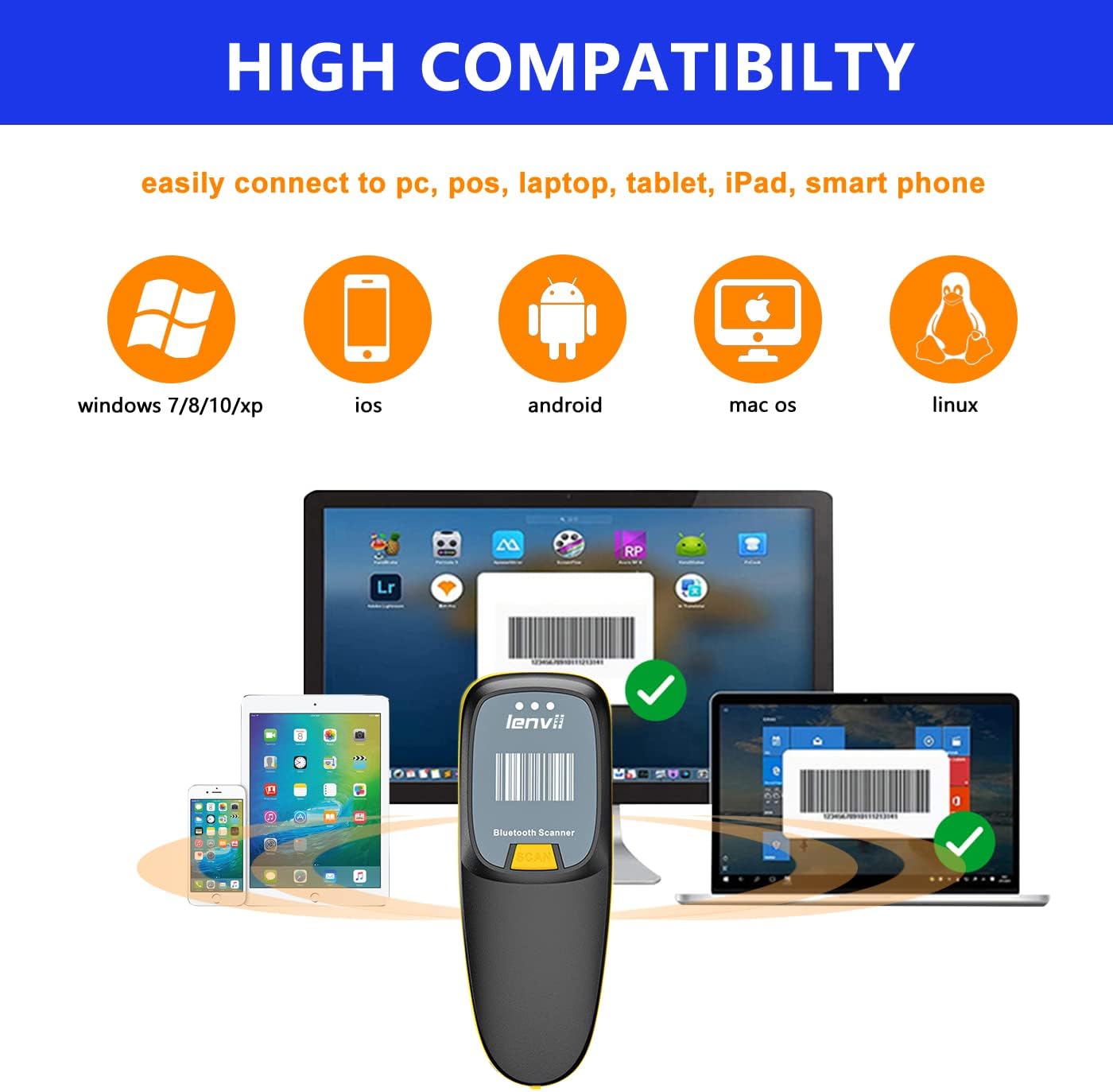
Նկար 3: The LENVII R999 scanner demonstrates high compatibility with various operating systems, including Windows (7/8/10/XP), iOS, Android, Mac OS, and Linux, connecting to PCs, POS systems, laptops, tablets, iPads, and smartphones.
- Աջակցվող օպերացիոն համակարգեր. Windows (7/8/10/XP), iOS, Android, Mac OS, Linux.
- Համատեղելի սարքեր. Համակարգիչներ, վաճառքի կետեր, նոութբուքեր, պլանշետներ, iPad-ներ, սմարթֆոններ։
Գործառնական հրահանգներ
Շտրիխ կոդերի սկանավորում
The scanner supports a wide range of 1D and 2D barcode types, including QR codes, and can scan directly from screens.
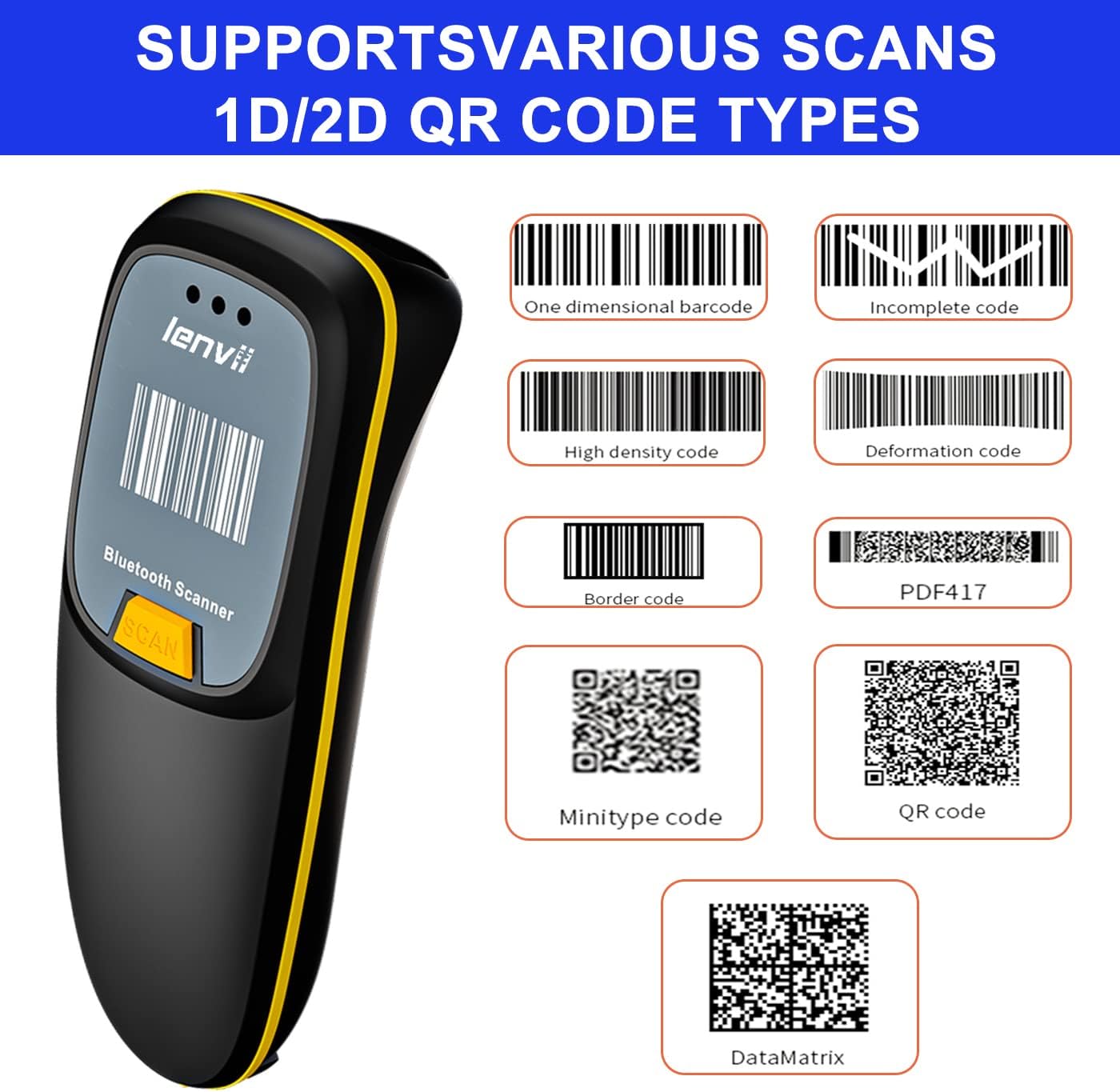
Նկար 4: The LENVII R999 scanner supports various 1D and 2D QR code types, including One Dimensional, Incomplete, High Density, Deformation, Border, PDF417, Minitype, QR Code, and DataMatrix.
- Աջակցվող շտրիխ կոդերի տեսակները՝ One Dimensional, Incomplete, High Density, Deformation, Border, PDF417, Minitype, QR Code, DataMatrix.
- Screen Scan: The scanner is capable of reading barcodes directly from digital screens.
- Սկանավորման կարգը. Point the scan window at the barcode and press the trigger button. A successful scan will typically be indicated by an audible beep and/or a change in the indicator light.
Տվյալների փոխանցման ռեժիմներ
The LENVII R999 offers two primary data transfer modes to suit different operational needs.

Նկար 5: The LENVII R999 scanner supports two data transfer modes: Instant Upload Mode, where scanned data is immediately sent to the connected device, and Offline Storage Mode, where data is stored internally for later upload.
- Ակնթարթային վերբեռնման ռեժիմ. Scanned data is immediately transmitted to the connected host device. This is ideal for real-time inventory management or point-of-sale operations.
- Անցանց պահեստավորման ռեժիմ՝ Scanned data is stored internally in the scanner's memory. This mode is useful when working out of range of a host device. Data can be uploaded later when the scanner is reconnected.
Refer to the scanner's quick start guide or advanced settings for instructions on switching between these modes.
Տեխնիկական սպասարկում
Մարտկոցի կառավարում
The LENVII R999 is equipped with a 1200mAh Lithium Ion battery, providing extended continuous use and standby time.

Նկար 6: The LENVII R999 barcode scanner features a 1200mAh battery, offering significantly longer operational time compared to scanners with 500mAh batteries.
- Լիցքավորում: Connect the scanner to a power source using the provided USB cable. The indicator light will show charging status.
- Մարտկոցի կյանք. A fully charged battery provides prolonged operation. Actual battery life may vary based on usage patterns.
- Պահպանում: If storing the scanner for an extended period, ensure the battery is partially charged (around 50%) to maintain battery health.
Մաքրում
To ensure optimal performance, keep the scanner clean.
- Սկան պատուհան. Gently wipe the scan window with a soft, lint-free cloth. For stubborn dirt, slightly dampՄաքրեք կտորը ջրով կամ մեղմ, ոչ հղկող մաքրող միջոցով: Խուսափեք կոշտ քիմիական նյութերից:
- Արտաքին տեսք: Մաքրեք արտաքին մասըasinգ՝ փափուկ, չոր կտորով։
- Խուսափել՝ Do not immerse the scanner in water or use abrasive materials.
Անսարքությունների վերացում
If you encounter issues with your LENVII R999 scanner, refer to the following common problems and solutions:
| Խնդիր | Հնարավոր պատճառ | Լուծում |
|---|---|---|
| Scanner does not turn on. | Մարտկոցի ցածր լիցք կամ էներգիայի խնդիր։ | Charge the scanner using the provided USB cable. Ensure the cable and power source are working. |
| Scanner does not connect via Bluetooth/2.4GHz. | Not in pairing mode, out of range, or interference. | Ensure the scanner is in the correct pairing mode. Check the distance to the host device. Remove potential sources of interference. Re-pair the device. |
| Սկաները չի կարդում շտրիխ կոդերը։ | Barcode damaged, poor lighting, scan window dirty, or incorrect barcode type settings. | Ensure the barcode is clear and undamaged. Provide adequate lighting. Clean the scan window. Verify the scanner is configured for the specific barcode type. |
| Սկանավորված տվյալները սխալ են կամ թերի։ | Partial scan, incorrect data format settings. | Ensure a complete scan of the barcode. Check the scanner's configuration for data formatting. |
Եթե խնդիրը շարունակվում է, խնդրում ենք կապվել հաճախորդների աջակցության հետ։
Տեխնիկական պայմաններ
Key technical specifications for the LENVII R999 Mini Wireless Barcode Scanner:
- Մոդելի համարը: R999
- Ապրանքանիշը: LENVII
- Միացման տեխնոլոգիա. Bluetooth, 2.4 ԳՀց անլար, USB լարով
- Power Source: սնուցվում է մարտկոցով
- Մարտկոցի տեսակը: 1 Lithium Ion battery (1200mAh capacity)
- Քաշը: Approximately 130g (as indicated in product imagery)
- Աջակցվող շտրիխ կոդեր. 1D and 2D (including QR Code, DataMatrix, PDF417, etc.)
- Transmission Distance (Bluetooth): Up to 30m (98ft) barrier-free, 15m (49ft) with obstacles.
- Transmission Distance (2.4GHz Wireless): Up to 50m (164ft) barrier-free, 20m (66ft) with obstacles.
- Համատեղելիություն: Windows (7/8/10/XP), iOS, Android, Mac OS, Linux.

Նկար 7: The LENVII R999 barcode scanner is designed for portability, featuring a mini size and a weight of approximately 130g, making it suitable for various scenarios such as retail, warehousing, and libraries.
Երաշխիք և աջակցություն
For warranty information, technical support, or further assistance, please contact the manufacturer or your point of purchase.
You may also visit the official LENVII store for support and product information: LENVII Official Store