
Cabletech URZ0336B
Cabletech URZ0336B DVB-T2 H.265 HEVC Digital Tuner
Օգտագործողի հրահանգների ձեռնարկ
1. Ներածություն
This manual provides comprehensive instructions for the installation, operation, and maintenance of your Cabletech URZ0336B DVB-T2 H.265 HEVC Digital Tuner. Please read this manual thoroughly before using the device to ensure proper functionality and to prevent damage.
2. Անվտանգության տեղեկատվություն
Always observe the following safety precautions to avoid electric shock, fire, or damage to the device:
- Սարքը մի՛ ենթարկեք անձրևի կամ խոնավության:
- Մի՛ բացեք c-նasinէ. Բոլոր սպասարկման հարցերը հանձնարարեք որակավորված անձնակազմին:
- Ապահովեք սարքի շուրջը պատշաճ օդափոխություն։ Մի՛ փակեք օդափոխության բացվածքները։
- Օգտագործեք միայն սարքի հետ տրվող հոսանքի ադապտեր:
- Սարքը հեռու պահեք ջերմության աղբյուրներից և արևի ուղիղ ճառագայթներից:
- Disconnect the power plug from the wall outlet if the device will not be used for a long period.
3. Փաթեթի բովանդակությունը
Խնդրում ենք ստուգել փաթեթի վրա հետևյալ կետերը.
- Cabletech URZ0336B DVB-T2 H.265 HEVC Digital Tuner
- Հեռակառավարման վահանակ
- AAA մարտկոցներ (2x)
- Power Adapter
- Օգտագործողի ձեռնարկ (այս փաստաթուղթը)
4. Ապրանքը ավարտված էview
Familiarize yourself with the main components and connections of your Cabletech URZ0336B tuner.
4.1. Device and Remote Control
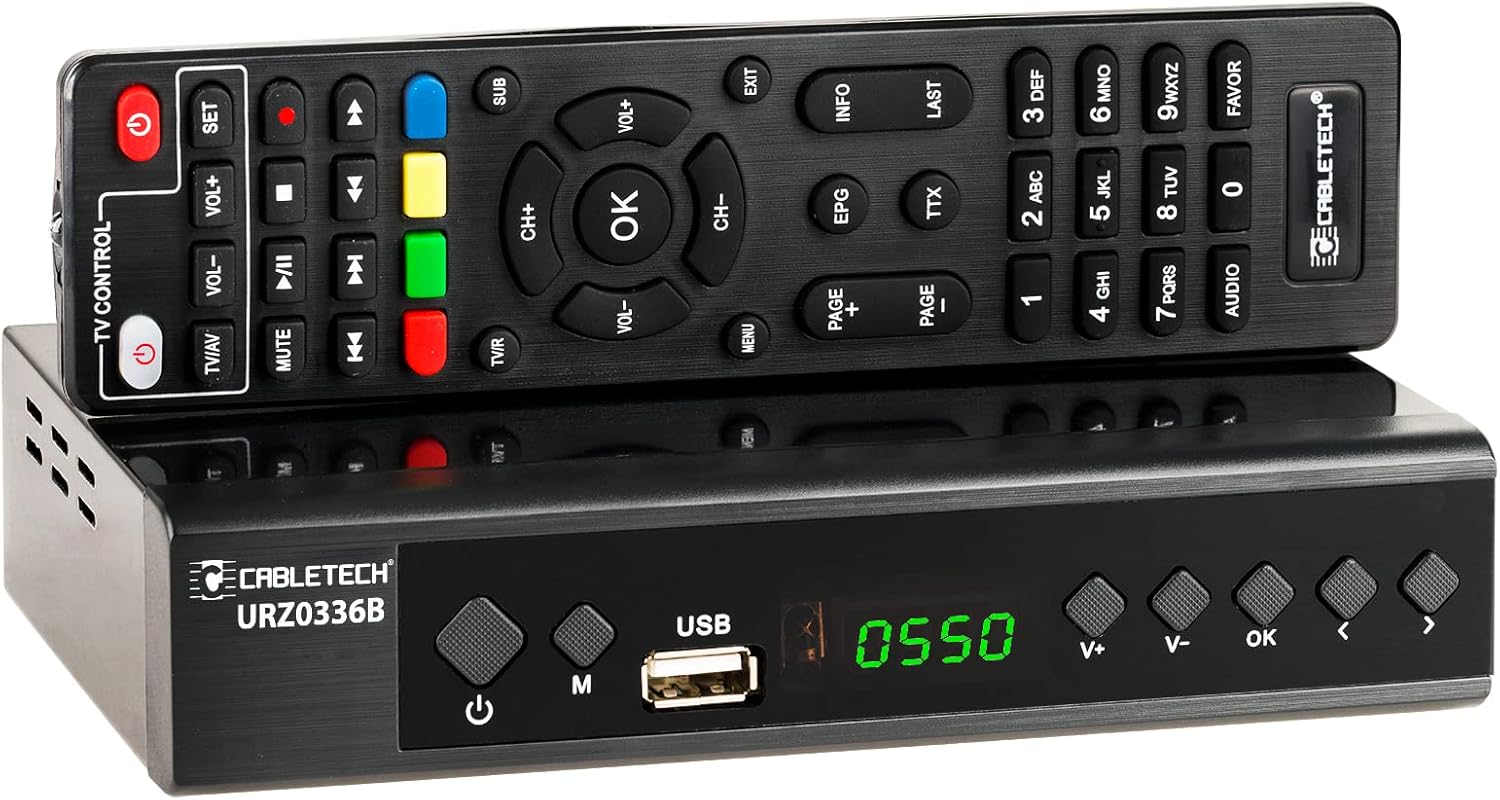
Image: The Cabletech URZ0336B DVB-T2 H.265 HEVC Digital Tuner shown with its accompanying remote control. The tuner is a compact black box, and the remote is also black with various control buttons.
4.2. Առջեւի վահանակ
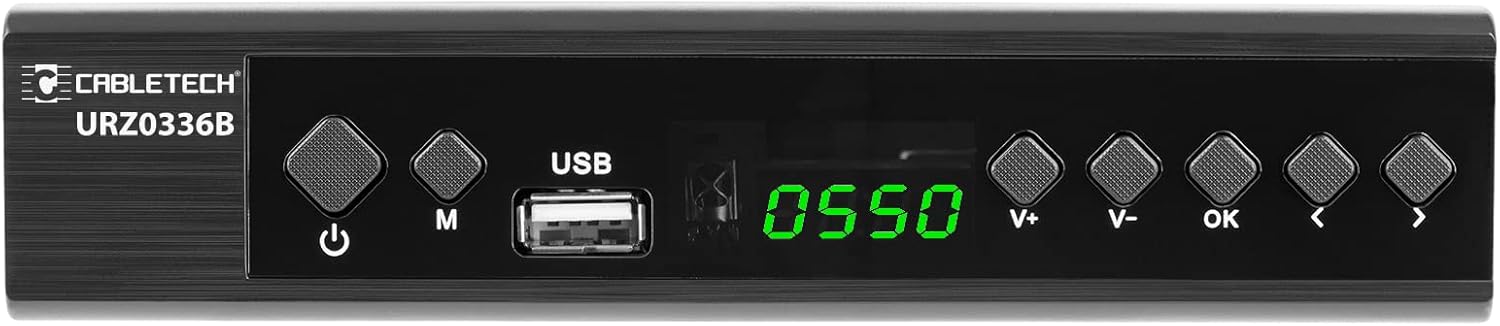
Image: Close-up of the Cabletech URZ0336B front panel, featuring a power button, menu button (M), USB 2.0 port, LED display showing "0550", and navigation/volume buttons (V+, V-, OK, <, >).
- Power կոճակը. Turns the device on/off or to standby.
- M (Menu) Button: Մուտք գործեք հիմնական մենյու:
- USB 2.0 միացք. For software updates, PVR recording, and media playback.
- Լուսադիոդային ցուցադրիչ: Shows channel number or time.
- V+/V- Buttons: Կարգավորում է ձայնը:
- OK կոճակ: Հաստատում է ընտրությունները:
- </> Buttons: Navigates through menus or changes channels.
4.3. Հետևի վահանակի միացումներ

Image: The rear panel of the Cabletech URZ0336B, showing various input and output ports: ANT IN (IEC socket), COAXIAL, USB, HD OUT (HDMI), SCART, and the power input (110-240V~ 50/60Hz).
- ANT IN: Connects to your DVB-T/T2 antenna.
- COAXIAL: Թվային աուդիո ելք:
- USB: Additional USB 2.0 port for external devices.
- HD OUT (HDMI): Միանում է ձեր հեռուստացույցին՝ բարձր որակի տեսանյութ և ձայն ստանալու համար։
- SCART: Connects to older TVs or VCRs.
- Էլեկտրաէներգիայի մուտքագրում. Միանում է հոսանքի ադապտերին:
4.4. Հեռակառավարման դասավորություն

Պատկեր՝ մանրամասն view of the Cabletech URZ0336B remote control, showing buttons for power, TV/AV, volume, channel, mute, playback controls, EPG, TTX, INFO, numeric keypad, and special function buttons.
The remote control provides full functionality for operating your tuner. Insert 2x AAA batteries into the battery compartment before first use.
5. Կարգավորում
5.1. Connecting the Tuner
- Անտենայի միացում՝ Connect your DVB-T/T2 antenna cable to the ANT IN port on the rear panel of the tuner.
- Միացեք հեռուստացույցին՝
- For HD TVs: Connect an HDMI cable from the HD ելք (HDMI) port on the tuner to an HDMI input on your TV.
- For older TVs: Connect a SCART cable from the SCART port on the tuner to the SCART input on your TV.
- Միացրեք հոսանքը. Connect the power adapter to the tuner's power input and then plug it into a wall outlet.
- Տեղադրեք մարտկոցներ. Open the battery compartment on the remote control and insert 2x AAA batteries, observing polarity.
5.2. First-Time Installation and Channel Scan
- Turn on your TV and select the correct HDMI or SCART input source that the tuner is connected to.
- Power on the Cabletech URZ0336B tuner using the power button on the front panel or remote control.
- The first-time installation wizard should appear on your TV screen. Follow the on-screen prompts.
- Select your preferred language and country.
- Initiate an Ավտոմատ որոնում for channels. The tuner will scan for all available DVB-T/T2 channels in your area. This process may take several minutes.
- Once the scan is complete, the tuner will save the found channels and display the first channel.
Note: If you experience poor signal quality, adjust your antenna position or consider using a signal ampավելի կենդանի
6. Գործառնական հրահանգներ
6.1. Հիմնական գործառույթներ
- Միացում/անջատում. Սեղմեք ԻՇԽԱՆՈՒԹՅՈՒՆ կոճակ հեռակառավարման վահանակի վրա:
- Ալիքի փոփոխություն. Օգտագործեք CH + / CH- buttons or the numeric keypad to enter a channel number.
- Ձայնի վերահսկում. Օգտագործեք VOL + / VOL- կոճակներ.
- Անջատել՝ Սեղմեք ՀԱՄՐ կոճակը՝ ձայնը ժամանակավորապես լռեցնելու համար։
- Մենյու: Սեղմեք ՄԵՆՈՒ button to access the main menu for settings and features.
- ԼԱՎ: Confirms selections in menus or displays the channel list.
- ԵԼՔ: Դուրս է գալիս ընթացիկ ընտրացանկից կամ էկրանից:
6.2. Electronic Program Guide (EPG)
The 7-day EPG provides a schedule of current and upcoming programs.
- Սեղմեք EPG կոճակ հեռակառավարման վահանակի վրա:
- Navigate through channels and program times using the arrow buttons.
- Մամուլ OK դեպի view details about a selected program.
6.3. PVR (Program Recording) and Timeshift
Connect a USB storage device (e.g., USB flash drive or external hard drive) to one of the USB 2.0 ports to use PVR and Timeshift functions.
- PVR ձայնագրություն՝
- Սեղմեք REC button (red circle) on the remote to start immediate recording of the current program. Press STOP (square) to end recording.
- Schedule recordings via the EPG: Select a program in the EPG and press OK, then choose the record option.
- Ժամկետային հերթափոխ.
- Հաղորդումը դիտելիս սեղմեք ԴԱԴԱՐ button. The tuner will begin recording the live broadcast to the USB device.
- Դուք կարող եք, ապա ԽԱՂԱԼ, ԱՐԱԳ ԱՌԱՋ, կամ ՀԵՏԱՓՈԽԵԼ within the buffered content.
- Մամուլ STOP to exit Timeshift and return to live TV.
6.4. Մեդիա նվագարկում
The tuner supports playback of various media files from a connected USB storage device.
- Connect your USB device to a USB port on the tuner.
- Go to the main menu and select "Media" or "USB".
- Գնացեք ցանկալիին file type (MP3, WMA, JPEG, BMP, AVI) and select the file խաղալ.
6.5. Supported Applications
The tuner supports various online applications when connected to the internet via an external MT7601 Wi-Fi adapter (not included).
- Եղանակը: View local weather forecasts.
- IPTV: Access Internet Protocol Television streams.
- YouTube: Watch videos from YouTube.
- RSS: Read RSS news feeds.
Note: An external MT7601 Wi-Fi adapter is required for internet connectivity and access to these applications.
6.6. Ծնողական վերահսկողություն
Set up parental control to restrict access to certain channels or programs based on age ratings.
- Access the "Parental Control" section in the main menu.
- Enter your PIN (default is usually 0000 or 1234, check your device for specifics).
- Configure age restrictions or lock specific channels.
6.7. erամաչափի գործառույթ
The timer function allows you to schedule the tuner to turn on/off at specific times or to switch to a particular channel.
- Navigate to the "Timer" section in the main menu.
- Set the event type (e.g., Power On, Power Off, Record), time, and duration.
7. Պահպանում
7.1. Մաքրում
To clean the device, disconnect it from the power supply and wipe the exterior with a soft, dry cloth. Do not use liquid or aerosol cleaners.
7.2. Ծրագրային ապահովման թարմացում
Software updates can improve performance and add new features. Updates are performed via the USB port.
- Ներբեռնեք վերջին որոնվածը file from the official Cabletech support webկայք (եթե առկա է):
- Պատճենեք որոնվածը file USB ֆլեշ կրիչի արմատային գրացուցակում։
- Connect the USB flash drive to the tuner's USB port.
- Go to the "System" or "Tools" menu, then select "Software Update" or "Upgrade by USB".
- Follow the on-screen instructions to complete the update. Do not power off the device during the update process.
8: Անսարքություն
If you encounter issues with your tuner, refer to the following common problems and solutions:
| Խնդիր | Հնարավոր պատճառ | Լուծում |
|---|---|---|
| Ոչ մի նկար կամ ձայն | Incorrect TV input selected; Loose cable connections; Tuner not powered on. | Select correct TV input (HDMI/SCART); Check all cable connections; Ensure tuner is powered on. |
| «Սիգնալ չկա» հաղորդագրությունը | Antenna not connected; Poor antenna signal; No channels scanned. | Connect antenna properly; Adjust antenna position; Perform an automatic channel scan. |
| Հեռակառավարումը չի աշխատում | Batteries are dead or inserted incorrectly; Obstruction between remote and tuner. | Replace batteries; Check battery polarity; Remove any obstructions; Point remote directly at the tuner. |
| Cannot record to USB | USB device not connected or formatted incorrectly; Insufficient storage space. | Ensure USB device is connected; Format USB device to FAT32 or NTFS; Free up space on USB device. |
| No internet access for apps | No MT7601 Wi-Fi adapter connected; Network configuration issues. | Connect a compatible MT7601 Wi-Fi adapter; Check network settings in the tuner's menu. |
9. Տեխնիկական պայմաններ
| Առանձնահատկություն | Մանրամասն |
|---|---|
| Մոդելի համարը | URZ0336B |
| CPU | GX6702S5 |
| Ներքին հիշողություն | 32 ՄԲ |
| RAM | 512 ՄԲ DDR2 |
| ANT միակցիչ | IEC վարդակից |
| Հաճախականության միջակայք | VHF: 170–230 MHz, UHF: 470–862 MHz |
| Դեմոդուլյացիա | QPSK, 16QAM, 64QAM, 256QAM |
| Լայնություն | 7 ՄՀց, 8 ՄՀց |
| Վերծանում | MPEG-1, MPEG-2, MPEG-4, H.264, H.265, AAC, HE-AAC, AC-3, DD+ |
| Մուտքեր/Ելքեր | 2x USB 2.0, HDMI, SCART, COAXIAL |
| Ասպեկտների հարաբերակցություն | Auto, 16:9 WS, 16:9 PB, 16:9 PS; 4:3 LB, 4:3 PS, 4:3 Full |
| Աջակցվող ձևաչափեր | MP3, WMA, JPEG, BMP, AVI |
| Էկրանի լուծում | 480i, 480p, 576i, 576p, 720p, 1080i, 1080p |
| Տեսանյութի բանաձեւ | 1920 x 1080 պիքսել |
| Աուդիո վերծանում | MPEG-1 LayerI/II, Dolby-Downmix 2-Channel (License), AAC LC, HE-AAC v1/V2, PCM-Downmix, IEC958 SPDIF |
| File Համակարգ | FAT32, NTFS |
| Համատեղելիություն | Fully compatible with DVB-T2/DVB-T |
| Հեռակառավարման վահանակ | Requires 2x AAA batteries |
| Էլեկտրաէներգիայի սպառում | Max. 6 W (Operating), Max. 50/60 Hz (Standby) |
| Չափերը (Վ x Հ) | 168 մմ x 36 մմ |
| Wi-Fi աջակցություն | Requires external MT7601 chip adapter |
| Tuner Bit Depth | 10 բիթ |
10. Երաշխիք և աջակցություն
This product comes with a standard manufacturer's warranty. For specific warranty terms and conditions, please refer to the documentation included with your purchase or contact Cabletech customer support.
For technical assistance, troubleshooting beyond this manual, or warranty claims, please contact your retailer or the official Cabletech support channels.
Ask a question about this manual
Ask about setup, troubleshooting, compatibility, parts, safety, or missing instructions. Manuals+ will review the question and use this page’s manual context to help answer it.