
TOUCARE T9S
TOUCARE T9S Motorcycle Bluetooth Intercom User Manual
Model: T9S | Brand: TOUCARE
Ներածություն
The TOUCARE T9S is a high-performance Bluetooth intercom system designed for motorcycle riders. It enables clear communication between up to four riders, offers music sharing, and integrates with your mobile phone for calls and GPS navigation. With advanced noise cancellation and a robust waterproof design, the T9S ensures a reliable and enjoyable riding experience in various conditions.
Հիմնական հատկանիշները
- 1200M Maximum Distance: Equipped with Bluetooth 5.0 for high compatibility and stability, allowing group communication within a 1200m intercom range.
- Support 4-Riders Intercom: Full-duplex communication for up to 4 riders simultaneously. Universal pairing function ensures compatibility with most Bluetooth headsets and mobile phones.
- Երաժշտության փոխանակում. Share music with another rider, enjoy Hi-Fi stereo music, FM radio, or GPS voice guidance.
- Noise Reduction and IP67 Waterproof: DSP and CVC advanced noise reduction technology for clear communication up to 120km/h. IP67 waterproof rating for all-weather use.
- Ultra-Long Standby Battery: 800mAh rechargeable battery provides up to a week of standby time and 15 hours of working time.

Image: The T9S system supports communication for up to four riders over a distance of 1200 meters.

Image: CVC & DSP Noise Cancellation Technology ensures clear and smooth communication even at high speeds.

Image: The IP67 waterproof rating makes the T9S suitable for use in all weather conditions, including water sports.

Image: The T9S offers extended endurance times for talking, music playback, and standby, supporting long-distance travel.
Փաթեթի բովանդակությունը
Each TOUCARE T9S package includes the following components:
- 1 x Bluetooth Intercom Unit
- 1 x Hi-Fi Speaker Set
- 1 x Բում միկրոֆոն
- 1 x կոճակով միկրոֆոն
- 1 x USB մալուխ
- 1 x Մոնտաժային փակ
- 1 x Clamp Ափսե
- 1 x Ալենի պտուտակաբանալի

Image: All components included in the TOUCARE T9S package, ensuring you have everything needed for installation and use.
Ապրանքը ավարտվել էview և կոճակների գործառույթներ
Familiarize yourself with the buttons and indicators on your T9S intercom unit:
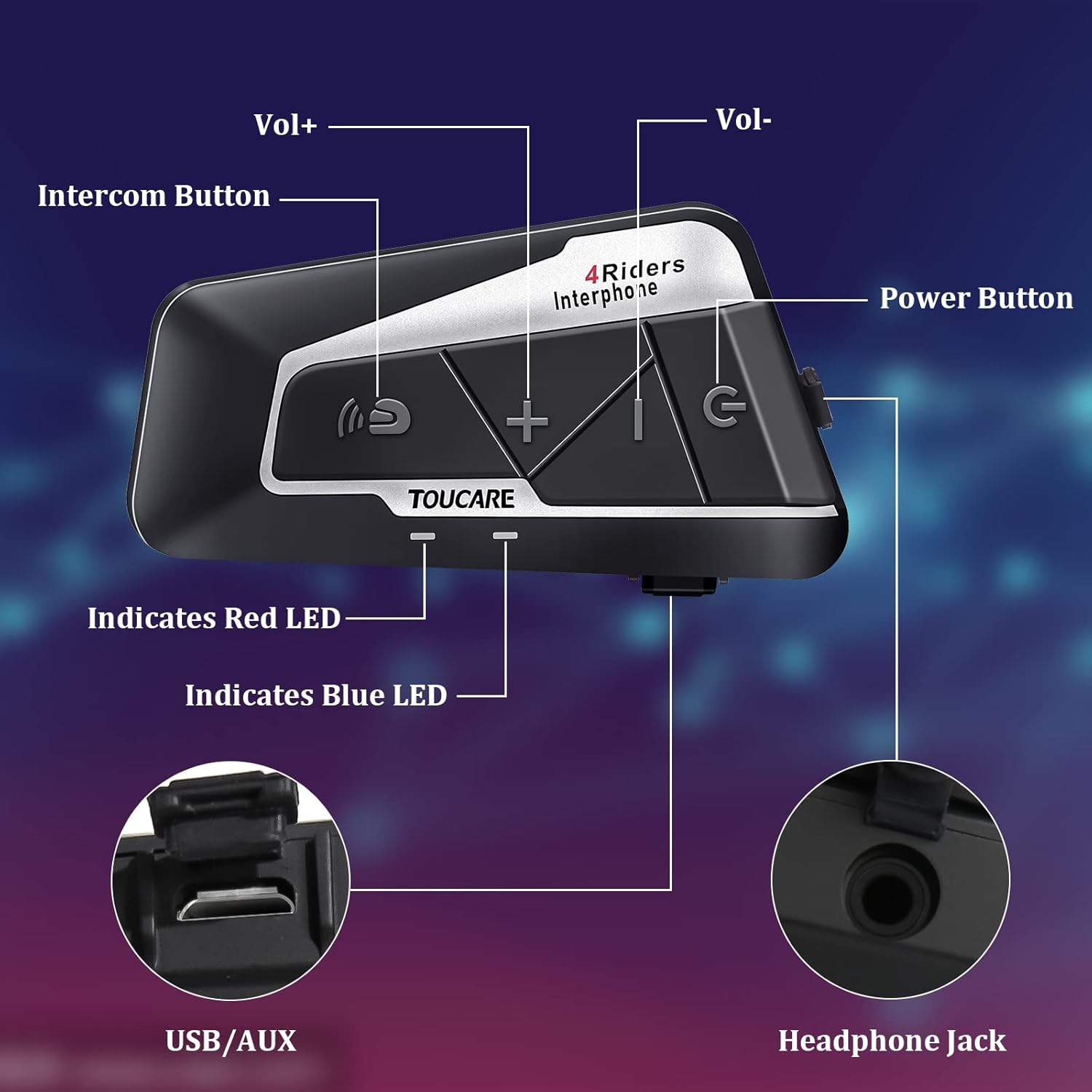
Image: Detailed diagram of the T9S unit, highlighting the location and labels of each button and port.
Power On/Off Button (G)
- Միացում/անջատում. Սեղմեք և պահեք՝ սարքը միացնելու կամ անջատելու համար:
- Paired Mobile Phone: Short press to connect/disconnect with a paired mobile phone.
- Էլեկտրաէներգիայի հուշում. Short press to hear battery level prompt.
- Hang up Bluetooth Intercom: Short press during an intercom call to end it.
- Երաժշտության նվագարկում/դադար. Կարճ սեղմեք՝ երաժշտությունը նվագարկելու կամ դադարեցնելու համար:
- Call Answering/Third Party Answer/End/Reject: Manage phone calls.
Bluetooth Intercom Button (Intercom Icon)
- Umeավալ +: Ձայնը մեծացնելու համար կարճ սեղմեք:
- Վերջին երգը. Երկար սեղմեք՝ նախորդ երգին անցնելու համար։
- FM Turn Up: Short press during FM mode to tune up.
- FM Turn On/Off: Long press to turn FM radio on or off.
- Վերջին համարի վերահավաքում. Double press to redial the last dialed number.
Volume - Button (-)
- Volավալ - Ձայնը նվազեցնելու համար կարճ սեղմեք:
- Հաջորդ երգը. Երկար սեղմեք՝ հաջորդ երգին անցնելու համար:
- FM Turn Down: Short press during FM mode to tune down.
- FM Turn On/Off: Long press to turn FM radio on or off.
- Ձայնային հավաքում. Double press to activate voice dialing (if supported by your phone).

Image: The T9S features ultra-large buttons, designed for easy operation even while wearing gloves.
Տեղադրման ուղեցույց
Տեղադրման ֆիքսված մեթոդ
Follow these steps to securely install the T9S intercom unit on your helmet:
- Locate and Clean: Identify a suitable flat area on the left side of your helmet for mounting. Ensure the surface is clean and dry.
- Պատրաստեք սոսինձ. Peel off the protective film from the 3M adhesive on the back of the mounting bracket.
- Կիրառել ճնշում. Firmly press the mounting bracket onto the chosen location on your helmet. Apply consistent pressure for several seconds to ensure a strong bond.
- Անվտանգ միավոր՝ Slide the T9S intercom unit onto the mounted bracket until it clicks securely into place.
- Install Speakers and Microphone: Route the speaker and microphone wires inside the helmet lining. Position the speakers inside the ear pockets and the microphone near your mouth for optimal audio.
Գործառնական հրահանգներ
Զուգավորում բջջային հեռախոսի հետ
- Ensure the T9S is powered off.
- Press and hold the Power On/Off button until the LED indicator flashes red and blue alternately, indicating pairing mode.
- On your mobile phone, enable Bluetooth and search for new devices. Select "TOUCARE T9S" from the list.
- Once paired, the LED will flash blue slowly.
Initiating Intercom Communication
- Ensure all T9S units are powered on and within range.
- To initiate a group intercom, short press the Bluetooth Intercom Button on your unit. The units will attempt to connect.
- To end an intercom call, short press the Power On/Off button.
Երաժշտության նվագարկում
- Նվագարկել/Դադար. Կարճ սեղմեք միացման/անջատման կոճակը:
- Հաջորդ երգը. Երկար սեղմեք ձայնի կոճակը։
- Նախորդ Երգ. Long press the Bluetooth Intercom button.
- Ձայնի ճշգրտում. Short press Volume + or Volume - buttons.
FM ռադիո
- Միացնել/անջատել. Long press either the Bluetooth Intercom button or the Volume - button.
- Կարգավորել. Short press the Bluetooth Intercom button.
- Կարգավորել: Կարճ սեղմեք ձայնի կոճակը։
Զանգերի պատասխանում/վերջացում
- Պատասխանել զանգին. Short press the Power On/Off button when a call comes in.
- Ավարտել զանգը. Short press the Power On/Off button during a call.
- Մերժել զանգը. Long press the Power On/Off button when a call comes in.
- Ձայնային հավաքում. Double press the Volume - button (requires phone support).
- Վերջին համարի վերահավաքում. Double press the Bluetooth Intercom button.
Տեխնիկական բնութագրեր
| Առանձնահատկություն | Հստակեցում |
|---|---|
| Bluetooth տարբերակ | 5.0 |
| Bluetooth Profiles Աջակցվում է | HSP, HFP, A2DP, AVRCP, AGHSP |
| Աշխատանքային ժամեր | 15 ժամ |
| Սպասման ժամանակ | 350 ժամ |
| Լիցքավորման ժամանակ | 3 ժամ |
| Մարտկոցի տեսակը | Rechargeable Lithium Battery, 800mAh, 3.7V |
| Չափերը | 89 x 46 x 30 մմ |
| Քաշը | 85 գ |
| Աղմուկի վերահսկում | Active Noise Cancellation (DSP & CVC) |
| Ջրի դիմադրության մակարդակը | IP67 |
| Միացման տեխնոլոգիա | Անլար |
| Նյութ | Ռետինե |
| Կառավարման տեսակը | Voice Control (via phone), Button Control |
Տեխնիկական սպասարկում
To ensure the longevity and optimal performance of your TOUCARE T9S intercom, follow these maintenance guidelines:
- Մաքրում: Սրբեք միավորը փափուկով, դamp կտոր. Մի օգտագործեք կոպիտ քիմիական նյութեր, մաքրող լուծիչներ կամ ուժեղ լվացող միջոցներ:
- Պահպանում: Սարքը չօգտագործելիս պահեք զով, չոր տեղում՝ ուղիղ արևի լույսից և ծայրահեղ ջերմաստիճաններից հեռու։
- Մարտկոցի խնամք. For long-term storage, charge the battery to about 50% every three months to prevent deep discharge and extend battery life.
- Ջրի ազդեցությունը. Although IP67 rated, avoid prolonged submersion. Ensure charging port is dry before charging.
- Մալուխի կառավարում. Զգուշորեն վարվեք մալուխների և միակցիչների հետ՝ վնասը կանխելու համար։
Անսարքությունների վերացում
If you encounter issues with your T9S intercom, try the following solutions:
Ոչ մի ուժ
- Ստուգեք մարտկոցը. Ensure the unit is fully charged. Connect it to a power source and check if the charging indicator lights up.
- Վերականգնել. If unresponsive, try holding the Power On/Off button for an extended period (e.g., 10-15 seconds) to force a reset.
Cannot Pair with Mobile Phone/Other Intercoms
- Airուգակցման ռեժիմ. Ensure the T9S is in pairing mode (LED flashing red and blue alternately).
- Սարքի տեսանելիությունը՝ Make sure Bluetooth is enabled on your phone/other intercoms and they are discoverable.
- Մաքրել զուգավորման պատմությունը. On your phone, forget the T9S device and try pairing again. For intercoms, consult the manual for clearing pairing history if available.
- Հեռավորությունը: Ensure devices are within close proximity (e.g., 1 meter) during pairing.
Poor Audio Quality/No Sound
- Ծավալը: Check if the volume is turned up on both the T9S and the connected device (phone/intercom).
- Խոսափողի դիրքը. Ensure the microphone is correctly positioned near your mouth and not obstructed.
- Բարձրախոսի միացում. Verify that the speakers are securely plugged into the headphone jack.
- Միջամտություն: Հեռու մնացեք ուժեղ էլեկտրամագնիսական միջամտության աղբյուրներից։
- Որոնվածը: Ստուգեք արտադրողի website for any available firmware updates that might improve audio performance.
Երաշխիք և աջակցություն
For warranty information, technical support, or service inquiries, please refer to the warranty card included with your product or visit the official TOUCARE webկայք: Պահպանեք ձեր գնման կտրոնը որպես գնման ապացույց՝ երաշխիքային պահանջների համար:
For further assistance, you may also contact TOUCARE customer service through the contact information provided on their official channels.