
WGP T6 Plus
WGP Teleheer T6 Plus Motorcycle Bluetooth Headset User Manual
Model: T6 Plus | Brand: WGP
Ներածություն
This manual provides detailed instructions for the installation, operation, and maintenance of your WGP Teleheer T6 Plus Motorcycle Bluetooth Headset. Please read this manual thoroughly before using the device to ensure proper function and safety. The T6 Plus is designed for motorcycle riders, offering full-duplex Bluetooth real-time intercom communication, hands-free calling, music playback, and voice assistant integration.
Հիմնական հատկանիշները
- Full Duplex Bluetooth Real-time Intercom: Stable signal transmission up to 1500 meters (93 MPH) with ceramic antenna.
- Hands-free & Multi-function Keys: Bluetooth 5.1 connectivity, supports call handling (answer/refuse/redial), music playback. Automatic switch to phone mode for incoming calls. Large button design for easy operation with gloves.
- IP65 Waterproof & Dustproof Design: Withstands various weather conditions, operational down to -15°F.
- HD Speakers & Ultra High Quality Sound: High-definition sound quality, especially for bass, with effective wind noise reduction.
- All-in-One Type-C Port: Integrated audio, data transfer, and charging.
- Երկար մարտկոցի կյանք. 850 mAh battery providing 30 hours of continuous use and 500 hours standby.
Փաթեթի բովանդակությունը
Խնդրում ենք ստուգել, որ բոլոր իրերը առկա են ձեր փաթեթում։
- WGP Teleheer T6 Plus Bluetooth Headset Unit (2 units for 2-pack)
- Սաղավարտի խոսնակներ
- Microphone (boom mic for open-face helmets, soft mic for full-face helmets)
- Mounting Clip (clamp and adhesive options)
- USB Type-C լիցքավորող մալուխ
- Օգտագործողի ձեռնարկ

Image: A detailed diagram illustrating the components of the WGP Teleheer T6 Plus headset, including the main unit with its Type-C port, indicator light, and control buttons (OFF/ON, Volume+, Volume-, Telephone, Connect). It also shows the securing clip, microphone, and trumpet (speakers), providing a clear visual guide to the parts included and their connections.
Կարգավորում և տեղադրում
1. Սարքի լիցքավորում
Before first use, fully charge the T6 Plus headset. Connect the provided USB Type-C cable to the headset's Type-C port and the other end to a USB power adapter (not included). The indicator light will show charging status and turn off when fully charged.
- Լիցքավորման ժամանակը: Մոտ 2-3 ժամ:
- Indicator light: Red during charging, off when fully charged.
2. Installing the Headset in Your Helmet
The T6 Plus can be installed using either the clamp mount or the adhesive mount.
- Ընտրեք տեղադրման վայրը. Select a flat area on the left side of your helmet where the headset unit can be easily accessed.
- Բարձրախոսների տեղադրում՝ Attach the speakers inside the helmet's ear pockets using the adhesive pads. Ensure they are positioned directly over your ears for optimal sound quality.
- Միկրոֆոնի տեղադրում՝
- For full-face helmets: Use the soft wire microphone and position it inside the chin bar, close to your mouth.
- For open-face or modular helmets: Use the boom microphone and position it in front of your mouth.
- Տեղադրեք հիմնական սարքը՝
- Clamp Լեռ. Սահեցրեք clamp between the helmet shell and the inner padding. Secure it tightly.
- Կպչուն լեռ. Clean the chosen surface on the helmet. Peel off the protective film from the adhesive mount and firmly press it onto the helmet for at least 30 seconds. Allow 24 hours for the adhesive to cure before use.
- Միացնել մալուխները. Plug the speaker/microphone cable into the Type-C port on the main headset unit.

Image: A WGP Teleheer T6 Plus headset unit mounted on the side of a motorcycle helmet. This image demonstrates the typical installation position of the headset on a helmet, showing its compact design and how it integrates with the helmet's exterior. The control buttons are visible, indicating ease of access for the rider.
Գործառնական հրահանգներ
1. Միացնել/անջատել
- Միացում՝ Սեղմեք և պահեք կոճակը Power կոճակը for 3 seconds until the indicator light flashes.
- Անջատել: Սեղմեք և պահեք կոճակը Power կոճակը for 3 seconds until the indicator light turns off.
2. Bluetooth Pairing with Mobile Phone
- Ensure the T6 Plus is powered off.
- Սեղմեք և պահեք կոճակը Power կոճակը for approximately 5-7 seconds until the indicator light flashes red and blue alternately, indicating pairing mode.
- On your mobile phone, enable Bluetooth and search for "Teleheer T6 Plus".
- Select "Teleheer T6 Plus" from the list of available devices to connect. Once connected, the indicator light will flash blue slowly.
3. Intercom Pairing (Two Units)
To establish intercom communication between two T6 Plus units:
- Ensure both T6 Plus units are powered off.
- On Unit 1, press and hold the Power կոճակը for 5-7 seconds until the indicator light flashes red and blue alternately.
- On Unit 2, press and hold the Power կոճակը for 5-7 seconds until the indicator light flashes red and blue alternately.
- Համառոտ սեղմեք Power կոճակը on either Unit 1 or Unit 2 (one short press). The units will search for each other.
- Once connected, the indicator lights on both units will flash blue slowly, and you will hear a confirmation tone.
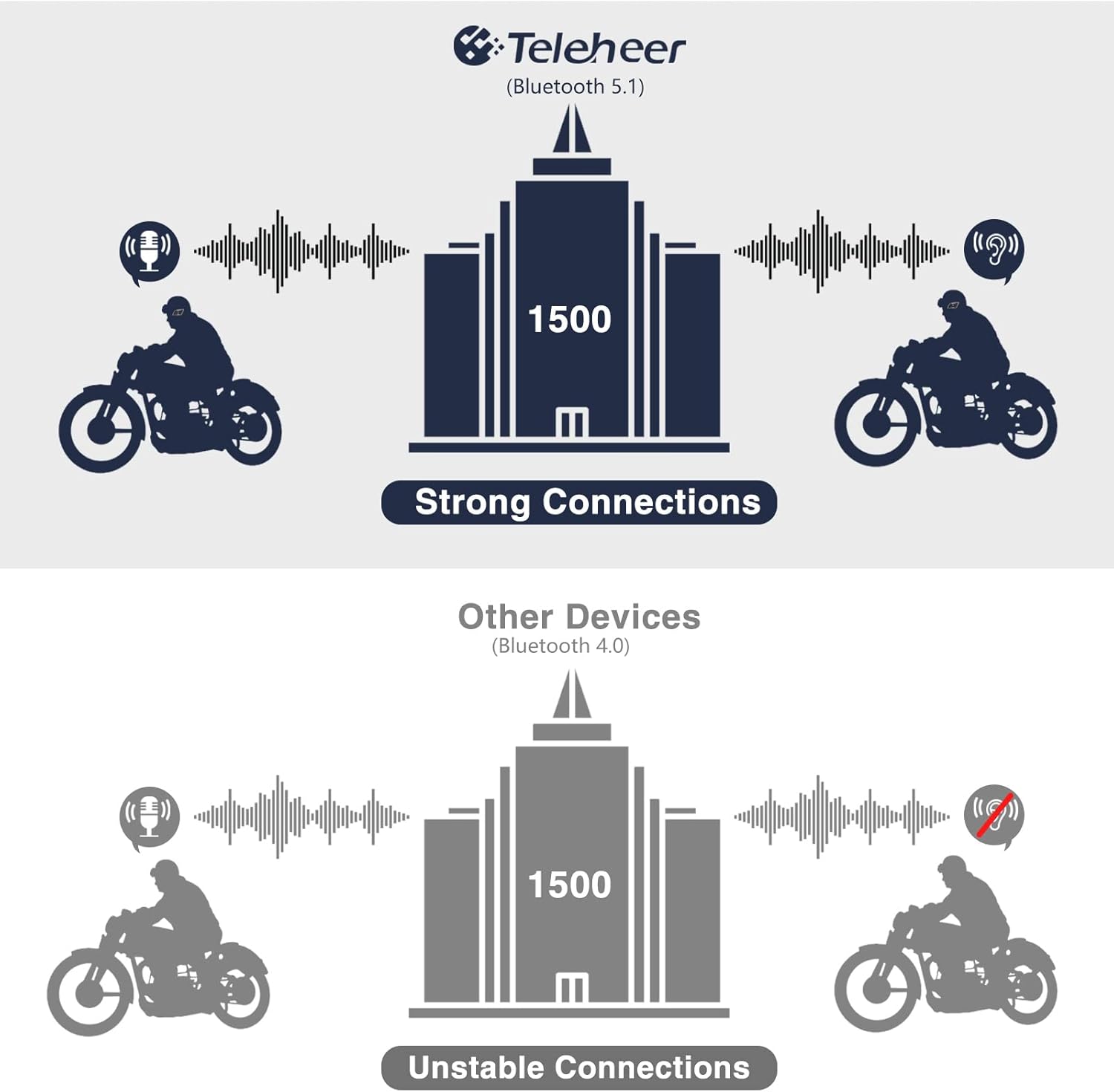
Image: A graphic illustrating the effective intercom range of the Teleheer T6 Plus (Bluetooth 5.1) compared to older Bluetooth 4.0 devices. The T6 Plus shows stable connections over 1500m, while older devices show unstable connections over shorter distances. This highlights the improved signal stability and range due to Bluetooth 5.1 and the ceramic antenna.
4. Phone Call Functions
- Պատասխանել զանգին. Կարճ սեղմեք Հեռախոսի կոճակ.
- Ավարտել զանգը. Կարճ սեղմեք Հեռախոսի կոճակ.
- Մերժել զանգը. Սեղմեք և պահեք կոճակը Հեռախոսի կոճակ 2 վայրկյանով։
- Կրկին հավաքեք Վերջին համարը. Կրկնակի սեղմեք կոճակը Հեռախոսի կոճակ.
5. Երաժշտության նվագարկում
- Նվագարկել/Դադար. Կարճ սեղմեք Հեռախոսի կոճակ.
- Հաջորդ հետքերը. Կարճ սեղմեք Umeավալը բարձրացնելու կոճակ.
- Նախորդ ուղի ՝ Կարճ սեղմեք Volume Down կոճակը.
- Ձայնի ճշգրտում. Սեղմեք և պահեք կոճակը Ձայնի բարձրացում/իջեցման կոճակներ ծավալը մեծացնելու կամ նվազեցնելու համար.
6. Ձայնային օգնական (Siri/Google Assistant)
- Ակտիվացնել ձայնային օգնականը. Կրկնակի սեղմեք կոճակը Power կոճակը.

Image: A graphic depicting the voice assistant feature of the Teleheer T6 Plus, showing a helmeted rider interacting with their phone via voice commands like "Hey Siri" or "Ok Google". This illustrates the hands-free convenience for navigation, calls, and other smartphone functions while riding.
Պահպանում և խնամք
- Մաքրում: Մաքրեք ականջակալների միավորը փափուկ, չոր կտորովamp կտոր. Մի օգտագործեք կոպիտ քիմիական կամ հղկող մաքրող միջոցներ:
- Ջրի դիմադրություն: The device is IP65 waterproof. While it can withstand water jets, avoid submerging it in water for extended periods. Ensure the Type-C port cover is securely closed when not charging.
- Պահպանում: Սարքը չօգտագործելիս պահեք զով, չոր տեղում։ Խուսափեք ծայրահեղ ջերմաստիճաններից։
- Մարտկոցի խնամք. Մարտկոցի կյանքը երկարացնելու համար խուսափեք մարտկոցի հաճախակի լրիվ լիցքաթափումից։ Սարքը պարբերաբար լիցքավորեք, նույնիսկ եթե երկար ժամանակ չեք օգտագործում։

Image: A WGP Teleheer T6 Plus headset unit partially submerged in water with splashes, demonstrating its IP65 waterproof rating. The image emphasizes the device's ability to withstand water exposure, making it suitable for various weather conditions during riding.
Անսարքությունների վերացում
| Խնդիր | Հնարավոր պատճառ | Լուծում |
|---|---|---|
| Սարքը չի միանում: | Ցածր մարտկոց: | Լիցքավորեք սարքը ամբողջությամբ։ |
| Հնարավոր չէ զուգակցել հեռախոսի հետ։ | Device not in pairing mode; Bluetooth off on phone; too many paired devices. | Ensure device is in pairing mode (red/blue flashing). Turn on phone's Bluetooth. Delete old Bluetooth connections on phone. |
| Intercom connection unstable or short range. | Obstructions; out of range; interference. | Ensure clear line of sight. Stay within 1500m range. Avoid strong electromagnetic interference. |
| Բարձրախոսներից ձայն չկա: | Speakers not connected properly; volume too low. | Check speaker connection to Type-C port. Increase volume. |
| Microphone not picking up voice. | Microphone not connected properly; microphone position. | Check microphone connection. Ensure microphone is close to your mouth. |
| Wind noise during calls/intercom. | High speed; improper microphone placement. | Ensure microphone is positioned correctly to minimize wind exposure. The device has DSP noise suppression, but extreme conditions may affect performance. |
Տեխնիկական պայմաններ
| Առանձնահատկություն | Մանրամասն |
|---|---|
| Մոդելի անվանումը | Teleheer T6 Plus |
| Bluetooth տարբերակ | Bluetooth 5.1 |
| Intercom Range | Up to 1500 meters (93 MPH) |
| Մարտկոցի հզորությունը | 850 mAh |
| Շարունակական օգտագործման ժամանակ | 30 ժամ |
| Սպասման ժամանակ | 500 ժամ |
| Լիցքավորման նավահանգիստ | Type-C |
| Ջրակայունություն | IP65 (Jet-proof) |
| Գործող ջերմաստիճանը | Մինչև -15°F |
| Անթենային նյութ | Կերամիկական |
| Վերահսկման մեթոդ | Սենսորային / ֆիզիկական կոճակներ |
| Նյութի քաշը | 14.4 ունցիա (մոտ 408 գրամ) |
| Չափերը (Փաթեթ) | 8.54 x 3.9 x 2.95 դյույմ |
Երաշխիք և աջակցություն
For warranty information and technical support, please refer to the official WGP webկայքում կամ ուղղակիորեն կապվեք նրանց հաճախորդների սպասարկման ծառայության հետ: Պահպանեք ձեր գնման կտրոնը որպես գնման ապացույց՝ երաշխիքային պահանջների համար:
Լրացուցիչ օգնության համար կարող եք այցելել՝ ապրանքի էջ Amazon-ում or contact the seller directly through the Amazon platform.
Ask a question about this manual
Ask about setup, troubleshooting, compatibility, parts, safety, or missing instructions. Manuals+ will review the question and use this page’s manual context to help answer it.