
Ներածություն
This manual provides detailed instructions for the installation, operation, and maintenance of your Everycom EC-901 80mm Thermal POS Receipt Printer. Please read this manual thoroughly before using the printer to ensure proper functionality and to prevent damage.
Անվտանգության տեղեկատվություն
- Ensure the printer is connected to a power source with the correct voltage.
- Do not expose the printer to water or high humidity.
- Avoid placing the printer in direct sunlight or near heat sources.
- Use only specified thermal paper for optimal performance and to prevent damage to the print head.
- Do not attempt to disassemble or repair the printer yourself. Contact qualified service personnel.
Փաթեթի բովանդակությունը
Ստուգեք, որ բոլոր իրերը առկա են փաթեթում.
- Everycom EC-901 Thermal POS Receipt Printer
- Roll paper × 1 Roll (for initial testing)
- CD-ROM (containing Drivers, Utility Software, Manuals)
- Թղթային ուղեցույց
- Paper Bearing
- USB մալուխ
- Power Adapter մալուխ
Ապրանքը ավարտվել էview
The Everycom EC-901 is a compact 80mm (3-inch) thermal POS receipt printer designed for efficient and reliable printing. It features a USB and LAN interface for versatile connectivity.

Նկար 1. Առջև view of the Everycom EC-901 Thermal POS Receipt Printer.
Հիմնական հատկանիշները:
- Արագ տպագրության արագություն. Up to 160mm per second for quick receipt output.
- Easy Paper Loading: Drop-in paper loading mechanism for quick and easy media changes.
- Կոմպակտ դիզայն. Low space requirement with an integrated power supply.
- Variable Paper Width: Supports 80mm paper width.
- Միացում: USB and LAN interface options.
- Բարձր լուծաչափ. 203 x 203 DPI for clear print quality.
- Աղմուկի ցածր մակարդակներ. Operates quietly, suitable for various work environments.

Figure 2: Top-open design for easy paper roll installation.
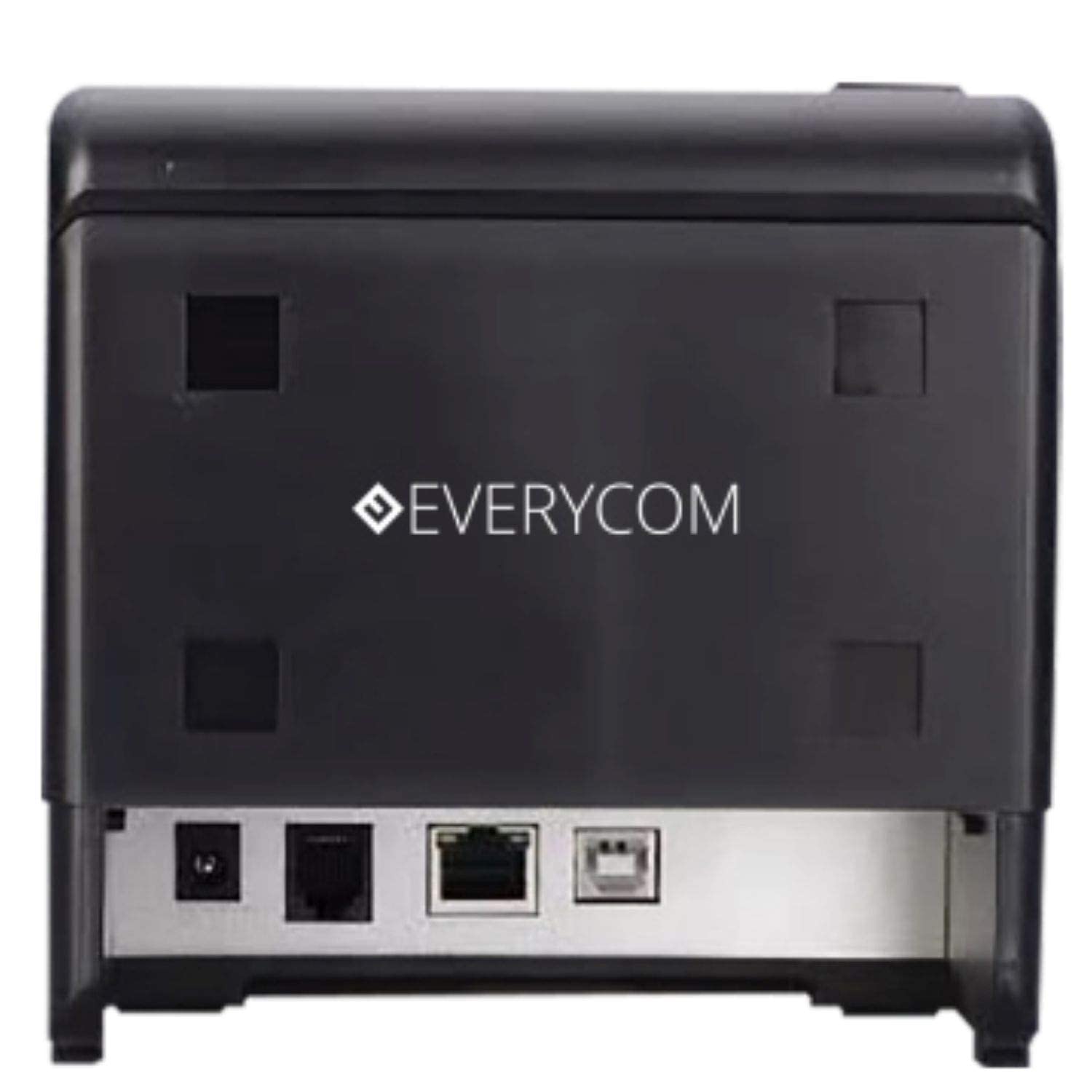
Նկար 3. Հետևի view showing USB and LAN connectivity ports.

Figure 4: The EC-901 printer is designed for low noise operation.

Figure 5: The EC-901 printer features an easy-to-use design for paper installation.
Կարգավորում
1. Տպիչի միացումը
- Connect the power adapter cable to the printer's power port and then plug it into a suitable electrical outlet.
- For USB connection: Connect one end of the USB cable to the printer's USB port and the other end to your computer.
- For LAN connection: Connect an Ethernet cable to the printer's LAN port and the other end to your network router or switch.
- Turn on the printer using the power switch located on the front or side of the device.
2. Թղթի գլանափաթեթի տեղադրում
- Open the printer cover by pressing the release button or lifting the cover.
- Insert the thermal paper roll into the compartment with the paper feeding from the bottom and exiting towards the front.
- Քաշեք մի փոքր քանակությամբ թուղթ կտրիչի կողքով։
- Հաստատ փակեք տպիչի կափարիչը, մինչև այն իր տեղում կտտացվի։
3. Վարորդի տեղադրում
Insert the provided CD-ROM into your computer's CD/DVD drive. Follow the on-screen instructions to install the printer drivers and utility software. Drivers are typically compatible with Windows operating systems, including Windows 10.
Գործառնական հրահանգներ
Ցուցանիշի լույսերը.
- ԻՇԽԱՆՈՒԹՅՈՒՆԸ: Ցույց է տալիս, որ տպիչը միացված է։
- ՍԽԱԼ. Lights up or flashes to indicate an error (e.g., print head overheating, cover open).
- Թուղթ: Indicates low paper or no paper.
Հիմնական տպագրություն՝
Once the printer is connected and drivers are installed, you can print receipts from your POS software or any application that supports printing. Ensure the Everycom EC-901 is selected as the default printer or the desired printer in your application's print settings.
Տեխնիկական սպասարկում
Տպիչի մաքրում.
- Turn off the printer and disconnect the power cable before cleaning.
- Օգտագործեք փափուկ, առանց մզկի կտոր, դampened with isopropyl alcohol to gently clean the thermal print head. Allow it to dry completely before use.
- Wipe the exterior of the printer with a soft, dry cloth. Do not use abrasive cleaners.
Replacing Paper:
When the PAPER indicator lights up or printing becomes faint, replace the paper roll following the steps outlined in the "Installing the Paper Roll" section.
Անսարքությունների վերացում
| Խնդիր | Հնարավոր պատճառ | Լուծում |
|---|---|---|
| Տպիչը չի միանում։ | Power cable disconnected or power outlet issue. | Check power cable connections. Ensure the power outlet is functional. |
| No printing or blank output. | No paper, paper loaded incorrectly, or print head issue. | Check paper roll and ensure it's loaded correctly. Clean the print head if necessary. Verify printer drivers are installed. |
| PAPER indicator is on. | Paper roll is empty or low. | Փոխարինեք թղթի գլանափաթեթը: |
| ERROR indicator is on. | Printer cover open, print head overheating, or other internal error. | Ensure the printer cover is closed properly. Turn off the printer, wait a few minutes for it to cool down, then restart. If the issue persists, contact support. |
| Տպիչը չի ճանաչվում համակարգչի կողմից։ | Driver not installed or USB/LAN cable issue. | Reinstall printer drivers. Check USB/LAN cable connections. Try a different port or cable. |
Տեխնիկական պայմաններ
| Առանձնահատկություն | Մանրամասն |
|---|---|
| Մոդելի անվանումը | EC-901 |
| Տպագրության տեխնոլոգիա | Ջերմային |
| Տպագիր մեդիա | Paper (plain thermal) |
| Առավելագույն մեդիայի չափը | 3 դյույմ (80 մմ) |
| Տպման առավելագույն արագություն | 160 մմ/վրկ |
| Բանաձեւ | 203 x 203 DPI |
| Միացման տեխնոլոգիա | USB, LAN Interface |
| Տպիչի ելք | Մոնոխրոմ |
| Օպերացիոն համակարգ | Windows 10 (և համատեղելի է Windows-ի այլ տարբերակների հետ) |
| Ապրանքի չափսերը (LxWxH) | 19.8 x 14.8 x 14.8 սմ |
| Նյութի քաշը | 1.8 կգ |
| Հատուկ առանձնահատկություն | Without Auto cutter |
Երաշխիք և աջակցություն
For technical assistance, warranty claims, or any product-related inquiries, please contact Everycom customer support.
- Անվճար համար՝ 1800 121 4480
- Աշխատանքային ժամեր: Երկուշաբթի - Շաբաթ, 10:00 - 6:30 (բացառությամբ պետական տոների)