
1. Ներածություն
Շնորհակալություն գնման համարasing the Muse M-308 BT Bluetooth Speaker. This manual provides essential information for the safe and correct use of your device. Please read it thoroughly before use and keep it for future reference.
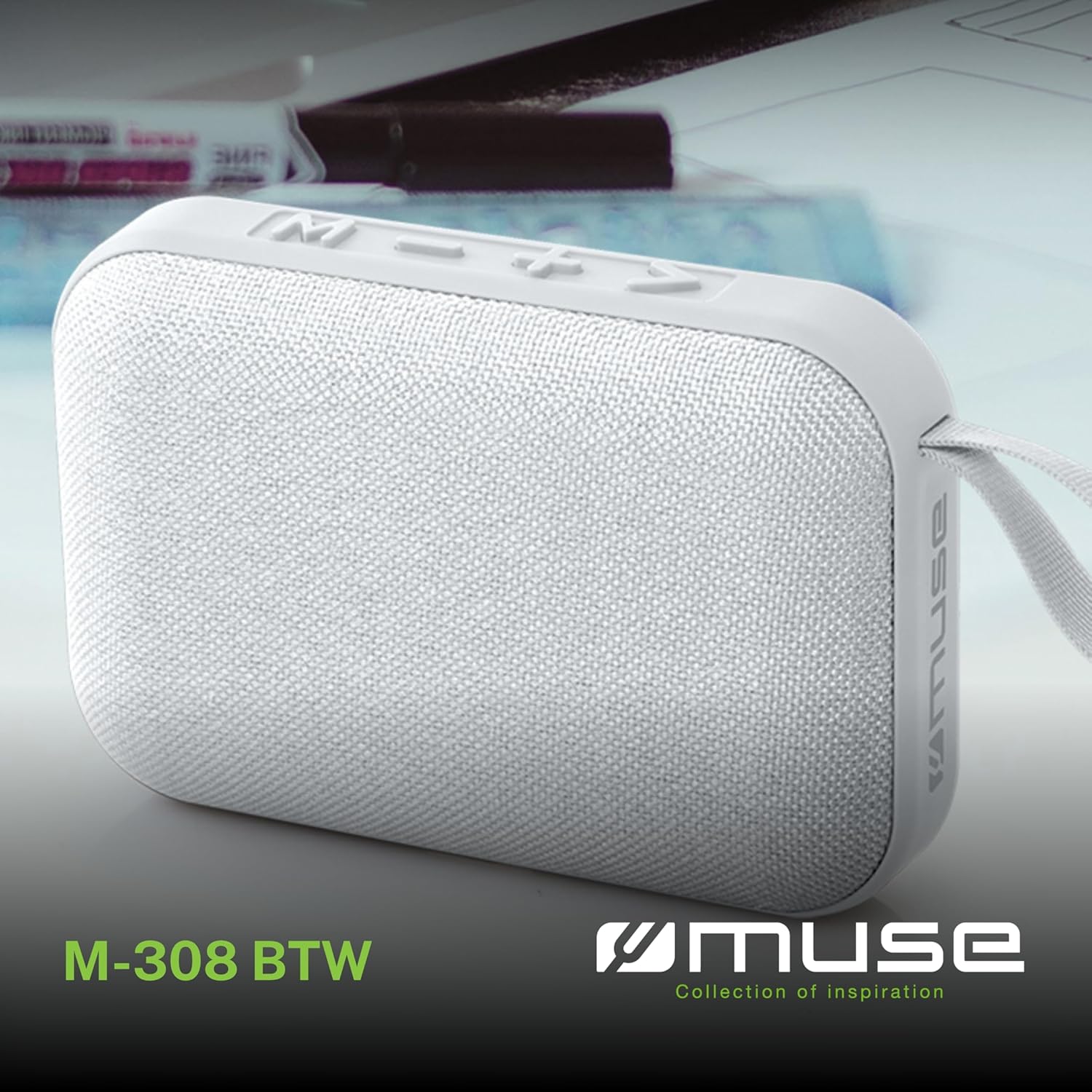
Պատկեր 1.1. Առջև view of the Muse M-308 BT Bluetooth Speaker.
2. Ապրանքի հատկությունները
- Bluetooth միացում. Անլար կերպով հեռարձակեք աուդիո համատեղելի սարքերից։
- Hands-free գործառույթ. Integrated microphone for taking calls.
- MediaԼՄ-ների նվագարկում. Supports music playback from USB and MicroSD (TF) cards.
- Ստերեո զուգավորում. Connect two M-308 BT speakers for enhanced stereo sound.
- LED ցուցիչ: Provides visual feedback for Bluetooth pairing and charging status.
- Կոմպակտ և թեթև. Designed for portability, weighing approximately 200g.
- Ներկառուցված վերալիցքավորվող մարտկոց. 1200mAh capacity for up to 10 hours of playback.
- Ելքային հզորություն: 5 Watts for clear audio.

Image 2.1: Key features of the Muse M-308 BT speaker.

Image 2.2: Additional functionalities of the Muse M-308 BT speaker.
3. Փաթեթի բովանդակությունը
Փաթեթավորումը բացելիս համոզվեք, որ բոլոր իրերը տեղում են.
- Muse M-308 BT Bluetooth Speaker
- USB լիցքավորման մալուխ
- Օգտագործողի ձեռնարկ (այս փաստաթուղթը)
4. Կառավարում և միացում
Familiarize yourself with the speaker's controls and connection ports:

Image 4.1: Top panel with various connections.
- USB պորտ. For playing music from a USB flash drive.
- Micro-USB Port: Բարձրախոսը լիցքավորելու համար:
- Միկրո SD (TF) քարտի բնիկ՝ For playing music from a Micro SD card.
- ON/OFF Անջատիչ. To power the speaker on or off.

Image 4.2: Side panel with control buttons.
- M Button (Mode): Press to switch between Bluetooth, USB, and Micro SD modes.
- - Button (Volume Down / Previous Track):
- Short press: Decrease volume.
- Long press: Go to the previous track.
- + Button (Volume Up / Next Track):
- Short press: Increase volume.
- Long press: Go to the next track.
- > Button (Play / Pause / Call):
- Short press: Play or pause music.
- Short press (during incoming call): Answer call.
- Long press (during incoming call): Reject call.
- Short press (during call): End call.
5. Կարգավորում
5.1 Բարձրախոսի լիցքավորում
- Connect the supplied USB charging cable to the Micro-USB port on the speaker.
- USB մալուխի մյուս ծայրը միացրեք USB սնուցման ադապտերին (չի մատակարարվում) կամ համակարգչի USB միացքին։
- LED ցուցիչը կվառվի՝ ցույց տալու համար լիցքավորման կարգավիճակը: Այն կանջատվի կամ կփոխի գույնը, երբ լիովին լիցքավորվի:
5.2 Միացում/անջատում
- To power on, slide the ON/OFF switch to the 'ON' position. You will hear an audible prompt.
- To power off, slide the ON/OFF switch to the 'OFF' position.
5.3 Bluetooth զուգավորում
- Ensure the speaker is powered on and in Bluetooth mode (indicated by a flashing LED). If not, press the 'M' button to switch to Bluetooth mode.
- Միացրեք Bluetooth-ը ձեր սմարթֆոնի, պլանշետի կամ այլ համատեղելի սարքի վրա։
- Որոնել available Bluetooth devices and select "M-308 BT" from the list.
- Միացնելուց հետո LED ցուցիչը կդադարի թարթել և կմնա անփոփոխ, և դուք կլսեք հաստատման ազդանշան։
- The speaker will automatically connect to the last paired device when powered on, if it is within range.
5.4 Stereo Pairing (TWS Function)
To pair two M-308 BT speakers for true wireless stereo sound:
- Ensure both speakers are powered on and in Bluetooth pairing mode (LED flashing).
- On one of the speakers (this will be the primary speaker), double-press the 'M' button. The speaker will search for another M-308 BT speaker.
- Once connected, both speakers will emit a confirmation tone, and the LED on the primary speaker will flash slowly, while the LED on the secondary speaker will remain solid.
- Հիմա միացրեք ձեր սարքը հիմնական բարձրախոսին Bluetooth-ի միջոցով, ինչպես նկարագրված է 5.3 բաժնում։
6. Գործառնական հրահանգներ
6.1 Երաժշտության նվագարկում
- Bluetooth ռեժիմ After successful pairing, start playing music on your connected device. The audio will stream through the speaker.
- USB/Micro SD ռեժիմ. Insert a USB flash drive or Micro SD card into the respective port. The speaker will automatically switch to the corresponding mode and begin playing music. If it doesn't, press the 'M' button to cycle through modes.
6.2 Ձայնի վերահսկում
- Սեղմեք «+» կոճակը՝ ձայնը մեծացնելու համար։
- Սեղմեք «-» կոճակը՝ ձայնը նվազեցնելու համար։
6.3 Track Navigation
- Long press the '+' button to skip to the next track.
- Long press the '-' button to go back to the previous track.
6.4 Անվճար զանգ
- When a call comes in, the music will pause. Press the '>' button to answer the call.
- To end a call, press the '>' button again.
- To reject an incoming call, long press the '>' button.
7. Պահպանում
- Պահեք բարձրախոսը ծայրահեղ ջերմաստիճաններից, արևի ուղիղ ճառագայթներից և խոնավությունից հեռու։
- Do not expose the speaker to water or other liquids. This model is not water-resistant.
- Մաքրեք բարձրախոսը փափուկ, չոր կտորով։ Մի օգտագործեք հղկող մաքրող միջոցներ կամ լուծիչներ։
- Մի փորձեք ինքներդ ապամոնտաժել կամ վերանորոգել բարձրախոսը։ Դա կչեղարկի երաշխիքը։
- Երկար ժամանակ չօգտագործելու դեպքում, մարտկոցը լիցքավորեք առնվազն երեք ամիսը մեկ՝ մարտկոցի առողջությունը պահպանելու համար։
8: Անսարքություն
| Խնդիր | Հնարավոր պատճառ | Լուծում |
|---|---|---|
| Բարձրախոսը չի միանում։ | Մարտկոցը սպառվել է։ | Լիցքավորեք բարձրախոսը՝ օգտագործելով մատակարարված USB մալուխը։ |
| Հնարավոր չէ զուգակցել Bluetooth-ի միջոցով։ | Bluetooth is not enabled on your device or speaker is not in pairing mode. Speaker is too far from the device. | Ensure Bluetooth is active on both devices. Make sure the speaker is in Bluetooth pairing mode (flashing LED). Move the speaker closer to your device (within 10 meters). |
| Ոչ մի ձայն: | Volume is too low. Speaker is not connected. Incorrect mode selected. | Increase the volume on both the speaker and your connected device. Re-pair the Bluetooth connection. Press the 'M' button to cycle through modes (Bluetooth, USB, Micro SD). |
| Music playback from Micro SD card is erratic or "screaming". | Կոռումպացված files on Micro SD card. Incompatible file ձևաչափը։ | Ապահովել աուդիո files are in a compatible format (e.g., MP3). Try using a different Micro SD card or reformatting the current one and reloading files. |
| Speaker switches between modes (e.g., SD and BT) unexpectedly. | Interference or a temporary software glitch. | Power off the speaker, wait a few seconds, then power it back on. Ensure no other devices are causing interference. If the issue persists, try removing the Micro SD card if it's inserted. |
9. Տեխնիկական պայմաններ
| Մոդելի անվանումը | Մ-308 ԲՏ |
| Բրենդ | Մուսա |
| Միացման տեխնոլոգիա | Bluetooth, լարային |
| Անլար կապի տեխնոլոգիա | Bluetooth |
| Բարձրախոսի առավելագույն ելքային հզորություն | 5 Վտ |
| Աուդիո ելքի ռեժիմ | Ստերեո |
| Բարձրախոսի տեսակը | Դյուրակիր Bluetooth բարձրախոս |
| Հատուկ առանձնահատկություններ | Bluetooth |
| Համատեղելի սարքեր | Սմարթֆոն, պլանշետ |
| Էլեկտրաէներգիայի աղբյուր | Մարտկոց |
| Մարտկոցի կյանք | 10 Ժամ |
| Մարտկոցի հզորությունը | 1200 մլնampվաղաժամ |
| Ապրանքի չափերը (D x W x H) | 118D x 30B x 76H millimeters (11.8 x 3 x 7.6 cm) |
| Նյութի քաշը | 200 գրամ |
| Նյութ | Plastic rubber material |
| Is Water Resistant | Ոչ |
| Ներառված բաղադրիչներ | USB լիցքավորման մալուխ |
Image 9.1: Dimensions of the Muse M-308 BT speaker.
10. Երաշխիք և աջակցություն
The Muse M-308 BT Bluetooth Speaker comes with a 2 տարվա երաշխիք գնման օրվանից:
For technical support, warranty claims, or further assistance, please contact your retailer or visit the official MUSE webկայքը կոնտակտային տեղեկատվության համար: