
1. Ներածություն
Thank you for choosing the Pantum BP5100DN Monochrome Laser Printer. This manual provides essential information for the safe and efficient use of your printer. Please read it thoroughly before operating the device and keep it for future reference.
The Pantum BP5100DN is designed for high-speed, high-quality monochrome printing, featuring automatic two-sided printing and versatile connectivity options including USB and Ethernet.
2. Անվտանգության տեղեկատվություն
- Միշտ տեղադրեք տպիչը կայուն, հարթ մակերեսի վրա։
- Ապահովեք տպիչի շուրջը պատշաճ օդափոխություն՝ գերտաքացումը կանխելու համար։
- Մի՛ ենթարկեք տպիչը ջրի կամ չափազանց խոնավության ազդեցությանը։
- Use only the specified power supply and connect to a grounded outlet.
- Աշխատանքի ընթացքում ձեռքերը և ազատ հագուստը պահեք շարժվող մասերից հեռու։
- Խուսափեք հալեցնող սարքին դիպչելուց, քանի որ այն կարող է շատ տաք լինել։
- Մի փորձեք ինքներդ սպասարկել տպիչը։ Դիմեք որակավորված սպասարկման մասնագետների։
3. Ի՞նչ կա տուփի մեջ
Ստուգեք, որ ստորև թվարկված բոլոր ապրանքները ներառված են ձեր փաթեթում.
- Pantum BP5100DN Monochrome Laser Printer
- Հոսանքի լարը
- USB ինտերֆեյսի մալուխ
- Արագ տեղադրման ուղեցույց
- Starter cartridge (3000 pages)
- Starter drum (30000 pages)

Figure 3.1: Package Contents. This image displays the Pantum BP5100DN printer along with its accessories: power cord, USB interface cable, quick setup guide, starter toner cartridge, and starter drum unit.
4. Ապրանքը ավարտված էview
4.1. Տպիչի բաղադրիչներ
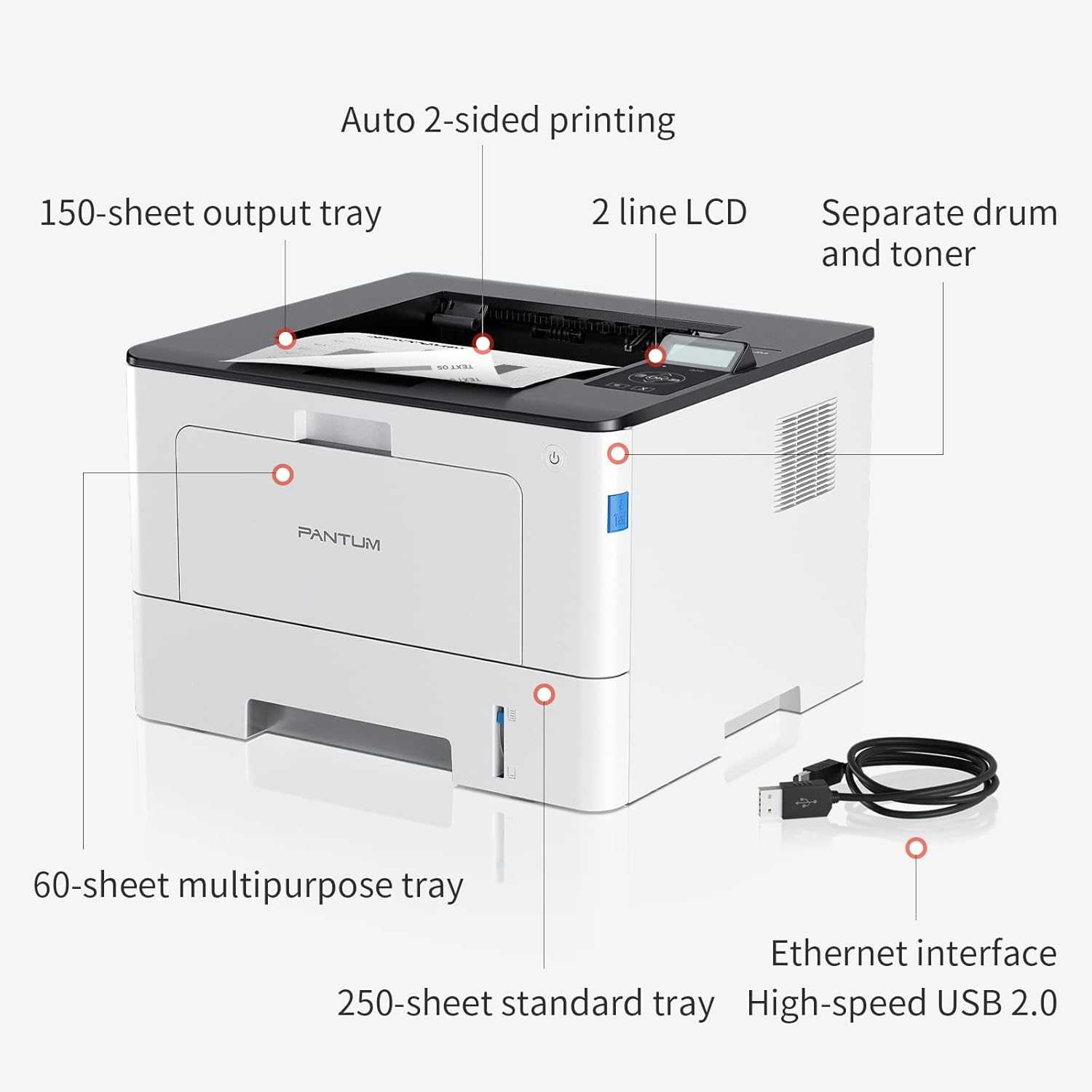
Figure 4.1: Printer Components. Key features include a 150-sheet output tray, a 2-line LCD display, separate drum and toner units, a 60-sheet multipurpose tray, a 250-sheet standard tray, an Ethernet interface, and a High-speed USB 2.0 port.
4.2. Չափերը

Figure 4.2: Printer Dimensions. The printer measures approximately 14.33 inches (W) x 10.12 inches (H) x 13.54 inches (D).
4.3. Control Panel

Figure 4.3: Control Panel. The control panel includes a 2-line LCD display for status messages and menu navigation, along with buttons for OK, arrow controls, and cancel functions.
5. Կարգավորում
5.1. Ապափաթեթավորում և տեղադրում
- Զգուշորեն հեռացրեք տպիչը իր փաթեթավորումից:
- Հեռացրեք տպիչից բոլոր պաշտպանիչ ժապավենները և փաթեթավորման նյութերը։
- Place the printer on a firm, level surface with adequate space for ventilation.
5.2. Toner and Drum Installation
- Բացեք տպիչի առջևի կափարիչը:
- Unpack the drum unit and toner cartridge.
- Insert the toner cartridge into the drum unit until it clicks into place.
- Insert the combined drum and toner unit into the printer.
- Փակեք առջևի կափարիչը:
5.3. Թղթի բեռնում
- Pull out the standard paper tray or open the multipurpose tray.
- Կարգավորեք թղթի ուղեցույցները ձեր թղթի չափսին համապատասխան։
- Load paper into the tray, ensuring it is flat and not exceeding the maximum capacity (250 sheets for standard tray, 60 sheets for multipurpose tray).
- Փակեք թղթի սկուտեղը:
5.4. Power and Connectivity
- Միացրեք սնուցման լարը տպիչին, ապա՝ հողակցված էլեկտրական վարդակիցին։
- For USB connection: Connect the provided USB 2.0 cable from the printer to your computer.
- For Ethernet connection: Connect an Ethernet cable from the printer to your network router or switch.
- Տպիչը միացնելու համար սեղմեք միացման կոճակը:
6. Գործառնական հրահանգներ
6.1. Վարորդի տեղադրում
For optimal performance, install the printer drivers from the official Pantum website or the provided installation media. The printer supports easy one-step installation for quick setup.
6.2. Printing a Document
- Բացեք այն փաստաթուղթը, որը ցանկանում եք տպել ձեր համակարգչում կամ բջջային սարքում։
- Ընտրեք տպագրության տարբերակը ձեր ծրագրից։
- Choose the Pantum BP5100DN from the list of available printers.
- Անհրաժեշտության դեպքում կարգավորեք տպագրության կարգավորումները (օրինակ՝ պատճենների քանակը, թղթի չափը, երկկողմանի տպագրությունը):
- Սեղմեք «Տպել»։
The printer offers fast printing speeds of up to 40 pages per minute (A4) / 42 pages per minute (Letter) in black and white. It also supports automatic two-sided printing to save paper.
6.3. Բջջային տպագրություն
The Pantum BP5100DN supports direct printing of office documents from mobile devices. Ensure your mobile device and printer are connected to the same network or via USB OTG (if supported by your device and printer).
7. Պահպանում
7.1. Replacing Toner Cartridge and Drum Unit
When the toner is low or the drum unit reaches its end of life, the printer's display will show a message. Refer to the instructions provided with the replacement consumables for proper installation. The starter toner cartridge yields approximately 3000 pages, and the starter drum unit yields approximately 30000 pages.
7.2. Տպիչի մաքրում
- Մաքրելուց առաջ անջատեք տպիչը և անջատեք սնուցման լարը։
- Մաքրեք տպիչի արտաքին մասը փափուկ, թել չթողնող կտորով։
- Use a dry cloth to clean the paper path and rollers if paper jams occur frequently.
- Մի օգտագործեք հղկող մաքրող միջոցներ կամ լուծիչներ:
8: Անսարքություն
If you encounter issues with your printer, refer to the following common solutions:
- Տպիչը չի արձագանքում. Check power connections, USB/Ethernet cable connections, and ensure the printer is turned on. Restart both the printer and your computer.
- Թղթի խցանումներ. Open all covers and carefully remove any jammed paper. Ensure paper is loaded correctly and not creased or damaged.
- Տպման վատ որակ. Check toner levels. If print quality is faded, especially with cut and paste text, ensure you are using the correct print settings and consider replacing the toner cartridge or drum unit if they are near end-of-life.
- Միացման հետ կապված խնդիրներ. For Ethernet, verify network cable connection and IP address settings. For USB, try a different USB port or cable.
- Սխալի հաղորդագրություններ. Consult the printer's display for specific error codes and refer to the quick setup guide or online support for detailed solutions.
For persistent issues, please contact customer service for support.
9. Տեխնիկական պայմաններ
| Առանձնահատկություն | Հստակեցում |
|---|---|
| Մոդելի անվանումը | BP5100DN |
| Տպագրության տեխնոլոգիա | Լազերային |
| Տպիչի ելք | Մոնոխրոմ |
| Առավելագույն տպագրության արագություն (մոնոխրոմ) | 40 ppm (A4) / 42 ppm (Letter) |
| Տպման առավելագույն լուծում | 1200 x 1200 dpi |
| Երկկողմանի տպագրություն | Այո (ավտոմատ) |
| Միացման տեխնոլոգիա | Ethernet, USB 2.0 |
| Մուտքային թերթիկի առավելագույն հզորությունը | 250 sheets (Standard Tray), 60 sheets (Multipurpose Tray) |
| Տպագիր մեդիա | Թուղթ (պարզ) |
| Թերթի չափը | A4, Letter, etc. |
| Համատեղելի սարքեր | Սմարթֆոններ, համակարգիչներ |
| Վատtage | 650 Վտ |
| Նյութի քաշը | 9.07 կգ (մոտավորապես 9 կգ 70 գ) |
| Արտադրող | Պանտում |
10. Երաշխիք և աջակցություն
The Pantum BP5100DN Monochrome Laser Printer comes with a 1-year warranty from the date of purchase. For warranty claims, technical support, or any inquiries, please refer to the contact information provided in your quick setup guide or visit the official Pantum webկայք։
For a better experience, please kindly refer to the user manual or contact customer service for support.