
Ներածություն
This manual provides detailed instructions for the safe installation, operation, and maintenance of your bimar Wi-Fi Ceiling Fan, Model 1 (Ø 132). Please read this manual thoroughly before using the product and retain it for future reference.
Նախատեսված օգտագործումը. This high-performance ceiling fan is designed for ventilation in indoor domestic environments. Any other use is considered improper and potentially hazardous. The manufacturer cannot be held responsible for any damages resulting from improper use or repairs performed by unqualified personnel.
Անվտանգության կարևոր ցուցումներ
Հրդեհի, էլեկտրական ցնցումների կամ մարդկանց վնասվածքների ռիսկը նվազեցնելու համար հետևեք հետևյալին.
- Օդափոխիչը տեղադրելուց առաջ կարդացեք բոլոր հրահանգները։
- Տեղադրումը պետք է իրականացվի որակավորված էլեկտրիկի կողմից՝ համաձայն բոլոր տեղական և ազգային էլեկտրական կանոնակարգերի։
- Ensure the installation site can support the fan's weight (approximately 6.2 kg).
- Տեղադրելուց կամ սպասարկումից առաջ միշտ անջատեք գլխավոր անջատիչից հոսանքը։
- Մի՛ աշխատեցրեք օդափոխիչը վնասված էլեկտրական լարով կամ խրոցով։
- Keep hands, hair, and clothing away from moving blades.
- Մի՛ մտցրեք որևէ առարկա օդափոխիչի շեղբերի մեջ, երբ այն աշխատում է։
- Այս սարքը նախատեսված չէ ֆիզիկական, զգայական կամ մտավոր կարողություններով կամ փորձի և գիտելիքների պակաս ունեցող անձանց (ներառյալ երեխաներ) օգտագործելու համար, բացառությամբ այն դեպքերի, երբ նրանց հսկողություն կամ հրահանգ չի տրվել սարքի օգտագործման վերաբերյալ իրենց անվտանգության համար պատասխանատու անձի կողմից:
- Երեխաները պետք է վերահսկվեն, որպեսզի նրանք չխաղան սարքի հետ:
Ինչ կա տուփի մեջ
Your bimar Wi-Fi Ceiling Fan package includes the following components:
- bimar Wi-Fi Ceiling Fan unit (with 3 blades)
- Հեռակառավարման վահանակ
- Մոնտաժային պարագաներ (պտուտակներ, ամրակներ և այլն)
- Հրահանգների ձեռնարկ (այս փաստաթուղթը)

Image: The bimar Wi-Fi Ceiling Fan, featuring three light-colored wooden blades and a brushed metal motor housing and downrod.
Կարգավորում և տեղադրում
1. Օդափոխիչի տեղադրում
Խստիվ խորհուրդ է տրվում մասնագիտական տեղադրումը կատարել որակավորված էլեկտրիկի կողմից։ Ensure the ceiling structure can safely support the fan's weight and that all wiring complies with local electrical codes.
- Պատրաստեք տեղադրման վայրը. Turn off power at the circuit breaker. Securely attach the mounting bracket to a ceiling joist or a fan-rated outlet box.
- Assemble the Downrod and Motor: Attach the downrod to the fan motor housing.
- Կախեք երկրպագուն. Զգուշորեն բարձրացրեք օդափոխիչի հավաքածուն և կախեք այն ամրացման փակագծից։
- Միացրեք օդափոխիչը՝ Connect the electrical wires (live, neutral, ground) from the ceiling to the fan's wiring, following the wiring diagram provided in the separate installation guide (if applicable).
- Կցեք շեղբերները. Securely fasten the three blades to the motor housing.
- Ապահովեք հովանոցը. Raise the canopy to cover the wiring and mounting bracket, securing it in place.

Պատկեր՝ Կողք view of the bimar ceiling fan, illustrating the angle of the light wood blades and the connection to the downrod.
2. Wi-Fi և հավելվածի միացում
The bimar Wi-Fi Ceiling Fan is compatible with the Bimar Live Smart app for advanced control and scheduling.
- Ներբեռնեք հավելվածը՝ Որոնել "Bimar Live Smart" in your smartphone's app store (iOS or Android) and install it.
- Ստեղծել հաշիվ. Բացեք հավելվածը և հետևեք էկրանին հայտնվող հրահանգներին՝ նոր օգտատիրոջ հաշիվ ստեղծելու կամ մուտք գործելու համար, եթե արդեն ունեք մեկը։
- Սարքի ավելացում. Power on the ceiling fan. In the Bimar Live Smart app, tap "Add Device" or the "+" icon. Select "Ceiling Fan" or the appropriate device type.
- Միացեք Wi-Fi-ին. Follow the app's instructions to put the fan into pairing mode (usually by pressing a button on the fan or remote for a few seconds). Connect the fan to your home 2.4GHz Wi-Fi network.
- Սարքի անվանումը՝ Once connected, you can name your fan for easy identification within the app.

Image: A modern living room featuring the bimar ceiling fan installed, with a smartphone displaying the Bimar Live Smart app interface, indicating Wi-Fi and voice control capabilities.
Գործառնական հրահանգներ
Your bimar Wi-Fi Ceiling Fan offers multiple control options for convenience.
1. Հեռակառավարման գործառույթ
The included remote control allows direct access to all fan functions.
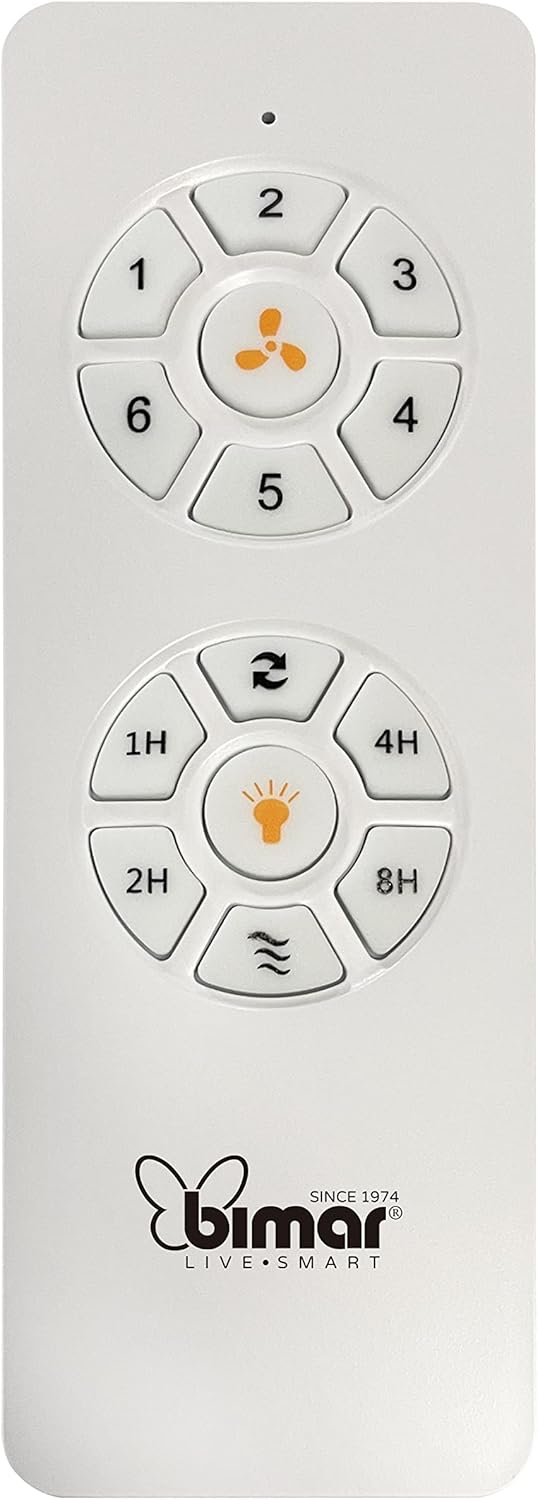
Image: The white remote control for the bimar ceiling fan, showing buttons for fan speed (1-6), fan on/off, timer (1H, 2H, 4H, 8H), mode selection, and reverse function.
- Միացում/անջատում. Սեղմեք օդափոխիչի պատկերակի կոճակը՝ օդափոխիչը միացնելու կամ անջատելու համար։
- Արագության կարգավորում. Use buttons 1-6 to select one of the six available fan speeds.
- Ժամաչափի գործառույթ. Press 1H, 2H, 4H, or 8H to set the fan to automatically turn off after the selected duration.
- Ռեժիմի ընտրություն. Use the mode button (often represented by waves or arrows) to cycle through Normal, Natural, Sleep, and Breeze modes.
- Ամառային/Ձմեռային ռեժիմ. The reverse button (often two arrows forming a circle) changes the blade rotation direction.
2. App Control (Bimar Live Smart)
Once connected to the Bimar Live Smart app, you can access enhanced features:
- Remote Operation: Control all fan functions from anywhere with an internet connection.
- Ժամանակացույց. Program daily and weekly on/off times for automated operation.
- Ժամաչափ: Adjust the timer from 1 to 8 hours.
- Mode and Speed Selection: Easily switch between the 6 speeds and 4 operating modes.
3. Ձայնային կառավարում
The bimar Wi-Fi Ceiling Fan is compatible with popular voice assistants like Amazon Alexa and Google Assistant. After connecting the fan to the Bimar Live Smart app, link your Bimar account to your voice assistant app (e.g., Alexa app or Google Home app).
Example Ձայնային հրամաններ.
- "Alexa, turn on the ceiling fan."
- "Hey Google, set ceiling fan speed to 3."
- "Alexa, turn off the ceiling fan in 1 hour."
4. Operating Modes and Speeds
- 6 Ventilation Speeds: Adjust the airflow intensity to your preference.
- Նորմալ ռեժիմ. Ընտրված արագությամբ հաստատուն օդային հոսք։
- Բնական ռեժիմ: Մոդելավորում է բնական քամիները՝ փոփոխելով օդափոխիչի արագությունը։
- Քնելու ռեժիմ: Operates at a lower, quieter speed for undisturbed rest.
- Breeze ռեժիմ. Provides a gentle, intermittent airflow.
5. Ամառային/ձմեռային գործառույթ
The reversible blade function allows for year-round use:
- Ամառային ռեժիմ (ժամացույցի սլաքի հակառակ ուղղությամբ պտույտ): Creates a downward airflow, generating a cooling breeze.
- Ձմեռային ռեժիմ (ժամացույցի սլաքի ուղղությամբ պտույտ): Creates an upward airflow, circulating warm air trapped near the ceiling, improving heating efficiency.

Image: A diagram illustrating the airflow patterns for summer (indirect ventilation, pushing air upwards) and winter (direct ventilation, pulling air downwards) modes of a ceiling fan.
Տեխնիկական սպասարկում
Կանոնավոր սպասարկումը ապահովում է ձեր առաստաղի օդափոխիչի օպտիմալ աշխատանքը և երկարակեցությունը։
- Մաքրում: Before cleaning, ensure the fan is turned off and power is disconnected at the circuit breaker. Use a soft, damp cloth to wipe down the blades and motor housing. Do not use abrasive cleaners or solvents.
- Սայրի ստուգում. Periodically check the blades for any signs of damage or warping. Ensure all blade screws are tight.
- Շարժիչի քսում. The fan's DC motor is designed for maintenance-free operation and does not require lubrication.
- Խստացնել ամրացնողները. Over time, some fasteners may become loose. Check and tighten all screws and connections annually.

Պատկեր՝ խոշոր պլան view of the bimar ceiling fan's brushed metal motor housing and the attachment points for the light wood blades, highlighting areas for cleaning and inspection.
Անսարքությունների վերացում
| Խնդիր | Հնարավոր պատճառ | Լուծում |
|---|---|---|
| Օդափոխիչը չի սկսվում | Էլեկտրամատակարարում չկա։ Հեռակառավարման վահանակի մարտկոցը ցածր է։ Սխալ միացում։ | Check circuit breaker and wall switch. Replace remote batteries. Verify wiring connections (consult electrician). |
| Օդափոխիչը տատանվում է | Թուլացած շեղբեր կամ ամրացման պարագաներ; Անհավասարակշռված շեղբեր։ | Ensure all blade screws and mounting screws are tight. Use a balancing kit (not included) if necessary. |
| Հեռակառավարումը չի աշխատում | Low battery; Obstruction between remote and receiver; Remote not paired. | Replace remote batteries. Ensure clear line of sight. Refer to pairing instructions in the full manual. |
| Wi-Fi կապի հետ կապված խնդիրներ | Wi-Fi գաղտնաբառը սխալ է։ Ռոուտերը չափազանց հեռու է։ Ընտրված է 5 ԳՀց ցանց։ | Verify Wi-Fi password. Move router closer or use a Wi-Fi extender. Ensure you are connecting to a 2.4GHz network. Reset fan and re-attempt pairing. |
| Օդափոխիչը աղմկոտ է | Loose screws; Blades hitting an obstruction; Motor issue. | Check and tighten all screws. Ensure nothing is obstructing the blades. If noise persists, contact customer support. |
Տեխնիկական պայմաններ
| Առանձնահատկություն | Մանրամասն |
|---|---|
| Բրենդ | bimar |
| Մոդելի համարը | 1 |
| Ապրանքի չափերը | 132 x 132 x 27.5 cm (Diameter x Diameter x Height) |
| Քաշը | 6.2 կգ |
| Շեղբերների քանակը | 3 |
| Նյութ | Փայտ |
| Գույն | Black (Note: Blades are light wood finish as shown in images) |
| Շարժիչի տեսակը | DC (Brushless, energy-saving) |
| Էլեկտրաէներգիայի սպառում | 35 Վտ |
| Վերահսկման մեթոդներ | Remote Control, Bimar Live Smart App, Voice Control (Amazon Alexa, Google Assistant) |
| Օդափոխիչի արագություններ | 6 |
| Գործառնական ռեժիմներ | Normal, Natural, Sleep, Breeze |
| Ժամաչափ | 1-ից 8 ժամ |
| Լրացուցիչ հատկանիշներ | Silent operation, Summer/Winter mode (reversible blades) |
| Էլեկտրաէներգիայի աղբյուր | Էլեկտրական |
| Տեղադրման տեսակը | Առաստաղի լեռ |

Image: The three light wood fan blades, detached and laid flat, showcasinդրանց դիզայնը և հյուսվածքը։


Պատկեր՝ Երկու views of the bimar ceiling fan, illustrating different downrod lengths: one with a 25 cm downrod and another with a 13 cm downrod, affecting the overall height of the fan.
Երաշխիք և աջակցություն
For warranty information, technical support, or service inquiries, please refer to the warranty card included with your product or visit the official bimar webկայք։ Պահպանեք ձեր գնման ապացույցը երաշխիքային պահանջների համար։
Արտադրող: Bimar S.r.l.
Կապ: Խնդրում ենք այցելել the bimar store on Amazon or the official bimar webկայքը `կոնտակտային տվյալների համար: