
Ներածություն
Thank you for choosing the Dpofirs Portable MP3 Player. This device is designed to provide high-quality, lossless audio playback in a compact and durable form factor. This manual will guide you through the setup, operation, and maintenance of your new MP3 player.
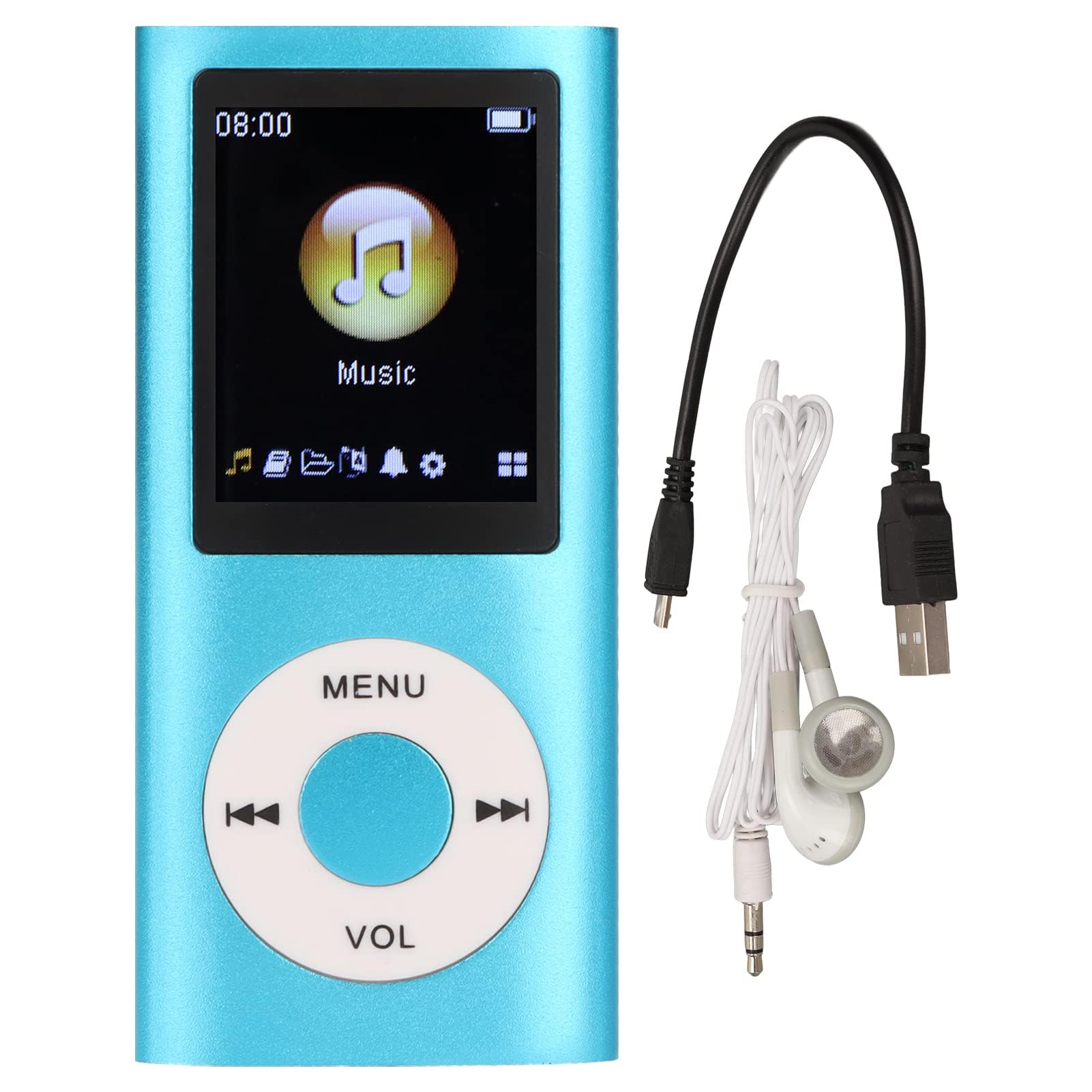
Image: The Dpofirs Portable MP3 Player, featuring a blue aluminum alloy casing and a circular control pad. A person is visible in the background, enjoying music with headphones.
Փաթեթի բովանդակությունը
Խնդրում ենք ստուգել փաթեթի վրա հետևյալ կետերը.
- 1 x Dpofirs MP3 Player
- 1 x լիցքավորման մալուխ
- 1 x Ականջակալներ
Հիմնական հատկանիշները
- Անկորստային ձայնի որակ՝ Supports MP3, WMA, FLAC, APE, AAC, OGG, and ACELP audio formats.
- Ընդլայնվող հիշողություն. Supports up to 64GB memory card (not included). MYMAHDI memory cards are recommended.
- Օգտագործողի համար հարմար ինտերֆեյս. Easy navigation for selecting songs, creating playlists, and managing playback.
- Երկար մարտկոցի կյանք. Մինչև 8 ժամ շարունակական նվագարկումը լրիվ լիցքավորման դեպքում:
- Երկարակյաց դիզայն. Constructed from premium aluminum alloy for enhanced durability.
- Նվագարկման ռեժիմներ. Supports sequential and random playback, and sleep shutdown function.
Կարգավորում
1. Սարքի լիցքավորում
Before first use, fully charge your MP3 player.
- Connect the provided charging cable to the MP3 player's charging port.
- Մալուխի մյուս ծայրը միացրեք USB սնուցման ադապտերին (չի մատակարարվում) կամ համակարգչի USB միացքին։
- The device will indicate charging status. A full charge typically takes approximately 2 hours.
Կարևոր է. Ensure the charging cable is functioning correctly. If the device does not charge, try a different USB port or adapter.
2. Հիշողության քարտի տեղադրում
The MP3 player requires a memory card for storing music.
- Գտեք հիշողության քարտի անցքը MP3 նվագարկչի կողքին։
- Gently insert a microSD card (up to 64GB, not included) into the slot until it clicks into place.
- Քարտը հանելու համար մի փոքր սեղմեք ներս, մինչև այն դուրս ցցվի։
Նշում. A memory card is not included with the player. MYMAHDI brand memory cards are recommended for optimal performance.
3. Ականջակալների միացում
Connect the provided earphones or your preferred 3.5mm audio headphones to the headphone jack on the MP3 player.
Գործառնական հրահանգներ
1. Միացնել/անջատել
- To power on, press and hold the power button (usually the Play/Pause button or a dedicated power button) until the screen lights up.
- Անջատելու համար կրկին սեղմեք և պահեք միացման կոճակը, մինչև էկրանը անջատվի։
2. Հիմնական նավարկություն
The MP3 player features a circular control pad with several buttons:
- ՄԵՆՈՒ. Access the main menu or go back to the previous screen.
- VOL (+/-): Կարգավորեք ձայնի մակարդակը:
- Նվագարկել/Դադար. Սկսել կամ դադարեցնել նվագարկումը:
- Հաջորդ/Նախորդ. Skip to the next track or go back to the previous track. Long press to fast forward/rewind.
3. Երաժշտության փոխանցում Files
Երաժշտությունը MP3 նվագարկիչ փոխանցելու համար՝
- Connect the MP3 player to your computer using the charging cable.
- The player should appear as a removable disk drive on your computer.
- Քաշեք և թողեք ձեր երաժշտությունը files (MP3, WMA, FLAC, APE, AAC, OGG, ACELP) into the player's memory card folder.
- Մալուխը անջատելուց առաջ անվտանգ կերպով հանեք սարքը համակարգչից։
4. Երաժշտություն նվագել
- From the main menu, navigate to the "Music" or "Audio" section.
- Browse your music by artist, album, genre, or all songs.
- Ընտրեք երգ՝ նվագարկումը սկսելու համար։
- Use the Play/Pause, Next/Previous, and VOL buttons to control playback.
5. Վերարտադրման ընտրանքներ
- Երգացանկեր: Create and manage custom playlists directly on the device.
- Խառնել/Կրկնել՝ Toggle between sequential playback, shuffle, and repeat modes.
- Sleep Shutdown: Set a timer for the device to automatically power off.
Տեխնիկական սպասարկում
- Սարքը պահեք չոր։ Խոնավությունը կարող է վնասել ներքին շղթաները։
- Խուսափեք ծայրահեղ ջերմաստիճանից:
- Clean the device with a soft, dry cloth. Do not use harsh chemicals or cleaning agents.
- Protect the screen from scratches.
- Պահպանեք սարքը անվտանգ վայրում, երբ այն չի օգտագործվում:
Անսարքությունների վերացում
Սարքը չի միանում՝
- Ensure the battery is charged. Connect the player to a power source and allow it to charge for at least 30 minutes.
- Try pressing and holding the power button for an extended period (5-10 seconds).
Cannot hear any sound:
- Check if the earphones are properly connected to the headphone jack.
- Բարձրացրեք ձայնը՝ օգտագործելով VOL+ կոճակը։
- Test with a different pair of earphones to rule out faulty headphones.
- Ապահովել աուդիո files ֆայլերը վնասված չեն և գտնվում են աջակցվող ձևաչափով։
Երաժշտություն files are not recognized:
- Ensure the memory card is properly inserted and recognized by the device.
- Ստուգեք, որ երաժշտությունը files are in one of the supported formats (MP3, WMA, FLAC, APE, AAC, OGG, ACELP).
- Try reformatting the memory card (this will erase all data) and re-transferring the music.
- Ensure the memory card is not full.
Սարքը կախվում է կամ չի արձագանքում.
- Ստիպողաբար վերագործարկելու համար սեղմեք և պահեք միացման կոճակը մոտ 10-15 վայրկյան։
- If available, use a small pin to press the reset button (if present on the device).
Տեխնիկական պայմաններ
| Բրենդ | Dpofirs |
| Մոդելի համարը | Dpofirs5yhtvp70d23123-13 |
| Նյութ | Ալյումինե խառնուրդ |
| Մարտկոց | Ներկառուցված 200 mAh լիթիումի մարտկոց |
| Լիցքավորման ժամանակ | Մոտ. 2 ժամ |
| Նվագարկման ժամանակը | Մինչև 8 ժամ (ամբողջությամբ լիցքավորված) |
| Հիշողության քարտի աջակցություն | Մինչև 64 ԳԲ (microSD, չի ներառվում) |
| Աջակցվող աուդիո ձևաչափեր | MP3, WMA, FLAC, APE, AAC, OGG, ACELP |
| Միացման տեխնոլոգիա | Օժանդակ, Bluetooth, Wi-Fi (Note: Bluetooth/Wi-Fi functionality not detailed in product description, focusing on core MP3 player features) |
| Գույն | Կապույտ |
| Ծագման երկիր | Չինաստան |
Երաշխիք և աջակցություն
Specific warranty information for this product is not provided in the available documentation. Please refer to the retailer's return policy or contact the seller directly for details regarding warranty coverage.
For technical support or further assistance, please contact Dpofirs customer service through the platform where you purchased the product.