
1. Անվտանգության կարևոր տեղեկատվություն
Please read all safety instructions carefully before using this product. Failure to follow these instructions may result in injury or damage.
- Տեղադրում: Avoid placing the camera in unstable locations or within reach of children or pets.
- Հզորությունը: Use only the provided AC adapter and power cable. Disconnect power before moving the device.
- Շրջակա միջավայր: Keep the camera away from high humidity, dust, and extreme temperatures. This product is not waterproof.
- Տեխնիկական սպասարկում: Do not attempt to disassemble or repair the camera yourself. Contact customer support for any issues.

Image: General safety guidelines for camera usage.
2. Փաթեթի բովանդակությունը
Ստուգեք, որ բոլոր իրերը ներառված են ձեր փաթեթում.
- Galayou G2 Camera Unit
- AC ադապտեր
- Power Cable
- Mounting Kit (screws, anchors)
- Ճապոներենի հրահանգների ձեռնարկ

Image: The Galayou G2 camera and a smartphone displaying its live feed.
3. Կարգավորման ուղեցույց
3.1 Նախնական կարգավորում
- Միացում՝ Connect the camera to power using the provided AC adapter and cable. The indicator light will turn red.
- Ծրագրի ներբեռնումը. Download the dedicated 'blurams' app from the App Store (iOS) or Google Play Store (Android).
- Հավելվածի թույլտվություններ. Ensure Bluetooth and Location permissions are enabled for the 'blurams' app in your smartphone settings.
- Վերագործարկեք տեսախցիկը՝ Press and hold the reset button on the camera until you hear a beep sound. The indicator light will flash red and blue alternately, indicating it's ready for network connection.
- Հավելվածում սարք ավելացնելը՝ Open the 'blurams' app, tap 'Add Device' or the '+' icon. Select your camera model (G2 or similar D1 model) and choose 'Wi-Fi connection via Bluetooth'.
- Wi-Fi կապ. Enter your 2.4GHz Wi-Fi network name and password. The camera only supports 2.4GHz Wi-Fi.
- QR կոդի սկանավորում. The app will display a QR code. Hold your smartphone in front of the camera lens to scan the QR code. You will hear a beep sound from the camera upon successful scan.
- Միացման հաստատում. The camera will announce 'Connection successful' and then 'Connecting to network'. Once connected, the indicator light will turn solid blue.
3.2 Video Guide: Bluetooth Wi-Fi Connection
Video: This video demonstrates the Bluetooth-assisted Wi-Fi connection method for the D1 camera, which is similar to the G2 model. It shows the steps from app permissions to successful network connection.
3.3 Video Guide: Camera Setup Method
Video: This video provides a general guide on how to set up a Skyworth pet camera, which can be used as a reference for the Galayou G2's setup process.
4. Գործառնական հրահանգներ
4.1 Ուղիղ View և շրջադարձի/թեքման կառավարում
Once connected, you can access the live feed through the 'blurams' app. The camera offers a 355° horizontal rotation and 52° vertical rotation for comprehensive coverage.
- Pan/Tilt: Օգտագործեք հավելվածի ուղղորդման կառավարման կոճակները՝ տեսախցիկը հեռակա կարգավորելու համար viewանգլ.
- Թվային խոշորացում. The camera supports 4x digital zoom to view մանրամասներ.

Image: The camera's pan and tilt capabilities, offering a wide field of view.
4.2 Տեսանյութի որակը և գիշերային տեսողությունը
The G2 camera features 2K high-resolution video (1440p) and a 3-megapixel CMOS sensor for clear images. It also provides advanced night vision capabilities.
- 2K լուծաչափ։ Վայելեք հստակ և մանրամասն տեսանյութtage.
- Գիշերային տեսողության ռեժիմներ. The camera supports three night vision modes: Smart Night Vision (auto-switches between color and black & white based on motion), Color Night Vision (always color), and Infrared Night Vision (always black & white).
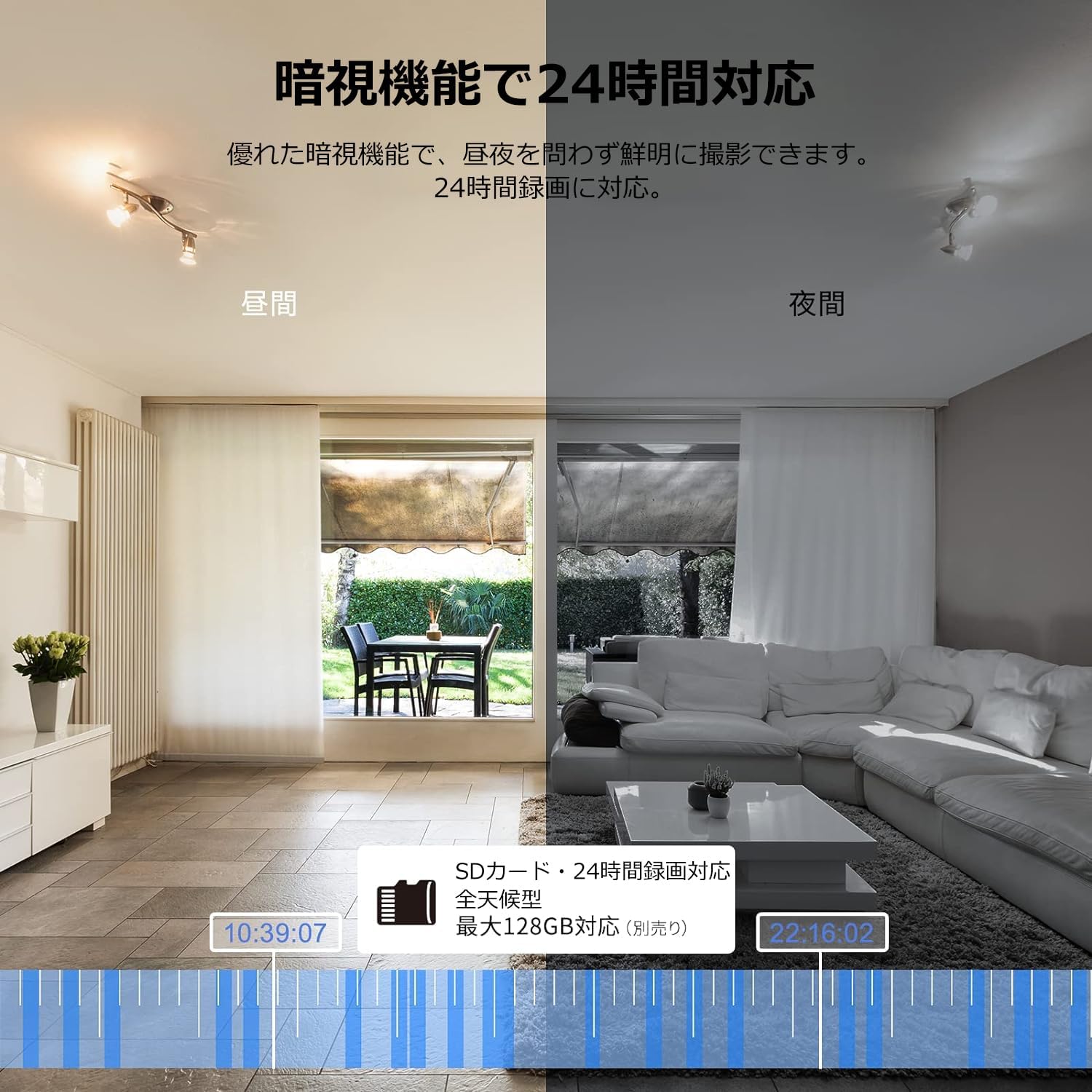
Image: Comparison of day and night vision, demonstrating the camera's ability to record clearly in low light.
4.3 Երկկողմանի աուդիո
Equipped with a microphone and speaker, the camera allows for real-time two-way communication.
- Speak and Listen: Talk to family members or pets through the app, and hear their responses.
- Աղմուկի նվազեցում. The two-way audio features noise reduction for clearer sound.

Image: The camera's two-way audio feature, allowing interaction with pets.
4.4 Motion Detection & Automatic Tracking
The camera can detect motion and automatically track subjects within its field of view.
- Շարժման ահազանգեր. Ստացեք ակնթարթային ծանուցումներ ձեր սմարթֆոնին, երբ շարժում հայտնաբերվի։
- Ավտոմատ հետևում. The camera will follow detected movement, keeping the subject in frame.
- Մարդու հայտնաբերում. Advanced AI can differentiate between humans and other moving objects, reducing false alarms.
- Զարթուցիչի գործառույթ. Trigger an alarm sound from the camera via the app to deter intruders.

Image: Motion detection and alarm features, showing alerts on a smartphone.
4.5 Ձայնագրում և պահպանում
The camera supports both local and cloud storage options for continuous recording.
- MicroSD քարտ. Supports up to 128GB microSD cards (sold separately) for 24-hour continuous recording with automatic overwriting.
- Ամպային պահեստավորում. Optional paid cloud storage service is available for extended recording and backup.
- Տեսանյութի սեղմում. Utilizes H.264 and H.265 compression formats for efficient storage.


Images: MicroSD card recording and cloud storage options.
4.6 Գաղտնիության ռեժիմ
Activate privacy mode to physically cover the camera lens, ensuring your privacy when needed.
- One-Tap Activation: Easily turn off the lens via the app.
- Physical Cover: The camera physically rotates its lens downwards, blocking the view.

Image: Privacy mode icon.
4.7 Alexa ինտեգրացիա
The Galayou G2 is Alexa-certified, allowing for voice control and viewing the camera feed on compatible Alexa devices.
- Ձայնային հրամաններ. Օգտագործեք ձայնային հրամաններ view the camera feed on an Echo Show or other Alexa-enabled screen.

Image: Alexa integration with the Galayou G2 camera.
4.8 Multi-Camera Support & Sharing
The app supports adding multiple cameras and sharing access with family members.
- Բազմաթիվ տեսախցիկներ. Monitor different areas of your home by adding several cameras to the app.
- Ընտանեկան համօգտագործում. Share camera access with up to 4 family members simultaneously.

Image: Family sharing and multi-camera viewինգ.
4.9 Video Guide: Product Features
Video: This video showcases various features of a Skyworth pet camera, including its monitoring capabilities, which are comparable to the Galayou G2.
4.10 Video Guide: Blurams 300万画素 見守りカメラ
Video: This video highlights the features of a Blurams 3-megapixel monitoring camera, demonstrating functionalities similar to the Galayou G2.
4.11 Video Guide: JUFLSKY 300万画素 360°PTZ機 (Preview)
Տեսանյութ՝ Կարճ նախաբանview տեսանյութի ցուցադրությունasing a 300-megapixel 360° PTZ camera, similar in functionality to the G2.
5: Անսարքություն
- Հնարավոր չէ միանալ Wi-Fi-ին.
- Համոզվեք, որ ձեր Wi-Fi ցանցը 2.4 ԳՀց է: Տեսախցիկը չի աջակցում 5 ԳՀց ցանցերին:
- Ստուգեք ձեր Wi-Fi գաղտնաբառի ճշգրտությունը։
- Տեսախցիկը մոտեցրեք ձեր Wi-Fi ռաութերին։
- Perform a factory reset on the camera and try the setup process again.
- No Live Feed:
- Ստուգեք ձեր ինտերնետ կապը:
- Ensure the camera is powered on and the indicator light is solid blue.
- Վերագործարկեք հավելվածը և/կամ ձեր սմարթֆոնը։
- Շարժման հայտնաբերումը չի աշխատում.
- Ստուգեք, որ շարժման հայտնաբերումը միացված է ծրագրի կարգավորումներում։
- Կարգավորեք շարժման հայտնաբերման զգայունությունը։
- Համոզվեք, որ տեսախցիկի աշխատանքը խոչընդոտող որևէ խոչընդոտ չկա view.
- Տեսանյութի վատ որակ.
- Check your internet speed. A stable connection is required for optimal streaming.
- Համոզվեք, որ տեսախցիկի ոսպնյակը մաքուր է:
- Adjust the video quality settings in the app (e.g., from SD to 2K).
6. Տեխնիկական պայմաններ
| Առանձնահատկություն | Հստակեցում |
|---|---|
| Մոդելի անվանումը | G2 |
| Մոնտաժման տեսակը | Tabletop and Ceiling Mount |
| Տեսանյութի նկարահանման լուծում | 1440p (2K) |
| Գույն | Automatic Tracking Camera |
| Ներառված բաղադրիչներ | Camera body, AC adapter, Japanese instruction manual, mounting set, power cable |
| Անլար կապի տեխնոլոգիա | Wi-Fi (միայն 2.4 ԳՀց) |
| Տեսանյութի արդյունավետ լուծում | 2 Megapixels (300万画素) |
| ոլորտը View | 95 աստիճան |
| Գիշերային տեսողության տիրույթ | 7 մետր |
| Շրջանակի արագություն | 15 կադր/վրկ |
| Նյութ | Պլաստիկ |
| Ապրանքի չափսերը (LxWxH) | 7.2 x 7.2 x 10.9 սմ |
| Ջրի դիմադրության մակարդակը | Ջրակայուն չէ |
| Լույսի աղբյուր | Ինֆրակարմիր |
| Առաջարկվող Օգտագործում | Ներքին անվտանգություն |
| Ներքին/Բացօթյա Օգտագործում | Փակ |
| Համատեղելի սարքեր | Սմարթֆոն, պլանշետ, համակարգիչ, նոութբուք |
| Էլեկտրաէներգիայի աղբյուր | Լարով էլեկտրական |
| Վերահսկիչի տեսակը | Հավելված |
7. Երաշխիք և աջակցություն
The Galayou G2 camera comes with a manufacturer's warranty and customer support.
- Երաշխիք: 1 տարվա արտադրողի երաշխիք։
- Տեխնիկական աջակցություն. For any issues or questions, please contact GALAYOU customer support through the app or visit the official GALAYOU store on Amazon.