
1. Ներածություն և ավարտview
This manual provides essential instructions for setting up, operating, and maintaining your Brinno TLC300 Time Lapse Camera. The TLC300 is designed for capturing time-lapse videos in various environments, including construction sites, outdoor projects, and general-purpose applications. It features Full HD 1080P resolution with HDR, a 118° field of view, and an intuitive user interface.

Նկար 1. Առջևի և կողային view of the Brinno TLC300 Time Lapse Camera.
Տեսանյութ 1. Օվերview of the Brinno TLC300 Time Lapse Camera's features and capabilities.
2. Ի՞նչ կա տուփի մեջ
Upon unboxing your Brinno TLC300, please ensure all the following items are present:
- Brinno Time Lapse Camera TLC300
- AA մարտկոցներ x 4
- Ոսպնյակի ծածկ
- SD քարտ
- Արագ ուղեցույցի ձեռնարկ
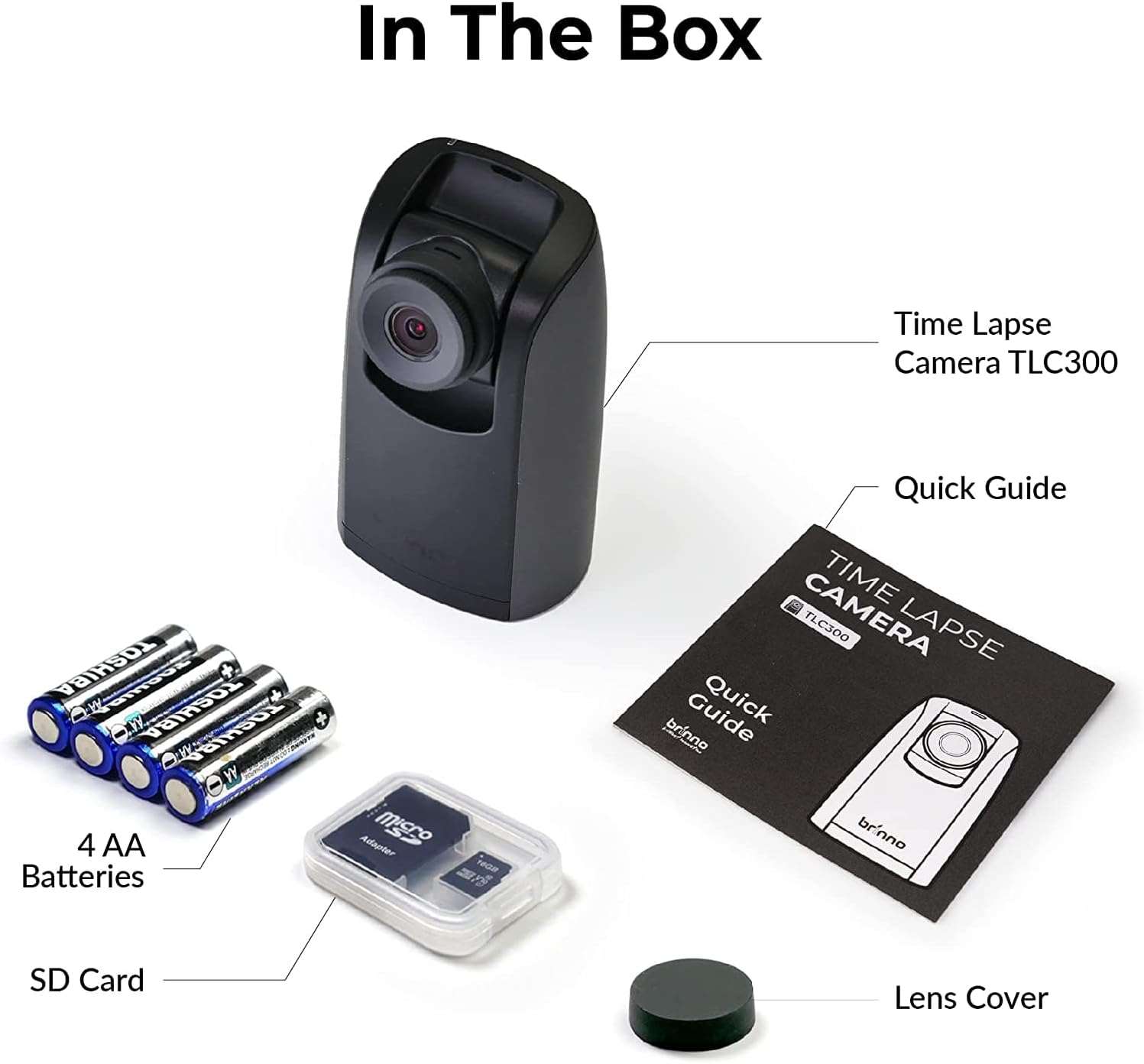
Figure 2: All items included in the Brinno TLC300 package.
3. Կարգավորում
3.1 Battery and SD Card Installation
- Բացեք մարտկոցի խցիկի կափարիչը, որը գտնվում է տեսախցիկի ներքևի մասում։
- Տեղադրեք 4 AA մարտկոց՝ ապահովելով ճիշտ բևեռականություն (+/-):
- Insert the provided Micro SD card into the SD card slot until it clicks into place. The camera supports up to 128GB.
- Ապահով փակեք մարտկոցի խցիկի կափարիչը:

Figure 3: Proper installation of AA batteries into the camera.
3.2 Սկզբնական միացում և հիմնական կարգավորումներ
- Սեղմեք և պահեք միացման կոճակը՝ տեսախցիկը միացնելու համար։
- The 1.44" IPS LCD screen will display the live view.
- Navigate the menu using the directional buttons and the OK button.
- Set the current date and time for accurate time-lapse recording.
- Select your preferred language from the multilingual user interface.

Figure 4: The camera's menu for adjusting settings.
4. Տեսախցիկի շահագործում
4.1 Setting Recording Parameters
The TLC300 offers straightforward operation. You primarily need to set the 'interval' and 'schedule' before starting a recording.
- Ընդմիջում: This defines how often the camera captures an image. Adjust this setting based on the duration of your project and the desired speed of the final time-lapse video.
- Ժամանակացույց: Use the schedule function to specify filming days and times. This ensures the camera only records during active periods, conserving battery life and storage.
- Բանաձև: The camera records in Full HD 1080P. Ensure HDR is enabled for optimal image quality, especially for day-to-night transitions.

Figure 5: Visual comparison of HDR and Night Mode performance.
4.2 Starting and Stopping Recording
After configuring your settings, press the OK button to begin recording. The camera will automatically start capturing images according to your set interval and schedule. To stop recording, press the Power button again.
5. Պահպանում
- Մաքրում: Օգտագործեք փափուկ, չոր կտոր՝ տեսախցիկի կորպուսը և օբյեկտիվը մաքրելու համար: Խուսափեք հղկող նյութերից կամ կոշտ քիմիական նյութերից:
- Մարտկոցի կյանք. The TLC300 offers up to 100 days of battery life with a 5-minute capture interval using 4 AA batteries. Monitor battery levels regularly, especially for long-term projects.
- Պահպանում: Periodically transfer your time-lapse videos from the SD card to a computer or external storage device to free up space and prevent data loss. The camera supports Micro SD cards up to 128GB.
- Ոսպնյակի Կափարիչ: Always use the provided lens cover when the camera is not in use to protect the lens from dust and scratches.
6: Անսարքություն
- Տեսախցիկը միացված չէ. Ensure batteries are correctly inserted and fully charged. Try replacing with new batteries.
- Պատկերի վատ որակ. Check lens for smudges or dirt. Ensure HDR is enabled for challenging lighting conditions. Verify the lens cover is removed.
- Ձայնագրությունը չի սկսվում. Confirm that the interval and schedule settings are correctly configured. Ensure the SD card has sufficient free space.
- SD քարտի սխալ՝ Reformat the SD card using the camera's menu (this will erase all data). If the issue persists, try a different SD card.
7. Տեխնիկական պայմաններ
| Առանձնահատկություն | Հստակեցում |
|---|---|
| Մոդելի համարը | TLC300 |
| Չափերը | 2.05 x 2.52 x 4.21 դյույմ |
| Նյութի քաշը | 4.9 ունցիա |
| Էլեկտրաէներգիայի աղբյուր | 4 AA մարտկոց |
| Տեսանյութի նկարահանման լուծում | 1080p լիարժեք HD |
| Ֆոտո սենսորային տեխնոլոգիա | CMOS |
| Առավելագույն կիզակետային երկարություն | 15 Միլիմետր |
| Առավելագույն բացվածք | 2 զ |
| Ֆլեշ հիշողության տեսակը | Micro SD (մինչև 128 ԳԲ) |
| Տեսանյութի նկարահանման ձևաչափ | MP4, MOV, AVI |
| Աջակցվող աուդիո ձևաչափ | MP3, ՇՊԱԿ |
| Էկրանի չափը | 1.44 դյույմ |
| Միացման տեխնոլոգիա | Bluetooth |
8. Երաշխիք և աջակցություն
Brinno products are designed for durability and performance. For any technical assistance, warranty claims, or product inquiries, please refer to the contact information provided in your Quick Guide Manual or visit the official Brinno support webկայք: Պահպանեք ձեր գնման կտրոնը որպես երաշխիքային ծառայությունների գնման ապացույց: