
Պոլի E220
Poly Edge E220 IP ստացիոնար հեռախոսի օգտագործողի ձեռնարկ
Your guide to setting up and using your Poly Edge E220 IP Desk Phone.
1. Ներածություն
The Poly Edge E220 is a versatile IP desk phone designed for modern office environments, offering advanced communication features. It supports up to 16 lines with 4-line keys and includes integrated Bluetooth for seamless mobile phone and headset pairing. This manual provides detailed instructions for setup, operation, and maintenance of your device.
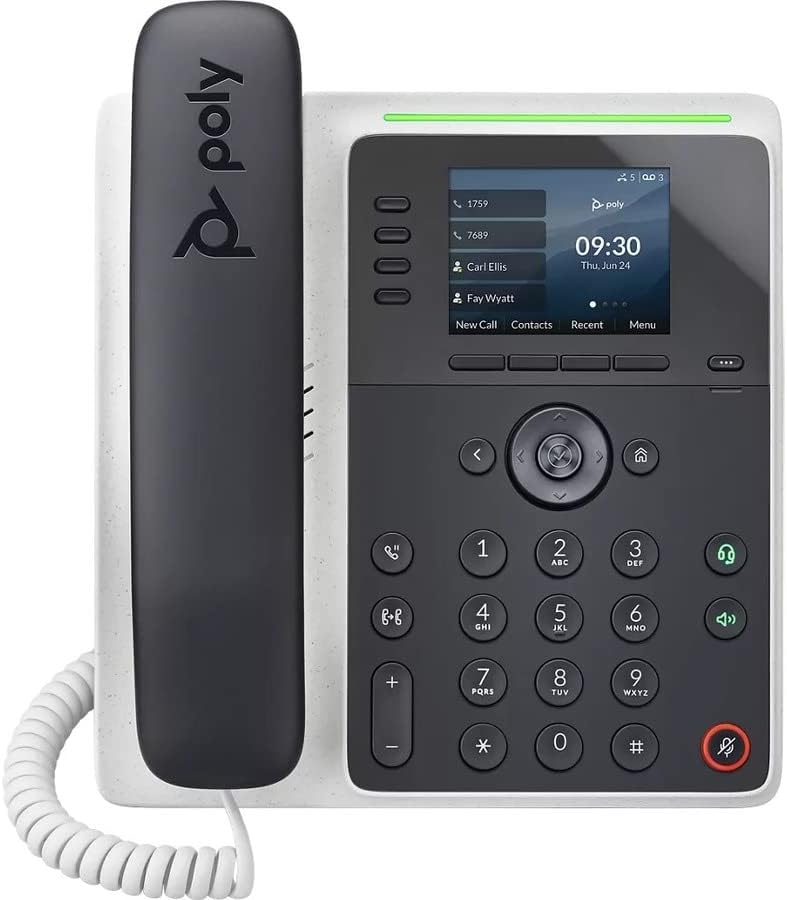
Պատկեր՝ առջևի view of the Poly Edge E220 IP Desk Phone, showcasing its display, keypad, and handset.
2. Ի՞նչ կա տուփի մեջ
Խնդրում ենք ստուգել, որ ձեր փաթեթում ներառված են հետևյալ բոլոր բաղադրիչները.
- Poly Edge E220 IP Desk Phone Unit
- Հեռախոս
- Հեռախոսի կծիկ լար
- Cat5E Ethernet Cable
- Integrated Wall Mount (pre-attached or separate)
- Բազային ստենդ
Note: A power supply is NOT included with this renewed product and must be acquired separately if Power over Ethernet (PoE) is not available.
3. Ապրանքի հատկությունները
- 4-Line Keys: Supports up to 16 lines for flexible call management.
- Ինտեգրված Bluetooth. Allows for seamless pairing with mobile phones and Bluetooth headsets.
- Բարձր լուծաչափով էկրան. Provides clear visibility for call information and menu navigation.
- HD Ձայն. Delivers superior audio quality for clearer conversations.
- Multi-Line Operation: Manage multiple active calls simultaneously.
- Կոնֆերանս զանգի հնարավորություն. Supports 3-way conferencing.
4. Կարգավորում և տեղադրում
4.1 Հեռախոսի հավաքումը
- Attach the Base Stand: Align the tabs on the base stand with the slots on the back of the phone unit. Slide the stand into place until it clicks securely.
- Connect the Handset: Plug one end of the coil cord into the handset and the other end into the handset port on the side of the phone unit.
4.2 Մալուխների միացում
Locate the ports on the back and side of the phone unit.

Պատկեր՝ Կողք view of the Poly Edge E220 IP Desk Phone, highlighting the various connection ports and the adjustable stand.
- Networkանցային կապ Connect one end of the Cat5E Ethernet cable to the LAN port on the phone and the other end to your network switch or router. If your network provides Power over Ethernet (PoE), the phone will power on automatically.
- Power Connection (if no PoE): If PoE is not available, connect an appropriate power adapter (not included) to the power port on the phone and then to a power outlet.
- Ականջակալների լրացուցիչ միացում՝ If using a wired headset, connect it to the dedicated headset port.
4.3 Նախնական միացում
Once connected, the phone will power on and begin its boot sequence. This may take a few moments. The display will show the Poly logo, followed by network configuration and registration status. If prompted, enter your network credentials or contact your IT administrator for setup assistance.
5. Գործառնական հրահանգներ
5.1 Զանգեր կատարելը և ստանալը
- Զանգահարելու համար. Pick up the handset, press the Speaker button, or press a line key. Dial the number and press the Dial soft key or wait for the call to connect.
- Զանգին պատասխանելու համար. Pick up the handset, press the Speaker button, or press the flashing line key.
- Զանգն ավարտելու համար. Replace the handset, or press the End Call soft key.

Image: A man engaged in a phone call using the Poly Edge E220 IP Desk Phone in a professional office environment.
5.2 Օգտագործելով Bluetooth
The Poly Edge E220 allows you to pair your mobile phone or Bluetooth headset for enhanced flexibility.
- Միացնել Bluetooth-ը. Navigate to the phone's menu, select Settings, then Bluetooth, and ensure Bluetooth is enabled.
- Սարքի զուգակցում. Put your Bluetooth device (mobile phone or headset) into pairing mode. On the phone, select 'Add New Device' or 'Scan for Devices'. Select your device from the list and follow the on-screen prompts to complete pairing.
- Միացում. Once paired, your device should automatically connect when in range. You can manually connect/disconnect from the Bluetooth menu.

Image: A woman working at a desk, utilizing the Poly Edge E220 IP Desk Phone alongside her laptop, demonstrating its integration into a modern workspace.
5.3 Ընդլայնված առանձնահատկություններ
- Պահել: During a call, press the Hold soft key to place the call on hold. Press it again to resume.
- Փոխանցում: During a call, press the Transfer soft key, dial the new number, and then press Transfer again to complete.
- Համաժողով. During an active call, press the Conference soft key, dial the number of the third party, and then press Conference again to join all parties.
- Ձայնային փոստ: Press the Voicemail button to access your voicemail messages.
6. Պահպանում
To ensure the longevity and optimal performance of your Poly Edge E220 IP Desk Phone, follow these maintenance guidelines:
- Մաքրում: Հեռախոսի մակերեսը և էկրանը մաքրելու համար օգտագործեք փափուկ, չոր, թել չթողնող կտոր։ Համառ հետքերի դեպքում մի փոքր մաքրեքampen the cloth with water. Avoid using harsh chemicals, abrasive cleaners, or aerosol sprays.
- Շրջակա միջավայր: Հեռախոսը պահեք չոր միջավայրում՝ հեռու արևի ուղիղ ճառագայթներից, չափազանց տաքությունից և խոնավությունից։
- Մալուխի կառավարում. Ensure all cables are neatly organized and not under strain to prevent damage to ports or cables.
- Ծրագրային թարմացումներ. Periodically check with your IT administrator for available software updates to ensure your phone has the latest features and security enhancements.
7: Անսարքություն
If you encounter issues with your Poly Edge E220, refer to the table below for common problems and solutions.
| Խնդիր | Հնարավոր պատճառ | Լուծում |
|---|---|---|
| Հեռախոսը չի միանում | No power supply or PoE connection | Ensure Ethernet cable is connected to a PoE-enabled port, or connect a compatible power adapter. |
| Զանգի ձայն չկա | Network issue or phone not registered | Check network cable connection. Verify network status on the phone display. Contact IT support if registration fails. |
| Չեմ լսում զանգահարողին / Զանգահարողը չի լսում ինձ | Volume too low, faulty handset/headset, or network audio issue | Adjust volume. Test with speakerphone. Check handset/headset connection. Restart phone. |
| Bluetooth սարքը չի զուգակցվում | Սարքը զուգավորման ռեժիմում չէ կամ տիրույթից դուրս | Ensure Bluetooth device is in pairing mode and within range. Restart both devices. |
If the problem persists after attempting these solutions, please contact your IT department or the product support team for further assistance.
8. Տեխնիկական պայմաններ
Key technical specifications for the Poly Edge E220 IP Desk Phone:
| Առանձնահատկություն | Մանրամասն |
|---|---|
| Ապրանքի չափերը | 12.1 x 10.3 x 3.4 դյույմ |
| Նյութի քաշը | 2.55 ֆունտ |
| Հեռախոսի տեսակը | Լարային IP հեռախոս |
| Էլեկտրաէներգիայի աղբյուր | Corded Electric (Power Supply NOT Included) / Power over Ethernet (PoE) |
| Dialer տեսակը | Մեկ ստեղնաշար |
| Պատասխանող համակարգի տեսակը | Digital (requires service provider support) |
| Կոնֆերանս զանգի հնարավորություն | 3-ուղի |
| Բազմատողային գործողություն | Yes, supports up to 16 lines with 4-line keys |
| Bluetooth | Integrated for mobile phone and headset pairing |
9. Երաշխիք և աջակցություն
As a renewed product, the Poly Edge E220 IP Desk Phone typically comes with a limited warranty provided by the refurbisher or seller. Please refer to your purchase documentation for specific warranty terms and conditions. For technical support, troubleshooting beyond this manual, or warranty claims, please contact the seller or your IT administrator.