
1. Ներածություն
This manual provides comprehensive instructions for the installation, operation, and maintenance of the MAIMEIMI MA-FLC-821 Throttle Response Controller. This device is designed to modify the electronic throttle signal, offering enhanced throttle response and customizable driving modes for compatible vehicles. Please read this manual thoroughly before installation and use to ensure proper function and safety.
2. Ապրանքը ավարտված էview և Առանձնահատկություններ
The MAIMEIMI MA-FLC-821 Throttle Response Controller is an electronic device that intercepts and modifies the signal from your vehicle's accelerator pedal to the engine control unit (ECU). This modification results in a more immediate and responsive throttle, reducing the typical delay found in electronic throttle systems. The controller features multiple driving modes and fine-tuning levels to suit various driving preferences and conditions.
Հիմնական հատկանիշները:
- 9 Drive Modes: Offers nine distinct driving modes, each with nine adjustable intensity levels, allowing for precise customization of throttle response.
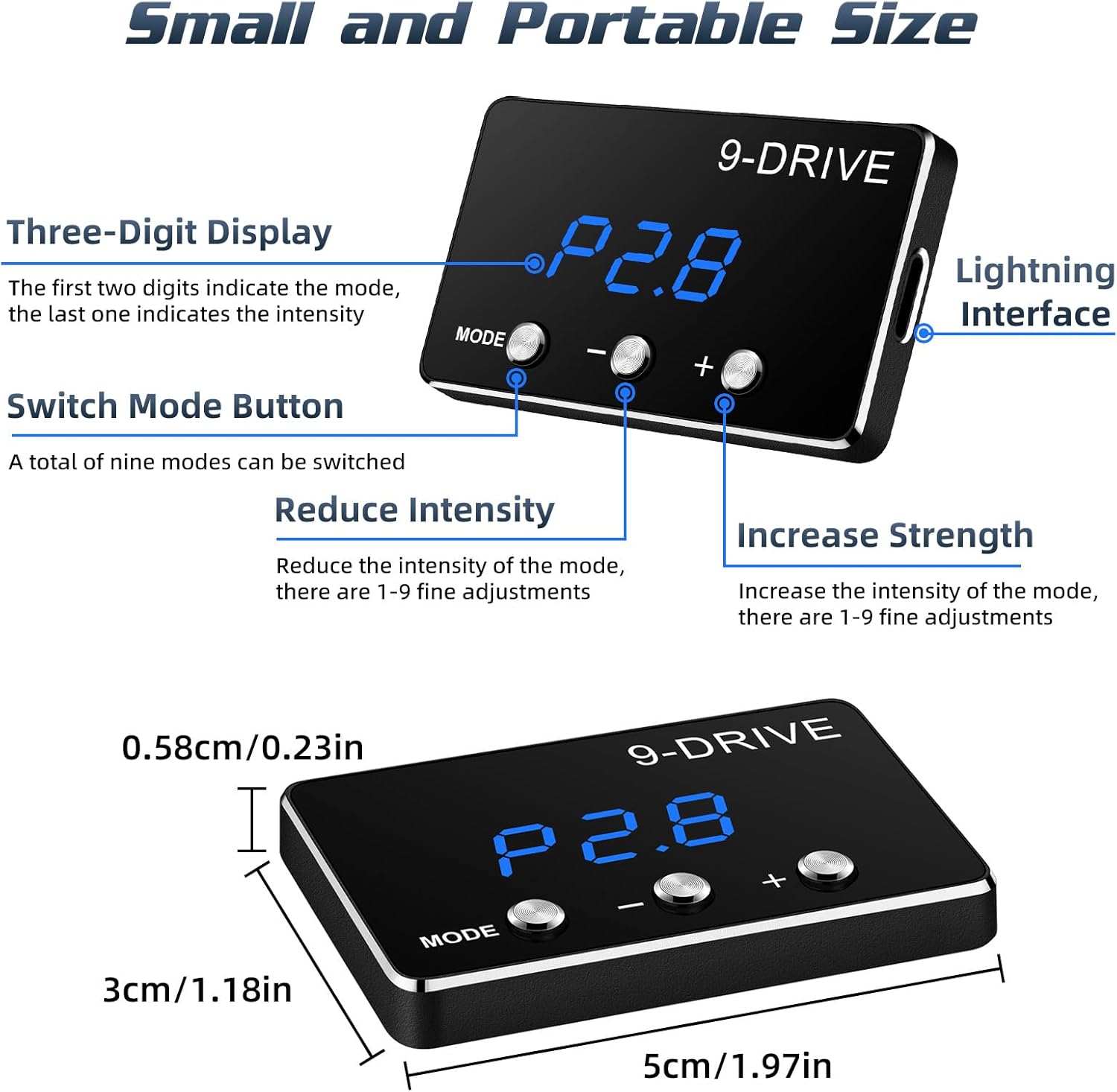
- Clear Display & Easy Adjustment: Equipped with a three-digit LED display to show the current mode and intensity level. Three buttons facilitate easy mode selection and intensity adjustment.
- Small & Portable Design: Compact size (approximately 5cm x 3cm x 0.58cm) for discreet installation and minimal intrusion into the vehicle's interior.
- Plug-and-Play տեղադրում. Designed for straightforward installation without cutting wires or complex modifications.
- Հիշողության գործառույթ. Retains the last selected driving mode and intensity level after the vehicle is turned off.
3. Համատեղելիություն
This throttle response controller is compatible with specific Toyota models. Please verify your vehicle's make, model, year, and engine type against the table below to ensure compatibility.

Կարևոր նշում.
- This electronic throttle controller is only applicable to vehicles equipped with an electronic throttle.
- It does not support vehicles with mechanical throttles.
- Always ensure your car has an electronic throttle with a compatible plug before installation.
4. Փաթեթի բովանդակությունը
Փաթեթը բացելիս համոզվեք, որ առկա են հետևյալ բոլոր բաղադրիչները.
- Throttle Response Controller Display Screen
- Main Control Unit (Adapter)
- Միացման մալուխ
- Zip Ties (for securing cables)
- Օգտագործողի ձեռնարկ (այս փաստաթուղթը)

5. Տեղադրման ուղեցույց
Follow these steps carefully for a successful installation. Ensure your vehicle's ignition is OFF before beginning.
- Locate the Accelerator Pedal: Identify the electronic accelerator pedal assembly in your vehicle.
- Disconnect the Pedal Interface: Carefully unplug the wiring harness from the accelerator pedal.
- Միացրեք վերահսկիչը. Connect the MAIMEIMI throttle controller's wiring harness inline with the accelerator pedal interface. One end connects to the vehicle's pedal, and the other to the disconnected harness. Ensure a secure fit.
- Տեղադրեք ցուցադրման միավորը՝ Route the cable for the display unit to a convenient location on your dashboard. Use the provided adhesive or zip ties to secure the display unit.
- Ապահով լարեր. Use the provided zip ties to neatly secure any loose wiring, preventing interference with pedal operation or other vehicle components.

Անվտանգության նախազգուշական միջոց.
All adjustments to the throttle controller must be made when the vehicle is safely parked and not in motion. Never attempt to adjust settings while driving.
6. Գործառնական հրահանգներ
The MAIMEIMI MA-FLC-821 features 9 distinct driving modes, each with 9 adjustable intensity levels (1-9). The display shows the mode (e.g., P1, P2, SSS, EC, NOR) and the intensity level (e.g., .8). The first two digits indicate the mode, and the last digit indicates the intensity.
Ռեժիմի ընտրություն.
- Սեղմեք ՌԵԺԻՄ button to cycle through the available driving modes.
- The display will show the current mode (e.g., P1, P2, SSS, EC, NOR).
Ինտենսիվության ճշգրտում.
- Ռեժիմը ընտրելուց հետո օգտագործեք + button to increase the intensity level (1-9).
- Օգտագործեք - button to decrease the intensity level (1-9).
- Higher intensity levels provide a more aggressive throttle response.
Driving Modes Explained:

- NOR (Normal Mode): This is the original factory throttle setting. The controller is active but does not modify the signal.
- P1 Comfort Mode (Automatic/Manual): Provides a smoother, more relaxed throttle response, suitable for daily driving and city conditions.
- P2 Sport Mode (Automatic/Manual): Offers a more dynamic and responsive throttle, ideal for spirited driving and improved acceleration.
- P3 Racing Mode (Automatic/Manual): Delivers the most aggressive throttle response for maximum acceleration and performance.
- EC Fuel-Saving Mode (Automatic/Manual): Optimizes throttle response for improved fuel efficiency, reducing aggressive acceleration.
7. Պահպանում
The MAIMEIMI MA-FLC-821 Throttle Response Controller is designed for durability and requires minimal maintenance. To ensure its longevity and optimal performance:
- Սարքը պահեք մաքուր, փոշուց և խոնավությունից զերծ։ Մաքրման համար օգտագործեք փափուկ, չոր կտոր։
- Խուսափեք սարքը երկար ժամանակ ծայրահեղ ջերմաստիճանի կամ արևի ուղիղ ճառագայթների տակ դնելուց:
- Ensure all connections remain secure. Periodically check the wiring harness for any signs of wear or damage.
- Մի փորձեք բացել կամ փոփոխել սարքը, քանի որ դա կչեղարկի երաշխիքը և կարող է վնաս պատճառել։
8: Անսարքություն
If you encounter any issues with your MAIMEIMI MA-FLC-821 Throttle Response Controller, please refer to the following troubleshooting tips:
Անջատված չէ սնուցումը/էկրանը՝
- Check all connections to ensure they are securely plugged in.
- Verify that the vehicle's ignition is on.
- Ensure the connecting cable is not damaged.
No Change in Throttle Response:
- Confirm that the device is powered on and displaying a mode other than 'NOR'.
- Check the intensity level; increase it using the '+' button.
- Վերականգնման կարգը. With the vehicle ignition ON (engine OFF), press and hold the MODE button until a specific code (e.g., '800') appears. Adjust to '800' if necessary. Fully depress and release the accelerator pedal. Then, press and hold the MODE button again until the main screen reappears. Start the vehicle.
- Ensure your vehicle is compatible with the device (refer to Section 3).
Check Engine Light or Error Codes:
- Immediately disconnect the throttle controller and reconnect the factory accelerator pedal harness.
- Start the vehicle and check if the error codes persist. If they do, consult a qualified mechanic.
- If the codes clear after removing the device, the controller may be incompatible with your specific vehicle's ECU or may be faulty. Contact customer support.
Ընդհատվող ֆունկցիոնալությունը.
- Check for loose connections at both the pedal and the controller.
- Ensure the wiring is not pinched or damaged.
- Consider environmental factors like extreme heat or cold, though the device is designed to be robust.
If these steps do not resolve the issue, please contact MAIMEIMI customer support for further assistance.
9. Տեխնիկական պայմաններ
| Հստակեցում | Մանրամասն |
|---|---|
| Բրենդ | ՄԱՅՄԵԻՄԻ |
| Մոդելի համարը | MA-FLC-821 |
| Նյութի քաշը | 4.6 ունցիա |
| Փաթեթի չափերը | 6.26 x 5.79 x 2.13 դյույմ |
| Drive ռեժիմներ | 9 (each with 9 intensity levels) |
| Ցուցադրել | 3 նիշ LED |
| Համատեղելիություն | Electronic throttle vehicles (specific Toyota models) |
10. Երաշխիքային տեղեկատվություն
MAIMEIMI products are manufactured to high-quality standards. This product comes with a limited warranty against defects in materials and workmanship under normal use. The warranty period typically covers 12 months from the date of purchase. Please retain your proof of purchase for warranty claims.
Երաշխիքը չի ներառում.
- Damage caused by improper installation or misuse.
- Չթույլատրված վերանորոգման կամ փոփոխությունների հետևանքով առաջացած վնաս:
- Նորմալ մաշվածություն:
- Damage due to accidents or external causes.
For detailed warranty terms and conditions, please refer to the official MAIMEIMI webկայք կամ կապվեք հաճախորդների աջակցության հետ:
11. Հաճախորդների աջակցություն
If you have any questions, require technical assistance, or need to make a warranty claim, please contact MAIMEIMI customer support through the following channels:
- Էլ. [Մուտքագրեք հաճախորդների աջակցության էլ․ հասցեն այստեղ]
- Webկայքը: MAIMEIMI Official Store on Amazon
- Հեռախոս: [Մուտքագրեք հաճախորդների աջակցության հեռախոսահամարը այստեղ]
Please provide your product model number (MA-FLC-821) and proof of purchase when contacting support to expedite the process.