
1. Ներածություն
This manual provides detailed instructions for the installation, operation, and maintenance of your CP PLUS 4MP Wi-Fi Floodlight Camera, model CP-F42A. Please read this manual thoroughly before using the product to ensure proper functionality and safety. This camera combines high-resolution video surveillance with integrated floodlighting for enhanced security.
2. Անվտանգության տեղեկատվություն
- Ensure the power supply matches the camera's requirements.
- Մի փորձեք ապամոնտաժել կամ փոփոխել տեսախցիկը։
- Install the camera in a location where it is protected from extreme weather conditions, although it has an IP54 rating, direct exposure to heavy rain or prolonged submersion is not recommended.
- Պահեք տեսախցիկը ջերմության աղբյուրներից և արևի ուղիղ ճառագայթներից հեռու։
- Ֆիզիկական վնասից խուսափելու համար տեսախցիկը զգույշ վարեք:
- Consult a qualified electrician for installation if you are unsure about electrical wiring.
3. Փաթեթի բովանդակությունը
Ստուգեք, որ բոլոր իրերը առկա են փաթեթում.
- CP PLUS 4MP Wi-Fi Floodlight Camera (CP-F42A)
- Power Adapter
- Մոնտաժային պտուտակներ և պատի խցաններ
- Արագ մեկնարկի ուղեցույց (չի ներառված այս ձեռնարկում)
4. Ապրանքը ավարտված էview
The CP-F42A is an outdoor Wi-Fi floodlight camera designed for surveillance and illumination. It features a 4MP sensor for clear video, H.265 video compression for efficient storage, and a 110° viewing angle. The integrated floodlight provides illumination, and the PIR sensor detects motion up to 12 meters.
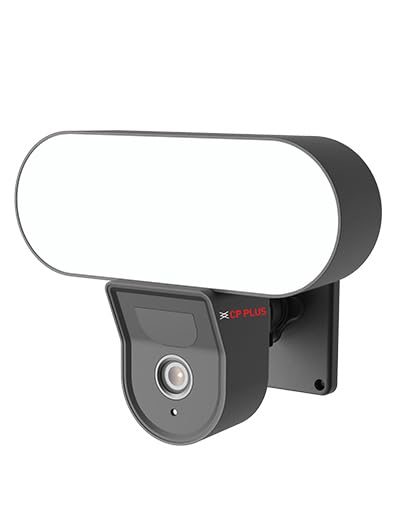
Պատկեր՝ առջևի view of the CP PLUS 4MP Wi-Fi Floodlight Camera CP-F42A, showing the camera lens and the integrated floodlight panel.
Հիմնական բաղադրիչներ.
- Տեսախցիկի Ոսպնյակներ. Captures 4MP video.
- Floodlight Panel: Ապահովում է լուսավորություն։
- PIR ցուցիչ: Հայտնաբերում է շարժումը:
- Խոսափող: Աուդիո մուտքագրման համար:
- Բանախոս: Երկկողմանի աուդիո ելքի համար։
- Մոնտաժային բրա. For secure installation.
5. Կարգավորում
5.1 Ֆիզիկական տեղադրում
- Ընտրեք տեղ՝ Ընտրեք բացօթյա տեղ՝ մաքուր view of the area you wish to monitor and within Wi-Fi range. Ensure the mounting surface is sturdy.
- Նշեք հորատման կետերը. Use the mounting bracket as a template to mark the screw holes on the wall.
- Հորատման անցքեր. Նշված կետերում փորեք ուղղորդող անցքեր: Քարե պատի վրա ամրացնելու դեպքում տեղադրեք պատի խցանները:
- Տեղադրեք տեսախցիկը. Secure the mounting bracket to the wall using the provided screws. Attach the camera to the bracket.
Image: The CP PLUS Floodlight Camera mounted on the exterior of a house, illustrating a typical installation scenario during the day.
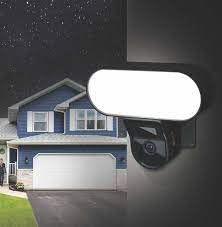
Image: The CP PLUS Floodlight Camera mounted on the exterior of a house at night, with the floodlight illuminated, demonstrating its night-time functionality.
5.2 Էլեկտրաէներգիայի միացում
Connect the provided power adapter to the camera's power input port and then plug it into a suitable electrical outlet. Ensure the connection is secure and protected from moisture.
5.3 Wi-Fi Connection and App Pairing
- Ներբեռնեք հավելվածը՝ Որոնել the "ezyKam+" app (or the recommended CP PLUS app) on your smartphone's app store (iOS or Android) and install it.
- Ստեղծել հաշիվ. Բացեք հավելվածը և գրանցվեք նոր հաշվի համար կամ մուտք գործեք, եթե արդեն ունեք մեկը։
- Սարքի ավելացում. Follow the in-app instructions to add a new device. Select "Floodlight Camera" or a similar option.
- Միացեք Wi-Fi-ին. The app will guide you through connecting the camera to your home Wi-Fi network. This usually involves scanning a QR code on the camera or entering your Wi-Fi credentials.
- Ամբողջական կարգավորում. Once connected, you can name your camera and adjust initial settings.
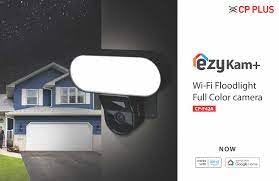
Image: Branding for CP PLUS ezyKam+ Wi-Fi Floodlight Full Color Camera, indicating compatibility with Alexa and Google Home, relevant for app pairing and smart home integration.
6. Գործառնական հրահանգներ
Access all camera functions through the dedicated mobile application.
6.1 Ուղիղ View
Բացեք հավելվածը և ընտրեք ձեր տեսախցիկը սարքերի ցանկից՝ view the live video feed. You can pinch to zoom and pan across the image.
6.2 Ձայնագրում և նվագարկում
- Ձեռքով ձայնագրում. Սեղմեք ձայնագրման կոճակը ուղիղ եթերում view ձեռքով ձայնագրությունը սկսելու/դադարեցնելու համար։
- Միջոցառման ձայնագրում. The camera automatically records when motion is detected. These recordings are stored on the installed microSD card (if any) or cloud storage (subscription may be required).
- Նվագարկում: Մուտք գործեք գրանցված տեղեկություններըtage through the "Playback" or "History" section in the app.
6.3 Շարժման հայտնաբերում և ահազանգեր
Configure motion detection sensitivity and areas within the app settings. When motion is detected, the camera can send push notifications to your phone and trigger recording. The PIR sensor has a detection range of 6-12 meters.
6.4 Լուսարձակի կառավարում
The floodlight can be controlled manually via the app or set to activate automatically upon motion detection during specific times or low-light conditions. Adjust brightness and duration settings in the app.
6.5 Երկկողմանի աուդիո
Use the microphone and speaker icons in the live view to communicate with visitors or deter intruders. Press and hold the microphone icon to speak, and release to listen.
6.6 Գիշերային տեսիլք
The camera features infrared (IR) night vision for clear black-and-white video in low-light conditions and can also utilize the floodlight for full-color night vision when activated. The night vision range is up to 12 meters.
7. Պահպանում
7.1 Մաքրում
Wipe the camera lens and floodlight panel with a soft, damp կտոր՝ փոշին և կեղտը հեռացնելու համար: Մի օգտագործեք կոշտ քիմիական նյութեր կամ հղկող մաքրող միջոցներ:
7.2 Որոնվածի թարմացումներ
Periodically check the app for available firmware updates. Keeping your camera's firmware up-to-date ensures optimal performance and security features.
7.3 Պահպանման կառավարում
If using a microSD card, regularly check its status in the app. Format the card periodically to maintain performance. Back up important recordings before formatting.
8: Անսարքություն
| Խնդիր | Հնարավոր լուծում |
|---|---|
| Տեսախցիկը չի միանում։ | Check power adapter connection and ensure the outlet is functional. |
| Հնարավոր չէ միանալ Wi-Fi-ին: | Ensure the camera is within Wi-Fi range. Verify Wi-Fi password. Try resetting the camera and router. |
| Տեսանյութի վատ որակ: | Check Wi-Fi signal strength. Clean the camera lens. Ensure sufficient lighting. |
| Շարժման հայտնաբերումը չի աշխատում: | Adjust motion detection sensitivity and area settings in the app. Ensure there are no obstructions. |
| Floodlight not activating. | Check floodlight settings in the app. Ensure it's set to activate on motion or during low light. |
9. Տեխնիկական պայմաններ
| Առանձնահատկություն | Մանրամասն |
|---|---|
| Մոդելի համարը | CP-F42A |
| Բանաձեւ | 4MP (Effective Still Resolution: 4 MP) |
| Տեսանյութի սեղմում | H.265, MPEG |
| Viewանգլ | 110 աստիճան |
| PIR հեռավորություն | 6-12 մետր |
| Անլար տեխնոլոգիա | Wi-Fi |
| Գիշերային տեսողության տիրույթ | 12 Meters (Infrared, Night Color) |
| Շրջանակի արագություն | 20 կադր վայրկյանում |
| Օպտիկական խոշորացում | 3x |
| Պաշտպանության միջազգային վարկանիշ | IP54 |
| Rtգուշացման տեսակը | Միայն շարժում |
| Էլեկտրաէներգիայի աղբյուր | Լարով էլեկտրական |
| Ներառված բաղադրիչներ | Ադապտոր |
| Չափերը (L x W x H) | 20 x 12 x 10 սանտիմետր |
| Նյութի քաշը | 630 գ |
| Ներքին/Դրսի օգտագործումը | Բացօթյա |
| Ֆոտո սենսորային տեխնոլոգիա | CMOS |
| Առաջարկվող կիրառումներ | Home Security, Night Vision |
10. Երաշխիք և աջակցություն
For warranty information and technical support, please refer to the official CP PLUS webկայքում կամ կապվեք նրանց հաճախորդների սպասարկման ծառայության հետ: Պահպանեք ձեր գնման կտրոնը որպես գնման ապացույց՝ երաշխիքային պահանջների համար:
CP PLUS Official Webկայքը: www.cpplusworld.com