
1. Ապրանքը ավարտված էview
The AUVON TENS Electrostimulation Device is a professional, rechargeable unit designed to stimulate sensory nerves and muscles. It utilizes a special pain gate mechanism to help relax your body and provide pain relief. Featuring 24 easy-to-use pre-programmed massage modes and an adjustable timer, this multi-mode electrotherapy device offers a convenient solution for pain management.

Նկար 1: The AUVON TENS device provides targeted pain relief for various body areas.
2. Կարևոր անվտանգության նախազգուշացումներ
Read all warnings and instructions before use. Failure to do so may result in serious injury.
- Չեն օգտագործում this product if you have an implanted defibrillator, pacemaker, or any other implanted metallic or electronic device.
- Չեն օգտագործում this product if you have heart rhythm problems, seizures, cerebral diseases, or neurological disorders.
- Չեն օգտագործում this product if you have undiagnosed chronic pain.
- Չեն օգտագործում this product if you are pregnant or in labor.
- Չեն օգտագործում this product if you have cancer.
- Չեն օգտագործում this product if you are sensitive to electrotherapy.
- Չեն օգտագործում this product excessively.
- Չեն օգտագործում this product above the neck, especially on the head or throat.
- Չեն օգտագործում this product if you are under 22 years old.
- Consult your doctor before use if you have any medical condition.
- Individual symptoms, situations, circumstances, and results may vary. The information provided is not intended for medical diagnosis or treatment, nor is it a substitute for professional medical advice.
3. Փաթեթի բովանդակությունը
Ստանալուց հետո խնդրում ենք ստուգել փաթեթի պարունակությունը՝ համոզվելու համար, որ բոլոր իրերը տեղում են՝
- 1 x AUVON TENS Electrostimulator Device
- 10 x 5 cm x 5 cm Electrode Pads
- 2 x Connection Wires (1/2 wire)
- 1 x Պահոց
- 1 x USB լիցքավորման մալուխ
- 1 x Պահպանման պայուսակ
- 1 x բազմալեզու Օգտագործողի ձեռնարկ

Նկար 2: All items included in your AUVON TENS device package.
4. Կարգավորման ուղեցույց
- Սարքի լիցքավորում. Before first use, ensure the device is fully charged. Connect the provided USB cable to the device and a suitable USB power source. The power indicator will show the charging status. A full charge provides up to 10 hours of continuous use.
- Միացրեք լարերը՝ Insert the 2mm pin connectors of the lead wires into the electrode pads. Ensure a secure connection.
- Պատրաստել մաշկը. Clean and dry the skin area where you intend to place the electrodes. Avoid applying on broken or irritated skin.
- Էլեկտրոդների կիրառում. Remove the transparent film from the electrode pads and firmly press them onto your skin. Ensure the entire surface of the pad is in contact with the skin for optimal conductivity.
- Միանալ սարքին. Plug the other end of the lead wires into the output ports on the AUVON TENS device.

Նկար 3: Visual guide for connecting electrodes and operating the device.
5. Գործառնական հրահանգներ
- Միացում՝ Press and hold the Power button (usually the 'M' button) to turn on the device.
- Ընտրեք ռեժիմ. Press the 'M' button to cycle through the 6 main massage modes. The device offers 24 pre-programmed sub-modes, which are accessible within these 6 main modes.
- Ընտրեք ենթառեժիմը՝ Once a main mode is selected, use the '+' or '-' buttons to navigate through the available sub-modes if applicable.
- Կարգավորել ինտենսիվությունը. Use the '+' button to increase the intensity and the '-' button to decrease it. Start with a low intensity and gradually increase until you feel a comfortable, yet effective, sensation.
- Սահմանել ժմչփ: Press the 'T' button to select your preferred massage duration. The timer is adjustable.
- Սկսել բուժումը. The device will start the treatment according to your selected settings.
- Անջատել: After your session, press and hold the Power button to turn off the device. Remove the electrodes from your skin.

Նկար 4: The device offers 24 mode choices and adjustable intensity for personalized treatment.
6. Պահպանում
6.1 Էլեկտրոդային բարձիկի խնամք
The electrode pads feature an advanced American adhesive gel designed for durability and reusability. To maximize their lifespan:
- Մաքրում: After each use, gently clean the adhesive side of the pads with a small amount of water. Do not use soap or harsh chemicals. Allow them to air dry completely before storing.
- Պահպանում: Always place the pads back onto the provided pad holder or their original protective film after use. This prevents them from drying out and losing their adhesive quality. Store them in a cool, dry place.
- Փոխարինում: Replace electrode pads when they lose their stickiness or if you notice reduced conductivity. The pads are designed for approximately 45 uses with proper care.
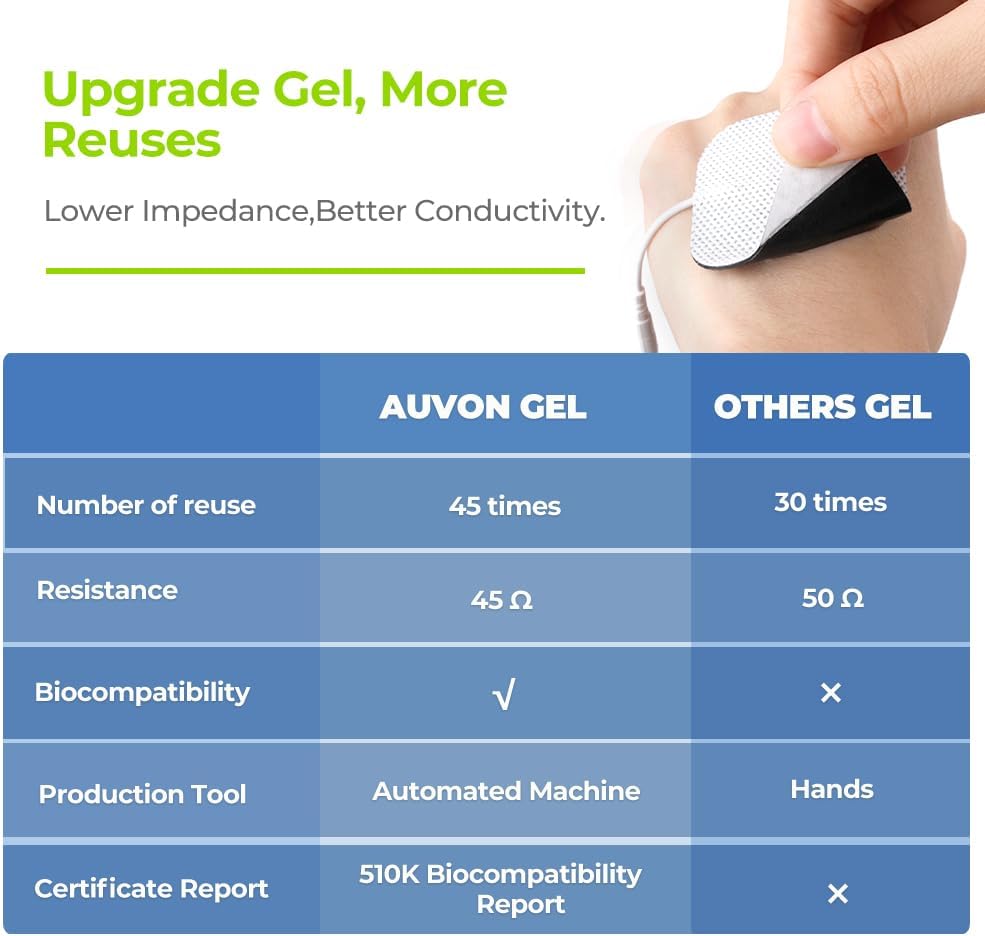
Նկար 5: AUVON electrode pads offer enhanced reusability and conductivity.
6.2 Սարքի խնամք
- Մաքրում: Սարքը սրբեք փափուկ, չոր կտորով։ Մի օգտագործեք հղկող մաքրող միջոցներ և մի ընկղմեք սարքը ջրի մեջ։
- Պահպանում: Սարքը պահեք տրամադրված պահեստային տոպրակի մեջ՝ զով, չոր տեղում, ուղիղ արևի լույսից և ծայրահեղ ջերմաստիճաններից հեռու։
- Մարտկոց. The device contains a rechargeable Lithium-ion battery. Charge it regularly to maintain battery health, even if not used frequently.
7: Անսարքություն
| Խնդիր | Հնարավոր պատճառ | Լուծում |
|---|---|---|
| Սարքը չի միանում: | Ցածր կամ սպառված մարտկոց։ | Լիցքավորեք սարքը տրամադրված USB մալուխի միջոցով: |
| Զգացմունքների բացակայություն կամ թույլ զգացողություն։ |
|
|
| Pads are not sticking. |
|
|
8. Ապրանքի բնութագրերը
| Բրենդ | AUVON |
| Մոդելի համարը | AS1080 |
| Սարքի տեսակը | TENS Electrostimulation Device |
| Ալիքներ | 2 անկախ ալիք |
| Ծրագրեր | 24 Pre-programmed Modes |
| Էլեկտրոդներ | 10 x 5cm x 5cm Electrode Pads (pin-style) |
| Մարտկոցի տեսակը | Rechargeable Lithium-ion (included) |
| Օգտագործման տևողությունը | Մինչև 10 ժամ (ամբողջական լիցքավորմամբ) |
| Փաթեթի չափերը | 14.6 x 9.2 x 7.7 սմ |
| Քաշը | 320 գրամ |
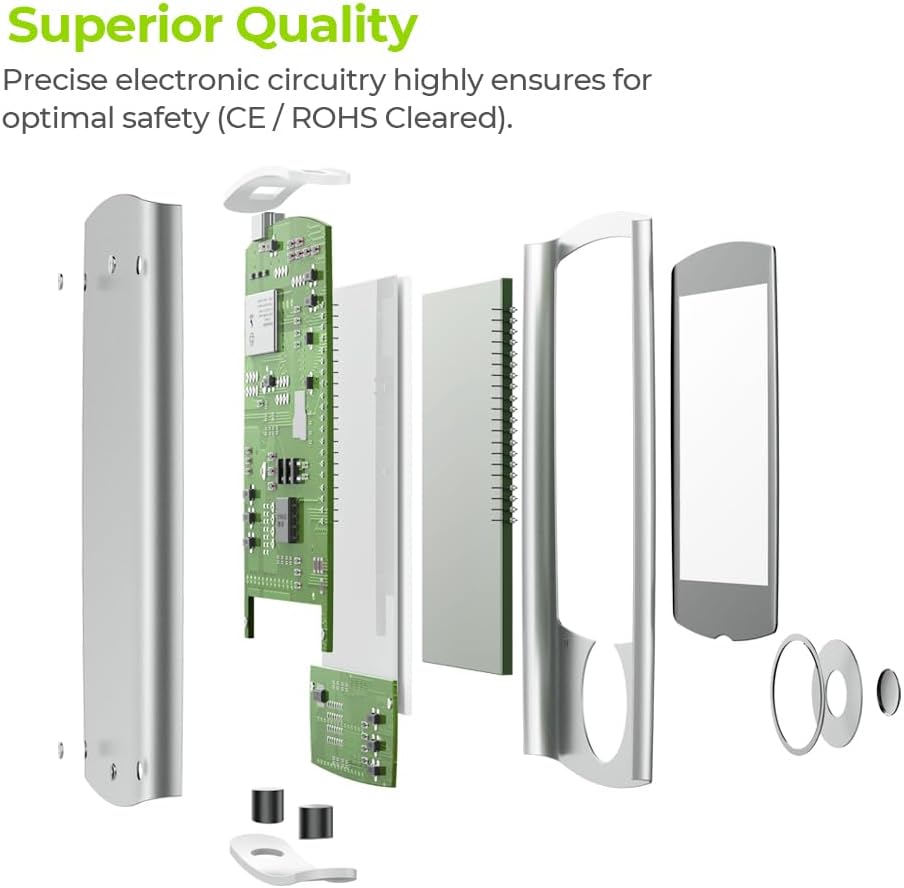
Նկար 6: Internal components demonstrating the superior quality and precise electronic circuitry.
9. Երաշխիք և հաճախորդների աջակցություն
The AUVON TENS Electrostimulation Device AS1080 comes with a 24 ամիս երաշխիք գնման օրվանից:
For any questions, concerns, or technical support, please contact AUVON customer service. You can also find additional resources, including a downloadable version of this manual, on the product details page where you purchased the device.
We are committed to providing friendly and helpful customer support.