
Ներածություն
The Havit Gamenote KB885L mechanical keyboard is engineered for precision, durability, and customization. It features a gasket structure design, providing a soft and stable typing experience while minimizing noise. The full key rollover with multi-key response ensures fast and accurate input, crucial for gaming. With customizable RGB backlighting, you can personalize your keyboard with various lighting modes and effects. The detachable USB-C cable enhances portability and simplifies cable management. This keyboard is built with mechanical switches rated for 50 million key presses, making it suitable for gamers, typists, and professionals who require long-lasting performance.
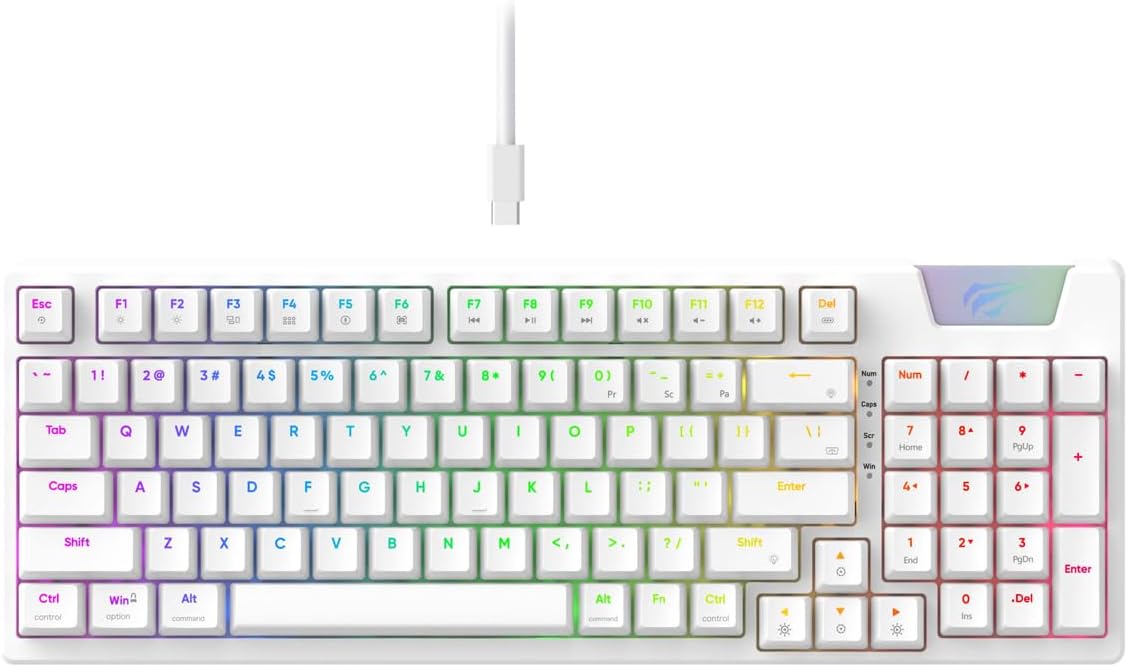
Image: The Havit Gamenote KB885L mechanical keyboard in white, showcasing its full layout and detachable USB-C cable.
Կարգավորման ուղեցույց
Follow these steps to set up your Havit Gamenote KB885L mechanical keyboard:
- Բացեք ստեղնաշարը. Զգուշորեն հանեք ստեղնաշարը և դրա պարագաները փաթեթավորումից։
- Միացրեք USB-C մալուխը՝ Insert the detachable USB Type-C cable into the port on the keyboard.
- Միանալ համակարգչին. Միացրեք USB մալուխի մյուս ծայրը ձեր համակարգչի հասանելի USB պորտին:
- Վարորդի տեղադրում. The keyboard is plug-and-play and typically does not require additional drivers. Your operating system should automatically detect and install the necessary drivers.
- Փորձարկման գործառույթ. Open a text editor or browser to test key presses and ensure all functions are working correctly.

Image: A close-up of the Havit Gamenote KB885L keyboard highlighting its portable design and detachable cable for easy setup and transport.
Գործառնական հրահանգներ
The Havit Gamenote KB885L keyboard offers various features for an enhanced user experience:
RGB լուսավորության կառավարում
Ստեղնաշարն ունի կարգավորելի RGB լուսավորություն: Լուսավորության էֆեկտները կարգավորելու համար օգտագործեք հետևյալ ստեղների համադրությունները.
- Fn + [Ստեղն]: Cycle through different RGB lighting modes. (Specific key combinations may vary, refer to on-keyboard legends if available).
- Fn + սլաքների ստեղներ՝ Adjust brightness and speed of lighting effects.

Image: The Havit Gamenote KB885L keyboard displaying its vibrant RGB backlighting, illustrating customizable lighting effects.
Լրիվ բանալիների փոխանցում (NKRO)
This keyboard supports Full Key Rollover, meaning every key press is registered independently, regardless of how many keys are pressed simultaneously. This feature is essential for fast-paced gaming and typing, preventing ghosting or missed inputs.
Էրգոնոմիկ դիզայն
The keyboard is designed with ergonomics in mind to provide comfort during extended use. Its layout and keycap profile aim to reduce strain on your wrists and fingers.

Պատկեր՝ Ա view of the Havit Gamenote KB885L keyboard highlighting its ergonomic design for comfortable use.
Տեխնիկական սպասարկում
Ճիշտ սպասարկումը ապահովում է ձեր ստեղնաշարի երկարակեցությունը և օպտիմալ աշխատանքը.
- Մաքրում: Regularly clean the keyboard with a soft, dry cloth. For deeper cleaning, use compressed air to remove dust and debris from between the keycaps. For stubborn dirt, a slightly damp կարելի է օգտագործել մեղմ օճառով կտոր՝ համոզվելու համար, որ ստեղնաշարի մեջ հեղուկ չի մտնում։
- Խուսափեք արտահոսքից. Keep liquids away from the keyboard to prevent damage to the internal components. In case of a spill, immediately disconnect the keyboard and allow it to dry completely before reconnecting.
- Մալուխի խնամք. Handle the detachable USB-C cable with care. Avoid sharp bends or excessive pulling to prevent damage to the cable or connectors.
- Պահպանում: Երբ ստեղնաշարը չեք օգտագործում, պահեք մաքուր, չոր միջավայրում՝ ծայրահեղ ջերմաստիճաններից հեռու։
Անսարքությունների վերացում
If you encounter issues with your Havit Gamenote KB885L keyboard, try the following solutions:
- Ստեղնաշարը չի արձագանքում.
- Համոզվեք, որ USB-C մալուխը ապահով կերպով միացված է և՛ ստեղնաշարին, և՛ համակարգչին։
- Փորձեք ստեղնաշարը միացնել ձեր համակարգչի այլ USB միակցիչի։
- Ստուգեք ստեղնաշարը մեկ այլ համակարգչի վրա՝ պարզելու համար, թե խնդիրը ստեղնաշարի մեջ է, թե ձեր համակարգում։
- RGB լույսերը չեն աշխատում.
- Check if the lighting is turned off using the Fn key combinations.
- Ensure the keyboard is properly powered via the USB connection.
- Բանալիները չեն գրանցվում / հայտնվում են որպես ուրվական։
- Due to full key rollover, this is unlikely. However, ensure no debris is lodged under the keycap.
- If a specific key is consistently failing, it might indicate a switch issue. Contact support if the problem persists.
Տեխնիկական պայմաններ
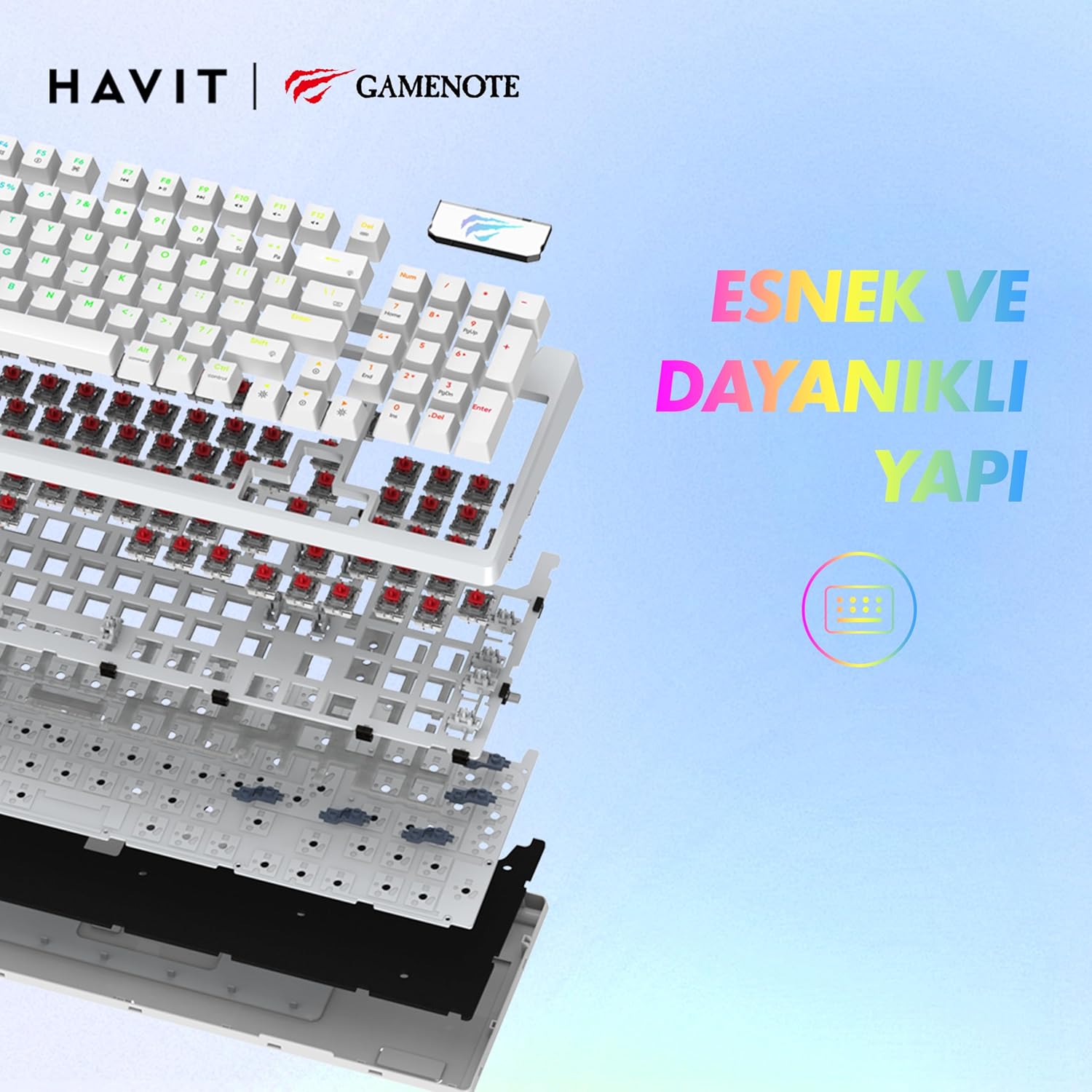
Պատկեր՝ Պայթյուն view of the Havit Gamenote KB885L keyboard, illustrating its internal gasket structure for enhanced stability and typing feel.
| Առանձնահատկություն | Մանրամասն |
|---|---|
| Բրենդ | Հավիթ |
| Մոդելի համարը | KB885L |
| Համատեղելի սարքեր | Համակարգիչ |
| Միացման տեխնոլոգիա | USB |
| Ստեղնաշարի նկարագրություն | Խաղեր |
| Առաջարկվող կիրառումներ | Խաղեր |
| Հատուկ առանձնահատկություն | Դյուրակիր |
| Գույն | Սպիտակ |
| Հետին լուսավորության գույնի աջակցություն | RGB (Red, Green, Blue model) |
| Ոճ | Ժամանակակից |
| Ապրանքի չափերը (L x W x H) | 38.7 x 14 x 4.5 սմ |
| Լեզու | Անգլերեն |
| Էլեկտրաէներգիայի աղբյուր | USB հզորություն |
| Անջատիչի տեսակը | Շոշափելի |
| Ստեղնաշարի դասավորություն | QWERTY |
| Ձեռքի կողմնորոշում | Երկկողմանի |
| Բանալիների քանակը | 95 |
| Կոճակների քանակը | 104 |
| Ներառված բաղադրիչներ | USB մալուխ |
| Նյութ | Պլաստիկ |
| Key Press Lifespan | 50 Million (from description) |

Image: An illustration highlighting the Havit Gamenote KB885L's durable mechanical switches, rated for a 50 million key press lifespan.
Երաշխիքային տեղեկատվություն
The Havit Gamenote KB885L Mechanical Keyboard comes with a մեկ տարվա երաշխիք from the date of purchase. This warranty covers manufacturing defects and issues arising from normal use. It does not cover damage caused by misuse, accidents, unauthorized modifications, or improper maintenance. Please retain your proof of purchase for warranty claims.
Հաճախորդների աջակցություն
For further assistance, technical support, or warranty inquiries, please contact Havit customer service through their official website or the retailer where you purchased the product. Have your model number (KB885L) and proof of purchase ready when contacting support.