
1. Ապրանքը ավարտված էview
The POLONO P31S is a compact and portable thermal label printer designed for various labeling needs in home, office, and school environments. It connects wirelessly via Bluetooth to your smartphone or tablet, allowing you to design and print labels using the dedicated mobile application. This device features a built-in cutter and operates without ink, utilizing thermal printing technology for clear, durable labels.
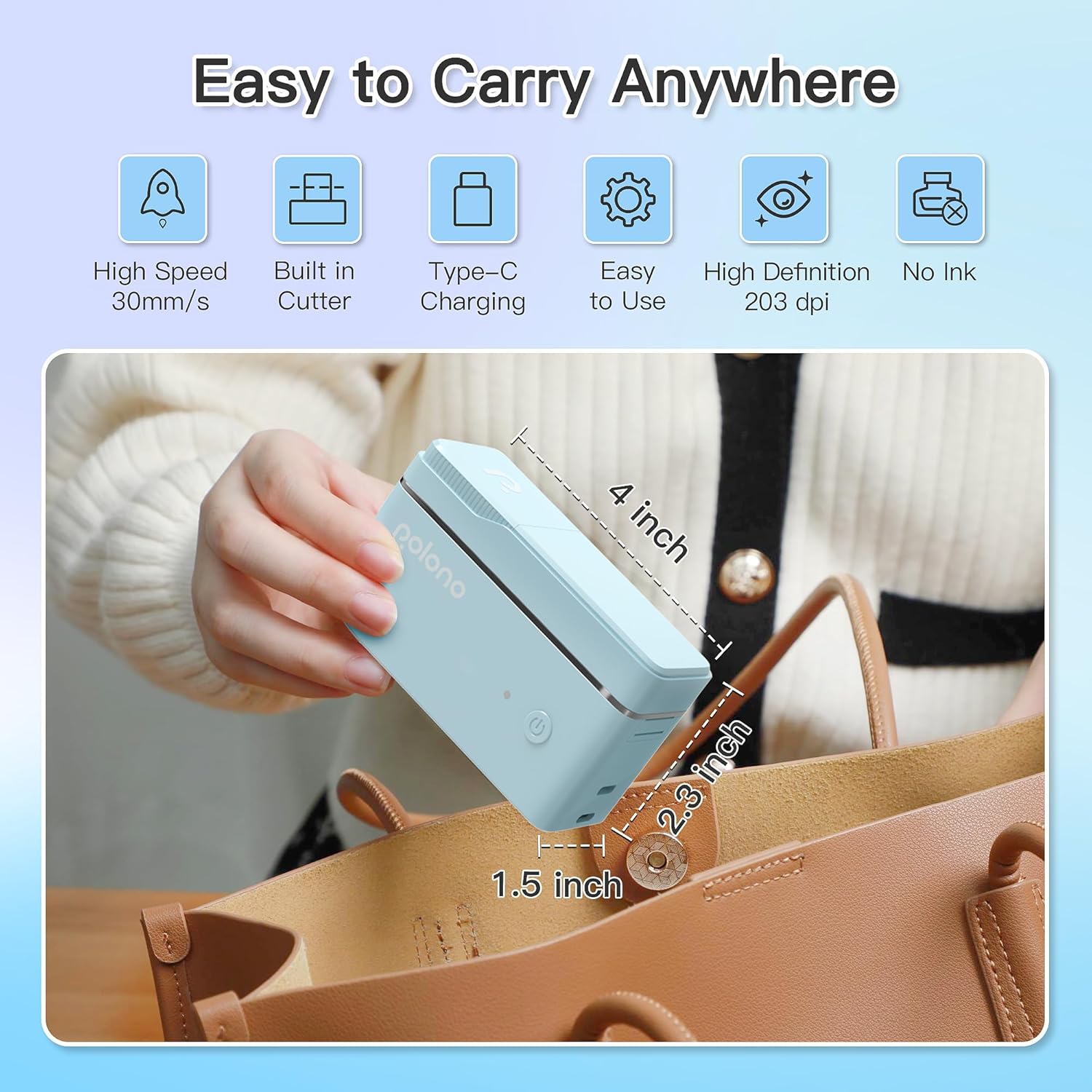
Նկար 1: POLONO P31S Label Printer highlighting its compact design and dimensions (approximately 4 inches long, 2.3 inches high, 1.5 inches wide).
Հիմնական հատկանիշները:
- Դյուրակիր և թեթև դիզայն։
- Bluetooth connectivity for wireless printing.
- Thermal printing technology (no ink required).
- Built-in label cutter.
- Supports various label types including text, QR codes, barcodes, and images.
- Վերալիցքավորվող մարտկոց:
2. Անվտանգության տեղեկատվություն
Please read and understand all safety instructions before using the POLONO P31S label printer to prevent injury or damage to the device.
- Մի ապամոնտաժեք, վերանորոգեք կամ փոփոխեք սարքը:
- Սարքը հեռու պահեք ջրից, խոնավությունից և ծայրահեղ ջերմաստիճանից:
- Use only POLONO-approved label tapes to ensure optimal performance and prevent damage.
- Տպելուց անմիջապես հետո խուսափեք տպիչի գլխիկին դիպչելուց, քանի որ այն կարող է տաք լինել։
- Պահել երեխաներից հեռու:
- Use the provided charging cable or a certified equivalent.
3. Փաթեթի բովանդակությունը
Ստուգեք, որ բոլոր իրերը առկա են փաթեթում.
- POLONO P31S Label Printer
- Label Tape Roll (starter roll)
- USB լիցքավորման մալուխ
- Օգտագործողի ձեռնարկ (այս փաստաթուղթը)
4. Կարգավորում
4.1 Սարքի լիցքավորում
Before first use, fully charge the label printer. Connect the provided USB charging cable to the printer's charging port and to a USB power adapter (not included) or a computer's USB port. The indicator light will show charging status.
4.2 Պիտակի ժապավենի տեղադրում
- Բացեք պիտակների բաժնի կափարիչը։
- Insert the label tape roll with the printing surface facing up, ensuring it is properly seated.
- Pull a small portion of the label tape out, extending it past the cutter blade.
- Ապահով կերպով փակեք պիտակի բաժնի կափարիչը։

Նկար 2: Proper installation of POLONO P31S label tape. Ensure the green sticker on the tape is not removed or damaged, as it contains chip technology for optimal performance. Do not pull the label out directly; use the cutting blade.
4.3 Հավելվածի ներբեռնում և Bluetooth միացում
- Download the "Labelnize" app from the Apple App Store or Google Play Store.
- Turn on the POLONO P31S label printer by pressing and holding the power button.
- Միացրեք Bluetooth- ը ձեր սմարթֆոնի կամ պլանշետի վրա:
- Open the "Labelnize" app. The app will prompt you to allow Bluetooth access. Grant permission.
- Within the app, search for available devices and select "P31S" to connect.
- Once connected, the app will indicate a successful connection, and you are ready to create labels.
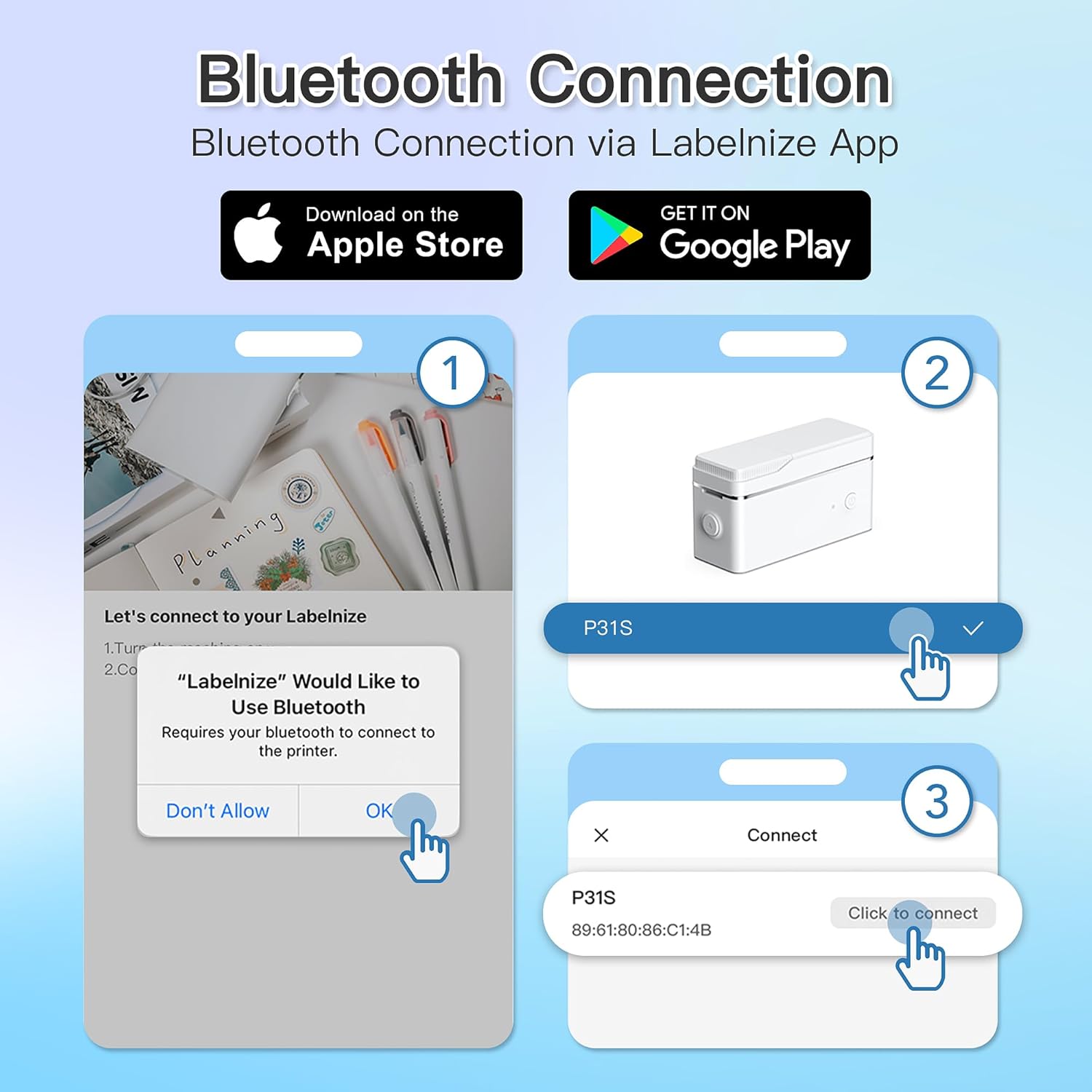
Նկար 3: Steps for Bluetooth connection via the Labelnize App. Download the app, allow Bluetooth access, select "P31S" from the device list, and click "Connect".
5. Գործառնական հրահանգներ
5.1 Creating Labels with the Labelnize App
The Labelnize app offers a variety of tools to design your labels:
- Տեքստ՝ Enter custom text, choose from over 90 fonts, adjust size, style (bold, italic), and alignment.
- Սահմաններ: Select from over 95 border designs to frame your labels.
- Icons/Graphics: Access a library of over 670 tab icons and other graphics to enhance your labels.
- QR Code/Barcode: Generate QR codes or barcodes for various applications.
- Պատկերներ: Տեղադրեք պատկերներ ձեր սարքի պատկերասրահից։
- Կաղապարներ: Օգտագործեք նախապես մշակված ձևանմուշներ պիտակավորման տարածված առաջադրանքների համար։

Նկար 4: The Labelnize app interface for creating labels, offering extensive customization options including borders, fonts, and icons. The app supports multiple languages.
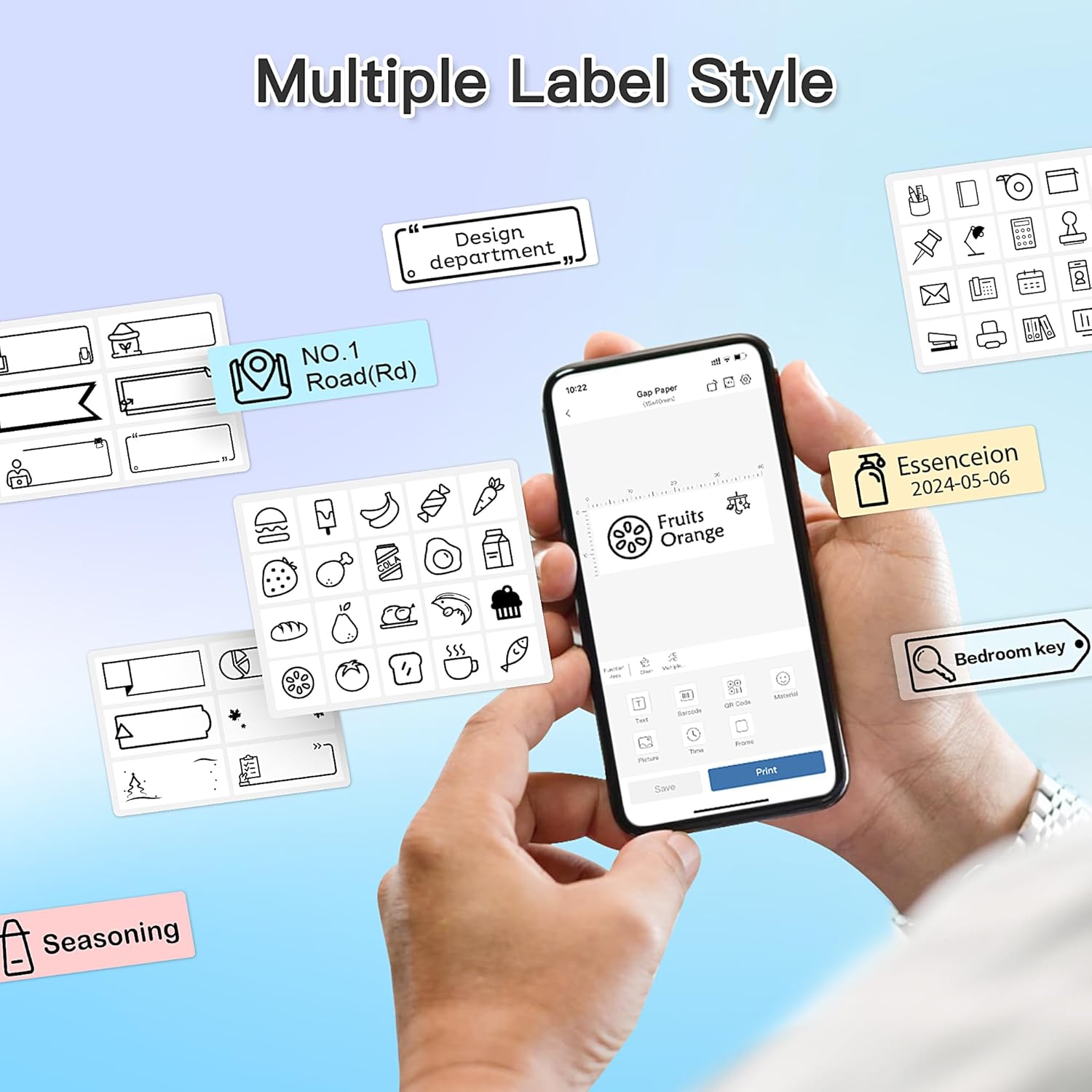
Նկար 5: Examples of diverse label styles achievable with the POLONO P31S, demonstrating the flexibility in design for different organizational needs.
5.2 Պիտակների տպագրություն
After designing your label in the Labelnize app:
- Review your label design on the app screen.
- Tap the "Print" button within the app.
- Confirm print settings (e.g., number of copies) if prompted.
- The printer will automatically feed and print the label.
5.3 Ներկառուցված կտրիչի օգտագործումը
The POLONO P31S features a built-in cutter for clean and precise label separation. After printing, gently press the cutter button or lever (depending on model variation) to cut the label. Do not pull the label manually to tear it, as this may damage the printer or result in uneven cuts.
6. Պահպանում
6.1 Տպիչի գլխիկի մաքրում
To maintain print quality, clean the print head periodically:
- Անջատեք տպիչը և անջատեք սնուցման մալուխը։
- Բացեք պիտակների բաժնի կափարիչը։
- Զգուշորեն սրբեք տպիչի գլուխը բամբակյա փայտիկով, թեթևակիampհագեցած է իզոպրոպիլային սպիրտով:
- Թողեք տպիչի գլուխը լիովին չորանա, նախքան կափարիչը փակելը և տպիչը միացնելը։
6.2 Մարտկոցի խնամք
- Charge the battery regularly, even if the printer is not used frequently, to prolong its lifespan.
- Խուսափեք մարտկոցի լիակատար լիցքաթափումից երկար ժամանակ։
- Պահպանեք տպիչը սառը, չոր տեղում, երբ այն չի օգտագործվում:
7: Անսարքություն
| Խնդիր | Հնարավոր պատճառ | Լուծում |
|---|---|---|
| Տպիչը չի միանում։ | Մարտկոցի պակաս կամ էներգիայի բացակայություն: | Լիցքավորեք տպիչը՝ օգտագործելով տրամադրված USB մալուխը: |
| Հնարավոր չէ միանալ Bluetooth-ի միջոցով։ | Bluetooth is off, printer is off, or app issue. | Ensure printer is on, Bluetooth is enabled on your device, and restart the Labelnize app. Try re-pairing. |
| Տպման վատ որակ: | Dirty print head, incorrect label tape, or low battery. | Clean the print head (Section 6.1). Ensure you are using POLONO P31S compatible label tape. Charge the printer. |
| Label jam. | Improper tape installation or foreign object. | Turn off the printer, open the cover, carefully remove any jammed tape. Reinstall tape correctly. |
| Տպիչը չի արձագանքում։ | Ժամանակավոր ծրագրային ապահովման խափանում։ | Restart the printer and the Labelnize app. |
8. Տեխնիկական պայմաններ
| Առանձնահատկություն | Մանրամասն |
|---|---|
| Մոդել | P31S |
| Տպագրության տեխնոլոգիա | Ջերմային |
| Միացում | Bluetooth |
| Տպման բանաձեւ | 203 x 203 DPI |
| Առավելագույն տպագրության արագություն (մոնոխրոմ) | 15 ppm |
| Մեդիա առավելագույն չափը | Label rolls (2 inches / 24 millimeters) |
| Թանաքի գույնը | Սև (ջերմային տպագրություն) |
| Էլեկտրաէներգիայի աղբյուր | 1 լիթիում պոլիմերային մարտկոց (ներառված է) |
| Ապրանքի չափերը | 7.2 x 7.4 x 12.7 սմ; 260 գ |
| Ներառված բաղադրիչներ | Պիտակներ |
9. Երաշխիք և աջակցություն
For warranty information and technical support, please refer to the official POLONO webկայքում կամ կապվեք նրանց հաճախորդների սպասարկման ծառայության հետ: Պահպանեք ձեր գնման կտրոնը որպես գնման ապացույց՝ երաշխիքային պահանջների համար:
Պաշտոնական Webկայքը: www.polono.com (Նշում. Սա տեղապահ է URL, խնդրում եմ ստուգել իրական պաշտոնականը website for POLONO products.)