
Ներածություն
This manual provides detailed instructions for the safe and effective use of your Yesido SF17 Multifunctional Selfie Stick Tripod. Please read this manual thoroughly before operating the device and retain it for future reference.
Ապրանքը ավարտվել էview
The Yesido SF17 is a versatile device designed to function as both a selfie stick and a tripod stand. It features an extendable pole, a 360-degree rotating phone holder, and a detachable Bluetooth remote control for convenient photo and video capture.
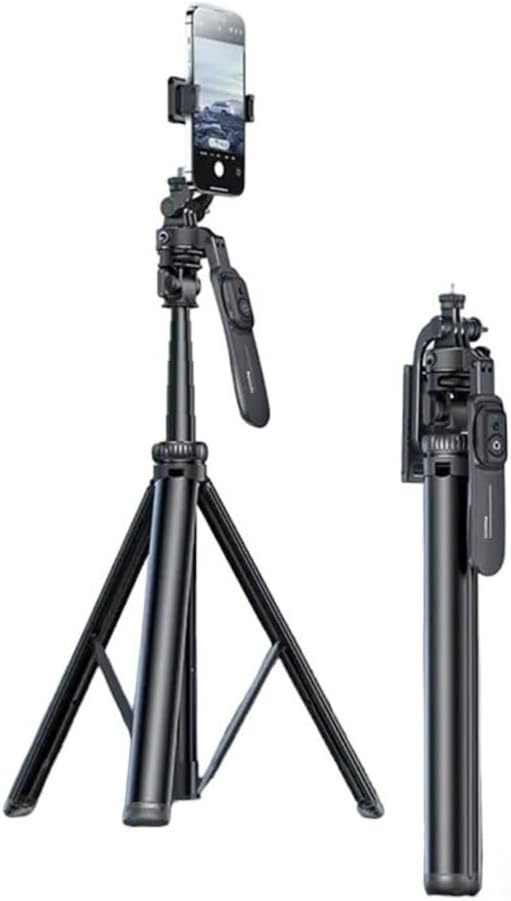
Image: The Yesido SF17 Selfie Stick Tripod shown both fully extended as a tripod with a phone attached, and folded into a compact stick for portability.
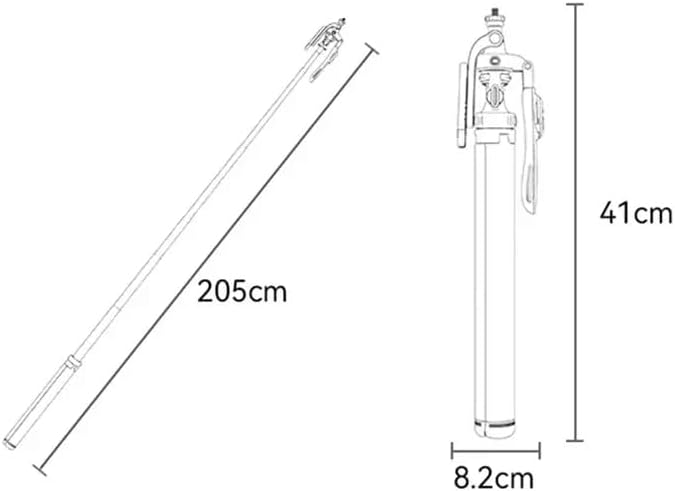
Image: A diagram illustrating the dimensions of the Yesido SF17. When folded, it measures approximately 41cm in length and 8.2cm in width. When fully extended, the pole reaches 205cm.
Հիմնական բաղադրիչներ.
- Extendable Pole: Allows for adjustable height up to 200cm.
- Եռոտանի ոտքեր՝ Provides stable support when used as a tripod.
- Հեռախոսի սեփականատեր. Կարգավորելի clamp to secure smartphones.
- Bluetooth հեռակառավարման վահանակ. Detachable remote for wireless photo/video capture.
- 1/4" Screw Mount: For attaching professional cameras or other accessories.
- Սառը կոշիկի նստատեղ՝ For mounting supplementary lighting or microphones.

Պատկեր՝ խոշոր պլան views of the Yesido SF17 tripod head, highlighting the 1/4 inch screw for professional camera installation, a 1/4 inch nut for microphone attachment, and a cold shoe seat for supplementary lighting.
Կարգավորման հրահանգներ
- Բացեք եռոտանին. Gently pull the three legs outwards from the base of the stick until they are fully extended and stable.
- Երկարացրեք սյունը. Pull the telescopic sections of the stick upwards to achieve the desired height. Ensure all sections are securely locked in place.
- Միացրեք ձեր սարքը՝
- Սմարթֆոնների համար. Open the adjustable phone holder clamp and carefully insert your smartphone. Ensure it is securely gripped. The holder supports phones between 4.7 and 7.1 inches.
- Տեսախցիկների համար. If using a camera, screw it onto the 1/4" screw mount located at the top of the tripod head.
- Զուգակցել Bluetooth հեռակառավարման վահանակը.
- Ensure the remote control is charged (if applicable) and powered on.
- Ակտիվացրեք Bluetooth-ը ձեր սմարթֆոնի վրա:
- Որոնել available devices and select "YESIDO" or a similar identifier.
- Once paired, the remote can be used to trigger your phone's camera shutter from up to 10 meters away.

Image: The Yesido SF17 tripod stand with a smartphone mounted, demonstrating the use of the detachable Bluetooth remote control for capturing photos from a distance of up to 10 meters.
Գործառնական հրահանգներ
- Adjusting Phone Holder Orientation: The phone holder can be rotated horizontally or vertically to suit your shooting needs.
- Adjusting Shooting Angles:
- The tripod head allows for 360-degree pan tilt rotation for panoramic shots.
- The holder can be adjusted up and down by 260 degrees to meet various shooting angles.
- Further adjustments of 180 degrees are available for diverse photo styles.
- Օգտագործումը որպես սելֆիի ձողիկ՝
- Fold the tripod legs back into the handle.
- Extend the pole to your desired length.
- Use the Bluetooth remote to capture photos or videos.
- Արտաքին պարագաների միացում.
- Խոսափող: Utilize the 1/4" nut for attaching external microphones.
- Supplementary Lighting: Mount LED lights or other lighting accessories onto the cold shoe seat.
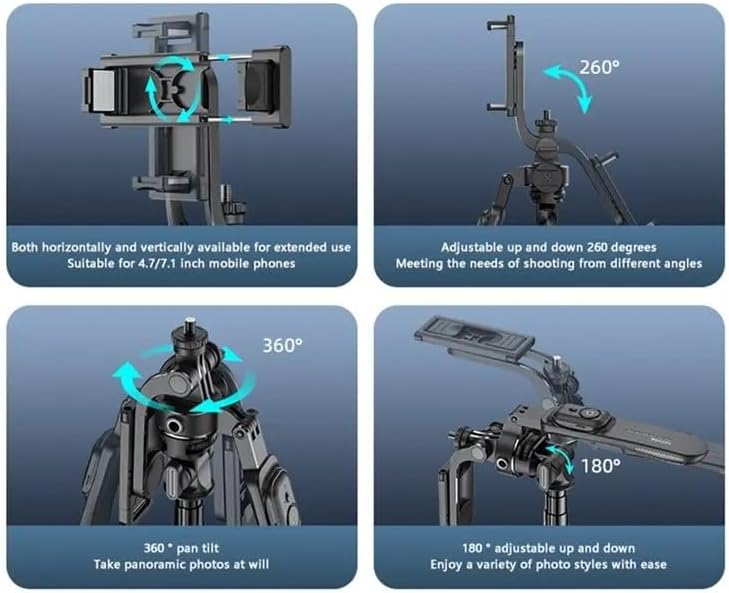
Image: Illustrations demonstrating the various adjustment capabilities of the Yesido SF17 tripod: horizontal and vertical phone holder rotation, 260-degree up and down adjustment, 360-degree pan tilt for panoramic photos, and 180-degree adjustable up and down for diverse photo styles.
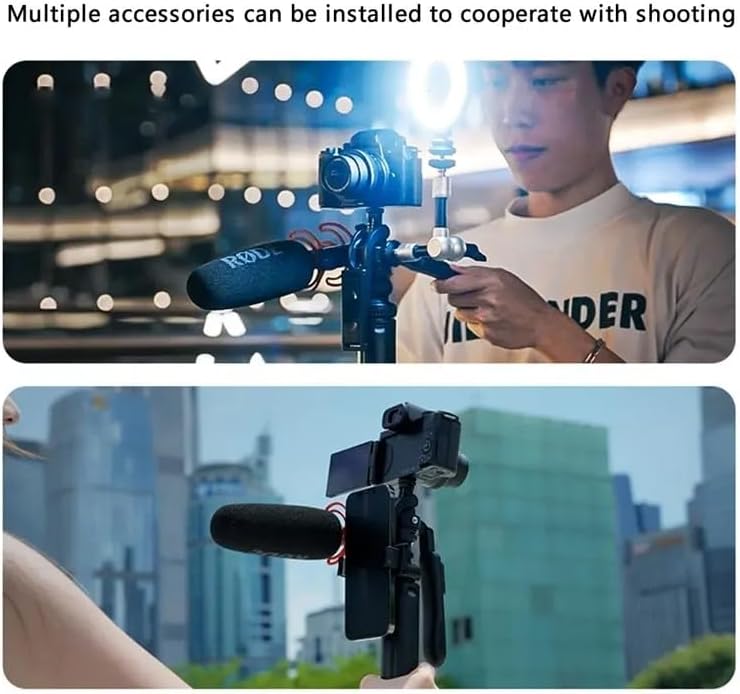
Image: Two scenarios showing the Yesido SF17 tripod with multiple accessories installed. The top image shows a camera, microphone, and supplementary light attached. The bottom image shows a smartphone, microphone, and external screen attached, demonstrating its versatility for content creation.
Տեխնիկական սպասարկում
- Մաքրեք սարքը փափուկ, չոր կտորով։ Խուսափեք հղկող մաքրող միջոցների կամ լուծիչների օգտագործումից։
- Պահեք եռոտանին զով, չոր տեղում՝ ուղիղ արևի լույսից և ծայրահեղ ջերմաստիճաններից հեռու։
- Ensure the telescopic pole sections are free from dust and debris to maintain smooth extension and retraction.
- Պարբերաբար ստուգեք բոլոր պտուտակները և միացումները՝ համոզվելու համար, որ դրանք անվտանգ են։
Անսարքությունների վերացում
- Problem: Bluetooth remote does not pair.
- Լուծում: Ensure the remote is charged and powered on. Turn off and on your phone's Bluetooth. If the issue persists, try restarting both your phone and the remote.
- Problem: Tripod feels unstable.
- Լուծում: Ensure the tripod legs are fully extended and placed on a flat, stable surface. Do not overload the tripod beyond its weight capacity.
- Problem: Pole does not extend or retract smoothly.
- Լուծում: Check for any obstructions or debris in the telescopic sections. Clean the pole with a dry cloth. Avoid forcing the pole if it resists movement.
Տեխնիկական պայմաններ
| Մոդելի անվանումը | Multifunctional Tripod Stand (SF17) |
| Բրենդ | YESIDO |
| Նյութ | Metal, Acrylonitrile Butadiene Styrene (ABS), Aluminum |
| Առավելագույն բարձրություն | 200 Centimeters (205cm as per image) |
| Ծալովի երկարություն | Approximately 41 Centimeters |
| Նյութի քաշը | 0.3 կիլոգրամ (300 գ) |
| Քաշը կարողություն Առավելագույն | 2.2 ֆունտ |
| Համատեղելի սարքեր | Smartphones (4.7-7.1 inches), Cameras |
| Bluetooth հեռակառավարման շառավիղ | Մինչև 10 մետր |
| Համակարգի համատեղելիություն | Android 4.4/iOS 5.1 կամ ավելի բարձր |
| Եռոտանի գլխի տեսակը | Գնդակի գլուխներ |
Անվտանգության տեղեկատվություն
- Մի՛ ենթարկեք սարքը ջրի կամ չափազանց խոնավության ազդեցությանը։
- Խուսափեք սարքը վայր գցելուց կամ ուժեղ հարվածներից:
- Պահել երեխաներից հեռու:
- Մի փորձեք ապամոնտաժել կամ փոփոխել սարքը:
- Ensure your device is securely mounted before use to prevent accidental falls.