
Ներածություն
This manual provides essential information for the installation, operation, maintenance, and troubleshooting of the Cisco Catalyst C9300L-24P-4X-E Network Essentials Switch. This device is designed for enterprise-grade access, offering 24 Gigabit PoE+ ports and four 10 Gbps SFP+ uplinks for robust network connectivity.
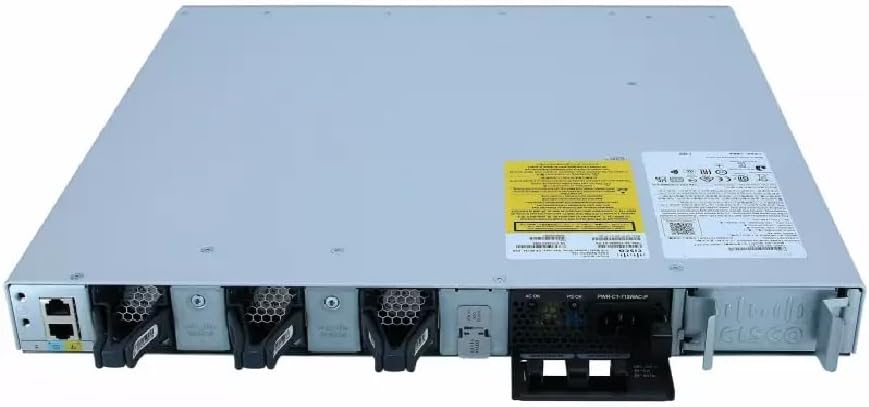
This image displays the rear panel of the Cisco Catalyst C9300L-24P-4X-E switch, highlighting the various ports, cooling fans, and the power supply unit.
Անվտանգության տեղեկատվություն
Սարքավորումների վնասվածքներից և վնասներից խուսափելու համար պահպանեք հետևյալ անվտանգության միջոցառումները.
- Հոսանքը միացնելուց առաջ համոզվեք, որ հողանցումը ճիշտ է։
- Մի՛ աշխատեցրեք անջատիչը խոնավ կամ չափազանց խոնավ միջավայրում։
- Օգտագործեք միայն հաստատված սնուցման լարեր և պարագաներ։
- Ապահովեք բավարար օդափոխություն՝ գերտաքացումից խուսափելու համար:
- Անջատեք էլեկտրամատակարարումը նախքան որևէ սպասարկման կամ տեղադրման ընթացակարգ կատարելը։
Փաթեթի բովանդակությունը
Ստուգեք, որ ձեր փաթեթը պարունակում է հետևյալ կետերը.
- Cisco Catalyst C9300L-24P-4X-E Switch
- Հոսանքի լարը
- Դարակի վրա ամրացման հավաքածու (եթե կա)
- Վահանակի մալուխ (RJ-45-ից մինչև DB-9)
- Փաստաթղթեր (արագ մեկնարկի ուղեցույց, անվտանգության տեղեկատվություն)
Ֆիզիկական նկարագրություն
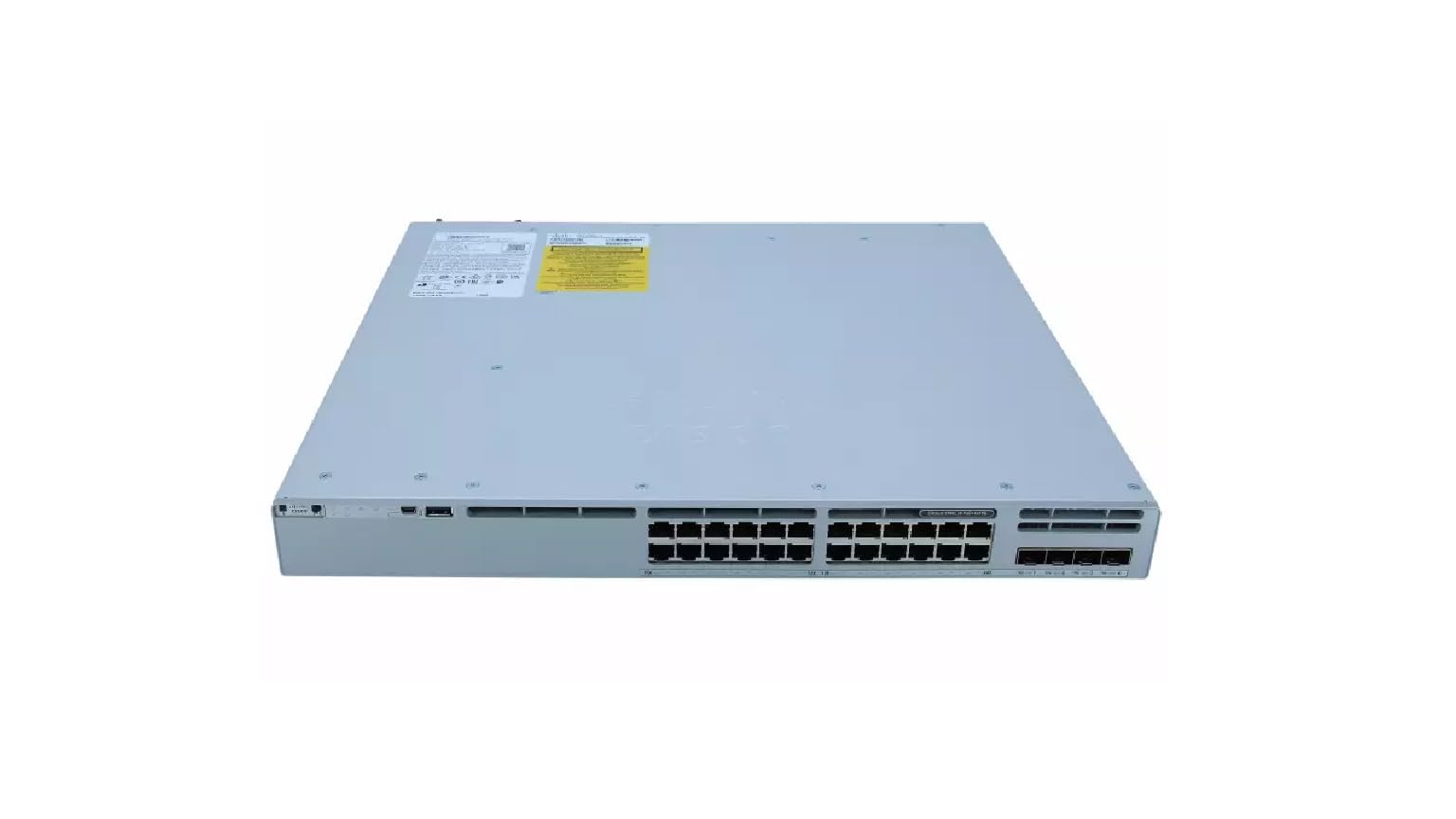
The Cisco Catalyst C9300L-24P-4X-E switch features a robust design for network deployments. The rear panel includes:
- 24 Gigabit Ethernet PoE+ Ports: For connecting network devices and providing power over Ethernet.
- 4x 10Gbps SFP+ Uplink Ports: For high-speed connections to the distribution or core layer.
- Վահանակի նավահանգիստ. For command-line interface access.
- USB պորտեր. Համար file management and system configuration.
- Modular Power Supply Bay: For installing power supply units.
- Սառեցման երկրպագուներ. Ջերմային կառավարման համար։
Մանրամասն view of the rear panel of the Cisco Catalyst C9300L-24P-4X-E switch, illustrating the 24 Gigabit PoE+ ports, four 10Gbps SFP+ uplink ports, and the modular power supply bay.
Կարգավորում
1. Ապափաթեթավորում և ստուգում
Carefully remove the switch from its packaging. Inspect the device for any signs of physical damage. If damage is found, contact your supplier immediately.
2. Անջատիչի տեղադրում
The switch can be mounted in a standard 19-inch equipment rack or placed on a desktop.
- Դարակաշարի տեղադրում՝ Attach the provided rack-mount brackets to the sides of the switch using the screws. Secure the switch into the rack using appropriate rack screws.
- Սեղանի տեղադրում. Ensure the surface is flat, stable, and allows for adequate ventilation around the switch. Attach the rubber feet (if provided) to the bottom of the switch.
3. Միացնելով հզորությունը
Insert the power cord into the AC power connector on the rear of the switch. Connect the other end of the power cord to a grounded electrical outlet. Ensure the power supply is properly seated in its bay.
4. Ցանցային միացումներ
- PoE+ նավահանգիստներ. Connect Ethernet cables from your network devices (e.g., IP phones, access points, surveillance cameras) to the 24 Gigabit PoE+ ports. These ports will provide both data connectivity and power.
- SFP+ Uplink Ports: Insert compatible SFP+ transceivers into the four 10Gbps SFP+ uplink ports. Connect fiber optic cables from these transceivers to your distribution or core network devices.
- Վահանակի նավահանգիստ. For initial configuration or troubleshooting, connect a console cable from your management workstation to the console port on the switch.
Անջատիչի շահագործում
1. Սկզբնական միացում
After connecting power, the switch will automatically power on. Observe the system LED indicators for boot status. The system LED should turn green once the boot process is complete.
2. Հիմնական կոնֆիգուրացիա
The Cisco Catalyst C9300L-24P-4X-E runs on Cisco IOS XE. Initial configuration can be performed via the console port using a command-line interface (CLI) or through a web-based graphical user interface (GUI) if enabled. Refer to Cisco's official documentation for detailed configuration guides.
3. LED ցուցիչներ
The switch features various LED indicators to provide status information:
- Համակարգի LED: Indicates overall system status (e.g., green for normal operation, amber for warning).
- PoE LED: Indicates Power over Ethernet status for the ports.
- Պորտի կարգավիճակի լուսադիոդներ. Նշեք կապի կարգավիճակը և ակտիվությունը յուրաքանչյուր ցանցային միացքի համար։
Տեխնիկական սպասարկում
Կանոնավոր սպասարկումը ապահովում է ձեր անջատիչի օպտիմալ աշխատանքը և երկարակեցությունը.
- Մաքրում: Պարբերաբար մաքրեք անջատիչի արտաքին մասը փափուկ, չոր կտորով: Համոզվեք, որ օդափոխության անցքերը զերծ են փոշուց և կեղտից: Մի օգտագործեք հեղուկ մաքրող միջոցներ անմիջապես սարքի վրա:
- Fրագրակազմի թարմացումներ. Keep the switch firmware updated to the latest version provided by Cisco. This ensures access to new features, security patches, and performance improvements.
- Բնապահպանական վերահսկողություն. Պահպանեք աշխատանքային միջավայրը սահմանված ջերմաստիճանի և խոնավության սահմաններում՝ սարքավորումների խափանումը կանխելու համար։
- Մալուխի կառավարում. Ensure all cables are neatly organized and properly secured to prevent accidental disconnections or damage.
Անսարքությունների վերացում
If you encounter issues with your switch, consider the following troubleshooting steps:
- Հզորություն չկա. Verify the power cord is securely connected to both the switch and the power outlet. Check the power source and any circuit breakers. Ensure the power supply unit is correctly installed.
- Ցանցային կապ չկա։ Check the link status LEDs on the affected ports. Ensure Ethernet cables are properly connected and undamaged. Verify connected devices are powered on and functioning correctly.
- PoE սարքը չի միանում՝ Confirm the PoE+ port is enabled and the device is PoE compatible. Check the PoE budget and ensure it's not exceeded.
- Դանդաղ կատարում. Check for network congestion, duplex mismatches, or errors on ports. Ensure uplink bandwidth is sufficient.
- Accessing the Switch: If unable to access via network, try connecting directly to the console port for CLI access.
Տեխնիկական պայմաններ
| Առանձնահատկություն | Մանրամասն |
|---|---|
| Բրենդ | Cisco |
| Մոդելի համարը | C9300L-24P-4X-E |
| Նավահանգիստների թիվը | 24 Gigabit PoE+ ports, 4x 10Gbps SFP+ uplinks |
| Ինտերֆեյս | PoE, SFP+ |
| Տվյալների փոխանցման արագություն | 1 Gigabits Per Second (Gigabit Ethernet), 10 Gigabits Per Second (Uplinks) |
| Հատtage | 240 վոլտ (AC) |
| Անջատիչի տեսակը | Managed, Fixed, PoE+, Layer 2 |
| Պատյանի նյութի տեսակը | Պլաստիկ |
| Համատեղելի սարքեր | Desktop, Laptop, Printer (and other network devices) |
Երաշխիքային տեղեկատվություն
Այս ապրանքը գալիս է ա 90 օր սահմանափակ երաշխիք. Please refer to the warranty documentation provided with your purchase for specific terms and conditions. For warranty claims, contact your reseller or the manufacturer's support channels.
Տեխնիկական աջակցություն
For further assistance, technical support, or advanced configuration guidance, please refer to the official Cisco documentation available on their website. You may also contact your authorized Cisco reseller or support provider for specialized assistance.
Cisco աջակցություն Webկայքը: https://www.cisco.com/c/en/us/support/index.html