
1. Ներածություն
The LEAUDIO Topping D70 PRO OCTO is a high-fidelity Digital-to-Analog Converter (DAC) designed to deliver exceptional audio performance. Featuring 8 Cirrus Logic CS43198 chips, Bluetooth 5.1 with LDAC support, and a full-color Aurora UI, this device offers advanced audio decoding capabilities up to PCM768kHz/32bit and DSD512. This manual provides detailed instructions for setting up, operating, and maintaining your D70 PRO OCTO to ensure optimal performance.
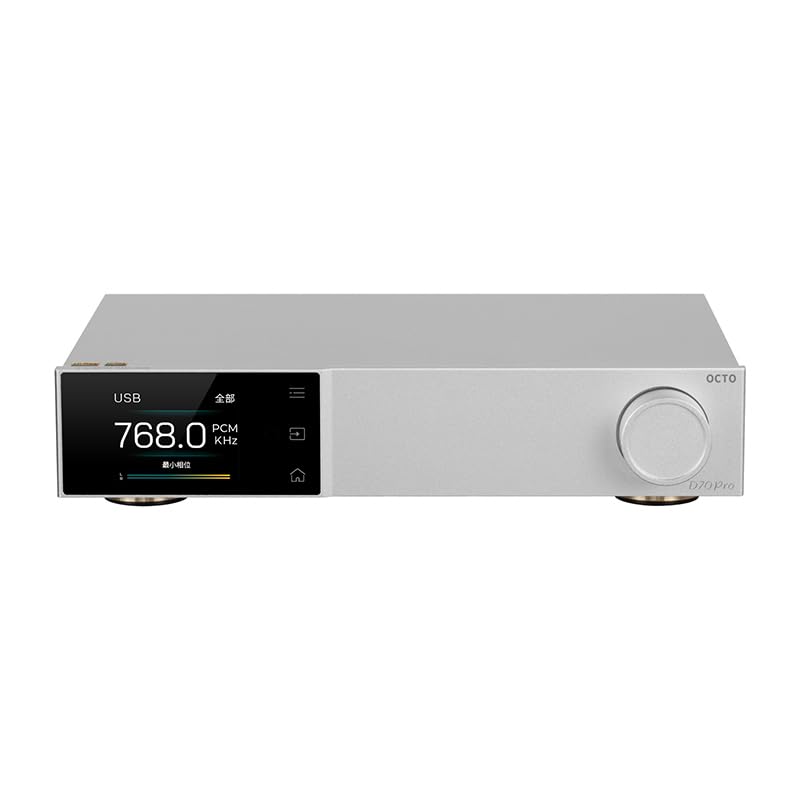
Նկար 1. Առջև view of the Topping D70 PRO OCTO HiFi DAC.
2. Փաթեթի բովանդակությունը
Խնդրում ենք ուշադիր ստուգել փաթեթավորումը հետևյալ կետերի առկայության համար.
- Topping D70 PRO OCTO Unit
- Հեռակառավարման վահանակ
- USB մալուխ
- AC հոսանքի մալուխ
- Bluetooth ալեհավաք
- Արագ մեկնարկի ուղեցույց
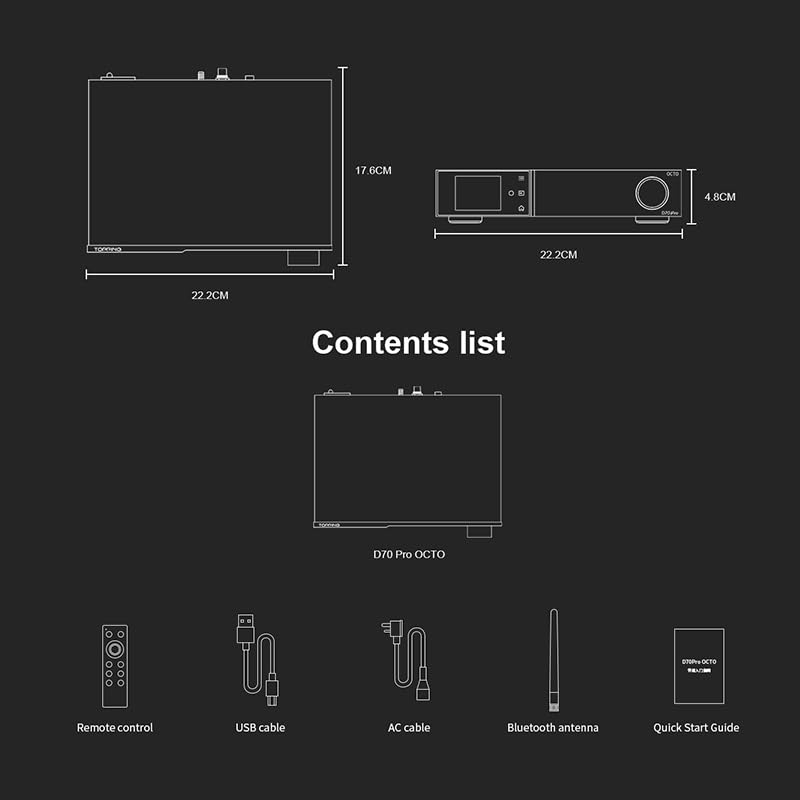
Figure 2: Included accessories: Remote control, USB cable, AC cable, Bluetooth antenna, and Quick Start Guide.
3. Ապրանքը ավարտված էview
The D70 PRO OCTO features a clear layout for easy connectivity and control.
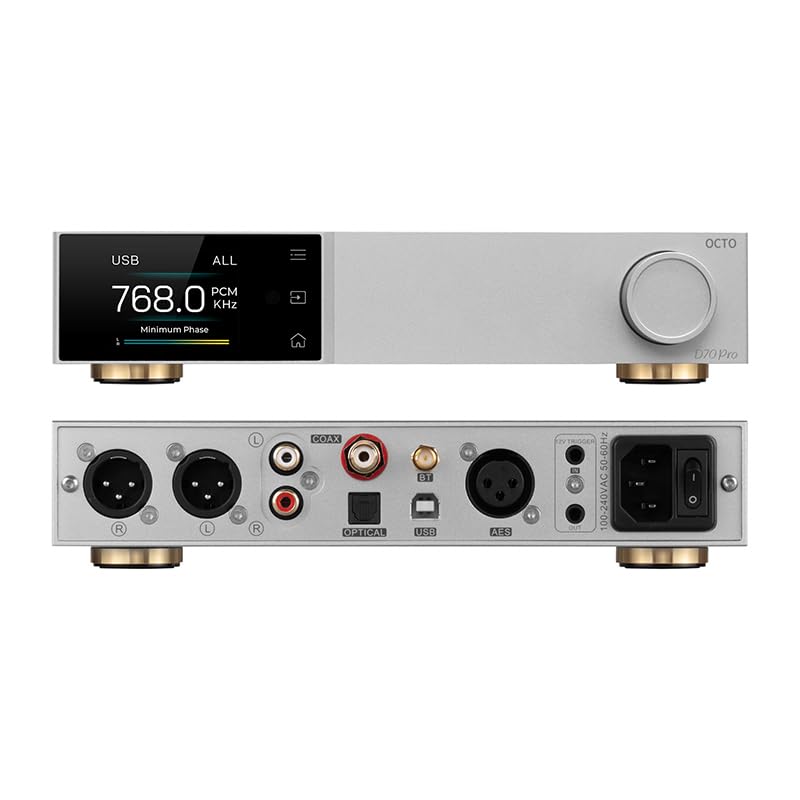
Figure 3: Front panel (top) with display and control knob, and rear panel (bottom) with various input/output ports.
Առջևի վահանակ
- Ցուցադրման էկրան. Shows current status, input, sample rate, and UI information.
- Կառավարման գլխիկ: For navigation, volume adjustment, and menu selection.
- Հպման կոճակներ: Three touch buttons for intuitive control of the Aurora UI.
Հետևի վահանակ
- USB մուտք. Connect to a computer for audio playback.
- Coaxial մուտքագրում: Թվային աուդիո մուտք։
- Օպտիկական մուտք. Թվային աուդիո մուտք։
- Bluetooth անտենայի միակցիչ՝ For wireless Bluetooth reception.
- USB-C (Power): Էլեկտրաէներգիայի մուտքագրում:
- RCA ելք (Ձախ/Աջ): Unbalanced analog audio output.
- XLR Output (L/R): Balanced analog audio output.
- 12V ձգան: For synchronized power control with other devices.
- Էլեկտրական անջատիչ. Հիմնական հոսանքի միացում/անջատում:
4. Կարգավորում
4.1 Սկզբնական միացում
- Connect the Bluetooth antenna to the designated connector on the rear panel.
- Connect the D70 PRO OCTO to a power source using the provided AC power cable.
- Connect your audio source (e.g., computer, CD player) to the appropriate input on the D70 PRO OCTO (USB, Coaxial, or Optical).
- Connect the D70 PRO OCTO's output (RCA or XLR) to your ampկենսունակ կամ ակտիվ բարձրախոսներ:
- Turn on the D70 PRO OCTO using the power switch on the rear panel.
4.2 Դրայվերի տեղադրում (Windows)
For Windows operating systems, a specific driver is required for optimal performance, especially for ASIO playback. The D70 PRO OCTO utilizes an XMOS XU316 and Thesycon custom driver. This driver can typically be downloaded from the manufacturer's official website. Other operating systems like Mac, Linux, iOS, and Android are generally driver-free and support plug-and-play functionality.

Figure 4: The D70 PRO OCTO offers wide compatibility with various operating systems, with specific driver requirements for Windows.
5. Գործողություն
5.1 Հիմնական հսկողություն
- Միացում/անջատում. Օգտագործեք հետևի վահանակի վրա գտնվող գլխավոր սնուցման անջատիչը։
- Ձայնի ճշգրտում. Rotate the control knob on the front panel to adjust the output volume.
- Ներածման ընտրություն. Press the control knob or use the remote control to cycle through available inputs (USB, Coaxial, Optical, Bluetooth).
5.2 Aurora UI and Display Modes
The D70 PRO OCTO features a full-color Aurora UI with three touch buttons for an enhanced user experience. The display can show various playback information, including sample rate, volume, and input source. You can also switch between different display modes such as FFT (Fast Fourier Transform) and VU (Volume Unit) meters according to your preference.

Figure 5: The Aurora UI offers a full-color screen, touch buttons, customizable functions via the volume knob, and language switching options.
5.3 Bluetooth 5.1 Transmission
The D70 PRO OCTO supports Bluetooth 5.1 with advanced audio encoding protocols including LDAC, aptX-Adaptive, aptX HD, aptX, AAC, and SBC. This allows for high-quality wireless audio streaming from compatible devices.
- Select Bluetooth as the input source on the D70 PRO OCTO.
- Enable Bluetooth on your source device (e.g., smartphone, tablet).
- Որոնել "D70 PRO OCTO" in your device's Bluetooth settings and pair.
- Once paired, audio will be streamed wirelessly to the DAC.

Figure 6: The D70 PRO OCTO supports Bluetooth 5.1 for high-quality wireless audio transmission.
6. Հիմնական հատկանիշները
- 8x CS43198 DAC Chips: Equipped with eight Cirrus Logic flagship CS43198 chips for superior audio conversion.
- Բարձր լուծման ձայնային աջակցություն. Supports PCM up to 768kHz/32bit and DSD512 audio decoding.
- Aurora UI: Full-color screen and three touch buttons for intuitive control and display.
- Բազմակողմանի ցուցադրման ռեժիմներ. Switch between playback information, FFT, and VU meters.
- Bluetooth 5.1: Supports LDAC, aptX-Adaptive, aptX HD, aptX, AAC, and SBC for high-quality wireless streaming.
- Low Distortion and High Dynamic Range: Achieves THD+N <0.00007% and a dynamic range of 134dB for accurate sound reproduction.
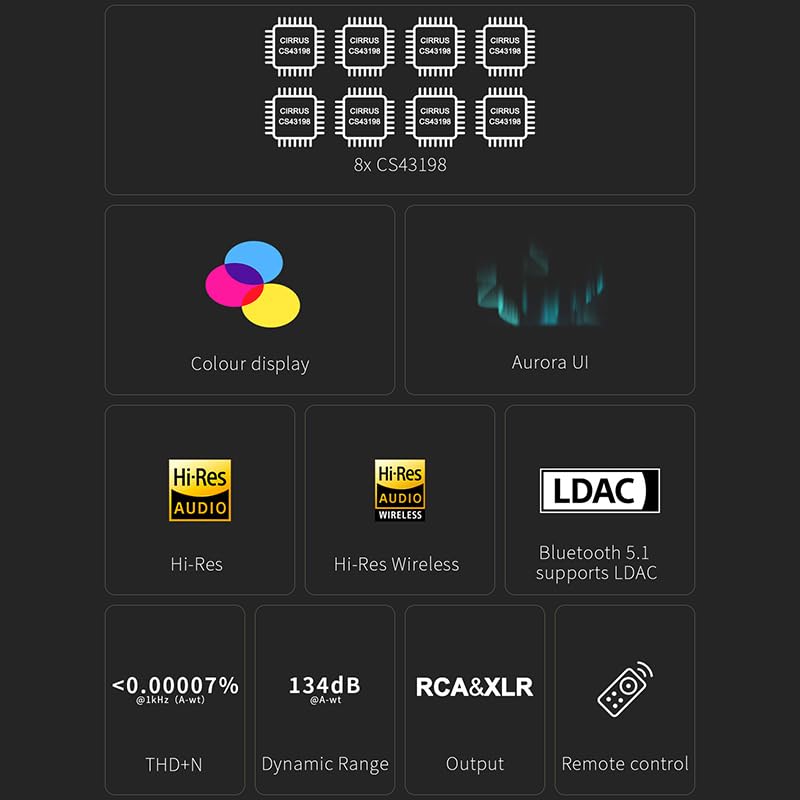
Figure 7: Visual representation of key features including 8x CS43198 chips, color display, Aurora UI, Hi-Res Audio, LDAC, and performance metrics.

Figure 8: Detailed audio performance metrics including THD+N, SNR, DNR, and Noise levels, demonstrating the DAC's high fidelity.
7. Տեխնիկական պայմաններ
| Առանձնահատկություն | Մանրամասն |
|---|---|
| DAC չիպ | 8x Cirrus Logic CS43198 |
| PCM Decoding | Up to 768kHz/32bit |
| DSD ապակոդավորում | Մինչև DSD512 |
| Bluetooth տարբերակ | 5.1 |
| Bluetooth կոդեկներ | LDAC, aptX-Adaptive, aptX HD, aptX, AAC, SBC |
| THD+N (RCA) | <0.00008% @ 1kHz (A-wt) |
| THD+N (XLR) | <0.00007% @ 1kHz (A-wt) |
| Dynamic Range (RCA) | 128dB @ 1kHz (A-wt) |
| Dynamic Range (XLR) | 134dB @ 1kHz (A-wt) |
| Output Impedance (RCA) | 50Ω |
| Ելքային դիմադրություն (XLR) | 100Ω |
| Մուտքագրումներ | USB, Coaxial, Optical, Bluetooth |
| Արդյունքներ | RCA, XLR |
| Չափերը | Մոտավորապես 14.41 x 9.49 x 3.43 դյույմ (փաթեթ) |
| Նյութի քաշը | Մոտավորապես 4.29 ֆունտ |
| Էլեկտրաէներգիայի մուտքագրում | USB-C (DC 15V) |
8. Պահպանում
To ensure the longevity and optimal performance of your D70 PRO OCTO, follow these maintenance guidelines:
- Մաքրում: Use a soft, dry cloth to clean the exterior of the device. Avoid using abrasive cleaners, solvents, or chemical sprays, as they may damage the finish.
- Տեղադրում: Սարքը տեղադրեք կայուն, հարթ մակերեսի վրա՝ արևի ուղիղ ճառագայթներից, ջերմության աղբյուրներից և չափազանց խոնավությունից հեռու։ Ապահովեք սարքի շուրջը բավարար օդափոխություն։
- Հզորությունը: Always use the provided power adapter. Disconnect the power cable during lightning storms or when the unit is unused for extended periods.
- Կառավարում: Խուսափեք սարքը վայր գցելուց կամ ուժեղ հարվածներից:
9: Անսարքություն
If you encounter any issues with your D70 PRO OCTO, please refer to the following common problems and solutions:
| Խնդիր | Հնարավոր պատճառ | Լուծում |
|---|---|---|
| Ոչ մի ուժ | Էլեկտրական մալուխը միացված չէ կամ վարդակը վնասված է։ | Ensure the power cable is securely connected and the outlet is functional. Check the power switch on the rear panel. |
| Ձայնի ելք չկա | Incorrect input/output selection, volume too low, or faulty cables. | Verify the correct input source is selected on the DAC. Check volume levels on both the DAC and connected amplifier/speakers. Ensure audio cables are securely connected and not damaged. |
| Bluetooth կապի հետ կապված խնդիրներ | Սարքը զուգավորման ռեժիմում չէ, գտնվում է կապի գոտուց դուրս կամ խանգարում է։ | Ensure the DAC is in Bluetooth input mode. Place the source device closer to the DAC. Try unpairing and re-pairing the devices. Avoid sources of strong electromagnetic interference. |
| Աղավաղված աուդիո | Input signal too high, faulty cables, or incorrect settings. | Reduce the volume on the source device. Check audio cables for damage. Ensure the DAC's settings (e.g., filter modes) are appropriate for your audio. |
| Windows PC not recognizing DAC | Missing or incorrect USB driver. | Download and install the latest USB driver from the LEAUDIO or Topping official website. Restart your computer and the DAC. |
Եթե այս լուծումները փորձելուց հետո խնդիրը շարունակվում է, խնդրում ենք կապվել հաճախորդների սպասարկման հետ։
10. Երաշխիք և աջակցություն
The LEAUDIO Topping D70 PRO OCTO is covered by a manufacturer's warranty. Please refer to the warranty card included in your package or visit the official LEAUDIO/Topping webկայքը՝ երաշխիքի մանրամասն պայմանների և դրույթների համար։
For technical support, service, or further inquiries, please contact your retailer or the manufacturer directly. Keep your purchase receipt and product serial number handy when seeking support.