
Ներածություն
This manual provides detailed instructions for the safe and effective operation of your WOUXUN KG-R56 VHF Professional Radio. Please read this manual thoroughly before using the device to ensure proper function and to prevent damage.
Ապրանքը ավարտվել էview
The WOUXUN KG-R56 is a compact and robust professional VHF transceiver designed for authorized users, operating within the 66-88 MHz frequency range. It features 256 memory channels, advanced menu functions, and integrated USB Type-C charging. The device is compliant with current R&TTE RED CE standards.
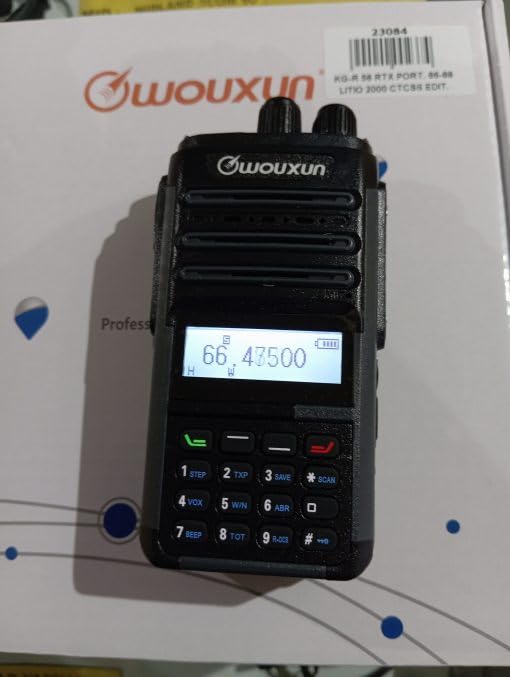
Image: WOUXUN KG-R56 VHF Professional Radio. This image shows the front view of the radio, highlighting its display, keypad, and antenna connection.
Փաթեթի բովանդակությունը
Ստուգեք, որ ստորև թվարկված բոլոր իրերը առկա են ձեր փաթեթում.
- KG-R56 Transceiver
- 7.4V - 2000 mAh Lithium-Ion Battery Pack
- Լիցքավորիչ
- 220 Վ էլեկտրամատակարարում
- Flexible Rubber Antenna
- Գոտու սեղմակ
- User Manual (in original language)
- Հավաստագրեր
Կարգավորում
1. Մարտկոցի տեղադրում
- Հավասարեցրեք մարտկոցի փաթեթը ռադիոյի հետևի մասում գտնվող ակոսների հետ։
- Սահեցրեք մարտկոցի փաթեթը վերև, մինչև այն ապահով կերպով ամրանա իր տեղում։
- Հանելու համար սեղմեք մարտկոցի ամրացման փականը (եթե կա) և մարտկոցը սահեցրեք ներքև։
2. Մարտկոցի լիցքավորում
The KG-R56 features an integrated USB Type-C port for convenient charging.
- Connect a USB Type-C cable to the radio's USB-C port.
- Connect the other end of the cable to the provided charger or a compatible USB power source.
- The charging indicator light on the radio will show the charging status.
- Լրիվ լիցքավորումը սովորաբար տևում է մի քանի ժամ։ Խուսափեք մարտկոցի գերլիցքավորումից։
3. Անտենայի միացումը
- Screw the flexible rubber antenna clockwise onto the antenna connector on top of the radio until it is finger-tight.
- Մի՛ չափազանցեք անտենան։
4. Գոտու սեղմակի ամրացում
- Օգտագործեք տրամադրված պտուտակները՝ գոտու սեղմակը ռադիոյի հետևի մասում նշված հատվածին ամրացնելու համար։
Գործառնական հրահանգներ
1. Միացնել/անջատել
Rotate the Power/Volume knob clockwise to turn the radio on. Rotate it counter-clockwise until a click is heard to turn it off.
2. Ձայնի կարգավորում
After powering on, continue rotating the Power/Volume knob to adjust the audio output level to your preference.
3. Ալիքի ընտրություն
Use the Up/Down arrow keys or the rotary encoder (if present) to select the desired channel or frequency. The display will show the selected channel number, frequency, or channel name.
4. Փոխանցում և ընդունում
- Հաղորդելու համար սեղմեք և պահեք ռադիոյի կողքի վրա գտնվող Push-To-Talk (PTT) կոճակը: Խոսեք հստակ միկրոֆոնի մեջ:
- Ստանալու համար բաց թողեք PTT կոճակը:
- Always ensure the channel is clear before transmitting to avoid interference.
5. Մենյու նավարկություն
The KG-R56 features an advanced menu system for managing various radio functions.
- Սեղմեք ՄԵՆՈՒ կոճակը հիմնական մենյու մուտք գործելու համար:
- Use the Up/Down arrow keys to scroll through the available menu options.
- Մամուլ ՄԵՆՈՒ նորից կամ OK (if available) to select an option.
- Use the Up/Down keys to change settings within a selected option.
- Մամուլ Ելք or ՀԵՏ to return to the previous menu or exit the menu system.
Հիմնական հատկանիշները
- DTMF Encoding/Decoding: Supports DTMF tones for advanced signaling capabilities.
- CTCSS/DCS: Includes 50 CTCSS groups and 105 DCS groups for selective calling. These can be customized via PC programming software.
- CTCSS/DCS Scanner: Automatically detects CTCSS/DCS tones on a received signal.
- Ձայնային ուղեցույց. Provides audible prompts for menu navigation and function selection, enhancing user experience.
- Channel Name Display: Allows for editing and displaying custom channel names for easier identification.
- Battery Capacity Inquiry: Check the current battery level directly from the radio.
- Համակարգչային ծրագրավորելի՝ Customize radio settings, frequencies, and channels using dedicated PC software.
- Selectable Bandwidth: Choose between various channel spacing options (5K/6.25K/10K/12.5K/25K).
- Reverse Frequency Function: Quickly switch between transmit and receive frequencies for specific operations.
- Multiple Scan Modes (TO/CO/SE): Offers various scanning options for monitoring channels efficiently.
- Ցուցադրման ռեժիմներ. Switch between displaying Frequency, Channel Number, or Channel Name.
- TOT (Ժամանակահատման ժամանակաչափ): Prevents excessively long transmissions by limiting transmission duration.
- Զբաղված ալիքի արգելափակում (BCLO): Prevents transmission on an occupied channel, avoiding interference.
- Keypad Lock (Automatic/Manual): Prevents accidental key presses and setting changes.
- Wired Clone Function: Copy settings and configurations from one radio to another using a cable.
- USB Type-C լիցքավորում. Conveniently charge the radio via a standard USB-C port.
Տեխնիկական սպասարկում
Մաքրում
Մաքրեք ռադիոյի մակերեսը փափուկ,amp cloth. Do not use harsh chemicals, abrasive cleaners, or solvents, as these can damage the casing. Ensure the USB-C port cover is closed when not charging to protect against dust and moisture.
Մարտկոցի խնամք
- Լիցքավորեք մարտկոցը մինչև սկզբնական օգտագործումը:
- Do not expose the battery to extreme temperatures (hot or cold).
- Եթե ռադիոն երկար ժամանակ չի օգտագործվելու, հանեք մարտկոցը և պահեք այն զով, չոր տեղում։
- Use only WOUXUN approved battery packs and chargers to ensure safety and optimal performance.
Անսարքությունների վերացում
| Խնդիր | Հնարավոր պատճառ | Լուծում |
|---|---|---|
| Ռադիոն չի միանում։ | Մարտկոցը ցածր է կամ ճիշտ տեղադրված չէ։ | Լիցքավորեք մարտկոցը կամ ճիշտ տեղադրեք այն։ |
| Հնարավոր չէ փոխանցել։ | Busy Channel Lockout (BCLO) active; incorrect frequency/channel; low battery. | Wait for the channel to clear; verify frequency/channel settings; charge battery. |
| No reception or weak signal. | Antenna not attached correctly; squelch level too high; out of range. | Check antenna connection; adjust squelch level; move closer to transmitting station. |
| Ստեղնաշարը չի արձագանքում։ | Ստեղնաշարի կողպեքը ակտիվ է։ | Անջատեք ստեղնաշարի կողպեքը (տե՛ս օգտագործման հրահանգները՝ ստեղների որոշակի համադրության համար): |
| USB-C լիցքավորումը չի աշխատում։ | Cable or charger faulty; port dirty. | Try a different USB-C cable/charger; carefully clean the port if visibly dirty. |
| Audio output is distorted. | Volume too high; weak signal; speaker damage. | Adjust volume; check signal strength; contact support if speaker is damaged. |
Տեխնիկական բնութագրեր
- Մոդել: KG-R56
- Հաճախականության միջակայք: 66-88 ՄՀց
- Ալիքների քանակը: 256
- Ալիքի տարածություն. 5K/6.25K/10K/12.5K/25K
- Մոդուլյացիա: FM F3E
- Գործող Voltage: 7.4V DC
- ՌԴ ելքային հզորություն. 5 Վտ/1 Վտ (ընտրելի)
- Ընդունիչի զգայունություն. 0.25 µV (12 dB SINAD)
- Squelch զգայունություն: <0.16 մվ
- Աուդիո ելքային հզորություն. 500 mW at 8 ohms
- Մարտկոցի տեսակը: 7.4V - 2000 mAh Lithium-Ion Pack
- Սպասման հոսանք. 50 մԱ
- Գործող ջերմաստիճանը. -30°C-ից +60°C
- Չափերը (H x W x D): 105 x 63 x 39 mm (without antenna and battery)
- Քաշը: 250 g (with battery and antenna)
- Պաշտպանության միջազգային վարկանիշ. IP54 (Protected from limited dust ingress and water spray from any direction)
- Ջրի դիմադրության մակարդակը. Not designed for immersion in water.
- Հատուկ առանձնահատկություններ. Weather-resistant, USB rechargeable
Նշում. Տեխնիկական պայմանները կարող են փոխվել առանց ծանուցման:
Անվտանգության տեղեկատվություն
- Do not operate the radio in explosive atmospheres (e.g., near flammable gases, dust particles, or metallic powders).
- Do not modify the radio. Unauthorized modifications can void your warranty and violate regulatory compliance.
- Keep the radio away from medical devices (e.g., pacemakers) to avoid potential interference.
- Use only WOUXUN approved accessories, including batteries and chargers.
- Do not expose the radio to direct sunlight for extended periods or to extreme heat sources.
- Dispose of batteries properly according to local environmental regulations.
- While rated IP54 for weather resistance, this device is not designed for immersion in water. Avoid exposing it to heavy rain or submersion.
Երաշխիք և աջակցություն
For warranty information or technical support, please contact your authorized WOUXUN dealer or the point of purchase. Keep your purchase receipt as proof of purchase.
For further assistance, you may visit the official WOUXUN website or consult the contact information provided in your original product packaging.