
1. Ներածություն և ավարտview
The Ditec RM-L 1370 is a universal replacement remote control designed for a wide range of Sony Bravia televisions. This remote offers direct compatibility with various Sony LCD, LED, UHD, OLED, and QLED 4K Ultra HD Smart Android TV models, eliminating the need for complex programming or pairing. It features dedicated hotkeys for popular streaming services like YouTube and Netflix for convenient access.

Image: The Ditec RM-L 1370 remote control, highlighting its compatibility as a single remote solution for Sony TVs.
2. Կարգավորում և սկզբնական օգտագործում
This remote control is designed for immediate use without any setup or programming. Simply insert the required batteries, and it will be ready to operate your compatible Sony TV.
2.1 Մարտկոցի տեղադրում
- Տեղադրեք մարտկոցի խցիկը հեռակառավարման վահանակի հետևի մասում:
- Սահեցրեք բացեք մարտկոցի խցիկի կափարիչը:
- Insert two (2) AAA batteries (not included), ensuring correct polarity (+ and - terminals).
- Ապահով փակեք մարտկոցի խցիկի կափարիչը:

Պատկեր՝ Հետևի մաս view of the remote control, illustrating the battery compartment location.
2.2 Առաջին օգտագործումը
Once batteries are installed, point the remote control towards your Sony TV and press the Power button. The remote should operate your TV without any further configuration.
3. Գործառնական հրահանգներ
The Ditec RM-L 1370 remote control provides all standard functions for your Sony Bravia TV, along with convenient shortcut buttons.
3.1 Հիմնական գործառույթներ
- Power կոճակը. Միացնում կամ անջատում է հեռուստացույցը:
- Համարային կոճակներ (0-9): Անմիջական ալիքի ընտրության համար։
- Ձայնի բարձրացում/Նվազում՝ Կարգավորում է հեռուստացույցի ձայնը:
- Ալիքի վերև/ներքև՝ Փոխում է հեռուստաալիքները։
- Նավիգացիոն վահանակ (վերև/ներքև/ձախ/աջ/մուտք): Մենյուում նավարկության և ընտրության համար։
- Գլխավոր կոճակ. Accesses the TV's Smart Home screen or main menu.
- Return/Back Button: Վերադառնում է նախորդ էկրանին կամ ընտրացանկին:
- Ընտրանքների կոճակ՝ Ցուցադրում է համատեքստից կախված տարբերակները։
3.2 Հատուկ առանձնահատկություններ
- YouTube Hotkey: Directly launches the YouTube application.
- Netflix-ի ստեղնաշարի կոճակներ՝ Անմիջապես գործարկում է Netflix հավելվածը։
The remote features an enhanced infrared sensor for a farther transmitting distance, allowing effective control up to 50 feet.

Image: The remote control demonstrating its farther distance sensor, capable of operating up to 50 feet.
4. Համատեղելիություն
The Ditec RM-L 1370 universal remote is compatible with a wide range of Sony Bravia LCD, LED, UHD, OLED, and QLED 4K Ultra HD Smart Android TVs. It is designed to replace many original Sony remote models, including but not limited to:
- RMT-TX100U, RMT-TX102U
- RMF-TX200U, RMF-TX201U, RMF-TX220U
- RMT-TX300U, RMF-TX310U
- RMT-TX500U, RMF-TX520U, RMF-TX600U
- And many other Sony TV remote models.
For a comprehensive list of compatible Sony TV remote models, please refer to the image below:
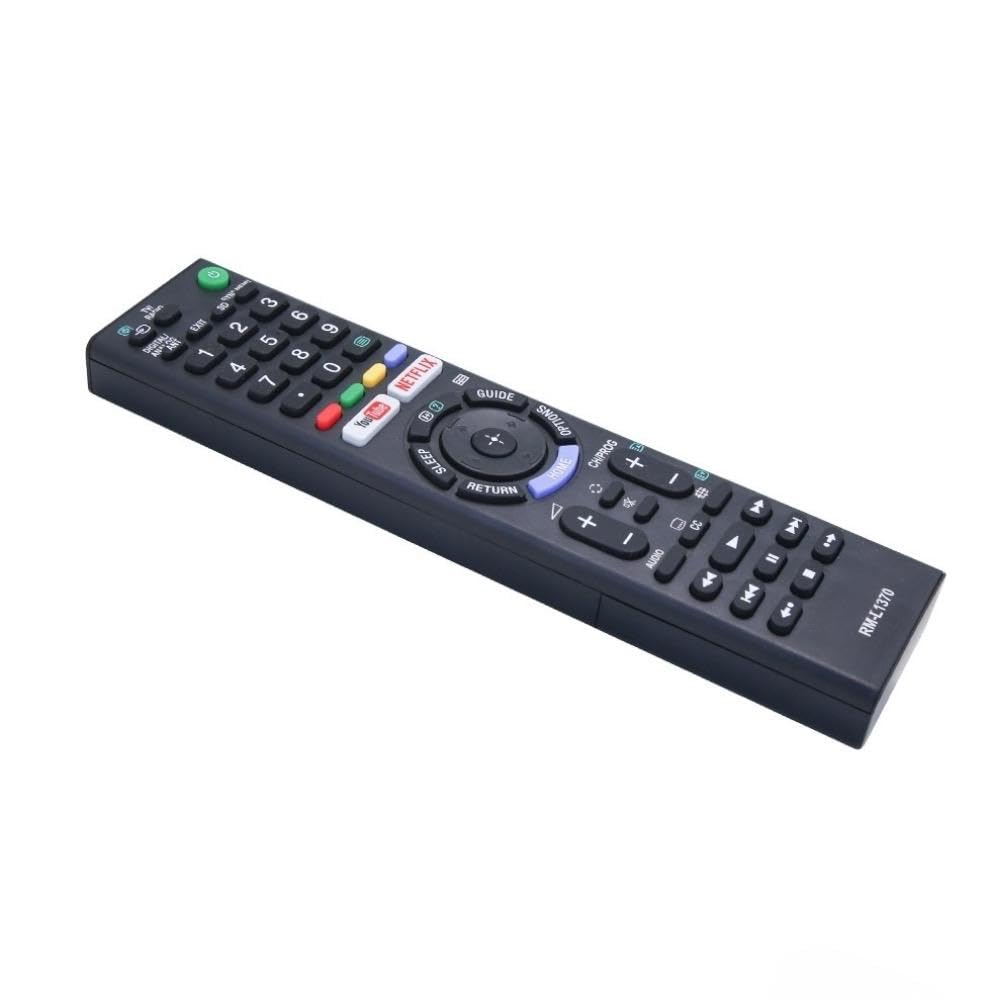
Image: A detailed list of Sony TV remote models that are compatible with the Ditec RM-L 1370.
It is recommended to compare the appearance of this remote with your original remote for visual confirmation of compatibility.
5. Պահպանում
5.1 Մարտկոցի փոխարինում
When the remote control's performance degrades or it stops responding, replace the batteries with two new AAA alkaline batteries. Always replace both batteries at the same time. Do not mix old and new batteries or different types of batteries.
5.2 Մաքրում
To clean the remote control, use a soft, dry cloth. Do not use liquid cleaners, sprays, or abrasive materials, as these may damage the remote's surface or internal components.
6: Անսարքություն
- Հեռակառավարիչը չի արձագանքում.
- Ստուգեք, թե արդյոք մարտկոցները ճիշտ են տեղադրված՝ ճիշտ բևեռականությամբ։
- Փոխարինեք հին մարտկոցները նորերով:
- Համոզվեք, որ հեռակառավարման վահանակի և հեռուստացույցի ինֆրակարմիր ընդունիչի միջև խոչընդոտներ չկան։
- Համոզվեք, որ գտնվում եք արդյունավետ աշխատանքային տիրույթում (մինչև 50 ոտնաչափ):
- Հատուկ կոճակները չեն աշխատում.
- Some advanced functions or TV-specific features might not be supported by a universal replacement remote.
- Ensure the TV is powered on and functioning correctly.
7. Տեխնիկական պայմաններ
| Առանձնահատկություն | Մանրամասն |
|---|---|
| Բրենդ | Ditec |
| Մոդել | RM-L 1370 |
| Համատեղելի սարքեր | Sony Bravia LCD, LED, UHD, OLED, QLED 4K Ultra HD Smart Android TVs |
| Միակցիչի տեսակը | Ինֆրակարմիր (IR) |
| Պահանջվում է մարտկոցներ | 2 x AAA (ներառված չէ) |
| Հատուկ առանձնահատկություններ | Ergonomic design, YouTube & Netflix Hotkeys |
| Ապրանքի չափերը | 3 x 3 x 12 սմ |
| Նյութի քաշը | 80 գ |
| Ծագման երկիր | Չինաստան |
8. Աջակցություն
For assistance with compatibility or any questions regarding your Ditec RM-L 1370 remote control, you may contact support by sending a picture of your old remote or your device's brand name and model number to +91 9924350801. This will help in verifying compatibility or addressing specific queries.

Image: Information on how to contact support for compatibility checks or questions.