
Bobtot K701S
Bobtot K701S 5.1/2.1 Channel Surround Sound System User Manual
Մոդել՝ K701S
1. Ներածություն
Շնորհակալություն գնման համարasing the Bobtot K701S 5.1/2.1 Channel Surround Sound System. This system is designed to provide a powerful and immersive audio experience for your home entertainment. With 800W peak power and a 6.5-inch subwoofer, it delivers clear, dynamic sound. This manual will guide you through the setup, operation, and maintenance of your new sound system.

Image 1.1: Bobtot K701S 5.1/2.1 Channel Surround Sound System with subwoofer, satellite speakers, and remote control.
2. Անվտանգության կարևոր ցուցումներ
Please read and follow these safety instructions carefully before operating the system to prevent electric shock, fire, or damage to the unit.
- Այս սարքը մի՛ ենթարկեք անձրևի կամ խոնավության:
- Մի՛ փակեք օդափոխության բացվածքները։ Տեղադրեք արտադրողի հրահանգներին համապատասխան։
- Մի տեղադրեք ջերմային աղբյուրների մոտ, ինչպիսիք են ռադիատորները, ջերմային ռեգիստրները, վառարանները կամ այլ սարքավորումները (այդ թվում՝ ampջեռուցիչներ), որոնք ջերմություն են արտադրում:
- Պաշտպանեք հոսանքի լարը քայլելուց կամ կծկվելուց, հատկապես խրոցակներում, հարմար պահարաններում և այն կետում, որտեղ դրանք դուրս են գալիս սարքից:
- Օգտագործեք միայն արտադրողի կողմից նշված կցորդներ/պարագաներ:
- Անջատեք այս սարքը կայծակային փոթորիկների ժամանակ կամ երկար ժամանակ չօգտագործելու դեպքում:
- Ամբողջ սպասարկումը փոխանցեք որակավորված սպասարկող անձնակազմին: Սպասարկումը պահանջվում է, երբ սարքը որևէ կերպ վնասված է:
3. Փաթեթի բովանդակությունը
Զգուշորեն բացեք տուփը և համոզվեք, որ բոլոր իրերը տեղում են և լավ վիճակում են։ Եթե որևէ իր բացակայում է կամ վնասված է, խնդրում ենք կապվել հաճախորդների սպասարկման հետ։
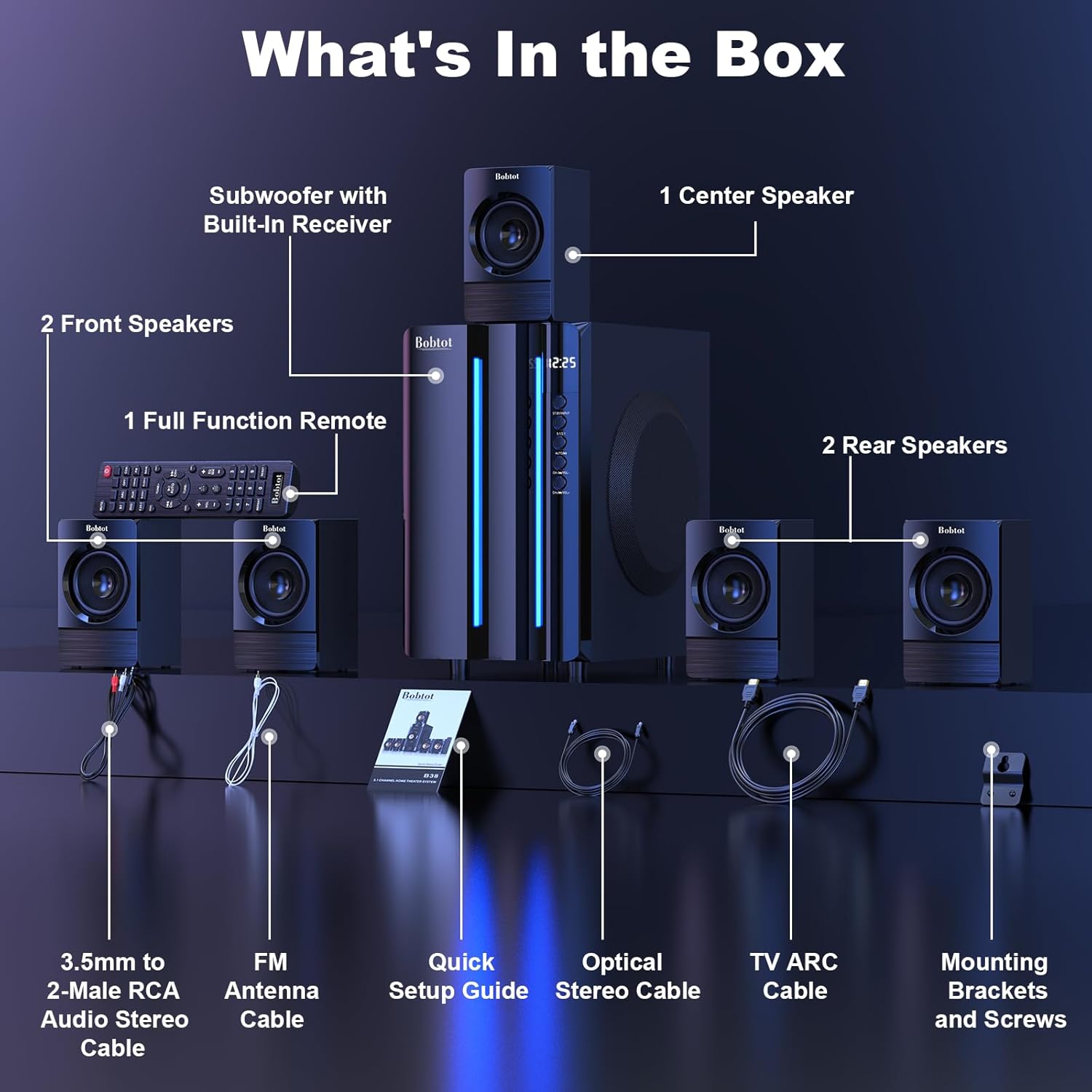
Image 3.1: Visual representation of all items included in the Bobtot K701S package.
- 1 x Subwoofer with Built-in Receiver
- 1 x Center Speaker
- 2 x Front Speakers
- 2 x Rear Speakers
- 1 x Full Function Remote Control
- 1 x 3.5mm to 2-Male RCA Audio Stereo Cable
- 1 x FM Antenna Cable
- 1 x Արագ տեղադրման ուղեցույց
- 1 x Optical Stereo Cable
- 1 x TV ARC Cable (HDMI)
- 1 x Coaxial մալուխ
- 1 x AUX մալուխ
- 1 x RCA մալուխ
- Մոնտաժային փակագծեր և պտուտակներ
- Օգտագործողի ձեռնարկ (այս փաստաթուղթը)
4. Բաղադրիչները ավարտված ենview
4.1 Subwoofer (Main Unit)
The subwoofer houses the main receiver and amplifier for the entire system. It features a 6.5-inch driver for deep bass and includes all input/output ports.

Նկար 4.1՝ Մանրամասն view of the 6.5-inch subwoofer, highlighting its internal components.
4.2 արբանյակային բարձրախոսներ
The system includes five satellite speakers: one center, two front (left/right), and two rear (left/right). These speakers are wired and connect directly to the subwoofer unit.
4.3 Հեռակառավարման վահանակ
The full-function remote control allows you to manage power, input modes, volume, channel selection, and other settings from a distance.
5. Համակարգի կարգավորում
Follow these steps to set up your Bobtot K701S surround sound system.
5.1 Բարձրախոսի միացում
The five satellite speakers come with integrated cables. Connect each speaker to the corresponding "Audio Output" slot on the rear of the subwoofer unit. The cables are color-coded or labeled for easy identification (e.g., FL for Front Left, FR for Front Right, CEN for Center, SL for Surround Left, SR for Surround Right).
- Front Center and L/R speakers: Cables are approximately 13 feet long.
- Rear L/R speakers: Cables are approximately 31 feet long.
Place all speakers in the same room for optimal surround sound performance.

Image 5.1: Recommended speaker placement for a 5.1 channel surround sound experience.
5.2 Power On and Initial Test
- Connect the subwoofer to a power outlet using the provided power cable.
- Միացրեք սուբվուֆերը՝ օգտագործելով հոսանքի անջատիչը:
- Սեղմեք հեռակառավարման վահանակի կամ առջևի վահանակի վրա գտնվող միացման կոճակը։
- Ստուգեք հեռակառավարման գործառույթը։
- Switch to "BT" (Bluetooth) mode and connect your mobile device to "B701D" via Bluetooth to ensure audio playback.
5.3 Արտաքին սարքերի միացում
Choose the appropriate input mode and connect your external device (e.g., TV, projector, DVD player, game console) to the subwoofer using the corresponding audio cables provided.
- Ensure the cable is securely plugged into the correct input slot on the subwoofer.
- Select the matching input mode on the system (e.g., HDMI ARC, OPT, COA, AUX, USB, DVD).

Պատկեր 5.2. Ավարտվել էview of the rear panel connections and supported multimedia inputs.
6. Գործառնական հրահանգներ
6.1 Հեռակառավարման գործառույթներ
The remote control provides full command over your sound system. Always press the power button before selecting an input mode when turning on the unit.

Image 6.1: Detailed diagram of the remote control buttons and their functions.
- Միացում/անջատում. Միացնում կամ անջատում է համակարգը:
- Input Mode Select: Buttons for BT, ARC, OPT, COA, DVD, AUX, USB/SD, FM to switch between audio sources.
- 5.1/2.1 Channel Select: Toggles between 5.1 surround sound and 2.1 stereo mode (in 2.1 mode, only the two front speakers play).
- Ձայնի ուժգնության կարգավորում (VOL +/-): Կարգավորում է համակարգի ընդհանուր ծավալը:
- Mic Volume Adjustment (MIC +/-): Adjusts the volume for connected microphones (supports wireless/wired microphones).
- Echo Control (ECHO +/-): Կարգավորում է միկրոֆոնների արձագանքի էֆեկտը:
- TUNE +/-: For FM radio tuning.
- CH +/-: For FM radio channel selection.
- ՀԱՄՐ: Անջատում կամ միացնում է աուդիո ելքը:
6.2 Input Modes
The Bobtot K701S supports various input methods:
- Bluetooth (BT): Սմարթֆոնների, պլանշետների և Bluetooth-ով աշխատող այլ սարքերի հետ անլար միացման համար։
- HDMI ARC: Connects to your TV's HDMI ARC port for high-quality audio transmission and TV remote control integration.
- Օպտիկական (OPT): Digital audio input for TVs, game consoles, and other devices with an optical output.
- Կոաքսիալ (COA): Digital audio input, similar to optical, for compatible devices.
- AUX: Analog audio input using a 3.5mm or RCA cable for a wide range of devices.
- USB/SD: Նվագարկել աուդիո files directly from USB drives or SD cards.
- FM ռադիո: Built-in FM tuner for listening to radio stations.
- DVD: Dedicated input for DVD players.
6.3 Channel Configuration (5.1 / 2.1)
The system offers two channel modes: 5.1 and 2.1. You can switch between these modes using the remote control or the front panel. In 5.1 mode, all five satellite speakers and the subwoofer are active, providing a full surround sound experience. In 2.1 mode, only the two front speakers and the subwoofer are active, suitable for stereo audio.
7. Connectivity Guide
This section details how to connect various devices to your sound system.
7.1 Bluetooth միացում
- Press the "BT" button on the remote control or front panel to select Bluetooth mode. The display will show "BT".
- Ձեր շարժական սարքում միացրեք Bluetooth-ը և փնտրեք հասանելի սարքեր:
- Select "B701D" from the list to pair. Once connected, you will hear a confirmation sound.
7.2 HDMI ARC միացում
- Connect one end of the HDMI ARC cable to the "HDMI ARC" port on the subwoofer.
- Connect the other end to the "HDMI ARC" port on your TV.
- Select "ARC" input mode on the sound system.
- Ensure your TV's audio output is set to HDMI ARC or external speakers.
7.3 Optical/Coaxial Connection
- Connect an optical or coaxial cable from your device's digital audio output to the corresponding "OPT" or "COA" input on the subwoofer.
- Select "OPT" or "COA" input mode on the sound system.
- Ensure your device's audio output is set to PCM (Pulse-code modulation) for optical/coaxial connections, as some devices may default to other formats not supported by the system.
7.4 AUX միացում
- Use the provided 3.5mm to 2-Male RCA cable or a standard RCA cable.
- Connect the cable from your device's audio output (e.g., headphone jack, RCA L/R output) to the "AUX" input on the subwoofer.
- Select "AUX" input mode on the sound system.
7.5 USB/SD վերարտադրում
- Տեղադրեք USB ֆլեշ կրիչ կամ SD քարտ, որը պարունակում է աուդիո files into the respective port on the subwoofer.
- Select "USB/SD" input mode. The system will automatically begin playing compatible audio files.
7.6 FM ռադիո
- Connect the FM antenna cable to the "FM ANTENNA" port on the subwoofer. Extend the antenna for better reception.
- Select "FM" input mode.
- Use the "TUNE +/-" or "CH +/-" buttons on the remote to scan for and select radio stations.
8. Տեխնիկական պայմաններ
| Առանձնահատկություն | Հստակեցում |
|---|---|
| Մոդելի համարը | K701S |
| Բարձրախոսի տեսակը | Արբանյակային |
| Շրջապատող ձայնի ալիքի կազմաձևում | 5.1 |
| Պիկ ելքային հզորություն | 800 Վտ |
| Subwoofer տրամագիծը | 6.5 դյույմ |
| Հաճախականության արձագանք | 20 ԿՀց |
| Անլար կապի տեխնոլոգիա | Bluetooth 5.0 |
| Միացման տեխնոլոգիա | Bluetooth, HDMI ARC, Optical, Coaxial, AUX, USB, DVD, FM |
| Վերահսկման մեթոդ | Հեռակառավարման վահանակ |
| Էլեկտրաէներգիայի աղբյուր | Լարով էլեկտրական |
| Ներածման ծավալըtage | 120 վոլտ |
| Ապրանքի չափերը (L x W x H) | 31.8 x 19.8 x 33 սմ |
| Նյութի քաշը | 6.56 կգ |
| Նյութ | Wood (MDF), Acrylonitrile Butadiene Styrene (ABS) |
| Հատուկ առանձնահատկություն | Բաս Ampկենսագործունեություն |
9: Անսարքություն
If you encounter issues with your Bobtot K701S system, refer to the following common problems and solutions:
9.1 Ձայն չկա
- Ստուգեք հզորությունը. Ensure the system is powered on and the power cable is securely connected.
- Ձայնի մակարդակը: Increase the master volume on the system and your connected device.
- Ներածման ռեժիմ. Verify that the correct input mode is selected on the system (e.g., BT, ARC, OPT).
- Մալուխային միացումներ. Ensure all audio cables are securely connected to both the system and the source device.
- Աղբյուրի սարքի ելքային ազդանշանը՝ Check the audio output settings on your source device (e.g., TV, DVD player) to ensure it's sending audio to the correct output port and format (e.g., PCM for optical/coaxial).
9.2 Poor Sound Quality / Distortion
- Ձայնի մակարդակը: Reduce the volume if it's too high, causing distortion.
- Մալուխի ամբողջականություն. Ստուգեք աուդիո մալուխները վնասվածության կամ թույլ միացումների համար։
- Բարձրախոսի տեղադրում. Ensure speakers are placed correctly and not obstructed.
- Աղբյուրի որակը. Փորձարկեք այլ աուդիո աղբյուրով կամ file to rule out issues with the original content.
9.3 Հեռակառավարիչը չի աշխատում
- Մարտկոցներ: Փոխեք մարտկոցները հեռակառավարման վահանակում:
- Տեսողության գիծ. Ensure there is a clear line of sight between the remote and the system's IR receiver.
- Հեռավորությունը: Operate the remote within its effective range.
9.4 Bluetooth կապի խնդիրներ
- Airուգակցման ռեժիմ. Համոզվեք, որ համակարգը Bluetooth զուգավորման ռեժիմում է։
- Սարքի մոտիկությունը՝ Keep your Bluetooth device within a few meters of the system.
- Միջամտություն: Հեռացեք այլ անլար սարքերից, որոնք կարող են խանգարել:
- Մոռացեք սարքը. On your mobile device, "forget" or "unpair" the "B701D" and attempt to reconnect.
10. Խնամք և սպասարկում
- Մաքրում: Use a soft, dry cloth to clean the surfaces of the system. Do not use liquid cleaners or aerosols.
- Օդափոխում: Ensure the subwoofer has adequate ventilation and is not placed in an enclosed space that could restrict airflow.
- Տեղադրում: Խուսափեք համակարգը տեղադրել արևի ուղիղ ճառագայթների տակ, ջերմության աղբյուրների մոտ կամ բարձր խոնավությամբ տարածքներում։
- Անջատել: Turn off and unplug the system when not in use for extended periods.
11. Երաշխիք և հաճախորդների աջակցություն
Bobtot is committed to providing a positive customer experience. If you encounter any issues with your B701D Home Surround Sound System, please refer to this user manual for initial troubleshooting.
For further assistance, please contact Bobtot customer support through the Amazon buyer-seller messaging service. Our support team is available to help you with any questions or concerns you may have.