
1. Ներածություն
This manual provides detailed instructions for the installation, operation, and maintenance of the Yitouniu EWeLink 2-Channel Smart WiFi Switch Relay. This device enables remote control of household appliances and electronic devices via a mobile application, RF remote control, and voice commands through smart assistants like Alexa and Google Home. It supports various operating modes and timing functions to enhance smart home automation.
2. Անվտանգության տեղեկատվություն
- Համոզվեք, որ անջատված է էլեկտրամատակարարումը տեղադրումից կամ սպասարկումից առաջ՝ էլեկտրական ցնցումից խուսափելու համար։
- Installation should be performed by qualified personnel or under strict adherence to electrical safety guidelines.
- Մի գերազանցեք առավելագույն հոսանքը և ծավալըtagսարքի համար նշված e վարկանիշները։
- Սարքը հեռու պահեք ջրից, խոնավությունից և ծայրահեղ ջերմաստիճանից:
- Հոսանքը վերականգնելուց առաջ ստուգեք, որ բոլոր լարերի միացումները անվտանգ և ճիշտ են։
3. Ապրանքը ավարտված էview
The Yitouniu EWeLink Smart WiFi Switch Relay is a compact, 2-channel device designed for integrating traditional appliances into a smart home system. It features WiFi and Bluetooth connectivity for app control and supports RF 433MHz for remote control.

Պատկեր 3.1. Առջև view of the Yitouniu EWeLink Smart WiFi Switch Relay. The device is white with branding and connection labels visible.

Նկար 3.2. Խոշոր պլան view of the Yitouniu EWeLink Smart WiFi Switch Relay, showing input terminals (N, L), output terminals (NO, COM, NC), and model information.

Image 3.3: The compact size of the Yitouniu EWeLink Smart WiFi Switch Relay, held in a hand for scale.
4. Տեխնիկական պայմաններ
| Պարամետր | Արժեք |
|---|---|
| Ներածման ծավալըtage | AC/DC 85-250V, Micro USB 5V input |
| Max ընթացիկ | 10 Ա |
| Max Power | 2200 Վտ |
| WiFi ստանդարտ | WiFi 2.4GHz b/n/g + Bluetooth (IEEE 802.11b/g/n) |
| Գործող ջերմաստիճանը | -20°C-ից մինչև 70°C |
| Նյութ | Ֆլեյմի դանդաղեցնող ABS |
| Ապրանքի չափերը | 2.76 x 1.77 x 1.1 դյույմ |
| Նյութի քաշը | 1.76 ունցիա |
| Կոնտակտային տեսակը | Սովորաբար բաց |
| Պաշտպանության միջազգային վարկանիշ | IP65 |
| Հավաստագրում | FCC |
5. Կարգավորում և տեղադրում
5.1 Միացման հրահանգներ
The device supports both AC/DC 85-250V input and Micro USB 5V input. Ensure correct wiring based on your application. The relay has Normally Open (NO), Common (COM), and Normally Closed (NC) contacts for controlling external devices.
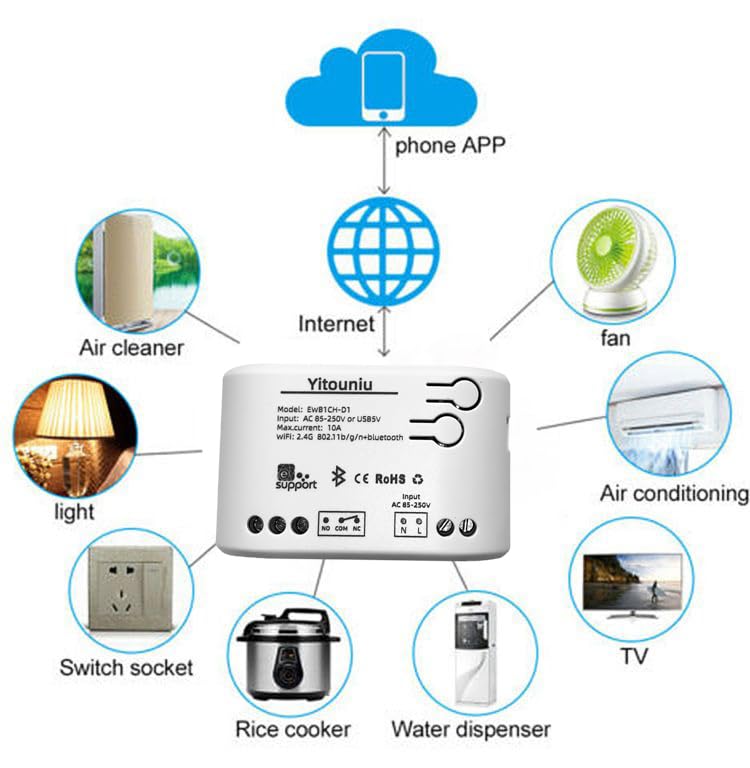
Image 5.1: Diagram illustrating the connectivity of the Yitouniu EWeLink Smart WiFi Switch Relay to various household appliances like lights, fans, and air conditioners, all controlled via a phone app and the internet.
5.2 Հավելվածի ներբեռնում և զուգակցում
- Ներբեռնեք eWeLink հավելված Apple App Store-ից կամ Google Play Store-ից:
- Գրանցեք հաշիվ և մուտք գործեք:
- Power on the Smart WiFi Switch Relay.
- Open the eWeLink app, tap the '+' icon to add a device.
- Follow the on-screen instructions to connect the device to your 2.4GHz WiFi network.

Image 5.2: Screenshots of the eWeLink app interface, showing controls for a garage door (ON/OFF) and a scheduling function for setting specific times.
6. Գործառնական ռեժիմներ
The device supports three operating modes: self-locking, interlocking, and inching (micromotion). These modes can typically be configured within the eWeLink app or via physical buttons on the device, depending on the specific model variant.
- Ինքնակողպման ռեժիմ՝ Each channel operates independently. Pressing the button (or app control) turns the relay ON, pressing it again turns it OFF.
- Փոխկապակցման ռեժիմ՝ When one channel is turned ON, all other channels are automatically turned OFF. This is useful for applications where only one device should be active at a time.
- Inching (Micromotion) Mode: The relay turns ON for a set duration (e.g., 0.5 seconds to 1 hour) and then automatically turns OFF. This is suitable for momentary actions like garage door openers or pulse controls.
7. App Control and Voice Control
7.1 eWeLink App Features
The eWeLink app provides comprehensive control over your Smart WiFi Switch Relay:
- Հեռակառավարման միացում/անջատում. Control connected devices from anywhere with an internet connection.
- Ժամանակի ֆունկցիաներ՝ Set schedules, countdowns, or recurring timers for automatic on/off operations.
- Անկախ վերահսկողություն. Each of the two channels can be controlled independently.
- Սարքի համօգտագործում. Share control of your devices with family members.
- Խմբի վերահսկում. Organize multiple smart devices into groups for simultaneous control.

Image 7.1: A user remotely controlling home lighting via the eWeLink mobile application, demonstrating the convenience of app-based control.

Image 7.2: Illustration of the eWeLink app's group control and sharing functions, allowing multiple users to manage devices across different rooms.

Image 7.3: The timing function interface within the eWeLink app, enabling users to set specific on/off times for connected appliances.
7.2 Ձայնային կառավարման ինտեգրում
The Yitouniu Smart WiFi Switch Relay is compatible with popular voice assistants, including Amazon Alexa and Google Home/Nest. To enable voice control:
- Ensure your Smart WiFi Switch Relay is successfully paired with the eWeLink app.
- Բացեք Alexa կամ Google Home հավելվածը։
- Անցեք «Հմտություններ» կամ «Աշխատում է Google-ի հետ» բաժին։
- Որոնել and enable the 'eWeLink Smart Home' skill/service.
- Կապեք ձեր eWeLink հաշիվը, երբ ձեզ խնդրեն։
- Discover devices. Your Smart WiFi Switch Relay should now be controllable via voice commands.
Example հրամաններ.
- «Ալեքսա, միացրու հյուրասենյակի լույսը»։
- «Օ՜, Google, անջատիր օդափոխիչը»։

Image 7.4: A user interacting with voice assistants like Amazon Alexa and Google Home to control smart devices, highlighting the voice control capability of the relay.
8. Պահպանում
The Yitouniu Smart WiFi Switch Relay requires minimal maintenance. Follow these guidelines:
- Մաքրում: Wipe the device with a dry, soft cloth. Do not use liquid cleaners or solvents.
- Միացման ստուգում. Պարբերաբար ստուգեք լարերի միացումները՝ համոզվելու համար, որ դրանք անվտանգ են։
- Fրագրակազմի թարմացումներ. Keep the eWeLink app updated to receive the latest firmware for the device, which may include performance improvements and new features.
9: Անսարքություն
- Սարքը չի միանում WiFi-ին.
- Համոզվեք, որ ձեր WiFi ցանցը 2.4 ԳՀց է: Սարքը չի աջակցում 5 ԳՀց ցանցերին:
- Check if the WiFi password entered in the app is correct.
- Move the device closer to your WiFi router.
- Վերագործարկեք սարքը և ձեր ռաութերը։
- Սարքը անջատված է հավելվածում՝
- Verify your home internet connection is active.
- Check if the device has power.
- Վերագործարկեք սարքը:
- Ձայնային կառավարումը չի աշխատում.
- Confirm the eWeLink skill/service is enabled and linked in your Alexa or Google Home app.
- Ensure the device is named clearly in the eWeLink app and discovered by your voice assistant.
- Ստուգեք ձեր ինտերնետ կապը:
- Device not responding to RF remote:
- Ensure the RF remote is paired with the switch. Refer to the RF pairing instructions (if applicable to your specific remote).
- Check the battery in the RF remote.
10. Ի՞նչ կա տուփի մեջ
Ապրանքի փաթեթավորումը բացելիս պետք է գտնեք հետևյալ բաղադրիչները.
- 1 x Yitouniu Wifi 2-Channel Relay Switch
- 1 x Հրահանգների ձեռնարկ (այս փաստաթուղթը)
11. Երաշխիք և աջակցություն
This product comes with a standard manufacturer's warranty. For specific warranty terms, conditions, and duration, please refer to the documentation included with your purchase or contact Yitouniu customer support. For technical assistance or further inquiries, please visit the official Yitouniu webկայքում կամ կապվեք նրանց հաճախորդների սպասարկման ալիքների հետ։